React with TypeScript: Props, Hooks & Events Guide
Module 12: Practical TypeScript with React
Learn how to use TypeScript in real React applications with typed props, state, events, children, and reusable custom hooks.
Throughout this series, we've learned how TypeScript works, how to define types, and how to write reusable, type-safe code.
Now it's time to apply those concepts to React.
Imagine you're building a tea-ordering application with product cards, forms, buttons, and API requests.
React manages the interface, while TypeScript helps ensure that components receive the correct data and functions are used safely.
How do we combine React's component-based architecture with TypeScript's type system?
Let's build the essential pieces.
1. Setting Up React with TypeScript
Vite is a popular build tool for creating modern React applications.
Create a React + TypeScript project:
npm create vite@latest tea-app -- --template react-tsNavigate into the project and start the development server:
cd tea-app
npm install
npm run dev
The TypeScript template provides .tsx support, TypeScript configuration, and React tooling.
Understanding .ts vs .tsx
Extension | Purpose |
|---|---|
| TypeScript without JSX syntax |
| TypeScript files containing JSX |
For example:
function App() {
  return <h1>Hello TypeScript!</h1>;
}

export default App;
Because the component contains JSX, its file should use the .tsx extension.
Remember: Use .tsx for React components containing JSX and .ts for ordinary TypeScript utilities.
2. Typing React Component Props
Props allow components to receive data from their parents.
Since props form an object, we can describe them using a type alias or interface.
2.1 Defining a props contract
type TeaCardProps = {
  name: string;
  price: number;
  isSpecial?: boolean;
};

function TeaCard({
  name,
  price,
  isSpecial = false
}: TeaCardProps) {
  return (
    <div>
      <h2>{name} {isSpecial && "⭐"}</h2>
      <p>Price: ₹{price}</p>
    </div>
  );
}
Here:
nameandpriceare required.isSpecial?is optional.isSpecial = falseprovides a default value.
Usage:
<TeaCard name="Masala Chai" price={25} />
<TeaCard name="Ginger Tea" price={30} isSpecial />
TypeScript reports errors when required props are missing or incorrect types are passed.
// Type error: price must be a number
// <TeaCard name="Masala Chai" price="25" />
Should you use React.FC?
You may encounter:
const TeaCard: React.FC<TeaCardProps> = (props) => {
  return <div>{props.name}</div>;
};
This is valid, but React.FC is not required.
Typing the props parameter directly is a simple and widely used approach.
Production tip: Keep component props explicit and focused. Avoid creating overly large props interfaces for simple components.
3. Typing useState
React's useState hook stores component state.
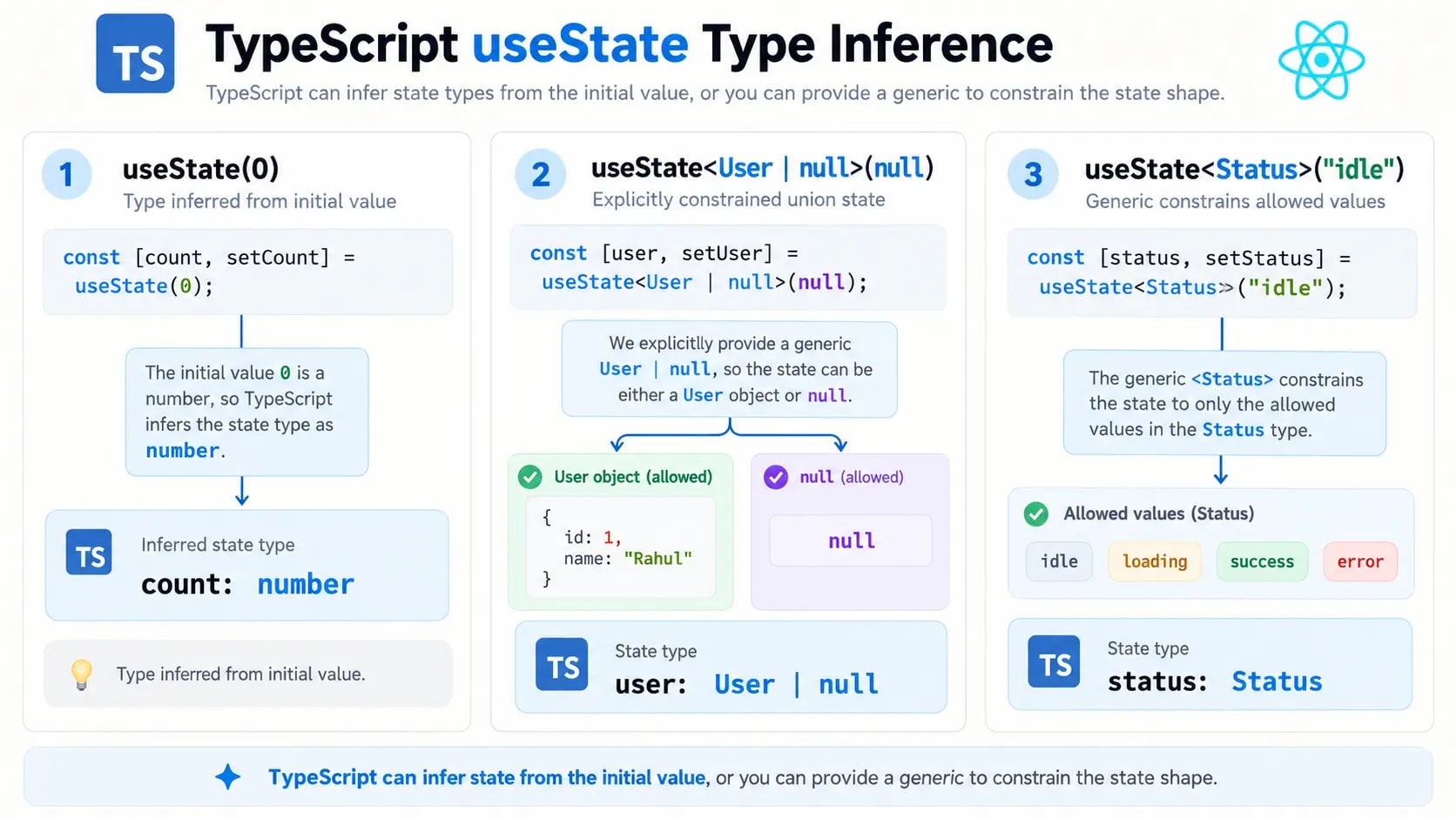
TypeScript can usually infer the state type from its initial value.
3.1 Primitive state inference
import { useState } from "react";

function Counter() {
  const [count, setCount] = useState(0);

  return (
    <button => setCount(count + 1)}>
      Count: {count}
    </button>
  );
}
Because the initial value is 0, TypeScript infers count as a number.
You don't need to write useState<number>(0) unless you want to make the type explicit.
3.2 State initialized with null
Imagine fetching a user profile.
Initially, the user hasn't loaded, so the state is null.
type User = {
  id: number;
  name: string;
};

const [user, setUser] = useState<User | null>(null);
Why use an explicit generic?
Without <User | null>, TypeScript would infer the state from null, leaving it unable to accept a User object later under strict type checking.
Now both values are permitted:
setUser({ id: 1, name: "Rahul" });
setUser(null);
Before accessing the user's properties, handle the null case:
return <p>{user?.name ?? "Loading..."}</p>;3.3 Union state for fixed values
Literal unions are useful for application statuses.
type Status = "idle" | "loading" | "success" | "error";

const [status, setStatus] = useState<Status>("idle");

setStatus("loading"); // Valid

// setStatus("done"); // Type error
This prevents accidentally introducing unsupported states.
4. Typing Form and Event Handlers
React uses event objects to handle user interactions.
TypeScript provides React event types that help developers access event properties safely.
4.1 Input change events
import { useState } from "react";
import type { ChangeEvent } from "react";

function TeaInput() {
  const [name, setName] = useState("");

  const handleChange = (
    event: ChangeEvent<HTMLInputElement>
  ) => {
    setName(event.currentTarget.value);
  };

  return (
    <input
      value={name}
      placeholder="Tea name"
    />
  );
}
ChangeEvent<HTMLInputElement> describes a change event originating from an HTML input.
The event's currentTarget is typed as the input element, giving access to properties such as value.
4.2 Form submission events
import type { FormEvent } from "react";

function TeaForm() {
  const handleSubmit = (
    event: FormEvent<HTMLFormElement>
  ) => {
    event.preventDefault();

    console.log("Form submitted");
  };

  return (
    <form
      <button type="submit">Submit</button>
    </form>
  );
}
The FormEvent<HTMLFormElement> type describes a form event.
preventDefault() prevents the browser's default form-submission behavior.
4.3 Common React event types
Event | Type |
|---|---|
Input change |
|
Form submission |
|
Button click |
|
Keyboard interaction |
|
These types are imported from React.
Remember: Inline event handlers often benefit from contextual typing, so explicit event annotations are most useful when extracting handlers into named functions.
5. Typing Component Children
Some components act as wrappers around other components.
For example, a reusable layout might accept headings, paragraphs, buttons, or nested components.
React provides the ReactNode type for this purpose.
5.1 Using ReactNode
import type { ReactNode } from "react";

type CardProps = {
  children: ReactNode;
};

function Card({ children }: CardProps) {
  return (
    <div className="card">
      {children}
    </div>
  );
}
Usage:
<Card>
  <h2>Masala Chai</h2>
  <p>Price: ₹25</p>
</Card>
ReactNode represents values React can render, including elements, strings, numbers, null, and supported collections of renderable content.
5.2 Using PropsWithChildren
React also provides PropsWithChildren<T>.
import type { PropsWithChildren } from "react";

type LayoutProps = {
  title: string;
};

function Layout({
  title,
  children
}: PropsWithChildren<LayoutProps>) {
  return (
    <section>
      <h1>{title}</h1>
      {children}
    </section>
  );
}
PropsWithChildren<T> combines your props with an optional children property.
ReactNode vs PropsWithChildren
ReactNode | PropsWithChildren |
|---|---|
Describes renderable content | Adds optional children to a props type |
Useful when declaring children explicitly | Useful for reusable wrapper props |
Can make children required | Children are optional by default |
Production tip: Use ReactNode when you want explicit control over whether children are required. Use PropsWithChildren when optional children fit your component contract.
6. Custom Hooks with Generics
Imagine multiple components fetching different data from an API.
You don't want to repeat loading, error, and response-state logic in every component.
A custom hook allows you to reuse that logic.
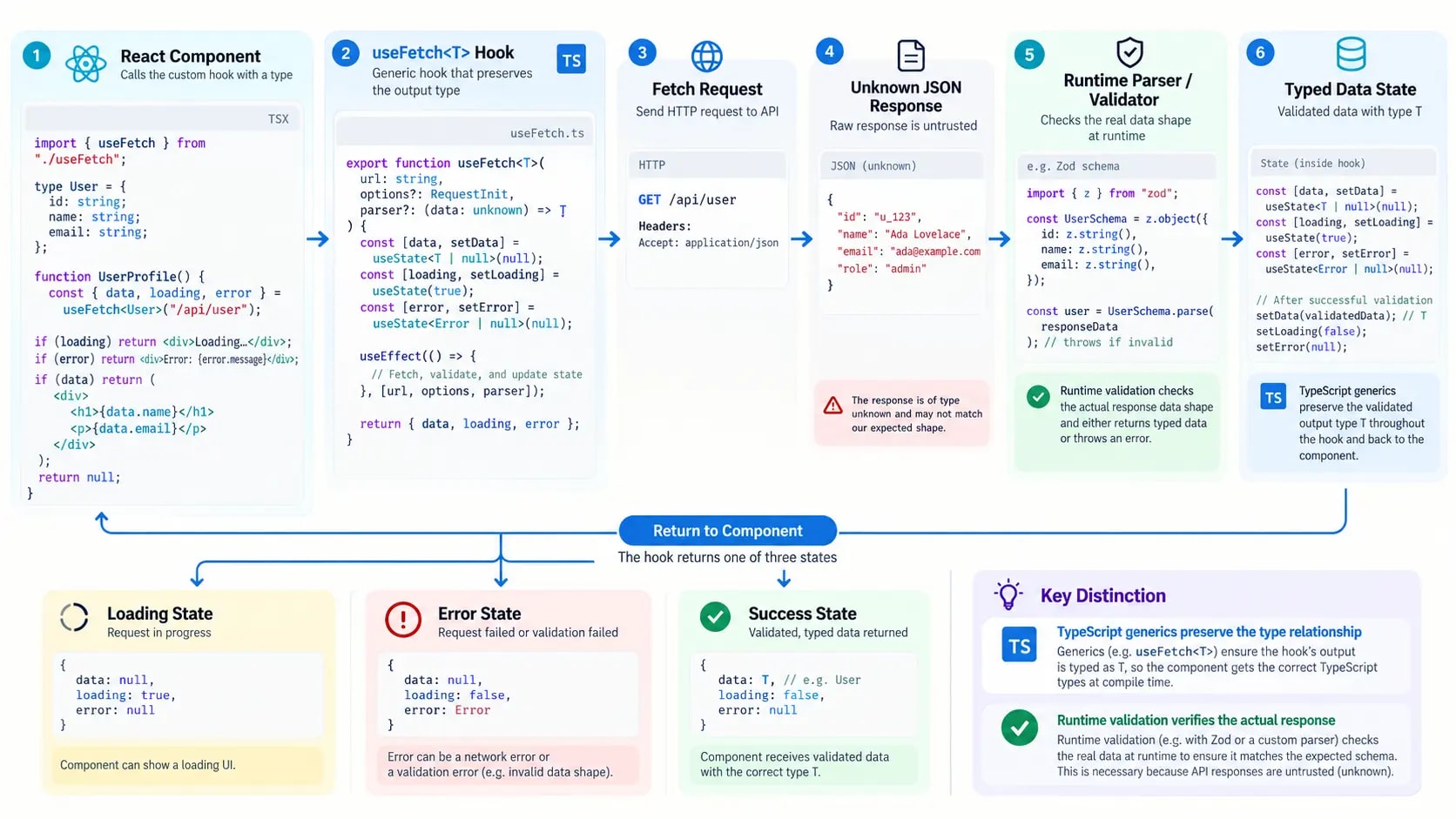
Generics make it possible to preserve different result types.
6.1 A generic useFetch hook
import { useEffect, useState } from "react";

function useFetch<T>(url: string, parse: (value: unknown) => T) {
  const [data, setData] = useState<T | null>(null);
  const [loading, setLoading] = useState(true);
  const [error, setError] = useState<string | null>(null);

  useEffect(() => {
    const controller = new AbortController();

    async function load() {
      setLoading(true);
      setData(null);
      setError(null);

      try {
        const response = await fetch(url, {
          signal: controller.signal
        });

        if (!response.ok) {
          throw new Error(`HTTP ${response.status}`);
        }

        const json: unknown = await response.json();
        const result = parse(json);

        if (!controller.signal.aborted) {
          setData(result);
        }
      } catch (err) {
        if (!controller.signal.aborted) {
          setError(
            err instanceof Error ? err.message : "Unknown error"
          );
        }
      } finally {
        if (!controller.signal.aborted) {
          setLoading(false);
        }
      }
    }

    void load();

    return () => controller.abort();
  }, [url, parse]);

  return { data, loading, error };
}
Here:
<T>describes the validated data type.useState<T | null>allows initial empty state.The
parsefunction validates or transforms unknown JSON intoT.AbortControllercancels outdated requests during cleanup.
For this hook, the parse function should have a stable reference—for example, by defining it outside the component—to avoid unnecessary refetching.
6.2 Using the hook
type User = {
  id: number;
  name: string;
};

function parseUser(value: unknown): User {
  if (
    typeof value !== "object" ||
    value === null ||
    !("id" in value) ||
    typeof value.id !== "number" ||
    !("name" in value) ||
    typeof value.name !== "string"
  ) {
    throw new Error("Invalid user response");
  }

  return { id: value.id, name: value.name };
}

function UserProfile() {
  const { data, loading, error } = useFetch(
    "/api/user",
    parseUser
  );

  if (loading) return <p>Loading...</p>;
  if (error) return <p>{error}</p>;
  if (!data) return <p>No user found</p>;

  return <h2>{data.name}</h2>;
}
TypeScript infers the hook's data type from the parser's return type.
Should you always build your own fetch hook?
Not necessarily.
For production applications with caching, retries, background refetching, and server-state synchronization, libraries such as TanStack Query or framework-provided data-loading mechanisms may be more suitable.
The custom hook above demonstrates how generics and React state work together.
7. Common Mistakes
Mistake | Better approach |
|---|---|
Using | Define a specific props type |
Writing explicit generics for every simple state | Let TypeScript infer obvious types |
Using | Use |
Leaving extracted event handlers untyped | Use React event types |
Assuming children are included automatically in every props type | Declare children explicitly |
Assuming generic API types validate responses | Validate external JSON at runtime |
8. TypeScript with React Interview Questions
Q1. How do you type React component props?
Define a type alias or interface describing the expected props and annotate the component's parameter with it.
Q2. When should you use generics with useState?
Use explicit generics when the state type cannot be inferred correctly from its initial value, such as nullable objects or restricted literal unions.
Q3. What type should you use for an input onChange event?
Use ChangeEvent<HTMLInputElement> from React when handling input change events in an extracted function.
Q4. What is the difference between ReactNode and PropsWithChildren?
ReactNode describes content React can render. PropsWithChildren<T> extends an existing props type with optional children.
Q5. Why are generics useful in custom React hooks?
Generics allow one hook to work with different data types while preserving the type relationship between its inputs and outputs.
Q6. Does typing an API response guarantee valid data?
No. TypeScript types are erased at runtime. API responses should be validated when their content cannot be trusted.
9. Quick Revision Notes
Core concepts
Concept | Remember |
|---|---|
| TypeScript file containing JSX |
Props typing | Define component input contracts |
Optional props | Use |
| Infers number |
| Allows object or null |
| Input change event |
| Form submission event |
| Renderable React content |
| Adds optional children |
Generic hook | Reusable hook preserving type relationships |
Essential syntax
Typed props
type ButtonProps = {
  label: string;
};

function Button({ label }: ButtonProps) {
  return <button>{label}</button>;
}
Typed state
const [count, setCount] = useState(0);
const [user, setUser] = useState<User | null>(null);
Typed event
const handleChange = (
  e: ChangeEvent<HTMLInputElement>
) => {
  console.log(e.currentTarget.value);
};
Children
type Props = {
  children: ReactNode;
};
Generic custom hook concept
function useData<T>(initialValue: T) {
  return useState<T>(initialValue);
}
Five things to remember
Use
.tsxfor components containing JSX.Define clear props contracts using
typeorinterface.Let TypeScript infer simple state types; add generics for unions and nullable values.
Use React's event types and
ReactNodefor safe component interfaces.Generics make reusable hooks type-safe, but external API data still requires runtime validation.
Final takeaway
React provides a component-based way to build interfaces, while TypeScript adds static guarantees around the data those components accept, store, and exchange.
You don't need to annotate every variable or wrap every component in React.FC.
The goal is to make component contracts clear, keep state predictable, and build reusable logic without losing type safety.
Further Reading
React with TypeScript: https://react.dev/learn/typescript
React Hooks Reference: https://react.dev/reference/react
Vite Getting Started: https://vite.dev/guide/
TypeScript Generics: https://www.typescriptlang.org/docs/handbook/2/generics.html