TypeScript .d.ts Files, fetch & Axios Typing Guide
Learn how TypeScript understands external libraries, manages type imports, and safely handles API responses.
Imagine you're building a React application that fetches user information from a backend.
Your API returns:
{
  "id": 1,
  "name": "Rahul",
  "email": "rahul@example.com"
}
TypeScript can check the structure of objects you define in your code. But how does it know the types of external JavaScript libraries or data coming from an API?
Two important concepts help solve these problems:
Declaration files (
.d.ts) describe the types of existing JavaScript APIs.Typed API requests describe expected responses, while runtime validation checks whether external data actually matches.
Let's understand both.
1. What Are Type Declaration Files (.d.ts)?
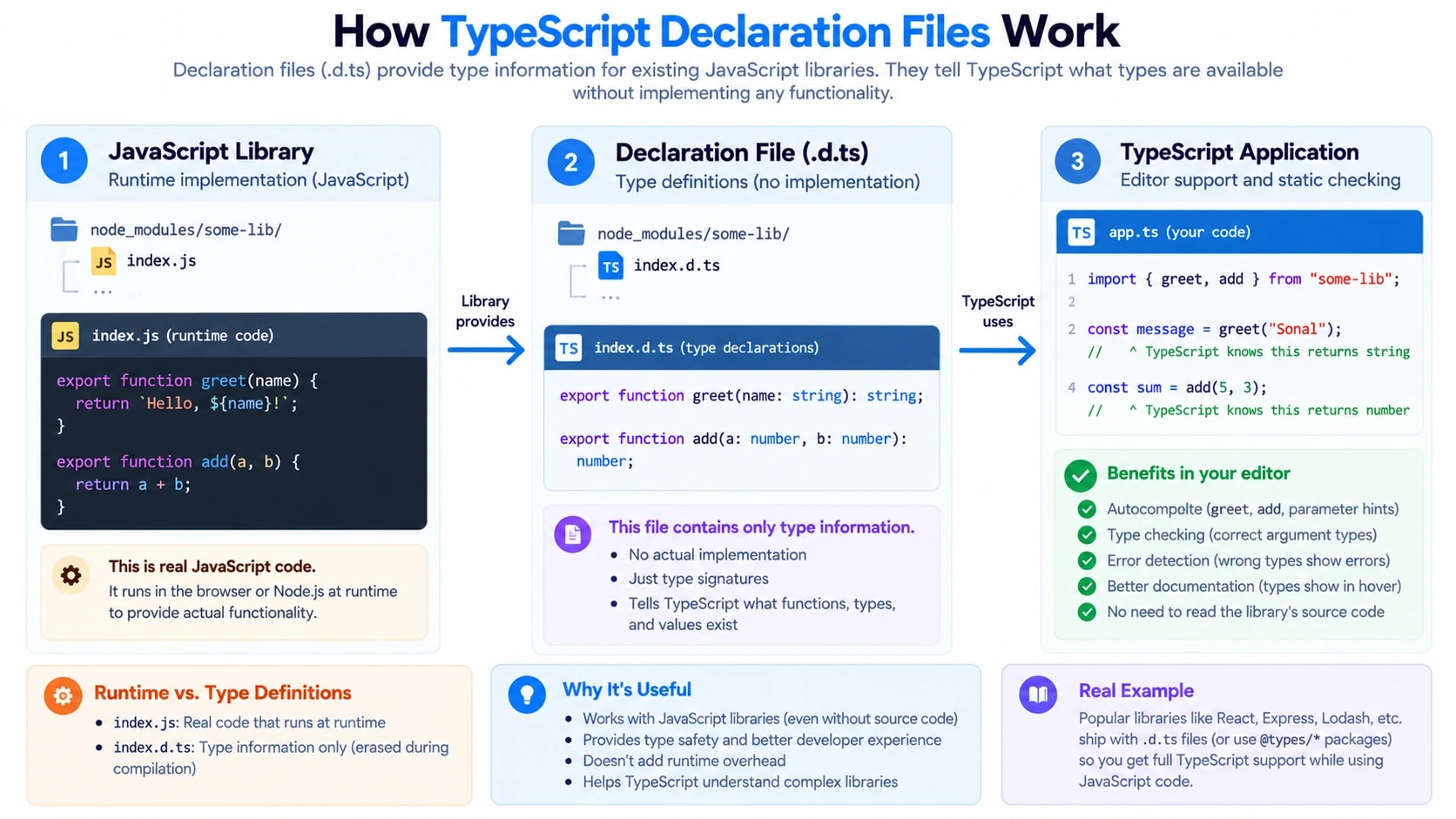
A declaration file describes the types of existing JavaScript code without providing its implementation.
Regular TypeScript files (.ts) can contain executable logic, while declaration files (.d.ts) contain type information only.
1.1 Understanding .ts vs .d.ts
Imagine you have a JavaScript function:
// math.js
export function add(a, b) {
  return a + b;
}
You can create a declaration file describing its expected types.
// math.d.ts
export declare function add(
  a: number,
  b: number
): number;
Now TypeScript understands that add() accepts two numbers and returns a number.
However, the declaration file doesn't contain the function's implementation.
|
|
|---|---|
Contains implementation and types | Contains type declarations |
Can generate JavaScript | Doesn't generate executable JavaScript |
Used to write application logic | Used to describe existing APIs |
Example: | Example: |
Remember: Declaration files tell TypeScript what exists; they don't create the actual JavaScript functionality.
2. Ambient Declarations and @types Packages
Sometimes a JavaScript library doesn't provide TypeScript definitions.
You can describe its API using the declare keyword.
2.1 Declaring an external module
Imagine you're using an existing JavaScript package called legacy-chai-lib.
Create a declaration file:
// legacy-chai-lib.d.ts
declare module "legacy-chai-lib" {
  export function brewChai(flavor: string): void;
}
Now TypeScript understands the library's function signature:
import { brewChai } from "legacy-chai-lib";

brewChai("Masala"); // Valid
// brewChai(42);    // Type error
Important: This declaration doesn't install or implement the library. The actual JavaScript package must exist at runtime.
2.2 Built-in type declarations
TypeScript includes declarations for standard JavaScript APIs and, depending on configuration, browser APIs.
For example:
document.getElementById("app");
window.alert("Hello");
TypeScript understands these APIs through its standard library declarations, including DOM definitions.
2.3 DefinitelyTyped and @types
Many JavaScript libraries have community-maintained type declarations published through the DefinitelyTyped project.
These packages use the @types/ namespace.
For example:
npm install -D @types/expressOther examples include:
npm install -D @types/node
npm install -D @types/lodash
However, many modern libraries already include their own declarations.
Production tip: Check whether a package ships built-in TypeScript definitions before installing a separate @types package.
3. import type: Importing Types Without Runtime Code
Sometimes you only need a type definition from another file.
Consider:
// userTypes.ts
export interface User {
  id: number;
  name: string;
}
You can import it using import type.
// app.ts
import type { User } from "./userTypes";

const user: User = {
  id: 1,
  name: "Rahul"
};
The import type declaration is removed from the generated JavaScript.
This makes it explicit that the import is used only for type checking.
import vs import type
|
|
|---|---|
Imports runtime values or types | Imports types only |
May remain in JavaScript output | Erased during compilation |
Used for functions, classes, and values | Used for interfaces and type-only references |
A class imported through import type can be used as a type, but not as a runtime constructor.
Remember: Use import type when you need a type but don't need its runtime value.
4. Typed API Requests with fetch()
Now let's understand how TypeScript works with API responses.
Imagine fetching a user's profile.
First, define the expected data structure:
interface User {
  id: number;
  name: string;
  email: string;
}
4.1 Basic typed fetch request
async function getUser(id: number): Promise<User> {
  const response = await fetch(`/api/users/${id}`);

  if (!response.ok) {
    throw new Error("Failed to fetch user");
  }

  const data = await response.json() as User;

  return data;
}
Here:
id: numberdefines the input.Promise<User>describes the expected asynchronous result.response.okchecks the HTTP response status.as Usertells TypeScript to treat the parsed data as aUser.
But there's an important problem.
The as User assertion does not verify that the server returned a valid User object.
The API might return:
{
  "id": "invalid",
  "name": null
}
TypeScript will not automatically detect that mismatch at runtime.
The response.json() method parses JSON into a JavaScript value; it doesn't validate that value against your interface.
5. Runtime Validation: Making API Requests Safer
For untrusted API responses, validate the data before treating it as a known type.
Let's create a custom type guard.
interface User {
  id: number;
  name: string;
  email: string;
}

function isUser(value: unknown): value is User {
  if (typeof value !== "object" || value === null) {
    return false;
  }

  if (!("id" in value) ||
      !("name" in value) ||
      !("email" in value)) {
    return false;
  }

  return (
    typeof value.id === "number" &&
    typeof value.name === "string" &&
    typeof value.email === "string"
  );
}
Now use it with fetch().
async function getUser(id: number): Promise<User> {
  const response = await fetch(`/api/users/${id}`);

  if (!response.ok) {
    throw new Error(`HTTP Error: ${response.status}`);
  }

  const data: unknown = await response.json();

  if (!isUser(data)) {
    throw new Error("Invalid user data");
  }

  return data;
}
This approach is safer because the response is checked before TypeScript treats it as a User.
For larger applications, schema validation libraries such as Zod can simplify this process.
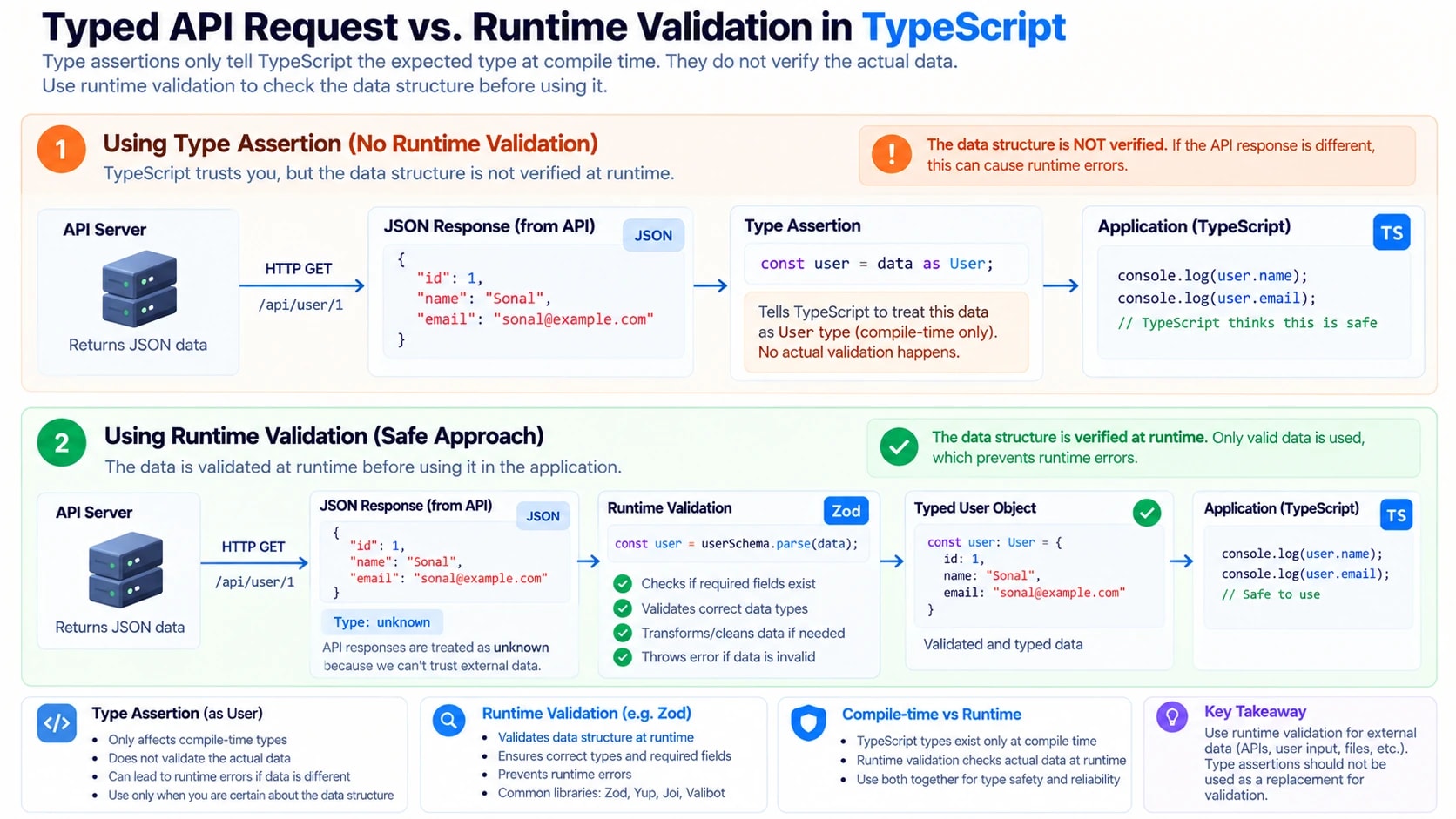
Key takeaway: TypeScript describes expected data. Runtime validation checks actual data.
6. Typed API Requests with Axios
Axios provides generic parameters for describing expected response data.
Install Axios:
npm install axiosAxios includes its own TypeScript definitions.
6.1 Basic Axios request
import axios from "axios";

interface User {
  id: number;
  name: string;
  email: string;
}

async function getUser(id: number): Promise<User> {
  const response = await axios.get<User>(
    `/api/users/${id}`
  );

  return response.data;
}
The generic parameter <User> describes the expected response payload.
TypeScript can now provide autocomplete:
const user = await getUser(1);

console.log(user.name);
console.log(user.email);
6.2 Does Axios validate the response?
No.
axios.get<User>() supplies a compile-time type, but it doesn't verify the JSON structure.
Just like fetch(), Axios responses require runtime validation when the data source cannot be trusted.
fetch vs Axios
Feature | fetch | Axios |
|---|---|---|
Availability | Built into modern browsers and Node.js | External package |
Response typing | Typically uses annotations or assertions | Supports response generics |
HTTP error statuses | Check | Rejects non-2xx statuses by default |
Runtime schema validation | Not automatic | Not automatic |
Both approaches work with TypeScript.
The important part is understanding the difference between declaring an expected response type and verifying external data.
7. Common Mistakes
Mistake | Better approach |
|---|---|
Assuming | Remember it only describes types |
Installing | Check for built-in declarations |
Using normal imports when only types are needed | Use |
Assuming | Treat external JSON as untrusted |
Blindly using | Validate the data |
Assuming Axios generics validate responses | Use runtime guards or schema validation |
8. TypeScript Interview Questions
Q1. What is a .d.ts file in TypeScript?
A declaration file contains type information describing JavaScript APIs, libraries, or globals. It doesn't generate executable JavaScript.
Q2. What is the difference between .ts and .d.ts?
A .ts file can contain implementation code and types, while a .d.ts file contains declarations used for static type checking.
Q3. What is the purpose of import type?
import type explicitly imports type information only. The import is removed from JavaScript output because it has no runtime role.
Q4. What is DefinitelyTyped?
DefinitelyTyped is a repository of community-maintained TypeScript declarations, many of which are published as npm packages under @types/.
Q5. Does axios.get<User>() guarantee that the API returns a valid User?
No. The generic specifies the expected static type but doesn't validate the received response at runtime.
Q6. Why should external API responses be validated?
Because external data may be missing fields, contain incorrect types, or have unexpected structures. Runtime validation verifies the actual value before the application relies on it.
9. Quick Revision Notes
Core concepts
Concept | Remember |
|---|---|
| Type declarations without implementation |
| Describes existing runtime entities |
| External library declarations |
DefinitelyTyped | Repository of community-maintained declarations |
| Type-only import erased from JavaScript |
| Describes an asynchronous result |
| Native HTTP request API |
| Axios request with expected response type |
| Safe starting type for uncertain values |
Type guard | Runtime check linked to type narrowing |
Essential syntax
Declaration file
declare module "legacy-lib" {
  export function run(): void;
}
Type-only import
import type { User } from "./types";Typed fetch result
const data: unknown = await response.json();Axios generic
const response = await axios.get<User>("/api/user");Type guard
function isString(value: unknown): value is string {
  return typeof value === "string";
}
Five things to remember
.d.tsfiles describe types but don't contain runtime implementations.@typespackages provide declarations for libraries that need them.import typeseparates type-only dependencies from runtime imports.fetch()and Axios do not automatically validate response structures.Use runtime validation before trusting external data.
Final takeaway
TypeScript helps developers work with external JavaScript libraries and API responses through declaration files and typed contracts.
But static typing has an important boundary: it cannot guarantee that data received over the network matches the expected structure.
Use declaration files to describe existing APIs, import type for type-only dependencies, and runtime validation when working with external data.
TypeScript tells you what data should look like. Runtime validation confirms what it actually contains.
Further Reading
TypeScript Type Declarations: https://www.typescriptlang.org/docs/handbook/2/type-declarations.html
TypeScript Declaration Files: https://www.typescriptlang.org/docs/handbook/declaration-files/introduction.html
Type-Only Imports: https://www.typescriptlang.org/docs/handbook/release-notes/typescript-3-8.html
MDN Fetch API: https://developer.mozilla.org/en-US/docs/Web/API/Fetch_API