TypeScript Compiler Architecture & Execution Pipeline
Understand how TypeScript transforms source code into executable JavaScript, from tokenization and syntax trees to type checking and code generation.
In the previous chapter, we learned that TypeScript helps developers catch type-related mistakes before their applications run.
But have you ever wondered what actually happens when you write TypeScript code?
Consider this simple function:
function greet(name: string): string {
  return `Hello, ${name}`;
}
Your editor understands that name must be a string. It can show errors, suggest properties, and identify incorrect arguments.
Yet the JavaScript runtime doesn't need those type annotations.
So how does TypeScript understand your code, verify its types, and transform it into JavaScript?
The answer lies inside the TypeScript compiler.
In this chapter, we'll explore its architecture, the five major compilation stages, and how modern tooling uses them.
1. Understanding TypeScript Compilation
TypeScript is designed to work with the JavaScript ecosystem.
Instead of introducing a completely separate execution environment, TypeScript provides a compiler that analyzes code and can generate JavaScript.
The process of converting source code from one programming language or language version into another is commonly called transpilation.
In TypeScript, compilation can involve both:
Static analysis: Checking syntax, types, declarations, and relationships between code elements.
Code transformation: Removing TypeScript-only syntax and converting supported language features into JavaScript output.
These are related but separate activities.
For example:
TypeScript source
const username: string = "Rahul";

function greet(name: string): string {
  return `Hello, ${name}`;
}

console.log(greet(username));
Generated JavaScript (ES2020 target)
const username = "Rahul";

function greet(name) {
  return `Hello, ${name}`;
}

console.log(greet(username));
Notice that the type annotations have disappeared.
The JavaScript code retains the runtime behavior of the original program.
Key takeaway: TypeScript's type system operates during development and compilation. Type annotations do not automatically enforce types at runtime.
2. The Big Picture: TypeScript Compiler Architecture
The TypeScript compiler contains multiple components, each responsible for understanding or processing a different aspect of your code.
For learning purposes, we can describe its operation through five major stages.
Scanner (Lexer)
Parser
Binder
Type Checker
Transformer and Emitter
2.1 Complete compiler execution flow
TypeScript Source (.ts)
         |
         v
  1. Scanner / Lexer
     Characters → Tokens
         |
         v
  2. Parser
     Tokens → Abstract Syntax Tree
         |
         v
  3. Binder
     Declarations → Symbols & Scopes
         |
         v
     Program Context
     Files + Compiler Options
         |
         v
  4. Type Checker
     Types + Semantic Diagnostics
         |
         v
  5. Transformer / Emitter
     Transform & Generate Output
         |
         v
 JavaScript / Declarations / Maps
         |
         v
     JavaScript Runtime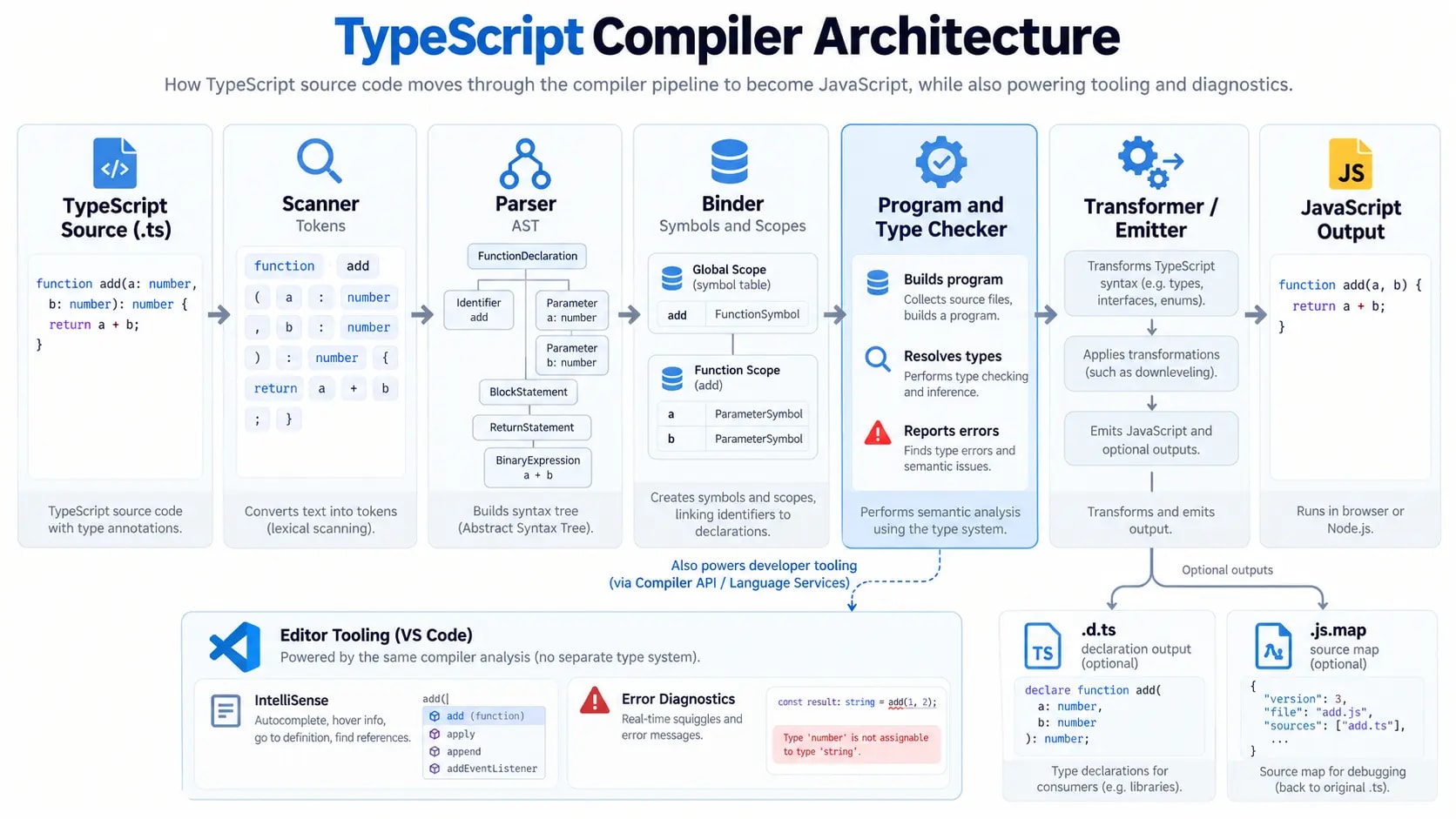
3. Stage 1: Scanner (Lexer / Tokenizer)
Before TypeScript can understand your program, it must first recognize the individual pieces of code.
Imagine reading a sentence:
Rahul is learning TypeScript.
You recognize separate words and punctuation before interpreting what the sentence means.
A programming language compiler begins with a similar process.
3.1 What does the scanner do?
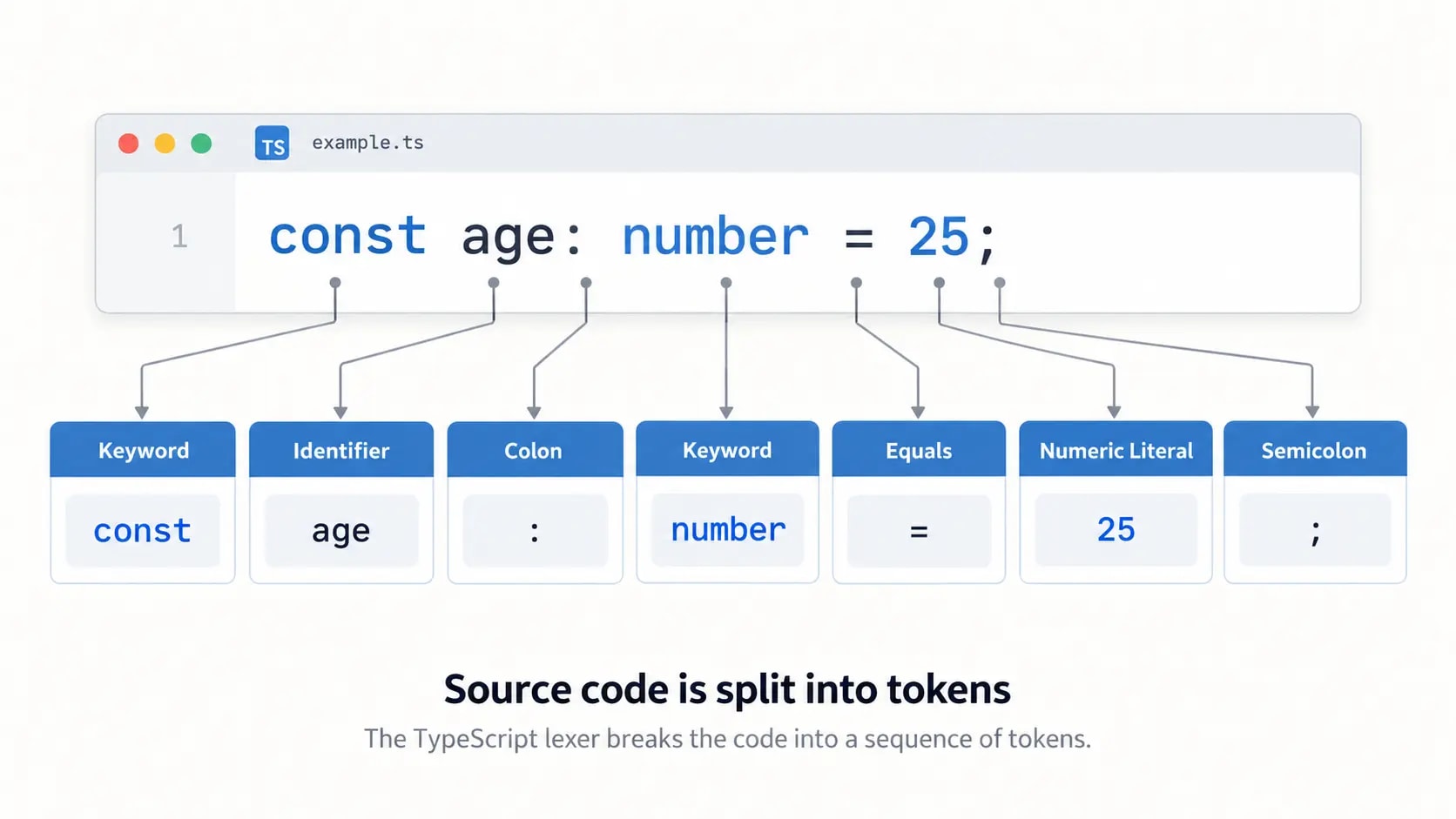
The scanner reads source code and recognizes tokens.
A token is a meaningful unit of programming language syntax, such as a keyword, identifier, literal, or operator.
Consider:
const age: number = 25;The scanner recognizes elements such as:
Source text | Token category |
|---|---|
| Keyword |
| Identifier |
| Colon token |
| Keyword |
| Equals token |
| Numeric literal |
| Semicolon token |
The scanner identifies these pieces without determining whether the entire statement is semantically valid.
3.2 Why is tokenization necessary?
Raw source code is just a sequence of characters.
The parser needs recognized language tokens to understand structure.
The scanner also helps identify lexical problems, such as malformed string literals.
However, it does not perform full syntactic or semantic validation. Those responsibilities belong to later compiler components.
Remember: The scanner answers, "What are the individual pieces of this code?"
4. Stage 2: Parser and Abstract Syntax Tree (AST)
Recognizing individual tokens is not enough.
The compiler must understand how those tokens relate to one another.
This is the parser's responsibility.
4.1 What does the parser do?
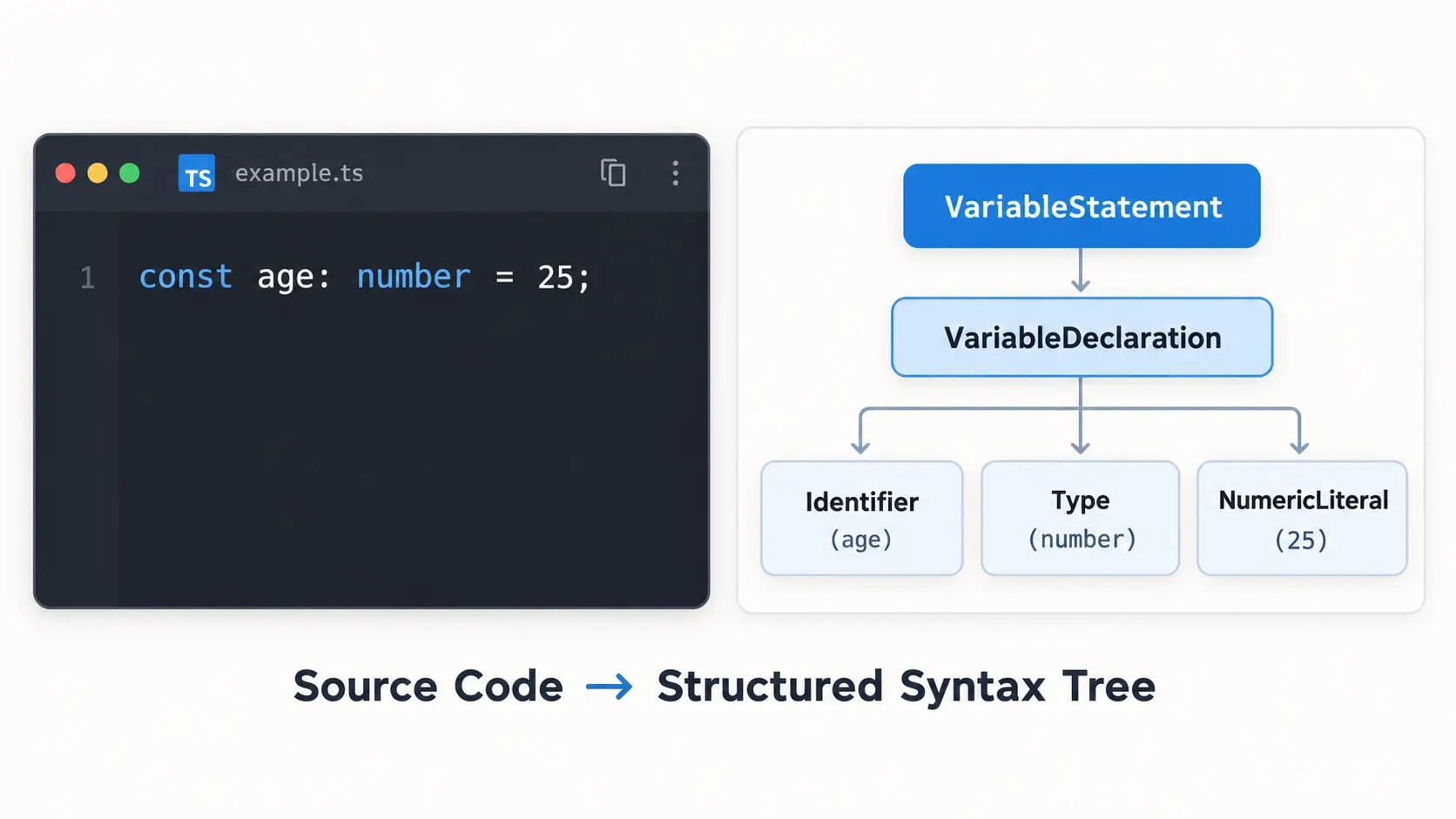
The parser consumes tokens according to TypeScript's grammar and constructs an Abstract Syntax Tree (AST).
An AST is a tree-shaped representation of the source code's syntactic structure.
Consider:
const age: number = 25;A simplified AST can be represented as:
VariableStatement
|
└── VariableDeclaration
    |
    ├── Name: age
    |
    ├── Type: number
    |
    └── Initializer
        |
        └── NumericLiteral: 25
This is a conceptual representation, not a complete dump of TypeScript's internal AST.
4.2 Why does the compiler need an AST?
The AST makes it possible to inspect the structure of code.
For example, the compiler can determine that:
ageis a variable declaration.numberis its declared type.25is its initial value.
The AST is also used by subsequent compiler stages and language tools.
4.3 AST vs tokens
Tokens represent individual syntax elements.
An AST represents the relationships between those elements.
Tokens | AST |
|---|---|
Individual language units | Hierarchical syntax structure |
Produced by lexical scanning | Constructed during parsing |
Recognize keywords and punctuation | Represent declarations and expressions |
Limited structural context | Understands syntactic relationships |
The parser can also report syntax errors, such as missing required tokens or invalid statement structures.
Remember: The parser answers, "How is this code structured?"
5. Stage 3: Binder — Symbols, Scopes, and Control Flow
After parsing, TypeScript has a representation of the source code.
But a syntax tree alone does not provide the full understanding of declarations and their relationships.
The compiler must organize identifiers and the scopes in which they are declared.
This is where the binder comes in.
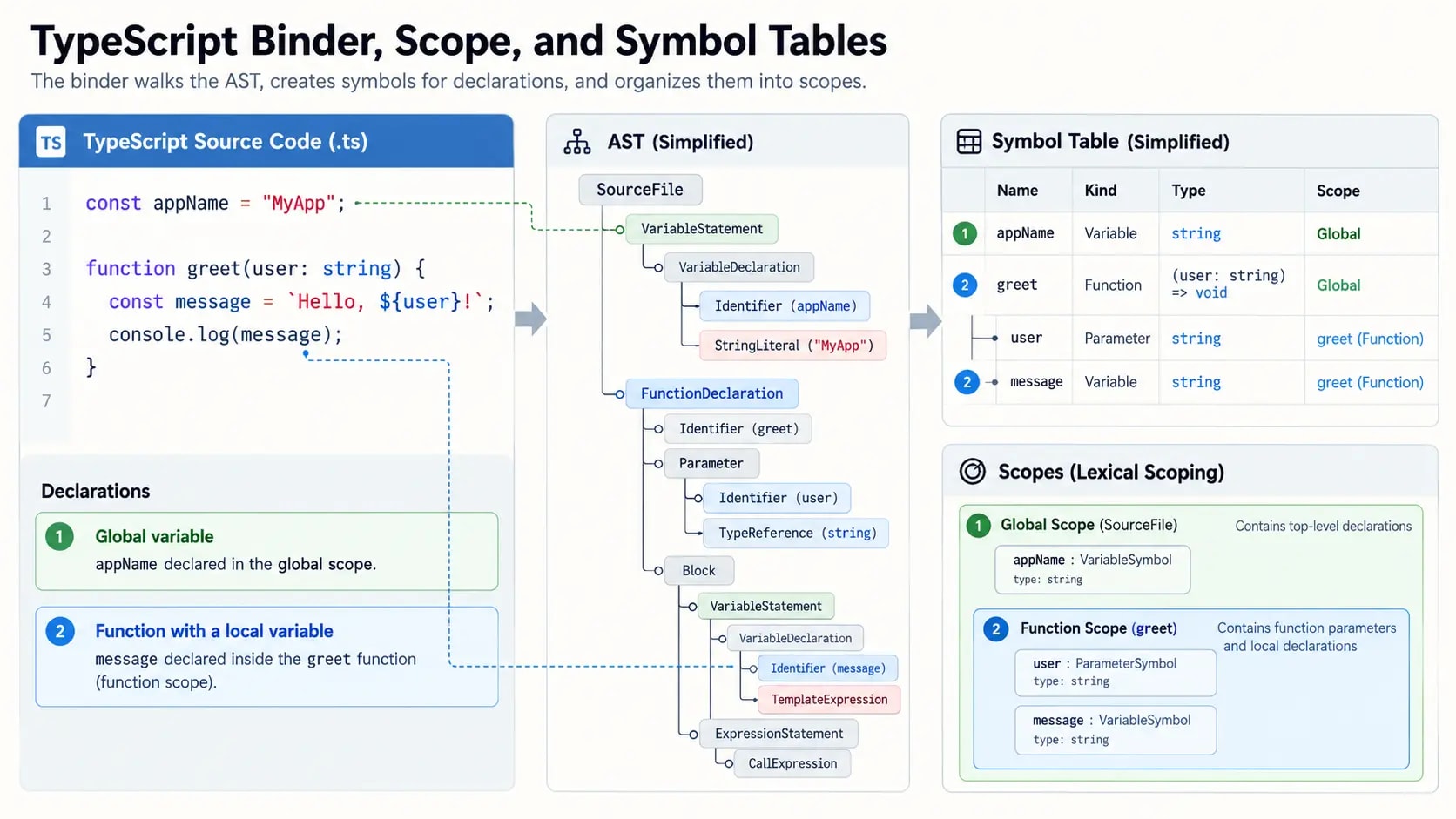
5.1 What does the binder do?
The binder walks the AST and associates declarations with symbols.
Consider:
const username = "Rahul";

function greet() {
  console.log(username);
}
The binder records information about declared names, including the variable username and the function greet.
A symbol represents a named entity in the program.
This information helps later stages resolve names and examine their relationships.
5.2 What is a symbol table?
A symbol table is a data structure that associates identifiers with compiler symbols.
A simplified conceptual representation might look like this:
Identifier | Declaration |
|---|---|
| Variable |
| Function |
Actual TypeScript symbols can contain much more information, including declaration references and symbol flags.
Symbols are important because code frequently refers to declarations from different locations.
5.3 How does scope work?
Consider:
const message = "Global";

function display() {
  const message = "Local";

  console.log(message);
}
Two variables share the same name but belong to different scopes.
The binder helps establish these scopes so the compiler can distinguish declarations.
Inside display, the local message shadows the outer variable.
5.4 Parent references and control-flow information
The binding process also establishes relationships used by subsequent analysis.
These include parent relationships between syntax nodes and control-flow information needed for type narrowing.
For example:
function printLength(value: string | null) {
  if (value === null) {
    return;
  }

  console.log(value.length);
}
The compiler can reason that execution only reaches the final statement when value is not null.
The checker uses control-flow analysis to narrow the type to string.
The binder helps construct the flow information that supports this analysis.
Remember: The binder answers, "What names are declared, where do they belong, and what structural relationships must later analysis use?"
6. Stage 4: Type Checker — Understanding Types and Detecting Errors
The type checker is one of the most important parts of the TypeScript compiler.
The scanner recognizes tokens.
The parser builds the AST.
The binder organizes declarations and scopes.
The checker determines whether operations are type-compatible.
6.1 How does type checking work?
Consider:
let age: number = 25;

age = "Twenty Five";
The checker determines that:
agehas the typenumber."Twenty Five"has the typestring.A string is not assignable to a variable declared as a number.
It reports a diagnostic explaining the incompatibility.
6.2 Type checking function arguments
function greet(name: string): string {
  return `Hello ${name}`;
}

greet("Rahul"); // Valid
greet(42);      // Type error
TypeScript compares the supplied argument type against the parameter's expected type.
Because number is not assignable to string, the call is flagged.
6.3 Type inference
The checker also helps determine types when developers do not write them explicitly.
const username = "Rahul";Here, TypeScript infers the literal type "Rahul" for the constant.
For a mutable variable:
let username = "Rahul";The inferred variable type is generally widened to string.
Type inference reduces unnecessary annotations while preserving useful type information.
6.4 Type narrowing through control flow
The checker can refine types based on conditions.
function printValue(value: string | number) {
  if (typeof value === "string") {
    console.log(value.toUpperCase());
  } else {
    console.log(value.toFixed(2));
  }
}
Inside the first branch, TypeScript understands that value is a string.
Inside the second branch, it understands that value is a number.
This is known as control-flow-based type narrowing.
6.5 Does the checker always perform two passes?
No.
It is misleading to describe TypeScript's checker as always making exactly two full passes over the codebase.
TypeScript performs much of its type resolution lazily, calculating information when it is needed.
The actual checking process depends on the program, requested information, and compiler operations.
This design is particularly valuable in editors, where the compiler needs to respond quickly to frequent code changes.
6.6 How does VS Code show type errors?
TypeScript provides language services that allow editors to request information such as:
Type diagnostics
Autocomplete suggestions
Function signatures
Go to definition
Find references
Refactoring support
VS Code can interact with TypeScript's language service through the TypeScript server.
The editor is therefore not independently implementing TypeScript's entire type system.
It relies on TypeScript-aware tooling to analyze the code.
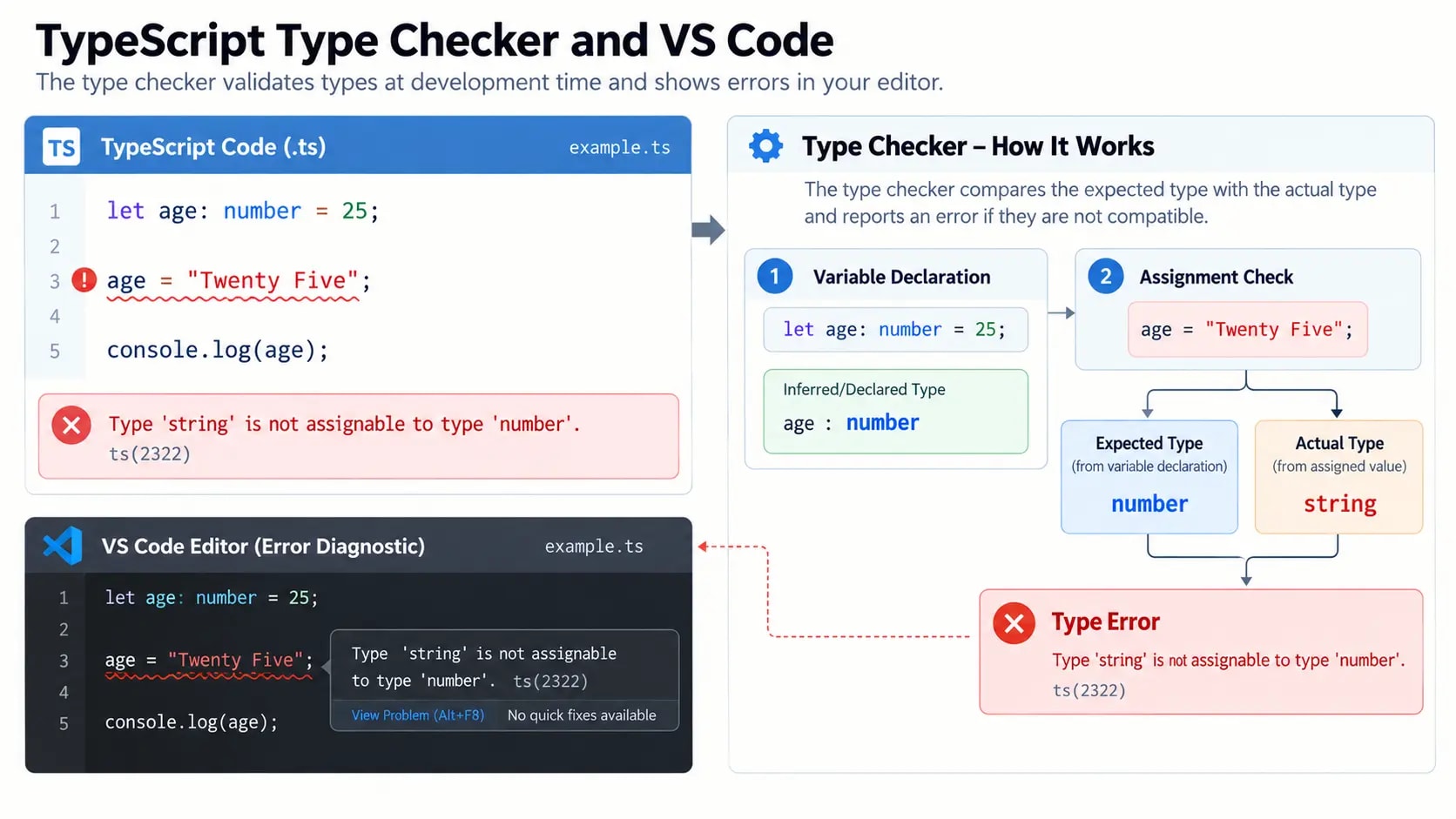
Key takeaway: The checker answers, "Are these types and operations compatible?"
7. Stage 5: Transformer and Emitter — Generating JavaScript
After the compiler understands the source code, it can generate JavaScript output.
Two important responsibilities are transformation and emission.
7.1 What does the transformer do?
Transformations can remove TypeScript-specific syntax and convert certain modern language features into older JavaScript constructs when required by the configured target.
For example, compiling to a modern target might preserve arrow functions, while compiling to an older target can rewrite them.
7.2 What does the emitter do?
The emitter generates output files from the compiler's internal representation.
Consider:
Input TypeScript
interface User {
  name: string;
}

function greet(user: User): string {
  return `Hello, ${user.name}`;
}
JavaScript output (modern target)
function greet(user) {
  return `Hello, ${user.name}`;
}
The User interface and the type annotations disappear because they are only used for static typing.
7.3 What files can TypeScript generate?
Depending on the configuration, the TypeScript compiler can produce several output artifacts.
File | Purpose |
|---|---|
| Executable JavaScript output |
| Type declarations describing an API |
| Maps generated JavaScript back to source code |
| Maps declaration output back to original declarations |
JavaScript files
Contain code that the JavaScript runtime can execute.
Declaration files
Describe exported types, functions, classes, and other public contracts.
They are especially useful for libraries and package consumers.
Source maps
Help debugging tools relate generated JavaScript locations to the original source code.
7.4 Does type checking have to succeed before emission?
Not always.
TypeScript can generate JavaScript even when type errors are reported.
By default, the noEmitOnError compiler option is false.
When enabled, it prevents output if errors are reported.
This means static type checking and JavaScript generation should be understood as separate responsibilities.
Remember: The transformer and emitter answer, "How do we produce the requested output from this source code?"
8. Practical Example: From TypeScript to JavaScript
Let's follow a complete example.
Step 1: Write TypeScript
Create a file named src/index.ts.
function greet(person: string): string {
  return `Hello ${person}`;
}

console.log(greet("Rahul"));
Step 2: Configure the compiler
Create tsconfig.json in the project root.
{
  "compilerOptions": {
    "target": "ES2020",
    "module": "CommonJS",
    "strict": true,
    "rootDir": "src",
    "outDir": "dist",
    "noEmitOnError": true
  },
  "include": ["src"]
}
Important configuration options:
Option | Purpose |
|---|---|
| Sets the JavaScript language target |
| Controls emitted module syntax |
| Enables stricter type checking |
| Defines the source directory structure |
| Sets the output directory |
| Prevents emission when errors are reported |
Step 3: Compile the project
Install TypeScript as a development dependency if necessary.
npm install -D typescriptRun the compiler:
npx tscTypeScript reads the project configuration and processes the source files.
Step 4: Inspect generated JavaScript
The generated file appears at:
dist/index.jsWith the configuration above, its output includes:
"use strict";

function greet(person) {
  return `Hello ${person}`;
}

console.log(greet("Rahul"));
Notice that person: string and the return type annotation are removed.
Step 5: Execute the JavaScript
node dist/index.jsOutput:
Hello RahulThe runtime executes the generated JavaScript, not the original type annotations.
Project structure
typescript-project/
│
├── src/
│   └── index.ts
│
├── dist/
│   └── index.js
│
├── package.json
└── tsconfig.json
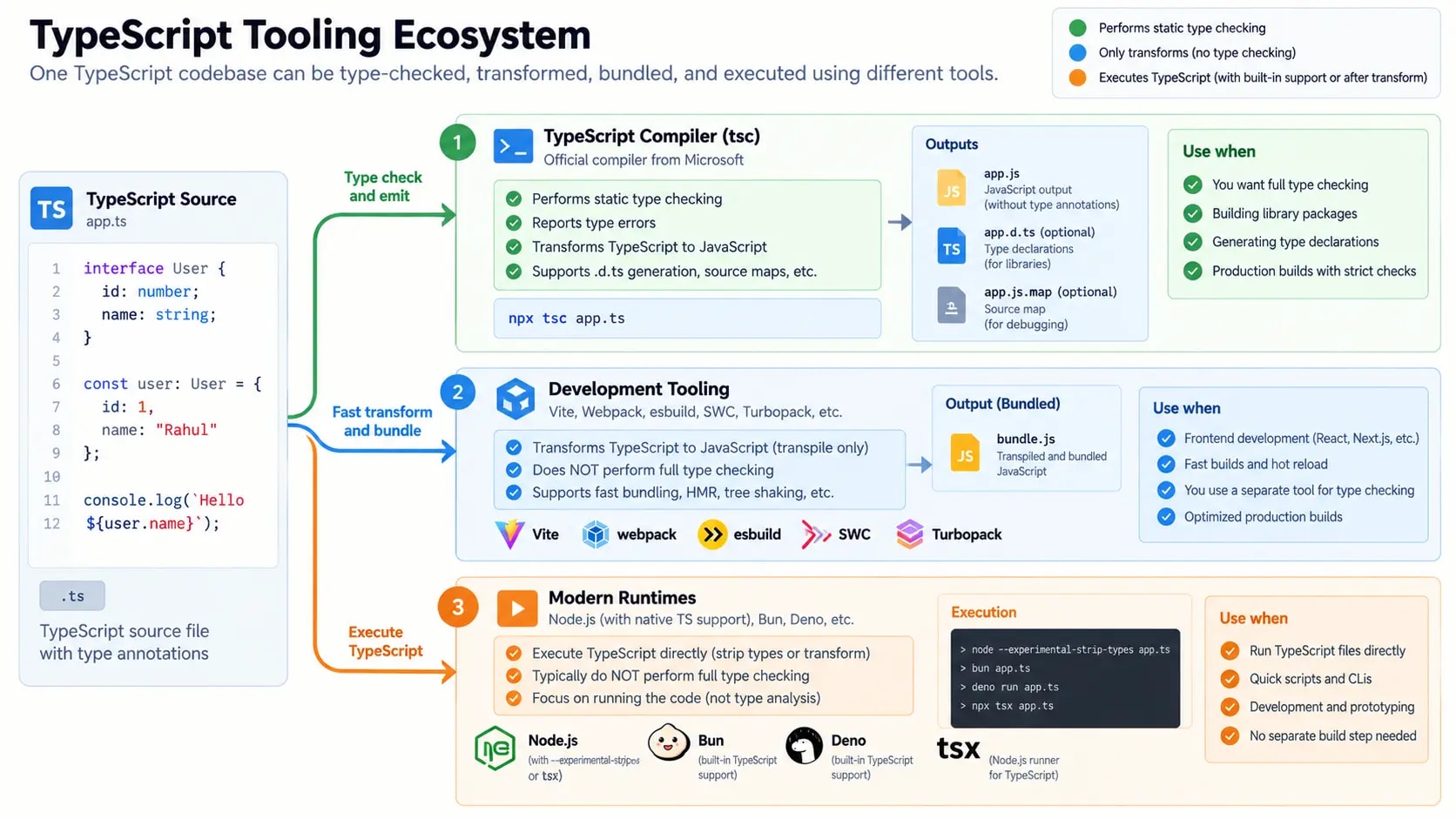
9. TypeScript Tooling and Modern Runtimes
Understanding the compiler also makes it easier to understand development tools.
9.1 TypeScript Playground
The TypeScript Playground is an online environment for experimenting with TypeScript.
Website: https://www.typescriptlang.org/play
It allows developers to write TypeScript, inspect emitted JavaScript, and change compiler configuration.
Specialized plugins and tools can also help visualize AST structures.
9.2 TypeScript Compiler (tsc)
The official tsc command can perform type checking and emit output.
Compile a configured project
npx tscType-check without generating output
npx tsc --noEmitThe second command is useful when another tool handles JavaScript generation.
9.3 Modern Node.js
Modern Node.js supports built-in type stripping for supported TypeScript syntax.
This allows compatible .ts files to execute without an additional manual compilation step.
However, built-in type stripping does not perform TypeScript type checking.
Some TypeScript features require transformation rather than simple erasure, so compatibility depends on the runtime and its supported syntax.
9.4 Bun
Bun can execute TypeScript files by transforming supported TypeScript syntax.
However, executing TypeScript through Bun does not mean the complete TypeScript type checker is automatically running.
For reliable type diagnostics, projects can still run tsc --noEmit.
9.5 TypeScript in frontend frameworks
Modern development tools can separate type checking from bundling and code transformation.
For example, a development server may transform TypeScript quickly while a separate process runs full static type checking.
This is why understanding the distinction between transpilation, type checking, and execution matters in production applications.
10. Common Misconceptions About the TypeScript Compiler
Misconception 1: TypeScript executes directly as typed code
Reality: TypeScript-specific syntax must be stripped or transformed for execution by standard JavaScript engines.
Misconception 2: The scanner understands the meaning of the program
Reality: The scanner recognizes lexical tokens. Syntax structure and semantic relationships are established by later compiler components.
Misconception 3: The AST contains only variable names and values
Reality: The AST represents declarations, statements, expressions, and many other syntactic structures.
Misconception 4: The checker always performs exactly two passes
Reality: Type checking involves lazy resolution and multiple internal operations. There is no universal two-pass rule.
Misconception 5: TypeScript emits JavaScript only when type checking succeeds
Reality: JavaScript may still be emitted when type errors are reported, unless configuration or tooling prevents it.
Misconception 6: Running a TypeScript file means types are checked
Reality: Some runtimes and tools execute TypeScript by stripping or transforming its syntax without performing full static type checking.
11. TypeScript Compiler Interview Questions
Q1. Explain the TypeScript compilation pipeline.
The compiler scans source code into tokens, parses it into an AST, binds declarations to symbols and scopes, performs type analysis, and generates output through transformation and emission. Program construction and module resolution also participate in the process.
Q2. What is the difference between a lexer and a parser?
The lexer recognizes tokens from source characters, while the parser organizes those tokens into a structured AST based on the language grammar.
Q3. What is an AST?
An Abstract Syntax Tree is a hierarchical representation of source-code syntax. It allows compiler components to inspect declarations, expressions, statements, and their structural relationships.
Q4. What is the role of the binder?
The binder establishes symbols, declarations, scopes, and related information used by semantic analysis and type checking.
Q5. What does the TypeScript checker do?
The checker determines types, resolves relationships, performs type compatibility analysis, supports control-flow narrowing, and reports semantic diagnostics.
Q6. Does the TypeScript checker perform exactly two passes?
No. TypeScript performs lazy type resolution and checking operations as required. Its behavior cannot accurately be reduced to a fixed two-pass process.
Q7. What is the difference between type checking and transpilation?
Type checking verifies type compatibility and produces diagnostics. Transpilation transforms source code into JavaScript-compatible output. They can be performed separately.
Q8. Can TypeScript generate JavaScript when type errors exist?
Yes. The compiler can emit JavaScript despite type errors. Enabling noEmitOnError prevents output when errors are reported.
Q9. What is the purpose of .d.ts files?
Declaration files describe the type contracts of JavaScript or TypeScript APIs. They are especially useful when consuming libraries and packages.
Q10. How does VS Code provide TypeScript IntelliSense?
VS Code uses TypeScript language services to obtain diagnostics, type information, completions, definition locations, and other code intelligence.
Q11. Does Node.js type stripping replace the TypeScript compiler?
Not completely. Node.js can execute supported TypeScript syntax after stripping types, but it does not perform TypeScript's full static type checking.
12. Quick Revision Notes
Compiler pipeline at a glance
Stage | Main responsibility | Output or effect |
|---|---|---|
Scanner | Recognizes source tokens | Token information |
Parser | Constructs syntax structure | AST |
Binder | Organizes declarations and scopes | Symbols and flow information |
Checker | Analyzes types and operations | Types and diagnostics |
Transformer / Emitter | Generates requested output | JavaScript, declarations, maps |
Key concepts
Token: A recognized unit of source-code syntax.
AST: A hierarchical representation of program syntax.
Symbol: A compiler representation of a named entity.
Symbol Table: A mapping used to organize symbols within scopes.
Binder: The component responsible for associating declarations with symbols and establishing scope-related information.
Type Checker: The component that analyzes type relationships and detects incompatible operations.
Transformer: Converts supported syntax into the form needed for output.
Emitter: Produces JavaScript, declaration files, and source maps when configured.
Type Erasure: Removal of type-only syntax before runtime.
Source Map: A mapping between generated code and its original source.
Commands to remember
Compile a TypeScript project
npx tscCheck types without generating files
npx tsc --noEmitRun generated JavaScript
node dist/index.jsFive things to remember before an interview
The TypeScript compiler has scanning, parsing, binding, checking, and emission-related stages.
The AST represents source-code structure, while symbols represent named declarations and related entities.
The checker performs semantic type analysis and supports features such as type inference and narrowing.
Type checking and JavaScript generation are separate responsibilities.
Modern runtimes can execute supported TypeScript syntax without performing full TypeScript type checking.
Final takeaway
When you write TypeScript, the compiler does much more than remove type annotations.
It recognizes tokens, understands syntax, organizes declarations, analyzes types, and generates the requested output.
Understanding this architecture explains why TypeScript editors can provide powerful autocomplete, detect type errors, support refactoring, and help developers manage large codebases.
The TypeScript compiler understands your code before the JavaScript runtime executes it.
Further Reading
TypeScript compiler source code: https://github.com/microsoft/TypeScript
TypeScript compiler architecture: https://github.com/microsoft/TypeScript/wiki/Architectural-Overview
TypeScript Compiler API: https://github.com/microsoft/TypeScript/wiki/Using-the-Compiler-API
TypeScript Playground: https://www.typescriptlang.org/play
Compiler configuration reference: https://www.typescriptlang.org/tsconfig/
Node.js TypeScript support: https://nodejs.org/api/typescript.html