TypeScript Types, Inference & Unions Explained
Learn how TypeScript understands data, checks types, and helps prevent common mistakes.
Imagine you're building a food-ordering application.
You store a customer's name, order quantity, payment status, and delivery status.
let customer = "Rahul";
let quantity = 2;
let isPaid = true;
TypeScript already knows the types of these variables, even though you haven't explicitly written them.
But how?
This happens through type inference, one of TypeScript's most useful features.
1. Type Inference: Let TypeScript Decide
Type inference means TypeScript automatically determines a type from the available information.
let drink = "chai";  // string
let price = 20;      // number
let isHot = true;    // boolean
TypeScript understands that drink is a string.
If you later write:
drink = 50;
// Error: Type 'number' is not assignable to type 'string'.
TypeScript reports an error because the new value is incompatible with the inferred type.
Does TypeScript always infer the same type?
Consider:
let drink = "chai";
const beverage = "coffee";drinkis inferred asstringbecause its value can change.beverageis inferred as the literal type"coffee"because aconstvariable cannot be reassigned.
This is known as literal type widening.
Remember: You don't need to manually annotate every variable. Let TypeScript infer types when the intended type is clear.
2. Type Annotations: Declare Types Explicitly
Sometimes, we want to tell TypeScript exactly what kind of data a variable or function should accept.
We use a colon (:) followed by the type.
let username: string = "Rahul";
let age: number = 25;
let isActive: boolean = true;
These are called type annotations.
When should you use annotations?
Annotations are particularly useful when defining function contracts.
function greet(name: string): string {
  return `Hello, ${name}`;
}

greet("Rahul"); // Valid
greet(25);      // Type error
Here:
name: stringspecifies the parameter type.: stringafter the parentheses specifies the return type.
Return types can often be inferred, but explicit annotations can make public function contracts clearer.
Type Inference vs Type Annotation
Type inference | Type annotation |
|---|---|
TypeScript determines the type | Developer declares the type |
Less repetitive code | Explicit type contract |
Best when types are obvious | Useful for parameters and public APIs |
Production tip: Prefer inference for simple local variables and explicit types where they improve clarity or enforce a contract.
3. Primitive Types in TypeScript
JavaScript provides several primitive data types. TypeScript uses corresponding type names to describe them.
Type | Example | Purpose |
|---|---|---|
|
| Text |
|
| Numbers |
|
| True/false values |
|
| Large integers |
|
| Unique identifiers |
|
| Missing or uninitialized value |
|
| Intentional absence of a value |
The most commonly used types are string, number, and boolean.
let product: string = "Laptop";
let price: number = 50000;
let inStock: boolean = true;
JavaScript's number type handles both integers and floating-point numbers. TypeScript doesn't have separate int or float primitive types.
Important: Use lowercase string, number, and boolean rather than their boxed object types String, Number, and Boolean.
4. Union Types: Allow Multiple Types
Imagine you're displaying subscriber counts.
Sometimes the value is a number:
let subscribers = 1000;Other times, it might be formatted text such as "1M".
A variable typed only as number cannot accept both.
That's where union types help.
What is a union type?
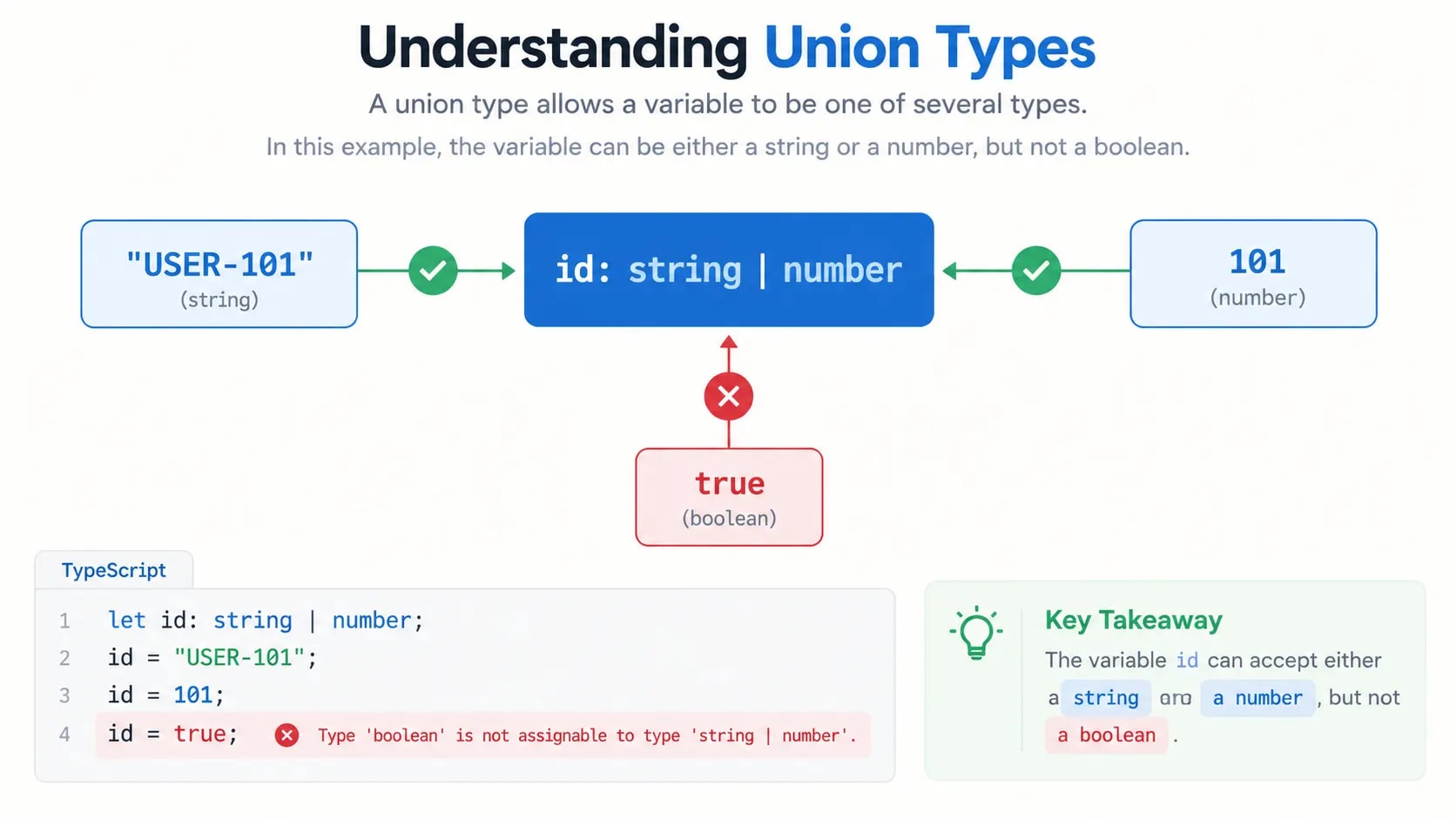
A union allows a value to belong to one of several types using the | operator.
let subscribers: number | string = 1000;

subscribers = "1M"; // Valid
subscribers = true; // Type error
Here, subscribers can contain a number or a string, but not a boolean.
Using unions in functions
function printId(id: string | number) {
  console.log(`User ID: ${id}`);
}

printId(101);
printId("USER-101");
But what if we want to call a string-specific method?
function printId(id: string | number) {
  // id.toUpperCase(); // Type error

  if (typeof id === "string") {
    console.log(id.toUpperCase());
  }
}
TypeScript requires us to check the value's type before using operations that are not available on every union member.
This is called type narrowing.
5. Literal Union Types: Allow Only Specific Values
Sometimes allowing an entire type is too broad.
Imagine an API request with three possible statuses:
Pending
Success
Error
We could declare:
let status: string = "pending";

status = "something"; // Allowed
But "something" isn't a valid application status.
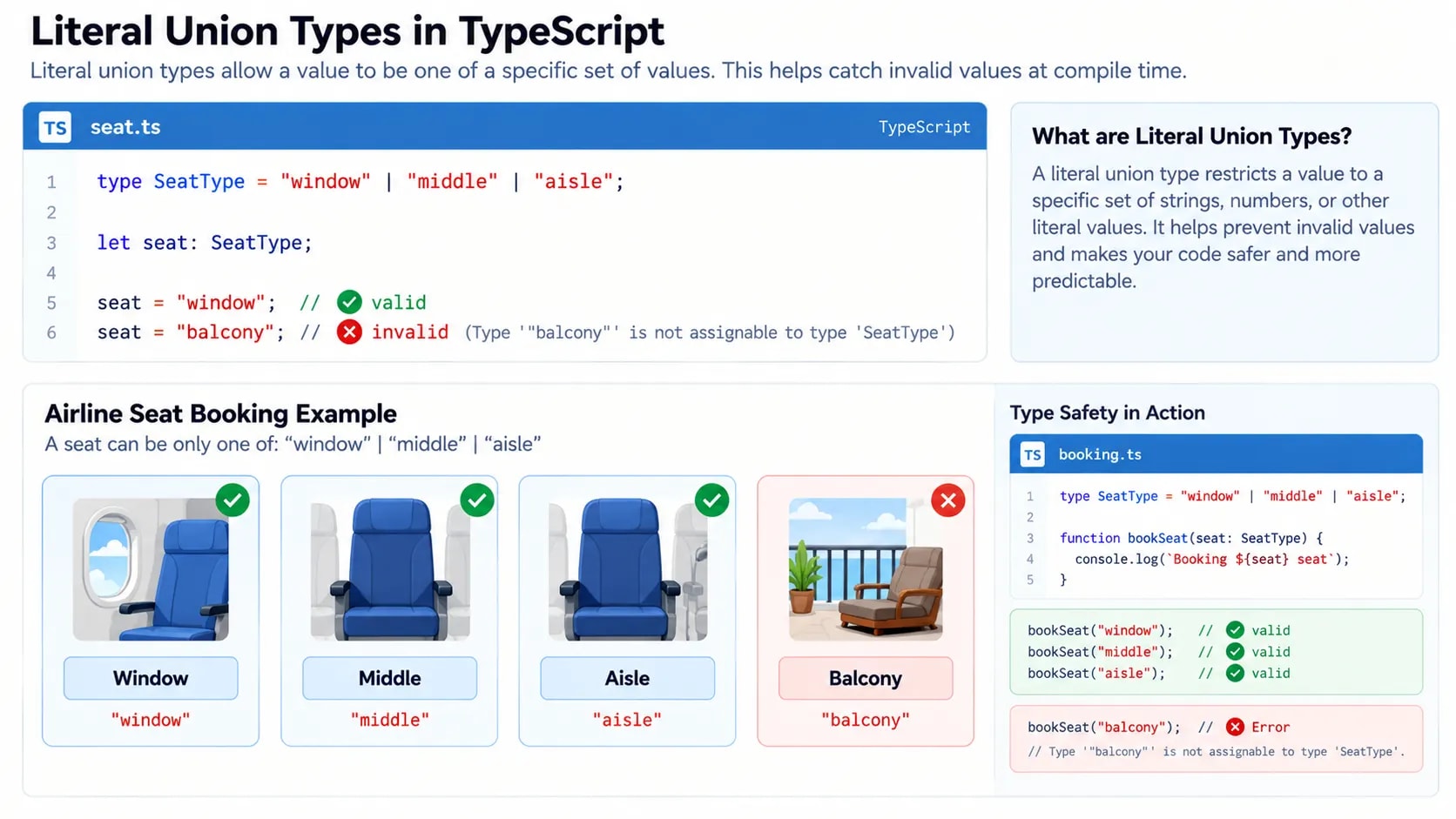
A literal union type solves this by allowing only specific values.
type RequestStatus = "pending" | "success" | "error";

let requestStatus: RequestStatus = "pending";

requestStatus = "success"; // Valid
requestStatus = "done";    // Type error
Now TypeScript restricts the variable to the three permitted strings.
Real-world example: Seat selection
type SeatType = "window" | "middle" | "aisle";

function bookSeat(seat: SeatType) {
  console.log(`Selected: ${seat}`);
}

bookSeat("window"); // Valid
bookSeat("balcony"); // Type error
Literal unions are useful for API status values, user roles, theme settings, payment states, and fixed application choices.
They also improve autocomplete because editors can suggest the permitted values.
6. Why You Should Avoid any
The any type tells TypeScript to skip many type-safety checks for a value.
let user: any = "Rahul";

user = 25;
user = true;
user = { name: "Rahul" };
All these assignments are allowed.
Even unsafe operations may pass type checking:
let user: any = 25;

user.toUpperCase(); // No type error
But at runtime, this will throw an error because a number doesn't have a toUpperCase() method.
This defeats one of the main reasons for using TypeScript.
What should you use instead?
Use a specific type whenever possible.
If the data genuinely has an unknown type, prefer unknown over any.
let value: unknown = "Rahul";

if (typeof value === "string") {
  console.log(value.toUpperCase());
}
Unlike any, unknown requires you to check the type before performing type-specific operations.
Remember: any bypasses type safety, while unknown makes you verify what you're working with.
7. Common Mistakes
Mistake | Better approach |
|---|---|
Annotating every obvious variable | Use type inference |
Using | Prefer specific types or |
Using | Use literal unions |
Calling methods directly on unions | Narrow the type first |
Using | Prefer lowercase primitive types |
8. TypeScript Interview Questions
Q1. What is the difference between type inference and type annotation?
Type inference allows TypeScript to determine types automatically. Type annotation means explicitly declaring an expected type using the : type syntax.
Q2. What is a union type?
A union allows a value to belong to multiple possible types, such as string | number. Operations must be safe for the possible types or require narrowing.
Q3. What is the difference between a union type and a literal union?
A union such as string | number permits values belonging to either broad type. A literal union such as "success" | "error" permits only the specified values.
Q4. Why should developers avoid any?
any disables many static type checks, allowing unsafe operations that may fail at runtime.
Q5. What is type narrowing?
Type narrowing is when TypeScript refines a variable's possible types using conditions such as typeof, equality comparisons, or other checks.
Q6. What is the difference between any and unknown?
Both can receive values of different types, but any allows unchecked operations while unknown requires type checking or narrowing before use.
9. Quick Revision Notes
Concept | Remember | |
|---|---|---|
Type inference | TypeScript determines types automatically | |
Type annotation | Explicit type using | |
| Text | |
| Integers and decimals | |
| True or false | |
Union type | Multiple possible types using ` | ` |
Literal union | Restricted set of exact values | |
Type narrowing | Refines possible types through checks | |
| Bypasses type checking | |
| Requires verification before type-specific operations |
Essential syntax
Inference
let drink = "chai";Annotation
let price: number = 50;Union
let id: string | number = 101;Literal union
type Status = "pending" | "success" | "error";Type narrowing
function display(value: string | number) {
  if (typeof value === "string") {
    console.log(value.toUpperCase());
  }
}
Final takeaway
TypeScript helps developers describe what kind of data their applications should accept.
Use type inference when the type is obvious.
Use type annotations when an explicit contract is useful.
Use union types when multiple types are valid.
Use literal unions when only specific values are allowed.
Avoid unnecessary
anybecause it weakens type safety.
The goal is not to write more types. It's to write types that make your code safer and easier to understand.
Further Reading
TypeScript Everyday Types: https://www.typescriptlang.org/docs/handbook/2/everyday-types.html
TypeScript Type Inference: https://www.typescriptlang.org/docs/handbook/type-inference.html
TypeScript Narrowing: https://www.typescriptlang.org/docs/handbook/2/narrowing.html