TypeScript: Type vs Interface & Generics Explained
Learn how to define reusable type contracts and write flexible, type-safe code using interfaces, type aliases, and generics.
Imagine you're building an application with users, admins, products, and API responses.
You need to describe their data structures without repeating the same definitions everywhere.
TypeScript provides two commonly used tools for this: type aliases and interface.
But another problem appears when you want a single function or API response structure to work with different data types.
Should you write a separate function for every type? Or use any and lose type safety?
Generics solve this problem by allowing code to work with different types while preserving their relationships.
1. Type Aliases: Naming Reusable Types
A type alias gives a name to an existing type or a combination of types.
Use the type keyword.
type Username = string;

type UserId = string | number;

type Status = "pending" | "success" | "error";
Type aliases can represent primitives, unions, tuples, object structures, and more.
Object type aliases
type User = {
  id: number;
  name: string;
  email: string;
};

const user: User = {
  id: 1,
  name: "Rahul",
  email: "rahul@example.com"
};
Combining types with intersections
Use & to combine type requirements.
type User = {
  id: number;
  name: string;
};

type Admin = User & {
  role: "admin";
};
Now Admin requires all properties from User plus role.
Remember: Type aliases can name almost any TypeScript type expression, not just objects.
2. Interfaces: Defining Object Contracts
An interface describes the expected structure of an object.
interface User {
  id: number;
  name: string;
  email: string;
}
You can use it to type objects:
const user: User = {
  id: 1,
  name: "Rahul",
  email: "rahul@example.com"
};
Interfaces are particularly useful for reusable object contracts, class implementations, and extensible library definitions.
2.1 Extending interfaces
Interfaces support inheritance through extends.
interface User {
  id: number;
  name: string;
}

interface Admin extends User {
  role: "admin" | "superadmin";
}
An Admin must contain id, name, and role.
const admin: Admin = {
  id: 1,
  name: "Rahul",
  role: "superadmin"
};
Interfaces can also extend multiple compatible interfaces.
2.2 Declaration merging
One distinctive interface feature is declaration merging.
interface Cart {
  items: string[];
}

interface Cart {
  totalPrice: number;
}
TypeScript combines these declarations.
The resulting Cart requires both properties:
const cart: Cart = {
  items: ["Tea", "Coffee"],
  totalPrice: 100
};
Type aliases do not support this behavior.
type Cart = {
  items: string[];
};

// Declaring another Cart type alias
// in the same scope causes an error.
Declaration merging is particularly useful for augmenting existing library types.
However, it should be used intentionally because automatic merging can make contracts harder to trace.
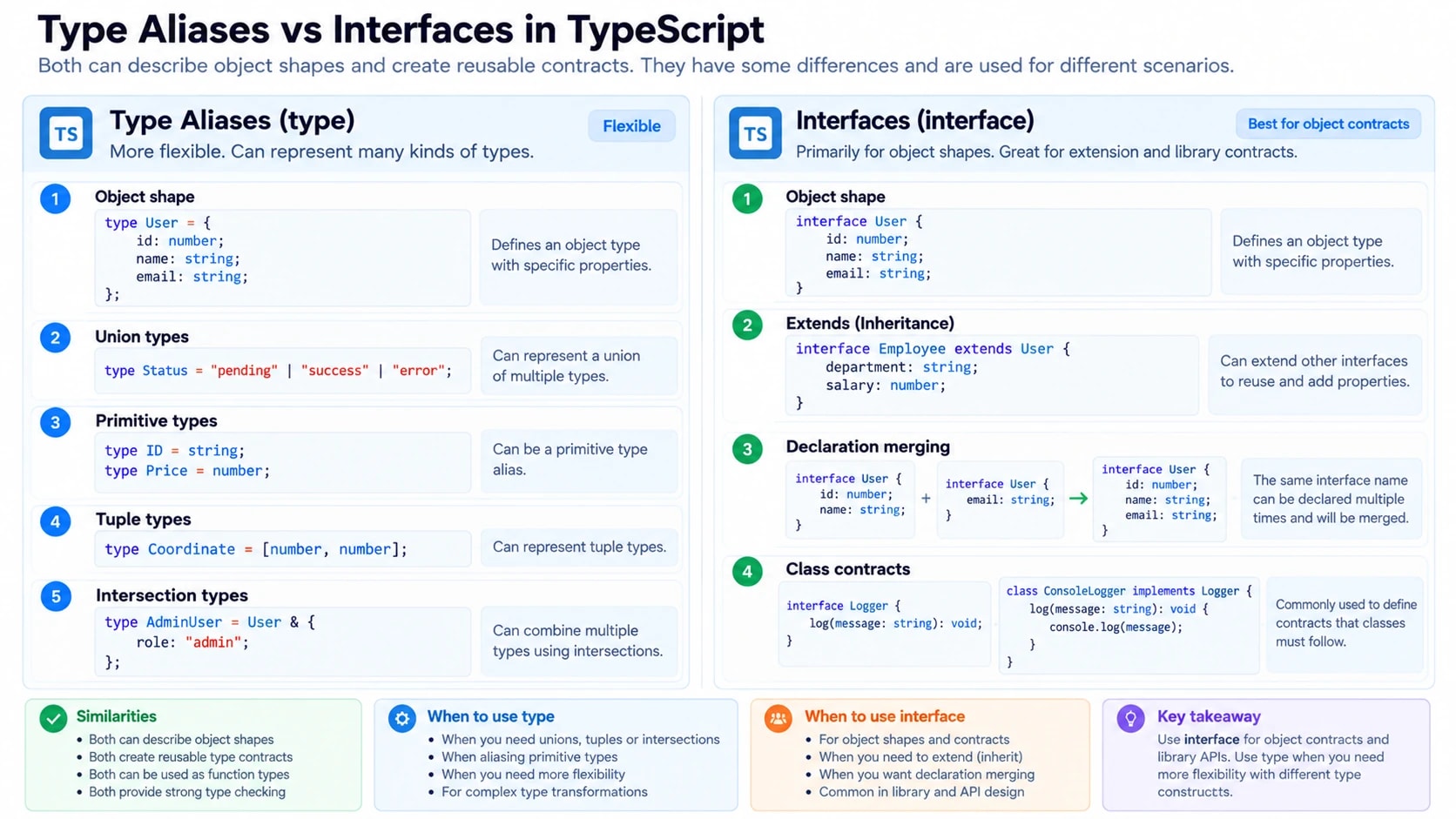
3. type vs interface: Which Should You Use?
Both can describe object structures, but they have different capabilities.
Feature |
|
|
|---|---|---|
Object shapes | Yes | Yes |
Primitive aliases | Yes | No |
Union types | Yes | No |
Tuple aliases | Yes | Supports tuple-like shapes through extension, but not tuple aliases directly |
Extension |
|
|
Declaration merging | No | Yes |
Class implementation | Yes, for compatible object types | Yes |
Production recommendation
Use interface when defining extensible object contracts, especially for classes or library APIs.
Use type when working with unions, tuples, intersections, mapped types, or other type expressions.
For ordinary object shapes, both are valid. Consistency within your codebase matters more than forcing one keyword everywhere.
4. Index Signatures: Objects with Dynamic Keys
Sometimes you know the type of an object's values, but not its property names.
For example, imagine storing product stock counts by product name.
interface Inventory {
  [productName: string]: number;
}
Now you can create an object with different keys:
const stock: Inventory = {
  tea: 50,
  coffee: 30,
  sugar: 100
};
Each string key must map to a number.
// Type error
// stock.milk = "Twenty";
Index signatures are useful for dictionaries, dynamic configuration objects, and lookup tables.
When you know the exact set of allowed keys, a mapped type or Record can provide a more precise contract.
5. Generics: Reusable Code Without Losing Types
Imagine writing a helper function that returns whatever value it receives.
Without generics, you might write:
function identity(value: any): any {
  return value;
}
This works, but TypeScript loses the relationship between the input and output types.
const result = identity("Rahul");

// result has type any
Using generics
function identity<T>(value: T): T {
  return value;
}
T is a type parameter.
It represents a type supplied or inferred when the function is used.
const name = identity("Rahul");
// Inferred as string

const age = identity(25);
// Inferred as number
The same function works with different types while preserving type information.
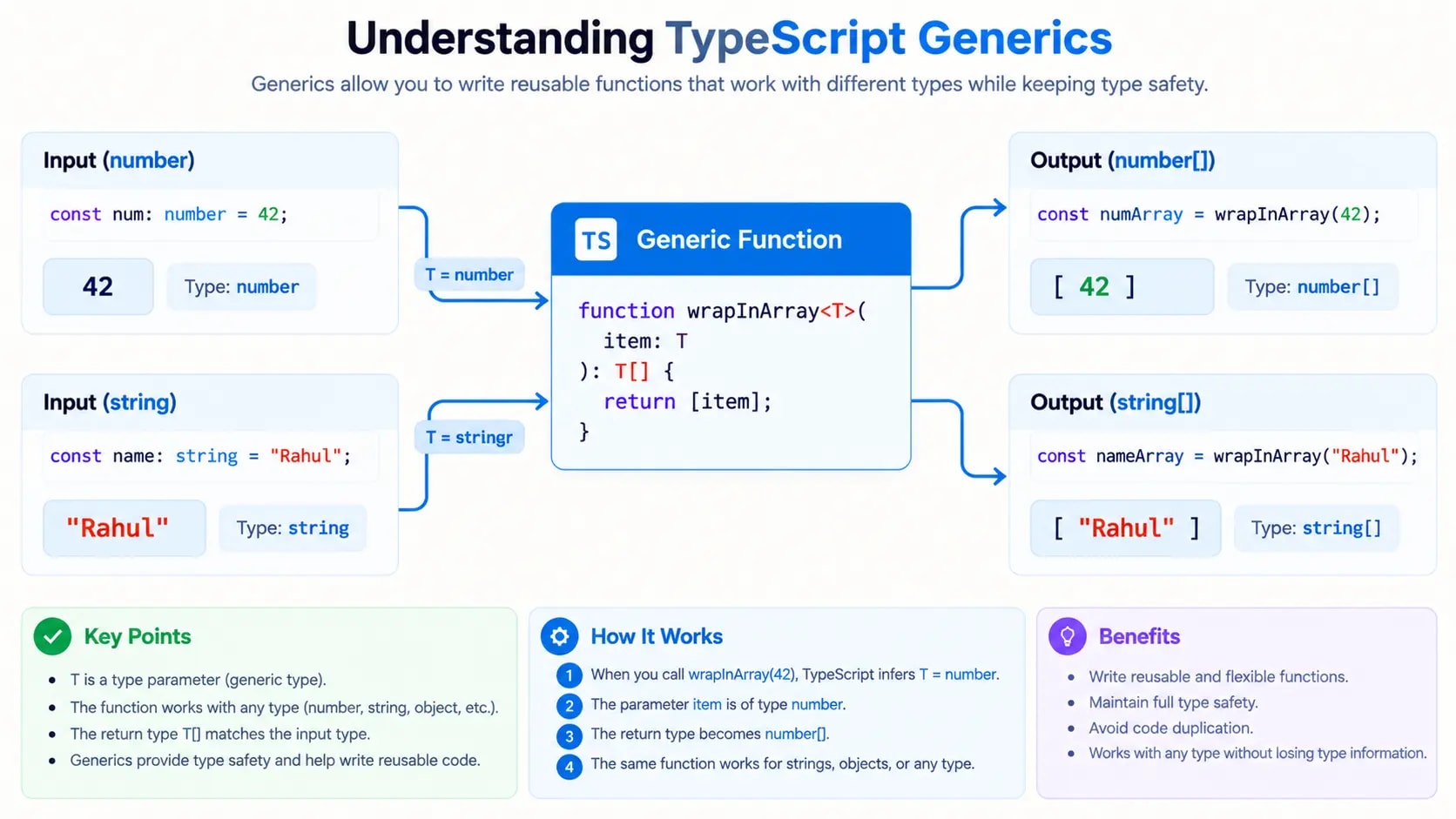
How does T work?
Consider:
function wrapInArray<T>(item: T): T[] {
  return [item];
}
Calling it with different values produces different inferred return types.
const numbers = wrapInArray(42);
// number[]

const names = wrapInArray("Rahul");
// string[]
You can also explicitly specify a generic type:
const values = wrapInArray<number>(10);Remember: Generics describe relationships between types rather than replacing them with any.
6. Generic Constraints: Restricting Allowed Types
Generics provide flexibility, but sometimes a function needs values with specific properties.
For example, imagine a function that returns the length of an input.
function getLength<T>(value: T) {
  // return value.length; // Type error
}
TypeScript cannot guarantee that every possible T has a length property.
We can solve this using a generic constraint.
function getLength<T extends { length: number }>(
  value: T
): number {
  return value.length;
}
Now TypeScript accepts values that contain a numeric length property.
getLength("Hello");    // 5
getLength([1, 2, 3]); // 3

// getLength(42); // Type error
Here, extends means the supplied type must satisfy the specified structural requirement.
Generic constraints with keyof
Another common pattern is restricting a key to the properties of an object.
function getProperty<T, K extends keyof T>(
  obj: T,
  key: K
): T[K] {
  return obj[key];
}
Usage:
const user = {
  id: 1,
  name: "Rahul"
};

getProperty(user, "name"); // Valid

// getProperty(user, "age"); // Type error
keyof T creates a union of the known property keys of T.
The K extends keyof T constraint ensures callers can only pass valid keys.
This is particularly useful when writing reusable utility functions.
7. Generics in Real-World API Responses
Imagine your backend returns different kinds of data:
User profiles
Product lists
Orders
Each response shares the same outer structure but contains different data.
Instead of defining separate response wrappers, we can use a generic interface.
interface ApiResponse<T> {
  status: number;
  success: boolean;
  data: T;
}
Using it with a user profile
interface UserProfile {
  id: number;
  username: string;
  email: string;
}

const response: ApiResponse<UserProfile> = {
  status: 200,
  success: true,
  data: {
    id: 1,
    username: "Rahul",
    email: "rahul@example.com"
  }
};
Reusing it with products
interface Product {
  id: number;
  name: string;
  price: number;
}

const products: ApiResponse<Product[]> = {
  status: 200,
  success: true,
  data: [
    { id: 1, name: "Tea", price: 25 },
    { id: 2, name: "Coffee", price: 50 }
  ]
};
Notice that the same ApiResponse<T> works with both a single object and an array.
This pattern is common in frontend API clients, backend services, reusable libraries, and application state management.
Production note: ApiResponse<UserProfile> describes the expected shape at compile time. It does not validate data received from an external API. Use runtime validation when the source cannot be trusted.
8. Common Mistakes
Mistake | Better approach |
|---|---|
Using | Use |
Assuming interfaces are always better than types | Choose based on required features |
Using | Use generics when types are related |
Adding a generic parameter that serves no purpose | Use a concrete type when appropriate |
Accessing unknown properties on unconstrained generics | Add meaningful constraints |
Assuming generic types validate API data | Validate external data at runtime |
9. TypeScript Interview Questions
Q1. What is the difference between type and interface?
Both can describe object structures. Type aliases can name unions, primitives, tuples, and other type expressions, while interfaces support declaration merging and are designed for extensible object contracts.
Q2. What is declaration merging?
Declaration merging allows multiple compatible interface declarations with the same name in the same scope to combine into a single interface definition.
Q3. What are generics in TypeScript?
Generics allow functions, classes, and interfaces to operate on different types while preserving type relationships and static type checking.
Q4. Why are generics preferred over any?
Generics retain information about input and output types, while any bypasses many type checks and loses useful type relationships.
Q5. What is a generic constraint?
A generic constraint restricts the types that can be supplied to a generic parameter using syntax such as <T extends Constraint>.
Q6. What is the purpose of keyof with generics?
keyof extracts the property keys of a type. Combined with generic constraints, it enables type-safe access to object properties.
10. Quick Revision Notes
Core concepts
Concept | Remember |
|---|---|
| Names a type expression |
| Defines an object contract |
| Extends an interface or constrains a generic |
| Combines type requirements |
Declaration merging | Combines compatible interface declarations |
Index signature | Describes dynamic object keys |
| Generic type parameter |
| Restricts generic inputs |
| Produces property keys of a type |
| Reusable generic data wrapper |
Essential syntax
Type alias
type Status = "pending" | "success";Interface
interface User {
  id: number;
  name: string;
}
Interface extension
interface Admin extends User {
  role: string;
}
Generic function
function identity<T>(value: T): T {
  return value;
}
Generic constraint
function getLength<T extends { length: number }>(
  value: T
): number {
  return value.length;
}
Generic API response
interface ApiResponse<T> {
  success: boolean;
  data: T;
}
Five things to remember
Use
typefor unions and other type expressions; useinterfacewhen extensible object contracts are useful.Interfaces support declaration merging, while type aliases do not.
Generics create reusable code without discarding type information.
Generic constraints restrict which types can be supplied.
Generics are especially useful for reusable API responses, utility functions, and shared data contracts.
Final takeaway
Type aliases and interfaces help describe reusable data structures, while generics make those structures and functions flexible.
Instead of creating separate implementations for every data type—or falling back to unsafe any—generics let you preserve type relationships while reusing code.
Use types to describe your data, interfaces to define extensible contracts, and generics to build reusable abstractions without losing type safety.
Further Reading
TypeScript Everyday Types: https://www.typescriptlang.org/docs/handbook/2/everyday-types.html
TypeScript Object Types: https://www.typescriptlang.org/docs/handbook/2/objects.html
TypeScript Generics: https://www.typescriptlang.org/docs/handbook/2/generics.html
TypeScript Keyof Type Operator: https://www.typescriptlang.org/docs/handbook/2/keyof-types.html