TypeScript Functions: Parameters, Return Types & void
Learn how to write type-safe functions using parameters, return types, optional values, and reusable function signatures.
Imagine you're building a food-ordering application.
You create a function to calculate the price of tea:
function calculatePrice(cups) {
  return cups * 25;
}

calculatePrice(2);       // 50
calculatePrice("three"); // NaN
JavaScript allows both calls, even though the second produces an invalid calculation.
How do we ensure a function receives the correct data and returns the expected result?
That's where TypeScript's function typing comes in.
1. Parameter Types: Controlling Function Inputs
A parameter type defines what kind of value a function accepts.
function calculatePrice(cups: number) {
  return cups * 25;
}

calculatePrice(2);       // Valid
calculatePrice("three"); // Type error
The annotation cups: number tells TypeScript that the function expects a number.
You can annotate multiple parameters:
function getTeaPrice(
  price: number,
  cups: number
) {
  return price * cups;
}

getTeaPrice(25, 3); // 75
TypeScript checks argument types and required argument counts when calling the function.
Remember: Parameter annotations describe the inputs a function expects.
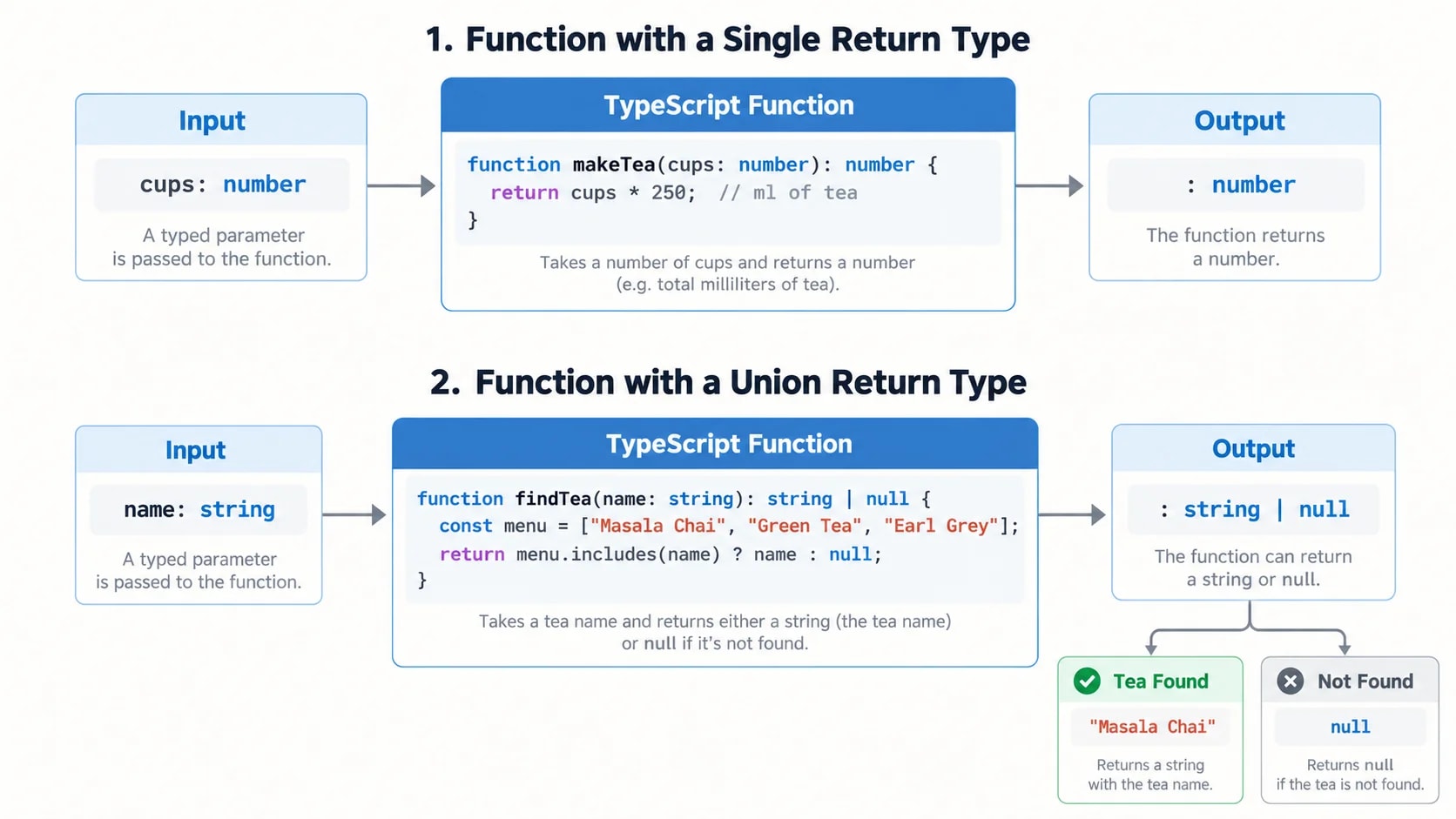
2. Return Types: Controlling Function Output
A return type defines the type of value a function should return.
It appears after the parameter list.
function getTeaPrice(cups: number): number {
  return cups * 25;
}
Here:
cups: numberdefines the parameter type.: numberdefines the return type.
If the function returns an incompatible value, TypeScript reports an error.
function getTeaPrice(cups: number): number {
  return "Fifty"; // Type error
}
Do you always need a return annotation?
No. TypeScript can infer return types.
function getTeaPrice(cups: number) {
  return cups * 25;
}
TypeScript infers the return type as number.
Production tip: Use inference for simple functions. Explicit return types are useful for public APIs, shared utilities, and functions whose return contracts should remain stable.
3. Understanding void, undefined, and null
Some functions perform an action without returning useful data.
For example:
function logTeaStatus(isReady: boolean): void {
  if (isReady) {
    console.log("Tea is ready!");
  }
}
The void return type indicates that callers should not expect a useful return value.
How is void different from undefined and null?
Type | Meaning |
|---|---|
| No useful return value is expected |
| A specific JavaScript value |
| A specific value representing intentional absence |
Consider:
function getNothing(): undefined {
  return undefined;
}

function getEmpty(): null {
  return null;
}
A normal JavaScript function that finishes without returning anything evaluates to undefined at runtime.
However, void and undefined have different meanings in TypeScript's type system.
One subtle distinction: a function assigned to a () => void callback type may internally return a value, but the callback contract ignores that result.
4. Union Return Types: Returning Multiple Possibilities
Sometimes a function cannot always return the same type.
Imagine searching for a tea by its ID.
If the tea exists, return its name. Otherwise, return null.
function findTea(id: number): string | null {
  if (id === 1) {
    return "Masala Chai";
  }

  return null;
}
The return type string | null tells TypeScript that both outcomes are possible.
When calling the function:
const tea = findTea(2);

if (tea !== null) {
  console.log(tea.toUpperCase());
}
TypeScript requires narrowing before string-specific operations.
This is useful for database queries, search results, and optional application data.
5. Optional and Default Parameters
Not every function parameter needs to be supplied by the caller.
TypeScript supports optional and default parameters.
5.1 Optional parameters
Use ? to make a parameter optional.
function orderTea(
  cups: number,
  flavor?: string
) {
  console.log(cups, flavor);
}

orderTea(2);           // Valid
orderTea(2, "Ginger"); // Valid
Inside the function, flavor has the type string | undefined.
You should handle the possibility that it was omitted.
function orderTea(cups: number, flavor?: string) {
  if (flavor !== undefined) {
    return `${cups} cups of ${flavor} tea`;
  }

  return `${cups} cups of tea`;
}
5.2 Default parameters
Default parameters provide a fallback value.
function orderTea(
  cups: number,
  flavor: string = "Masala"
) {
  return `${cups} cups of ${flavor} tea`;
}

orderTea(2);           // 2 cups of Masala tea
orderTea(2, "Ginger"); // 2 cups of Ginger tea
The default applies when the caller omits the argument or passes undefined.
5.3 Optional vs default parameters
Optional parameter | Default parameter |
|---|---|
Uses | Uses |
Can be omitted | Can use a fallback value |
May be | Default removes |
Example: | Example: |
Important: A parameter marked with ? must come after required parameters. Default-initialized parameters can appear before required parameters, but callers must pass undefined in that position to use the default. Placing default parameters toward the end usually makes APIs easier to use.
6. Object Parameters: Cleaner Function Contracts
As applications grow, functions often require several related values.
Instead of passing many individual arguments:
function orderTea(
  type: string,
  cups: number,
  sugar: number
) {
  // Process order
}
You can group them into an object.
type TeaOrder = {
  type: string;
  cups: number;
  sugarLevel?: number;
};

function processOrder(order: TeaOrder): number {
  console.log(`Processing ${order.cups} cups`);

  return order.cups * 25;
}
Usage:
processOrder({
  type: "Masala",
  cups: 2,
  sugarLevel: 1
});
This approach makes function calls more readable and reduces mistakes caused by confusing argument positions.
It's particularly useful for API services, database operations, and functions that accept configuration objects.
7. Function Types and Arrow Functions
Functions are also values in JavaScript.
TypeScript allows us to describe a function's signature using a reusable type.
type PriceCalculator = (
  price: number,
  cups: number
) => number;
Now assign a function to that type:
const calculateTotal: PriceCalculator = (price, cups) => {
  return price * cups;
};
Notice that we didn't annotate price and cups again.
TypeScript infers their types from PriceCalculator.
This is called contextual typing.
Functions as arguments
Function types are especially useful for callbacks.
function processOrder(
  cups: number,
  callback: (message: string) => void
) {
  callback(`${cups} cups ordered`);
}

processOrder(2, (message) => {
  console.log(message);
});
TypeScript knows that the callback receives a string.
Production perspective: Function types are common in React event handlers, array methods, asynchronous callbacks, and reusable utilities.
8. Common Mistakes
Mistake | Better approach |
|---|---|
Leaving parameters implicitly typed as | Define appropriate parameter types |
Annotating every obvious return type | Use inference where the contract is clear |
Returning | Use an appropriate union return type |
Assuming | Understand its role as a return-value contract |
Placing optional | Put optional parameters after required ones |
Passing too many positional arguments | Use a typed object parameter |
9. TypeScript Interview Questions
Q1. What is function typing in TypeScript?
Function typing defines the expected parameter types and return type of a function, allowing TypeScript to check how it is called and implemented.
Q2. Is it necessary to explicitly define function return types?
No. TypeScript can infer return types. Explicit annotations are useful when you want a stable or clearly documented function contract.
Q3. What is the difference between void and undefined?
void describes a function whose return value should not be used, while undefined is a specific JavaScript value and TypeScript type.
Q4. What is the difference between optional and default parameters?
Optional parameters can be omitted and may be undefined. Default parameters provide a fallback when the argument is omitted or explicitly undefined.
Q5. What happens if a function returning number returns null?
With strictNullChecks enabled, TypeScript reports an error because null is not assignable to number. If null is a valid outcome, use number | null.
Q6. What is a function type expression?
A function type expression describes a function's parameters and return type, such as (price: number) => number. It is useful for callbacks and reusable function contracts.
10. Quick Revision Notes
Core concepts
Concept | Remember | |
|---|---|---|
Parameter annotation |
| |
Return annotation |
| |
Return inference | Compiler determines the return type | |
| No useful return value expected | |
Union return | `string | null` |
Optional parameter |
| |
Default parameter |
| |
Object parameter | Accepts a typed object | |
Function type |
| |
Contextual typing | Types inferred from expected function signature |
Essential syntax
Parameter and return types
function add(a: number, b: number): number {
  return a + b;
}
void return type
function log(message: string): void {
  console.log(message);
}
Optional and default parameters
function greet(name = "Guest", title?: string) {
  return title ? `${title} ${name}` : name;
}
Function type
type Calculator = (a: number, b: number) => number;Five things to remember
Parameter annotations define valid function inputs.
Return annotations define the expected output, but inference often works.
voidmeans callers should not expect a useful return value.Optional parameters may be
undefined; defaults provide a fallback.Reusable function types make callbacks and shared APIs easier to maintain.
Final takeaway
Functions are contracts between the code that calls them and the code that implements them.
TypeScript makes those contracts clearer by describing accepted parameters, possible return values, and reusable function signatures.
A well-typed function makes it clear what goes in, what comes out, and how the function should be used.
Further Reading
TypeScript More on Functions: https://www.typescriptlang.org/docs/handbook/2/functions.html
TypeScript Everyday Types: https://www.typescriptlang.org/docs/handbook/2/everyday-types.html