TypeScript Narrowing, Type Guards & never Explained
Learn how TypeScript handles uncertain data, safely identifies types, and prevents invalid states in real-world applications.
Imagine you're building an application that receives data from an external API.
You expect a user's name, but the API might return a string, a number, null, or an unexpected object.
How can you safely work with data when you don't know its type?
This is where type narrowing, type guards, and TypeScript's unknown and never types become useful.
1. unknown vs any: Handling Uncertain Data
Both any and unknown can hold values of any type, but they behave differently when you try to use those values.
Using any
let value: any = "Rahul";

value.toUpperCase(); // Allowed
value.someMethod();  // Allowed by TypeScript
any bypasses TypeScript's type-safety checks for these operations.
The compiler doesn't complain, but someMethod() will fail at runtime because the string doesn't have that method.
Using unknown
let value: unknown = "Rahul";

// value.toUpperCase(); // Type error

if (typeof value === "string") {
  console.log(value.toUpperCase());
}
unknown requires you to verify the value's type before performing type-specific operations.
|
|
|---|---|
Bypasses type checking | Preserves type safety |
Allows unchecked property access | Requires checking before access |
Can hide runtime errors | Encourages safe handling |
Avoid when possible | Prefer for uncertain data |
Remember: Use unknown when you don't know what a value contains. It forces you to check before using it.
2. Type Narrowing: From General to Specific
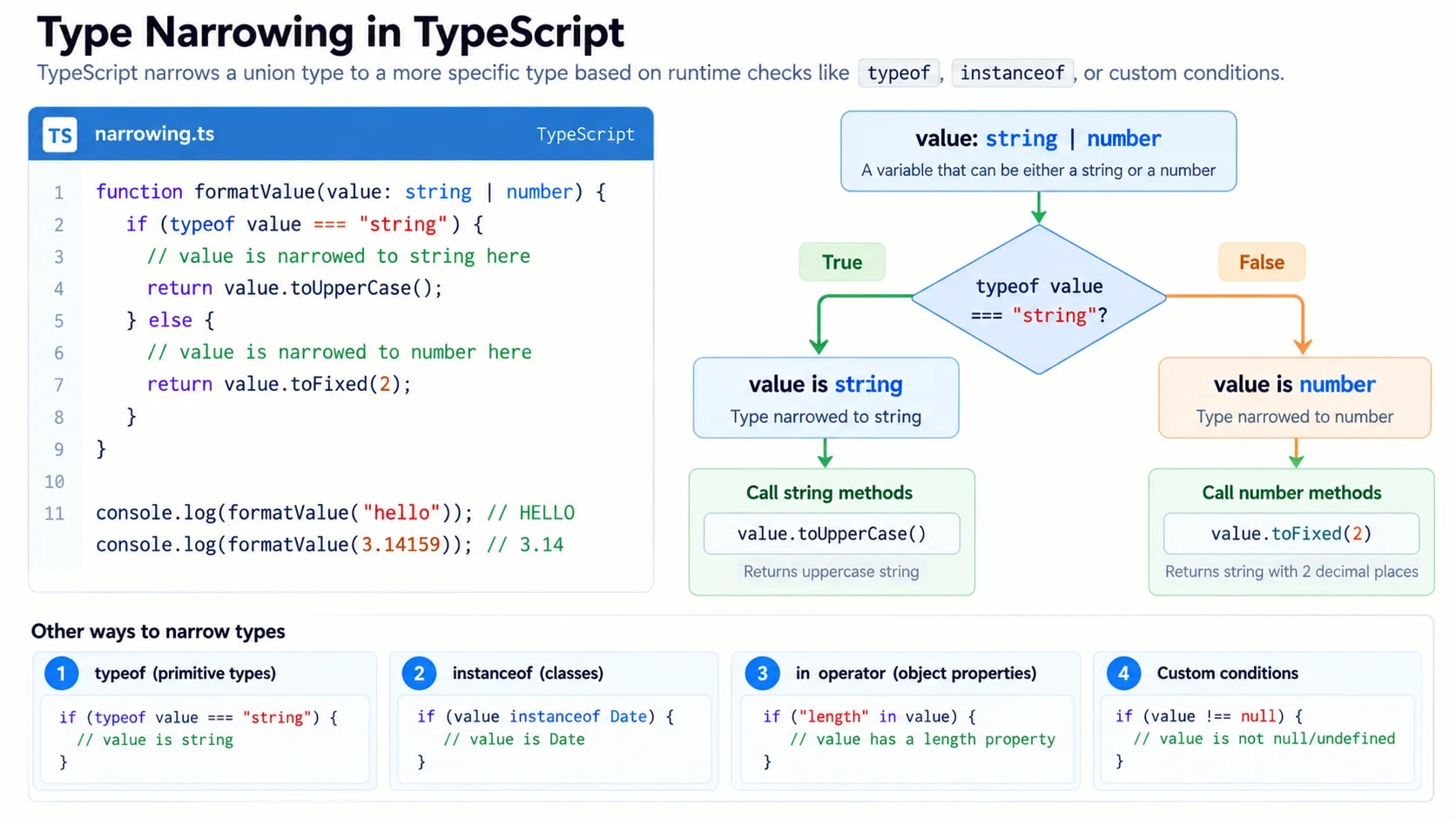
Type narrowing is the process of refining a variable's possible types based on conditions.
Consider:
function formatValue(value: string | number) {
  if (typeof value === "string") {
    return value.toUpperCase();
  }

  return value.toFixed(2);
}
Initially, value can be either a string or a number.
After checking typeof value === "string", TypeScript knows:
Inside the
ifblock,valueis astring.After the
ifblock,valuemust be anumberbecause the string branch returns.
This is called control-flow-based type narrowing.
3. Built-in Type Guards
TypeScript understands several JavaScript conditions that help narrow types automatically.
3.1 typeof — Checking primitive types
Use typeof to identify values such as strings, numbers, and booleans.
function printValue(value: string | number) {
  if (typeof value === "number") {
    console.log(value.toFixed(2));
  } else {
    console.log(value.toUpperCase());
  }
}
typeof is useful for primitive types, but remember that typeof null returns "object" in JavaScript.
3.2 Truthiness checks — Handling optional values
function greet(name?: string) {
  if (name) {
    console.log(name.toUpperCase());
  }
}
The condition narrows name to a string when its value is truthy.
However, truthiness checks also reject valid falsy values such as "", 0, and false.
When you only want to exclude null and undefined, use:
if (name != null) {
  console.log(name.toUpperCase());
}
3.3 instanceof — Checking class instances
function handleError(error: unknown) {
  if (error instanceof Error) {
    console.log(error.message);
  }
}
instanceof checks whether a value is associated with a constructor's prototype chain.
It's commonly used with Error, Date, and custom classes.
3.4 in — Checking object properties
type Admin = { permissions: string[] };
type User = { email: string };

function handleAccount(account: Admin | User) {
  if ("permissions" in account) {
    console.log(account.permissions);
  } else {
    console.log(account.email);
  }
}
TypeScript uses the property check to narrow the union.
Important: The in operator checks property existence, including inherited properties. It does not validate the property's value or data type.
Built-in guards at a glance
Guard | When to use |
|---|---|
| Primitive type checks |
Truthiness | Exclude falsy values |
| Exclude null and undefined |
| Class or constructor checks |
| Check whether an object has a property |
4. Custom Type Guards: Validating Unknown Objects
Built-in guards work well for simple checks.
But what if an API returns a complex object?
Suppose your application expects:
type TeaOrder = {
  type: string;
  sugar: number;
};
A response might be:
const response: unknown = {
  type: "masala",
  sugar: 2
};
Because the value is unknown, TypeScript won't allow direct property access.
We can create a custom type guard to validate the object's structure.
function isTeaOrder(value: unknown): value is TeaOrder {
  if (typeof value !== "object" || value === null) {
    return false;
  }

  if (!("type" in value) || !("sugar" in value)) {
    return false;
  }

  return (
    typeof value.type === "string" &&
    typeof value.sugar === "number"
  );
}
Now use it:
if (isTeaOrder(response)) {
  console.log(response.type);
  console.log(response.sugar);
}
What does value is TeaOrder mean?
It is called a type predicate.
It tells TypeScript that when the function returns true, the value should be treated as TeaOrder.
The function itself is responsible for correctly validating that claim. TypeScript trusts the declared predicate—it does not independently prove that the guard's implementation is correct.
For complex production schemas, validation libraries such as Zod can help avoid writing repetitive validation logic.
Remember: A custom type guard connects runtime checks with TypeScript's static type system.
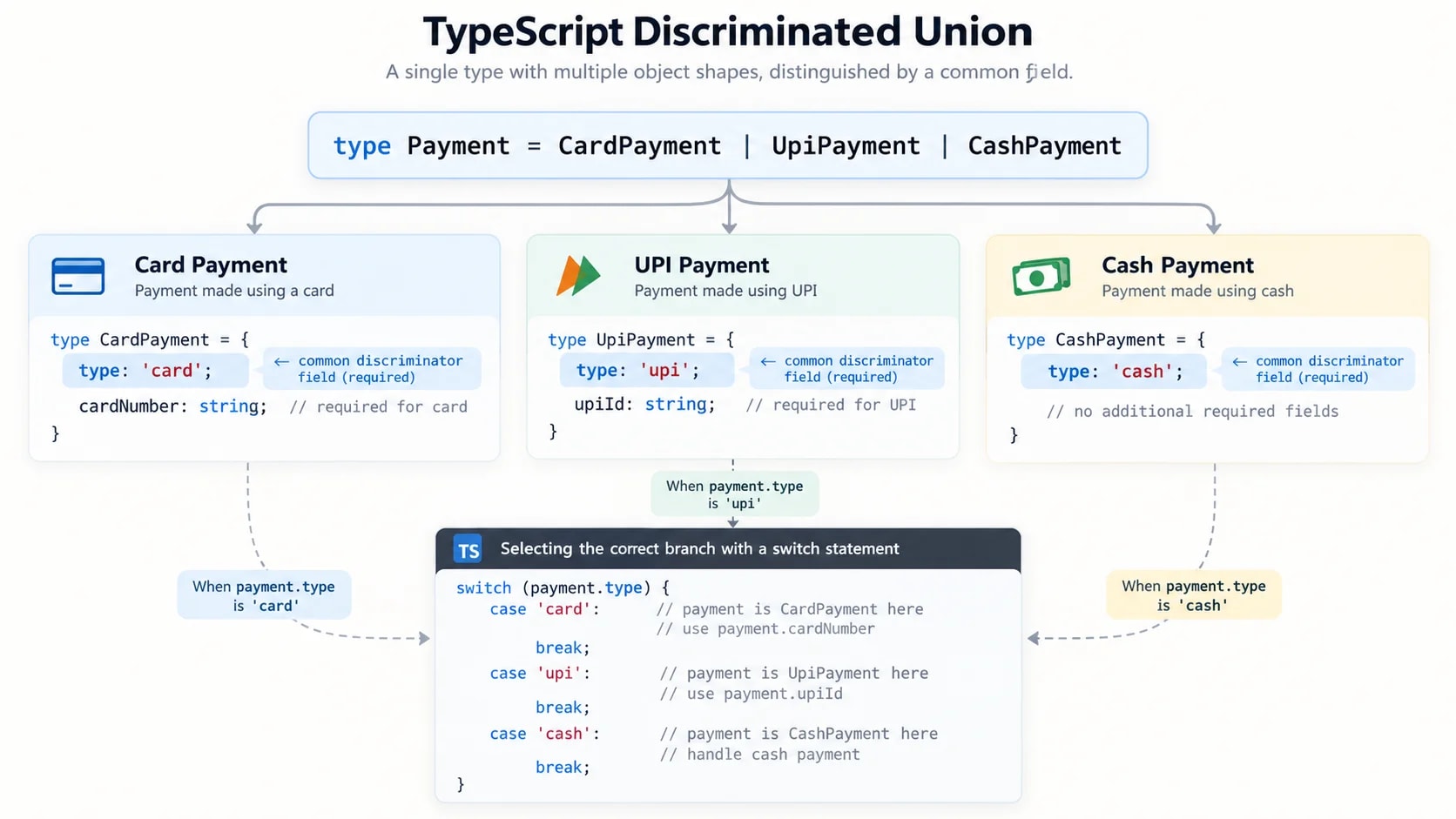
5. Discriminated Unions: Handling Multiple Object Shapes
Imagine your application supports different payment methods.
Each payment method requires different data.
type Payment =
  | { type: "card"; cardNumber: string }
  | { type: "upi"; upiId: string }
  | { type: "cash" };
The common type property is called a discriminant.
TypeScript uses its literal values to identify the correct object shape.
function processPayment(payment: Payment) {
  switch (payment.type) {
    case "card":
      console.log(payment.cardNumber);
      break;

    case "upi":
      console.log(payment.upiId);
      break;

    case "cash":
      console.log("Cash payment");
      break;
  }
}
Inside each case, TypeScript automatically narrows payment to the matching variant.
For example, payment.upiId is available only in the "upi" branch.
Discriminated unions are particularly useful for API response states, payment methods, authentication flows, and application events.
6. The never Type: Handling Impossible States
The never type represents values that cannot occur.
One of its most useful applications is exhaustive checking.
Exhaustive switch statements
Let's reuse our payment example.
function processPayment(payment: Payment) {
  switch (payment.type) {
    case "card":
      return payment.cardNumber;

    case "upi":
      return payment.upiId;

    case "cash":
      return "Cash payment";

    default:
      const impossible: never = payment;
      return impossible;
  }
}
Why does this work?
After handling every possible variant, TypeScript knows no valid Payment type remains.
Therefore, payment is narrowed to never.
Now imagine adding another payment method:
type Payment =
  | { type: "card"; cardNumber: string }
  | { type: "upi"; upiId: string }
  | { type: "cash" }
  | { type: "wallet"; walletId: string };
If the switch statement isn't updated, TypeScript reports an error at the never assignment.
This prevents developers from accidentally forgetting new cases.
Functions that never return
never also represents functions that cannot return normally.
function throwError(message: string): never {
  throw new Error(message);
}
Because the function always throws, it never returns a value to its caller.
Remember: never represents an impossible value, while void generally describes a function whose return value isn't used.
7. Type Assertions: Telling TypeScript What You Know
Sometimes TypeScript doesn't have enough information to understand a value's intended type.
A type assertion allows you to tell the compiler how to treat that value.
const input = document.getElementById("username")
  as HTMLInputElement | null;

if (input) {
  console.log(input.value);
}
Here, we assert that a matching element should be an HTML input element, while still accounting for the possibility that no element was found.
Do assertions validate data?
No.
Consider:
type User = {
  name: string;
};

const data = JSON.parse('{"age": 25}') as User;

console.log(data.name); // undefined
The assertion compiles, but the actual object does not contain name.
Type assertions do not convert values or validate their structure at runtime.
For unknown API responses, use guards or schema validation rather than blindly asserting the expected type.
Type guard vs type assertion
Type guard | Type assertion |
|---|---|
Performs a runtime check | Does not perform runtime validation |
Can narrow a type based on evidence | Instructs the compiler to treat a value as a type |
Safer for uncertain external data | Appropriate when you have reliable external knowledge |
8. Type-Safe Error Handling with try-catch
JavaScript allows throwing almost any value—not just an Error object.
throw "Something failed";Or:
throw new Error("Something failed");Because thrown values can differ, TypeScript uses unknown for catch variables when strict mode is enabled, unless that behavior is overridden.
Unsafe assumption
try {
  throw new Error("Request failed");
} catch (error) {
  // console.log(error.message); // Type error
}
Safe error handling
try {
  throw new Error("Request failed");
} catch (error) {
  if (error instanceof Error) {
    console.error(error.message);
  } else {
    console.error("Unknown error:", error);
  }
}
instanceof Error checks whether the caught value is an Error instance before accessing its message property.
This is especially useful when handling API calls, database operations, and asynchronous application logic.
9. Common Mistakes
Mistake | Better approach |
|---|---|
Using | Start with |
Assuming truthiness means a value exists | Use |
Using | Validate untrusted data at runtime |
Writing custom guards without checking the actual structure | Verify all required properties |
Forgetting new discriminated union cases | Add exhaustive |
Accessing | Use |
10. Interview Questions
Q1. What is type narrowing in TypeScript?
Type narrowing is the process of refining a variable's possible types through control flow and checks such as typeof, instanceof, equality comparisons, and property existence tests.
Q2. What is the difference between any and unknown?
any bypasses type checking for many operations, while unknown requires narrowing or validation before type-specific operations.
Q3. What is a custom type guard?
A custom type guard is a function that uses a type predicate, such as value is User, to help TypeScript narrow a value when the function returns true.
Q4. What is a discriminated union?
A discriminated union is a union of object types sharing a common property with distinct literal values, allowing TypeScript to identify each variant through that property.
Q5. What is the purpose of never?
never represents impossible values. It is useful for exhaustive union checks and functions that cannot return normally.
Q6. What is the difference between a type assertion and a type guard?
A type assertion changes how the compiler treats a value without validating it. A type guard evaluates a runtime condition that TypeScript can use to narrow the value's type.
11. Quick Revision Notes
Concept | Remember |
|---|---|
| Bypasses many type checks |
| Requires narrowing before type-specific operations |
Type narrowing | Refines possible types using conditions |
| Checks primitive types |
| Checks constructor/prototype relationships |
| Checks property existence |
Type predicate | Uses |
Discriminated union | Union with a shared literal discriminator |
| Type assertion without runtime validation |
| Represents impossible values |
Exhaustive checking | Ensures all union variants are handled |
Essential syntax
Narrowing with typeof
if (typeof value === "string") {
  console.log(value.toUpperCase());
}
Custom type guard
function isString(value: unknown): value is string {
  return typeof value === "string";
}
Type assertion
const input = document.querySelector("input")
  as HTMLInputElement | null;
Exhaustive check
function assertNever(value: never): never {
  throw new Error(`Unexpected value: ${String(value)}`);
}
Five things to remember
Prefer
unknownoveranyfor uncertain data.Type narrowing allows safe operations on union types.
Custom guards connect runtime validation with static type checking.
Assertions do not validate or convert values at runtime.
Use
neverto detect unhandled cases in discriminated unions.
Final takeaway
TypeScript's type system becomes especially valuable when data is uncertain.
Rather than assuming every value has the expected structure, use narrowing and guards to check it.
Use assertions only when you have a reliable reason, and use exhaustive checking to prevent forgotten application states.
Safe TypeScript isn't about forcing types onto data. It's about proving what data contains before using it.
Further Reading
TypeScript Narrowing: https://www.typescriptlang.org/docs/handbook/2/narrowing.html
TypeScript Everyday Types: https://www.typescriptlang.org/docs/handbook/2/everyday-types.html
TypeScript More on Functions: https://www.typescriptlang.org/docs/handbook/2/functions.html