Introduction to TypeScript: Fundamentals, Examples & Interview Notes
JavaScript powers everything from interactive websites to large-scale applications. But as projects grow, the flexibility that makes JavaScript easy to use can also become a source of bugs.
Imagine passing a number to a function that expects a user's name. JavaScript might execute the code without complaining, even though the result makes no sense.
What if your editor could catch that mistake before the application runs?
That's one of the problems TypeScript was created to solve.
In this chapter, we'll explore what TypeScript is, why developers use it, how its type system works, and what happens to TypeScript code before execution.
1. Why Do We Need TypeScript?
The problem with JavaScript
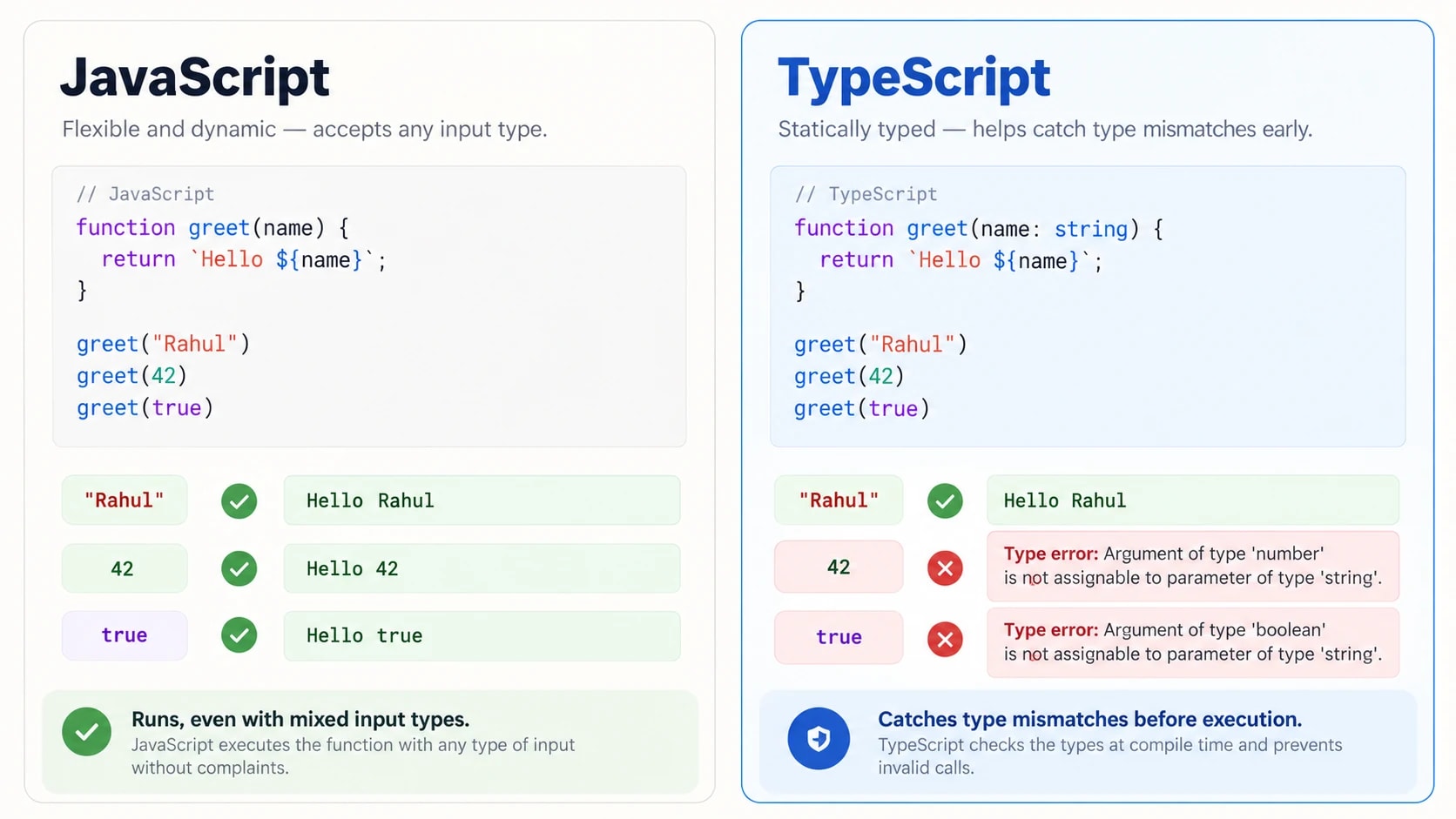
Consider a function that greets a user:
function greet(name) {
  return `Hello, ${name}`;
}

console.log(greet("Rahul")); // Hello, Rahul
console.log(greet(42));      // Hello, 42
console.log(greet(true));    // Hello, true
The function was designed to receive a person's name, but JavaScript accepts all three inputs.
No error is thrown because converting numbers and booleans into strings is valid JavaScript behavior.
The code works technically, but it produces unintended results.
This demonstrates an important limitation of dynamically typed code: JavaScript doesn't enforce the intended types of function parameters.
In a small application, this mistake might be easy to find. In a large application with hundreds of functions and multiple developers, such issues become harder to track.
How TypeScript solves this problem
Let's rewrite the function using TypeScript.
function greet(name: string): string {
  return `Hello, ${name}`;
}

greet("Rahul"); // Valid
greet(42);      // TypeScript error
greet(true);    // TypeScript error
By writing name: string, we tell TypeScript that the function expects a string.
If someone passes a number or boolean, TypeScript reports a type error during development.
This allows developers to detect many mistakes before execution.
Key takeaway: JavaScript allows type flexibility at runtime. TypeScript adds static checking to catch incompatible types earlier.
2. What Is TypeScript?
TypeScript is a statically typed superset of JavaScript developed by Microsoft.
Understanding this definition requires three concepts.
2.1 TypeScript is a superset of JavaScript
A superset extends an existing language while preserving its capabilities.
TypeScript supports JavaScript syntax and adds features such as static type annotations, interfaces, and advanced type utilities.
For example, this JavaScript code is also valid TypeScript:
const username = "Rahul";

function sayHello() {
  console.log(`Hello, ${username}`);
}

sayHello();
You don't need to rewrite every line of JavaScript to start using TypeScript.
Existing JavaScript projects can often be migrated gradually.
2.2 TypeScript uses static typing
Static typing means type compatibility can be checked before the program executes.
Consider:
let age: number = 25;

age = "Twenty Five";
// Error: Type 'string' is not assignable to type 'number'.
TypeScript identifies the incompatible assignment during static analysis.
JavaScript, on the other hand, allows a variable to hold values of different types.
2.3 TypeScript adds a development-time safety layer
TypeScript doesn't fundamentally change how JavaScript executes.
Instead, it helps developers understand and enforce the expected structure of their code before runtime.
This is particularly valuable when building applications with multiple modules, APIs, services, and developers.
Remember: TypeScript is JavaScript with an additional static type system.
3. Static Typing vs Dynamic Typing
The fundamental difference lies in how types are checked.
Dynamic typing in JavaScript
let price = 500;

price = "Five Hundred"; // Allowed
price = true;           // Allowed
JavaScript allows the variable to reference values of different types throughout execution.
Static typing in TypeScript
let price: number = 500;

price = "Five Hundred"; // Type error
price = true;           // Type error
TypeScript knows that price is supposed to contain a number.
Any incompatible assignment is reported during type checking.
Comparison
Feature | JavaScript | TypeScript |
|---|---|---|
Type system | Dynamic | Static |
Type annotations | Not required | Supported |
Type checking | Primarily during execution | Before execution |
Type inference | Runtime values determine types | Compiler infers static types |
Error detection | Many issues appear at runtime | Many issues are detected earlier |
Execution | Runs as JavaScript | Type syntax is removed before execution |
Does TypeScript require explicit types everywhere?
No.
TypeScript supports type inference, meaning it can often determine types automatically.
let username = "Rahul";

// TypeScript infers: string

username = 100; // Type error
Even without writing : string, TypeScript infers the variable's type from its initial value.
This is why professional TypeScript code doesn't annotate every variable unnecessarily.
Interview takeaway: Static typing checks type relationships before execution, while JavaScript's dynamic typing permits values of different types at runtime.
4. How Does TypeScript Work Internally?
One of the most important TypeScript concepts is understanding its relationship with JavaScript execution.
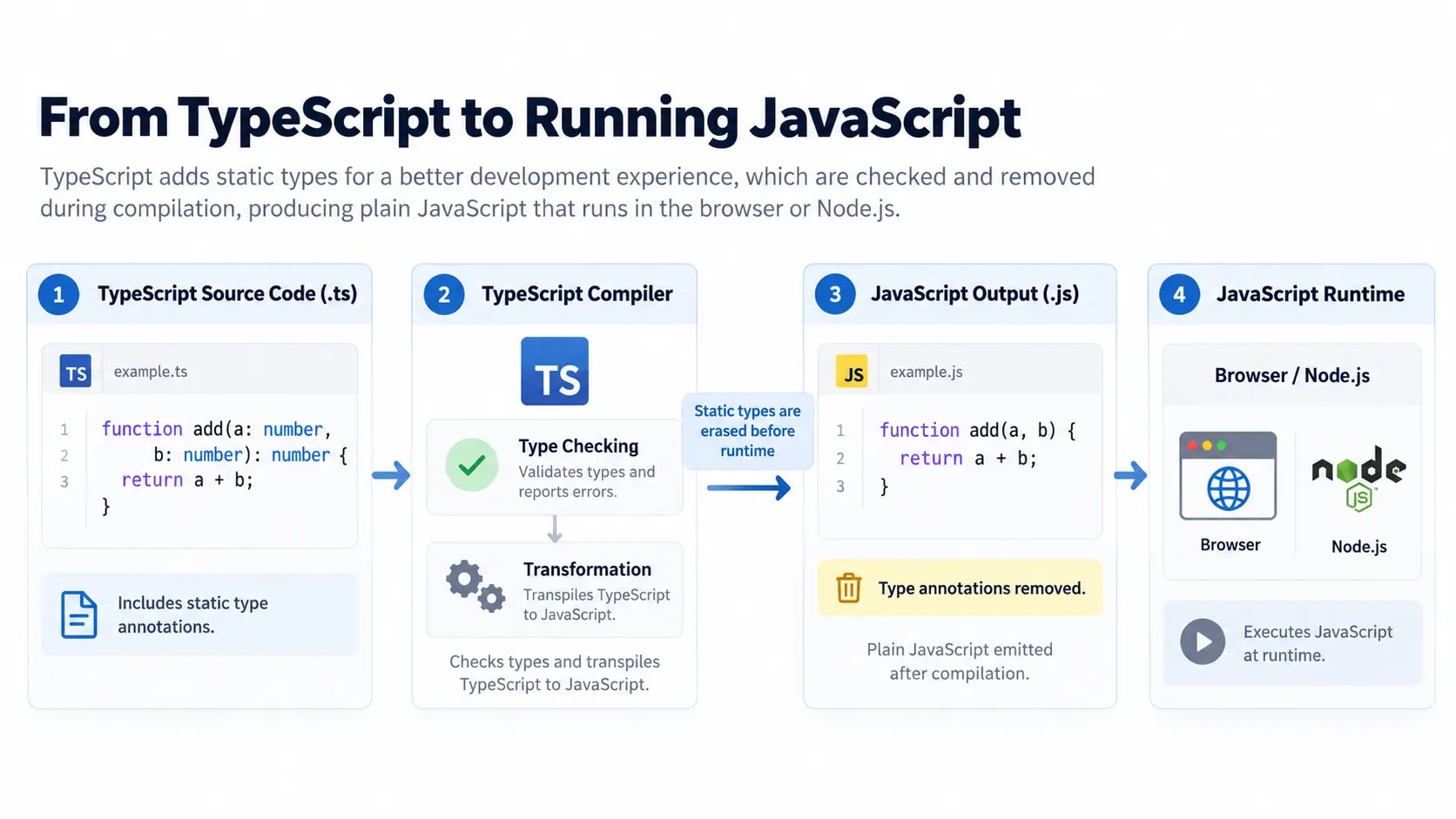
TypeScript type annotations do not exist at runtime.
Consider the following TypeScript code:
function add(a: number, b: number): number {
  return a + b;
}

console.log(add(10, 20));
Before this code runs through a standard JavaScript execution environment, TypeScript-specific syntax is removed.
The resulting JavaScript can look like this:
function add(a, b) {
  return a + b;
}

console.log(add(10, 20));
Notice what disappeared:
a: numberb: numberThe return type
: number
These annotations help the TypeScript compiler but aren't needed by the JavaScript runtime.
4.1 The TypeScript compilation process
A typical TypeScript workflow involves four stages.
Step 1: Write TypeScript
Developers create source files with the .ts or .tsx extension.
Step 2: Analyze types
The compiler checks assignments, function arguments, return values, and other type relationships.
Step 3: Transform or emit JavaScript
The type syntax is removed, and code may be transformed to match the configured JavaScript target.
Step 4: Execute JavaScript
The resulting JavaScript runs in a browser, Node.js, or another compatible JavaScript runtime.
4.2 Does TypeScript execute directly?
Traditionally, TypeScript required compilation or transformation before execution.
Modern Node.js versions support executing certain TypeScript files through built-in type stripping.
However, there is an important distinction:
Type stripping does not perform TypeScript type checking.
Node.js removes supported TypeScript syntax and executes JavaScript semantics. It does not automatically enforce annotations such as : string or : number.
Similarly, build tools can transform TypeScript without independently checking all types.
For reliable static checking, developers commonly run the TypeScript compiler as part of their development or build workflow.
4.3 Can TypeScript produce JavaScript despite type errors?
Yes.
The TypeScript compiler can emit JavaScript even when it reports type errors, depending on its configuration.
For example:
function greet(name: string) {
  return `Hello ${name}`;
}

greet(42); // Type error
The compiler reports an incompatible argument.
However, JavaScript output may still be generated.
To prevent output when TypeScript reports errors, developers can configure:
{
  "compilerOptions": {
    "noEmitOnError": true
  }
}
This distinction is useful in interviews because it shows that type checking and code execution are separate processes.
5. TypeScript vs JSDoc
Before adopting TypeScript, many JavaScript projects documented types with JSDoc.
JSDoc example
/**
 * @param {string} name
 * @returns {string}
 */
function greet(name) {
  return `Hello ${name}`;
}
JSDoc describes what a function expects and returns.
With suitable tooling, such as TypeScript's checkJs option, these comments can also participate in static type checking.
TypeScript example
function greet(name: string): string {
  return `Hello ${name}`;
}
TypeScript expresses the expected types directly in the language syntax.
Main differences
Feature | JSDoc with JavaScript | TypeScript |
|---|---|---|
Type definitions | Comments | Type syntax |
Type checking | Supported with configuration | Core feature |
Advanced type utilities | Limited compared with TS syntax | Extensive support |
Runtime validation | Not automatic | Not automatic |
Common use | JavaScript-first codebases | TypeScript applications |
JSDoc is useful when developers want type information without migrating fully to TypeScript.
TypeScript is generally more suitable when a project needs extensive type modeling and deeper integration with type-aware tooling.
6. Why Is TypeScript Popular in Production?
Imagine an application with dozens of developers and hundreds of components.
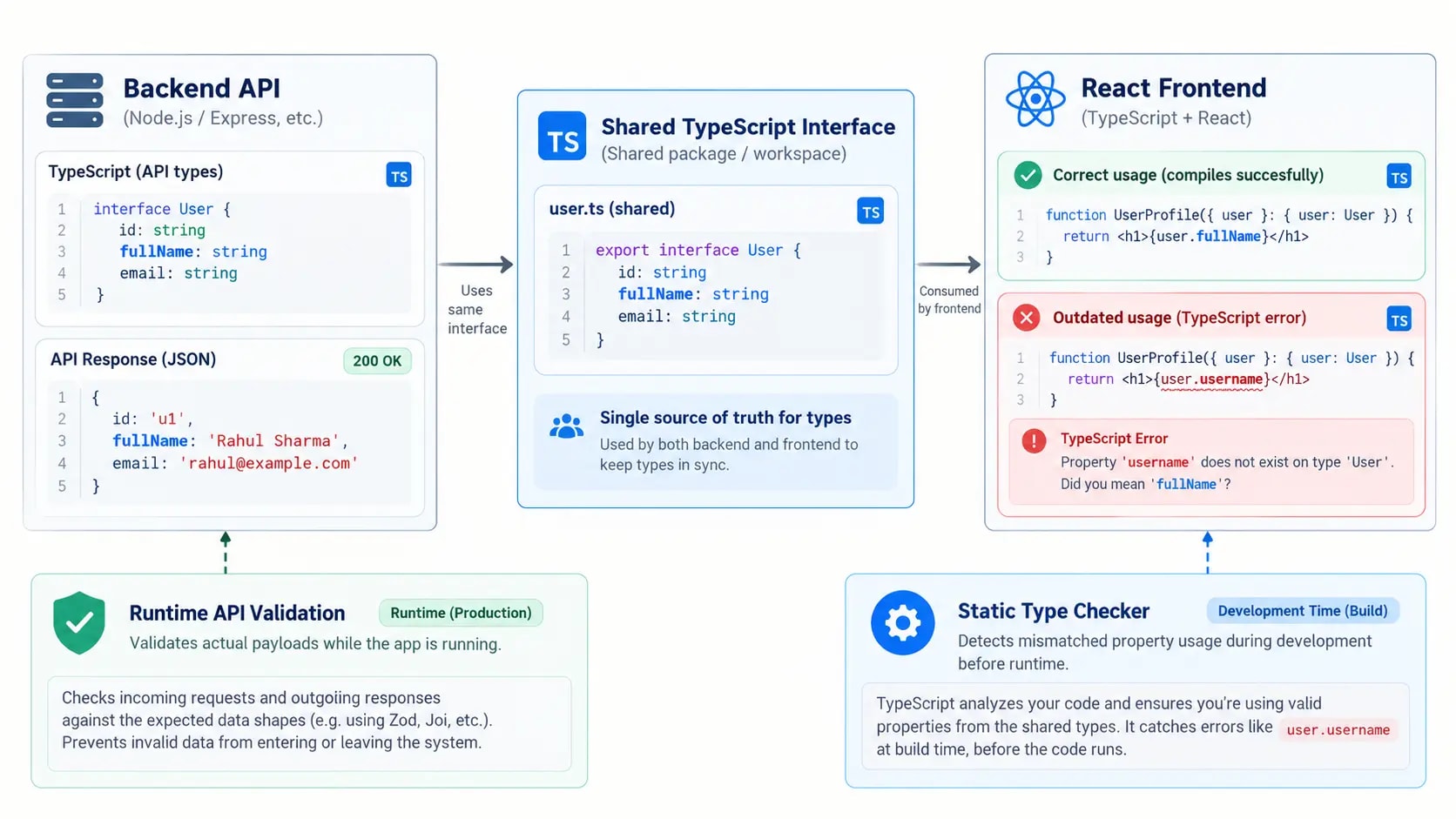
Initially, your backend returns the following user object:
{
  id: 1,
  username: "Rahul"
}
Later, another developer updates the response:
{
  id: 1,
  fullName: "Rahul"
}
Components that still depend on username may no longer work correctly.
In an untyped JavaScript codebase, this mismatch might remain unnoticed until the affected code runs.
With TypeScript, you can describe the expected object structure.
interface User {
  id: number;
  fullName: string;
}

function displayUser(user: User) {
  return user.username;
}
TypeScript reports:
Property 'username' does not exist on type 'User'.This helps developers identify affected code while making changes.
6.1 Main benefits of TypeScript
Early error detection
Incorrect assignments, incompatible arguments, and missing properties can often be identified before execution.
Safer refactoring
When developers rename properties or change function contracts, TypeScript can help reveal affected code.
Better autocomplete
Code editors can provide more accurate suggestions because they understand the expected types and object structures.
Improved maintainability
Types make data contracts easier to understand, especially in large applications.
Better collaboration
Teams can share type definitions to communicate how functions, services, and components should interact.
6.2 What TypeScript cannot do
TypeScript does not eliminate every possible bug.
It cannot automatically protect against:
Incorrect business logic
Network failures
Unexpected external API responses
Invalid user input at runtime
Unsafe type assertions
Every possible null or undefined error
For untrusted external data, developers still need runtime validation.
7. Where Is TypeScript Used?
TypeScript is widely used in frontend, backend, and full-stack applications.
Frontend development
Common TypeScript use cases include:
React component props
State and hooks
API response types
Forms and validation models
Shared application types
Frameworks and libraries such as React and Next.js provide extensive TypeScript support.
Backend development
TypeScript is also used for:
Node.js services
Express applications
NestJS applications
API request and response contracts
Database models
Service and repository interfaces
Full-stack development
In a full-stack application, shared type definitions can reduce inconsistencies between frontend and backend code.
However, sharing TypeScript types does not replace runtime validation of actual API responses.
Production perspective: TypeScript becomes particularly useful when an application has complex data structures, frequent changes, and multiple developers working across different parts of the system.
8. Common TypeScript Misconceptions
Misconception 1: TypeScript is completely different from JavaScript
Reality: TypeScript builds on JavaScript. JavaScript knowledge remains essential.
Misconception 2: TypeScript types exist during runtime
Reality: Type-only annotations are removed before execution.
Misconception 3: TypeScript prevents every error
Reality: It detects many type-related problems but cannot guarantee correct runtime behavior.
Misconception 4: Every variable must have a type annotation
Reality: Type inference automatically determines many types.
Misconception 5: TypeScript automatically validates API responses
Reality: Static types do not automatically validate untrusted runtime data.
9. TypeScript Interview Questions and Answers
Q1. What is TypeScript?
TypeScript is a statically typed superset of JavaScript that adds compile-time type checking. It helps developers catch type-related mistakes early and makes large applications easier to maintain.
Q2. Why was TypeScript created?
TypeScript addresses maintainability and type-safety challenges in JavaScript applications. It provides static analysis, explicit data contracts, and improved developer tooling.
Q3. What is the difference between JavaScript and TypeScript?
JavaScript is dynamically typed, while TypeScript adds static type checking. TypeScript code is transformed or stripped into JavaScript-compatible code for execution.
Q4. Does TypeScript run directly in browsers?
Browsers generally execute JavaScript rather than TypeScript type syntax. TypeScript-specific syntax must be removed or transformed before execution.
Q5. What happens to TypeScript types after compilation?
Type-only annotations and declarations are erased. They do not provide automatic runtime type enforcement.
Q6. What is type inference?
Type inference is TypeScript's ability to determine types automatically from initial values or surrounding context without requiring explicit annotations.
Q7. Can TypeScript prevent runtime errors?
TypeScript can prevent many type-related mistakes before execution, but it cannot eliminate runtime errors or replace input validation and testing.
Q8. Can TypeScript compile code with errors?
Yes. TypeScript may still emit JavaScript despite type errors. The noEmitOnError compiler option can prevent JavaScript emission when compilation errors are reported.
10. Quick Revision Notes
Core concepts
Concept | Remember |
|---|---|
TypeScript | Statically typed superset of JavaScript |
JavaScript | Dynamically typed language |
Static typing | Checks type compatibility before execution |
Type annotations | Describe expected types |
Type inference | Automatically determines many types |
Compilation | Transforms TypeScript into JavaScript-compatible output |
Type erasure | Removes type-only information |
JSDoc | Documents types and can enable checking in JavaScript |
Runtime validation | Must be handled separately for untrusted data |
| Prevents compiler output when errors are reported |
Essential syntax to remember
Variable annotation
let age: number = 25;Function parameter
function greet(name: string) {
  return `Hello ${name}`;
}
Function return type
function add(a: number, b: number): number {
  return a + b;
}
Type inference
let username = "Rahul";
// Inferred as string
Five things to remember before an interview
TypeScript is a statically typed superset of JavaScript.
It catches many type-related errors before execution.
TypeScript types do not provide automatic runtime enforcement.
Type inference reduces the need for explicit annotations.
TypeScript improves maintainability, refactoring, and developer tooling.
Final takeaway
JavaScript gives developers flexibility, while TypeScript adds a static type system that helps them manage that flexibility as applications grow.
TypeScript doesn't replace JavaScript. It helps developers write more predictable, maintainable JavaScript applications.