TypeScript Object Types, Structural Typing & Utility Types
Learn how TypeScript understands object structures, checks compatibility, and creates reusable types without repeating code.
Imagine you're building a food-ordering application.
Every product has a name, price, availability status, and ingredients.
const tea = {
  name: "Masala Chai",
  price: 30,
  isHot: true
};
TypeScript automatically understands the structure of this object.
But what happens when you want to reuse the same structure for hundreds of products? Or create an update API where users can change only one property?
That's where object types, structural typing, and utility types become useful.
1. Object Types: Defining Data Structures
An object type describes which properties an object should contain and the types of those properties.
1.1 Automatic type inference
const tea = {
  name: "Masala Chai",
  price: 30,
  isHot: true
};
TypeScript infers:
{
  name: string;
  price: number;
  isHot: boolean;
}
If you assign an incompatible value:
tea.price = "Thirty"; // Type errorTypeScript detects the mismatch.
1.2 Explicit object types
You can define an object's structure manually:
let tea: {
  name: string;
  price: number;
  isHot: boolean;
};

tea = {
  name: "Masala Chai",
  price: 30,
  isHot: true
};
All required properties must be present.
Instead of repeating the same structure, create a reusable type alias:
type Tea = {
  name: string;
  price: number;
  isHot: boolean;
};

const order: Tea = {
  name: "Ginger Tea",
  price: 40,
  isHot: true
};
1.3 Nested objects and arrays
Object properties can contain other objects or arrays.
type Tea = {
  name: string;
  price: number;
  ingredients: string[];
  details: {
    isHot: boolean;
    size: string;
  };
};
This helps model structured data such as API responses, database records, and application state.
1.4 Optional and readonly properties
Not every property needs to be mandatory.
type Tea = {
  readonly id: number;
  name: string;
  price: number;
  description?: string;
};description?makes the property optional.readonly idprevents reassignment through that typed property.
These checks are enforced by TypeScript, not by automatically freezing the JavaScript object.
Remember: Object types describe the expected shape of data. They do not automatically validate objects received at runtime.
2. Structural Typing: If the Shape Matches, It Works
TypeScript uses a structural type system.
This means compatibility is primarily based on an object's properties and their types, rather than the name of the type.
It's often explained through duck typing:
"If it looks like a duck and walks like a duck, treat it like a duck."
2.1 Example: Two compatible objects
type Cup = {
  size: string;
};

let smallCup: Cup = {
  size: "200ml"
};

const bigCup = {
  size: "500ml",
  material: "steel"
};

smallCup = bigCup; // Valid
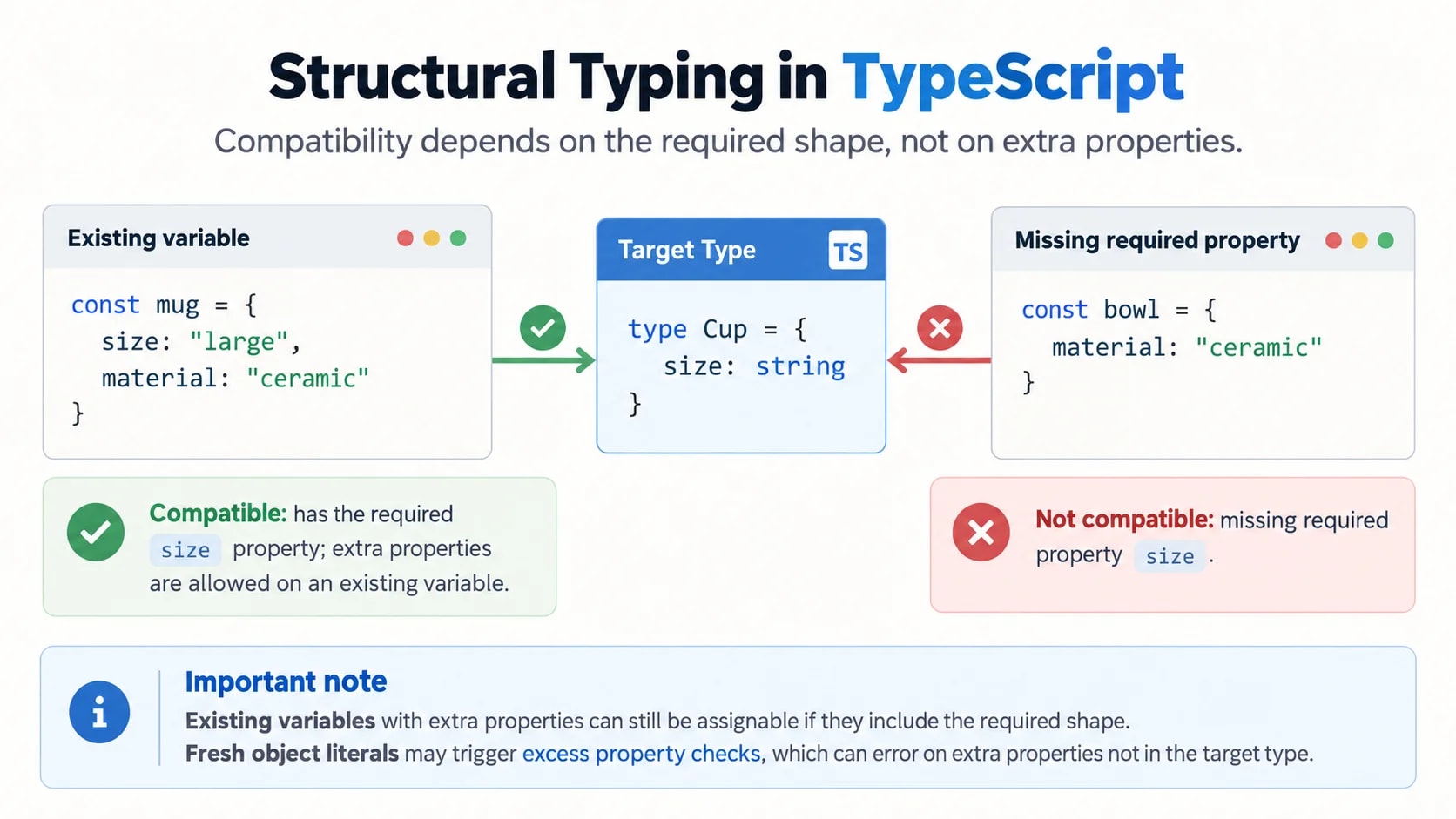
Why does this work?
The Cup type requires a size property of type string.
bigCup has that property, so it satisfies the required structure.
Its extra material property doesn't prevent the assignment.
2.2 What happens when a required property is missing?
const brokenCup = {
  material: "steel"
};

// smallCup = brokenCup; // Type error
The assignment fails because brokenCup does not contain the required size property.
2.3 Important exception: Excess property checks
Consider:
type Cup = {
  size: string;
};

const cup: Cup = {
  size: "200ml",
  material: "steel" // Type error
};
Why does TypeScript reject this when the previous example worked?
Fresh object literals receive additional excess property checks.
These checks help catch unexpected property names and common mistakes.
However, assigning an existing variable with a compatible structure generally allows extra properties.
Assignment | Result |
|---|---|
Required properties match | Compatible |
Required property missing | Type error |
Existing object has extra properties | Usually allowed |
Fresh object literal has unknown properties | Excess property error |
Key takeaway: Structural typing checks whether a value satisfies the required structure, not whether the types share the same name.
3. Utility Types: Reusing Existing Types
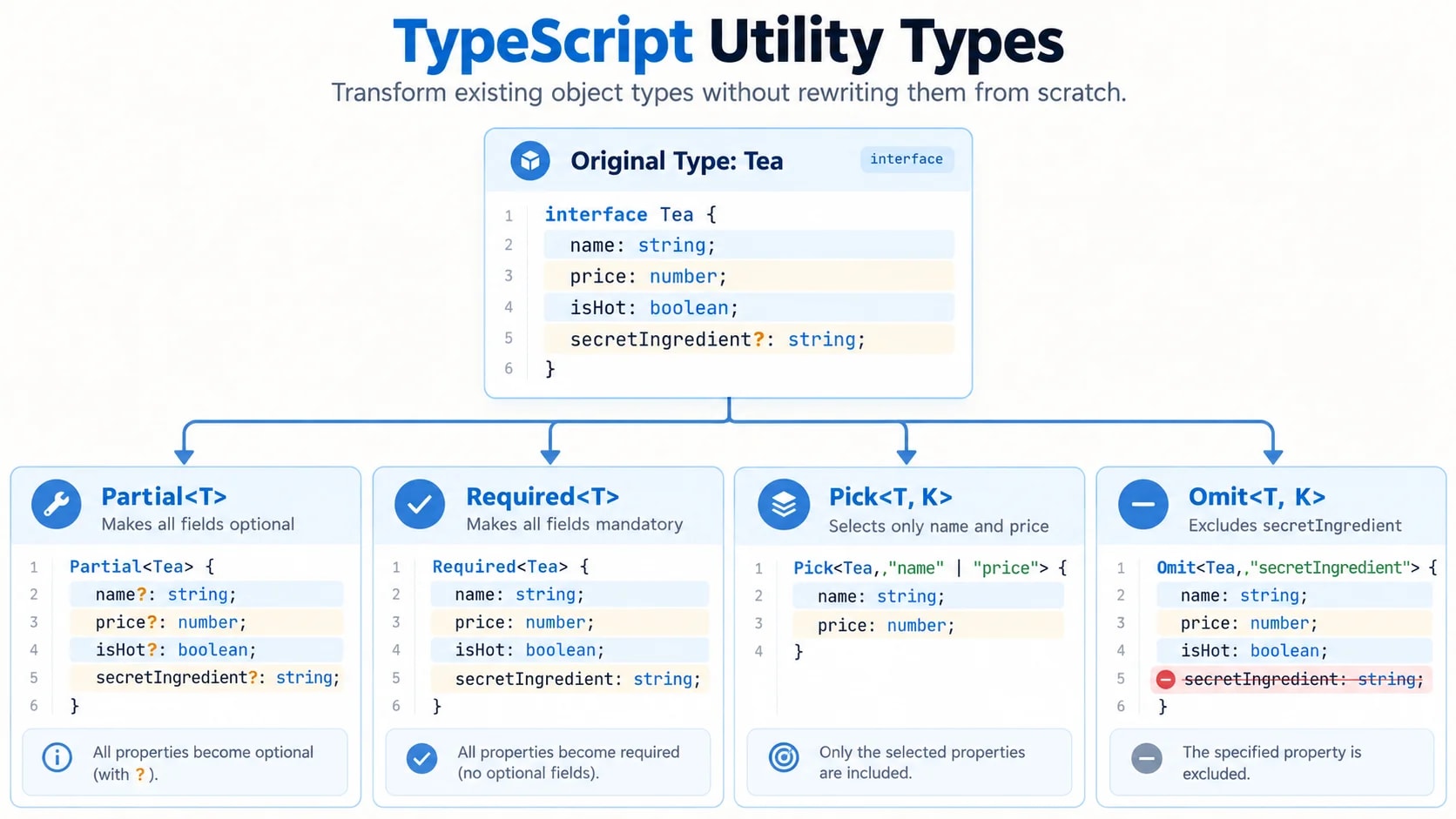
Imagine you already have a Tea type:
type Tea = {
  name: string;
  price: number;
  isHot: boolean;
  secretIngredient?: string;
};
Now you need different versions of it:
One for updating a tea.
One where every property is mandatory.
One containing only basic information.
One without the secret ingredient.
You could manually write four new types, but that would duplicate code.
TypeScript provides utility types to transform existing types.
3.1 Partial: Make every property optional
type UpdateTea = Partial<Tea>;Conceptually, this creates:
type UpdateTea = {
  name?: string;
  price?: number;
  isHot?: boolean;
  secretIngredient?: string;
};
Now you can provide only the properties you want to update.
const update: UpdateTea = {
  price: 35
};
When to use it: PATCH APIs, update forms, and partial configuration changes.
A common production pattern is to combine Partial with Pick to allow updates only to permitted fields.
3.2 Required: Make every property mandatory
type CompleteTea = Required<Tea>;All properties become required, including secretIngredient.
const tea: CompleteTea = {
  name: "Masala Chai",
  price: 30,
  isHot: true,
  secretIngredient: "Cardamom"
};
Omitting any property produces a type error.
When to use it: When a particular operation requires all fields to be present.
3.3 Pick: Select specific properties
type TeaPreview = Pick<Tea, "name" | "price">;This creates a type containing only:
type TeaPreview = {
  name: string;
  price: number;
};
Usage:
const preview: TeaPreview = {
  name: "Masala Chai",
  price: 30
};
When to use it: UI cards, summary data, and functions that require only selected fields.
3.4 Omit: Exclude specific properties
type PublicTea = Omit<Tea, "secretIngredient">;Conceptually, this produces:
type PublicTea = {
  name: string;
  price: number;
  isHot: boolean;
};
When to use it: Defining object contracts that should not expose selected internal properties.
But there's an important limitation.
Omit only changes the TypeScript type. It does not remove properties from an existing JavaScript object.
const original = {
  name: "Masala Chai",
  price: 30,
  isHot: true,
  secretIngredient: "Cardamom"
};

const publicTea: PublicTea = original;

console.log(publicTea.secretIngredient);
// Type error, but the property still exists at runtime
If you're returning API data, explicitly construct a safe response object instead of relying on Omit to hide sensitive fields.
4. Utility Types in a Real API
Imagine you're building a product management API.
Your original product type is:
type Product = {
  id: string;
  name: string;
  price: number;
  stock: number;
};
Different operations need different shapes.
Creating a product
The database generates the id, so the client shouldn't supply it.
type CreateProduct = Omit<Product, "id">;Updating a product
The client can update one or more editable properties.
type UpdateProduct = Partial<CreateProduct>;Displaying a product card
The frontend needs only the name and price.
type ProductCard = Pick<Product, "name" | "price">;Complete example
function updateProduct(
  id: string,
  changes: UpdateProduct
) {
  console.log(id, changes);
}

updateProduct("p1", {
  price: 499
});
This approach keeps the types connected to the original Product definition.
If a property type changes, the derived types reflect that change automatically.
Production note: Utility types provide compile-time contracts. Validate incoming API payloads at runtime, especially when enforcing allowed fields, numeric ranges, and required business rules.
5. Common Mistakes
Mistake | Better approach |
|---|---|
Repeating object shapes everywhere | Create reusable types |
Assuming extra properties are always accepted | Understand excess property checks |
Using | Make only the intended fields optional |
Assuming | Explicitly construct safe output objects |
Assuming a matching type name is required | Remember structural typing |
6. TypeScript Interview Questions
Q1. What is an object type in TypeScript?
An object type defines the expected structure of an object, including its properties, value types, and optional or readonly modifiers.
Q2. What is structural typing?
Structural typing determines compatibility based on required properties and their types, rather than the names of the types.
Q3. Why does TypeScript sometimes reject extra object properties?
Fresh object literals undergo excess property checks to catch unexpected property names. Existing variables with structurally compatible shapes can generally contain additional properties.
Q4. What is the difference between Partial and Required?
Partial<T> makes every property optional, while Required<T> makes every property mandatory.
Q5. What is the difference between Pick and Omit?
Pick<T, K> creates a type containing selected properties. Omit<T, K> creates a type excluding selected properties.
Q6. Does Omit remove sensitive properties at runtime?
No. Omit only affects static type checking. Runtime properties must be removed or excluded explicitly before data is exposed.
7. Quick Revision Notes
Core concepts
Concept | Remember |
|---|---|
Object type | Defines an object's expected structure |
Type inference | Automatically determines property types |
Optional property | Uses |
Readonly property | Prevents reassignment through the type |
Structural typing | Compatibility based on shape |
Excess property check | Additional check for fresh object literals |
| Makes all properties optional |
| Makes all properties required |
| Selects specified properties |
| Excludes specified properties from a type |
Essential syntax
Reusable object type
type User = {
  name: string;
  age: number;
};
Optional property
type User = {
  name: string;
  email?: string;
};
Structural typing
type Person = { name: string };

const employee = {
  name: "Rahul",
  role: "Developer"
};

const person: Person = employee; // Valid
Utility types
type UpdateUser = Partial<User>;
type CompleteUser = Required<User>;
type UserName = Pick<User, "name">;
type WithoutAge = Omit<User, "age">;
Five things to remember
Object types define the structure of data.
Structural typing compares required properties, not type names.
Fresh object literals receive excess property checks.
Utility types reduce duplication by deriving types from existing definitions.
Utility types do not change runtime JavaScript objects.
Final takeaway
TypeScript allows developers to model complex data without repeatedly defining the same structures.
Structural typing makes object compatibility flexible, while utility types help derive smaller, stricter, or partially optional versions of existing types.
Define your data shape once, reuse it where possible, and remember that static types do not replace runtime validation.
Further Reading
TypeScript Object Types: https://www.typescriptlang.org/docs/handbook/2/objects.html
TypeScript Utility Types: https://www.typescriptlang.org/docs/handbook/utility-types.html