TypeScript Arrays, Tuples & Enums Explained
Learn how TypeScript handles collections, fixed-length data, and named constants with practical examples.
Imagine you're building a food-ordering application.
You need to store multiple tea flavors, represent an order containing a product name and price, and restrict order statuses to predefined values.
JavaScript already provides arrays for storing collections. TypeScript makes these structures safer by defining what values they can contain, their expected order, and whether they can be modified.
In this chapter, we'll understand arrays, tuples, and enums—and when to use each in production.
1. Arrays: Storing Multiple Values
An array stores multiple values in a single variable.
TypeScript allows you to define the type of its elements.
1.1 Declaring typed arrays
There are two common syntaxes:
// Square-bracket syntax
const flavors: string[] = ["Masala", "Ginger"];

// Generic syntax
const prices: Array<number> = [20, 25, 30];
Both approaches are valid.
string[] is commonly preferred for simple arrays because it's shorter and easier to read.
1.2 Type safety in arrays
const flavors: string[] = ["Masala", "Ginger"];

flavors.push("Elaichi"); // Valid
flavors.push(100);       // Type error
TypeScript checks that the inserted value matches the declared element type.
You can also create arrays of objects:
type Tea = {
  name: string;
  price: number;
};

const menu: Tea[] = [
  { name: "Masala", price: 25 },
  { name: "Ginger", price: 30 }
];
This pattern is common when working with database records, API responses, and UI lists.
1.3 Readonly arrays
Sometimes a function should read an array without modifying it.
const cities: readonly string[] = [
  "Delhi",
  "Jaipur"
];

console.log(cities[0]); // Delhi

// cities.push("Pune"); // Type error
// cities[0] = "Mumbai"; // Type error
You can also use:
const cities: ReadonlyArray<string> = [
  "Delhi",
  "Jaipur"
];
Both describe readonly arrays.
Important: readonly prevents direct mutation through TypeScript's type system. It doesn't freeze the underlying JavaScript array at runtime.
Array vs Readonly Array
|
|
|---|---|
Allows | Mutation methods are unavailable |
Allows index reassignment | Prevents index reassignment |
Useful for mutable collections | Useful for data that should not be changed |
Production tip: Prefer readonly array parameters when a function only needs to read data.
2. Tuples: Fixed Positions and Known Types
An array typically represents a collection where elements share a common type.
But what if the position of each element has a specific meaning?
Imagine storing a tea name and its price:
const tea = ["Masala", 25];TypeScript may infer this as (string | number)[], which doesn't describe the intended order precisely.
A tuple solves this problem.
2.1 Declaring tuples
let tea: [string, number] = ["Masala", 25];The tuple requires:
First element:
stringSecond element:
number
Incorrect assignments are rejected:
// Type errors
// tea = [25, "Masala"];
// tea = ["Masala"];
// tea = ["Masala", 25, true];
Unlike a regular array, a tuple defines the types expected at specific positions.
2.2 Named tuples
Tuples can include labels to make their meaning clearer.
type TeaItem = [
  name: string,
  price: number
];

const chai: TeaItem = ["Ginger", 30];
The labels improve readability and editor hints, but don't become runtime object properties.
You still access elements by index:
console.log(chai[0]); // Ginger
console.log(chai[1]); // 30
2.3 Optional tuple elements
A tuple can have optional trailing elements.
type Order = [
  name: string,
  price: number,
  isHot?: boolean
];

const order1: Order = ["Masala", 25];
const order2: Order = ["Ginger", 30, true];
Here, isHot can be omitted.
2.4 Readonly tuples
const coordinates: readonly [number, number] = [
  28.61,
  77.20
];

// coordinates[0] = 30; // Type error
Readonly tuples prevent index reassignment and methods that mutate the tuple through that reference.
The tuple push() caveat
This is an important interview concept.
let tea: [string, number] = ["Masala", 25];

tea.push("Extra"); // Allowed by TypeScript
Even though the tuple is defined with two elements, its mutable array methods can allow additional elements to be pushed.
This happens because tuples use JavaScript arrays at runtime, and TypeScript exposes some standard array methods on mutable tuples.
Using a readonly tuple prevents direct calls to mutation methods.
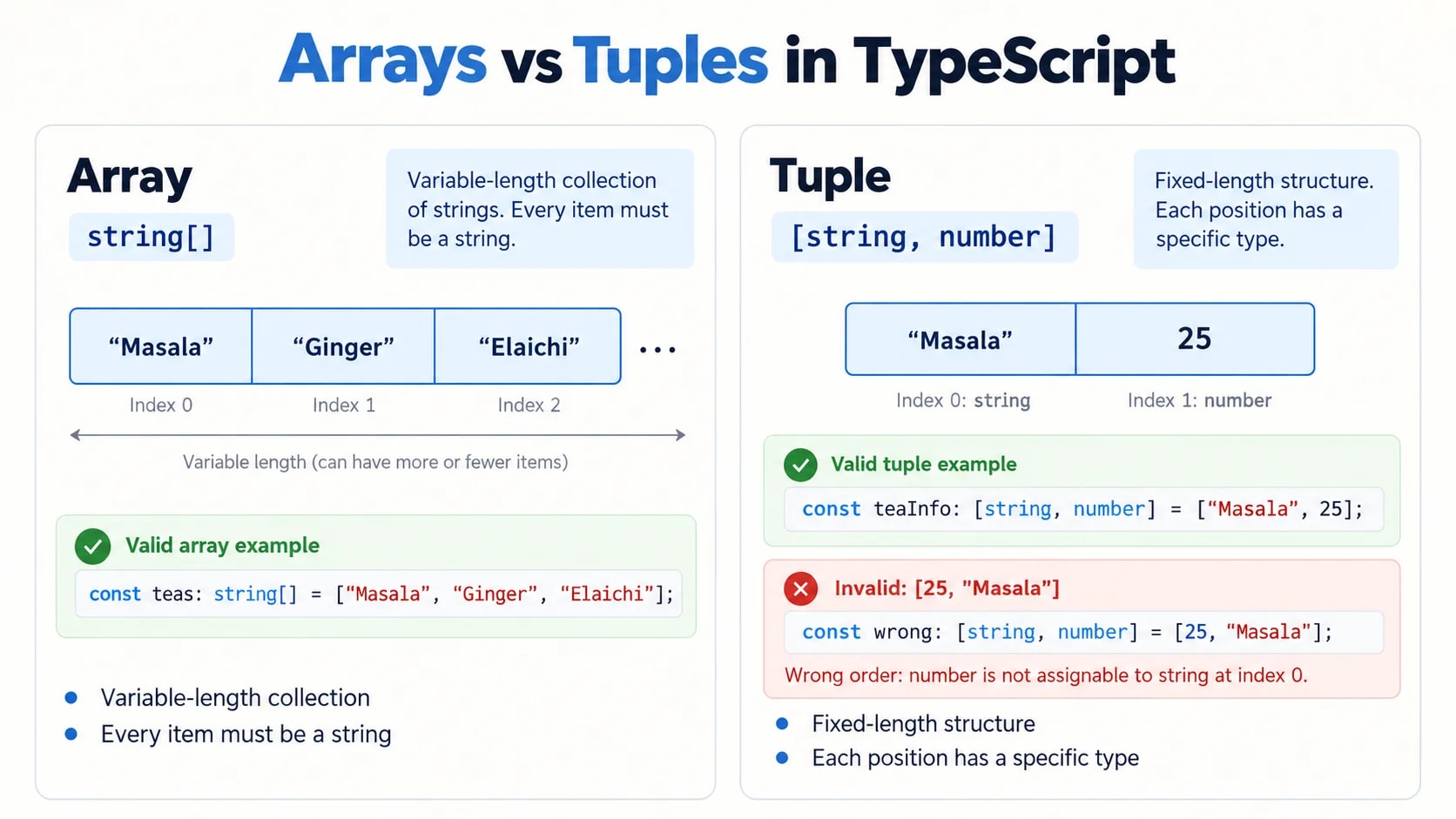
Array vs Tuple
Array | Tuple |
|---|---|
Collection of elements | Position-specific elements |
Usually one element type | Can contain different element types |
Length generally flexible | Length described by the tuple type |
Example: | Example: |
Useful for lists | Useful for fixed structured values |
Remember: Use arrays for collections and tuples when positions carry a specific meaning.
3. Enums: Creating Named Constants
Imagine your application supports three tea flavors.
You want developers to use predefined names instead of repeatedly writing arbitrary strings.
An enum defines a set of named constants.
3.1 Numeric enums
By default, numeric enums start at 0 and increment automatically.
enum OrderStatus {
  Pending,
  Preparing,
  Delivered
}

console.log(OrderStatus.Pending);   // 0
console.log(OrderStatus.Preparing); // 1
console.log(OrderStatus.Delivered); // 2
You can also assign starting values:
enum Priority {
  Low = 1,
  Medium,
  High
}
The values become 1, 2, and 3.
Numeric enums are useful when working with numeric codes or existing numeric protocols.
3.2 String enums
String enums use explicit string values.
enum TeaType {
  MASALA = "masala",
  GINGER = "ginger",
  LEMON = "lemon"
}

function makeTea(type: TeaType): void {
  console.log(`Brewing ${type}`);
}

makeTea(TeaType.MASALA);
String enums produce readable values such as "masala" instead of numeric codes like 0 or 1.
This makes them useful for logging and predictable serialized values.
Numeric vs String Enums
Numeric enum | String enum |
|---|---|
Values can auto-increment | String values are explicitly initialized |
Example: | Example: |
Compact numeric representation | Human-readable representation |
Numeric enums support reverse mapping | String enums do not generate reverse mapping |
Production tip: String enums are often easier to understand when values appear in logs or API payloads. However, string literal unions can be even simpler for many application-level states.
4. const enum: Avoiding Runtime Enum Objects
Normal enums generate JavaScript code to represent the enum at runtime.
TypeScript also supports const enum.
const enum SugarLevel {
  LOW = 1,
  MEDIUM = 2,
  HIGH = 3
}

const mySugar = SugarLevel.MEDIUM;
With ordinary TypeScript compilation, the member reference can be inlined:
const mySugar = 2;This avoids generating a normal runtime enum lookup object.
Should you always use const enum?
No.
const enum can cause compatibility issues with certain isolated-transpilation workflows and when ambient const enums are published across package boundaries.
Use it only when you understand your project's compiler and build setup.
For most beginner projects, regular enums or literal unions are easier to manage.
5. Enums vs Literal Union Types
In modern TypeScript applications, you don't always need an enum to restrict values.
Consider:
Using an enum
enum Status {
  Pending = "pending",
  Success = "success",
  Error = "error"
}

let status: Status = Status.Pending;
Using a literal union
type Status = "pending" | "success" | "error";

let status: Status = "pending";
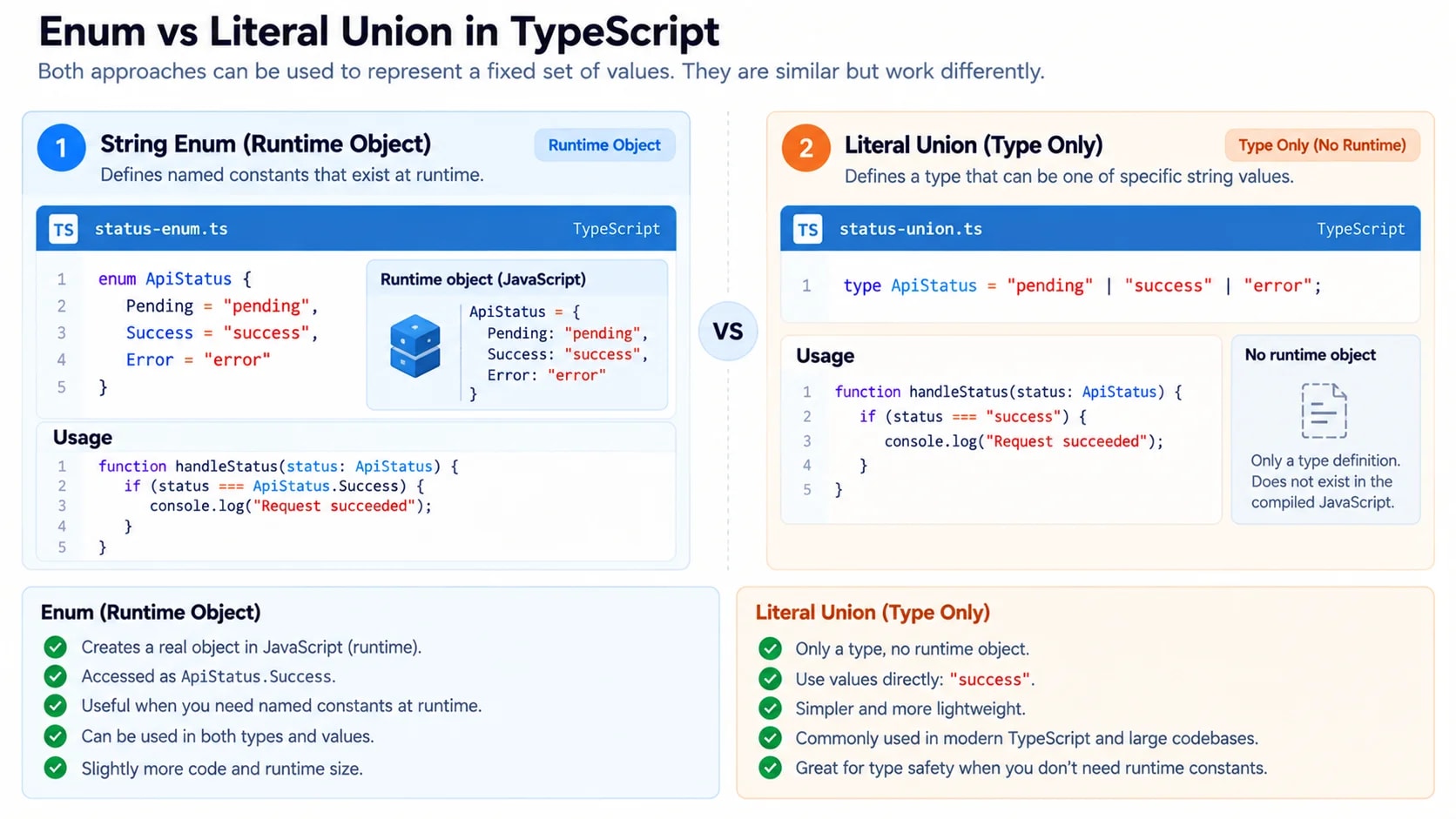
Both allow a defined set of states, but they work differently.
Enum | Literal union |
|---|---|
Provides a runtime object | Type-only definition |
Values usually accessed through members | Direct literal values |
Useful for named runtime constants | Useful for simple state contracts |
Generates runtime JavaScript for regular enums | Type definition is erased |
For many React components, API response statuses, and application state types, literal unions are a clean default.
Use enums when you specifically benefit from named runtime constants or need compatibility with an existing enum-based system.
6. Common Mistakes
Mistake | Better approach |
|---|---|
Using | Specify element types |
Assuming | Remember it's static protection |
Using tuples for ordinary lists | Prefer arrays |
Assuming mutable tuples cannot grow | Understand the |
Using enums for every fixed set of values | Consider literal unions |
Using | Prefer simple, compatible patterns |
7. TypeScript Interview Questions
Q1. What is the difference between an array and a tuple?
An array represents a collection of values, usually sharing an element type. A tuple describes specific types at specific positions and can constrain the number of elements.
Q2. What is the difference between string[] and readonly string[]?
string[] permits mutation, while readonly string[] prevents direct mutation through TypeScript's type checker. Readonly does not freeze the array at runtime.
Q3. Why can a mutable tuple sometimes accept push()?
Tuples are represented by JavaScript arrays and retain compatible array methods. The .push() method can append values without enforcing the original tuple's exact length.
Q4. What is the difference between numeric and string enums?
Numeric enums use numbers and may auto-increment. String enums use explicitly assigned string values, making their runtime representations more descriptive.
Q5. What is a const enum?
A const enum allows TypeScript to inline constant member values during compilation instead of generating a regular enum runtime object, subject to compiler configuration and tooling limitations.
Q6. When should you use an enum instead of a literal union?
Use an enum when named runtime constants are useful or required by an existing system. Use a literal union when you only need a type-level restriction on allowed values.
8. Quick Revision Notes
Core concepts
Concept | Remember |
|---|---|
| Array of strings |
| Generic array syntax |
| Prevents direct array mutation |
| Tuple with fixed positions |
Named tuple | Adds labels to tuple positions |
Optional tuple element | Uses |
| Readonly tuple |
Numeric enum | Named numeric constants |
String enum | Named string constants |
| Can inline enum values |
Literal union | Restricts values without a runtime enum object |
Essential syntax
Typed array
const prices: number[] = [20, 30, 40];Readonly array
const cities: readonly string[] = ["Delhi", "Pune"];Tuple
const item: [string, number] = ["Tea", 25];Readonly tuple
const point: readonly [number, number] = [10, 20];String enum
enum Status {
  Pending = "pending",
  Success = "success"
}
Literal union
type Status = "pending" | "success";Five things to remember
Arrays store collections of typed values.
Tuples define the expected types at specific positions.
readonlyprevents direct mutation through static checking, not runtime freezing.String enums provide readable named runtime constants.
Literal unions are often a simpler choice for fixed application states.
Final takeaway
Arrays, tuples, and enums solve different problems.
Use arrays when storing collections, tuples when element positions have defined meanings, and enums or literal unions when restricting values to a known set.
Choose the simplest structure that accurately represents your data, and don't confuse TypeScript's static guarantees with JavaScript runtime enforcement.
Further Reading
TypeScript Object and Tuple Types: https://www.typescriptlang.org/docs/handbook/2/objects.html
TypeScript Enums: https://www.typescriptlang.org/docs/handbook/enums.html
TypeScript Everyday Types: https://www.typescriptlang.org/docs/handbook/2/everyday-types.html