useReducer Hook
Understanding React useReducer: Giving State Changes a Clear Set of Rules
The shopping cart starts with one button:
Add to cart.
You keep an array in state. Clicking the button adds a product. Everything works.
Then the requirements arrive.
“If someone adds the same product twice, increase its quantity.”
“Let them decrease the quantity.”
“Remove the item when its quantity reaches zero.”
“And add a Clear cart button.”
None of these requirements is particularly difficult. But the rules now live across several event handlers, and each handler needs to understand the cart’s structure.
You begin asking a different question:
“Can we put the rules for changing the cart in one place?”
That is the problem useReducer helps solve.
1. From Updating Values to Describing Events
With useState, an event handler often calculates the next state directly:
setCount((current) => current + 1);With useReducer, the handler sends a description of what happened:
dispatch({ type: "incremented" });A separate function calculates the next state.
That function is called a reducer.
Conceptually:
nextState = reducer(currentState, action);The three inputs to our understanding are:
Term | Meaning |
|---|---|
State | The information React currently remembers |
Action | A description of an event, with any required data |
Reducer | A function that calculates the next state |
Dispatch | The function used to submit an action to React |
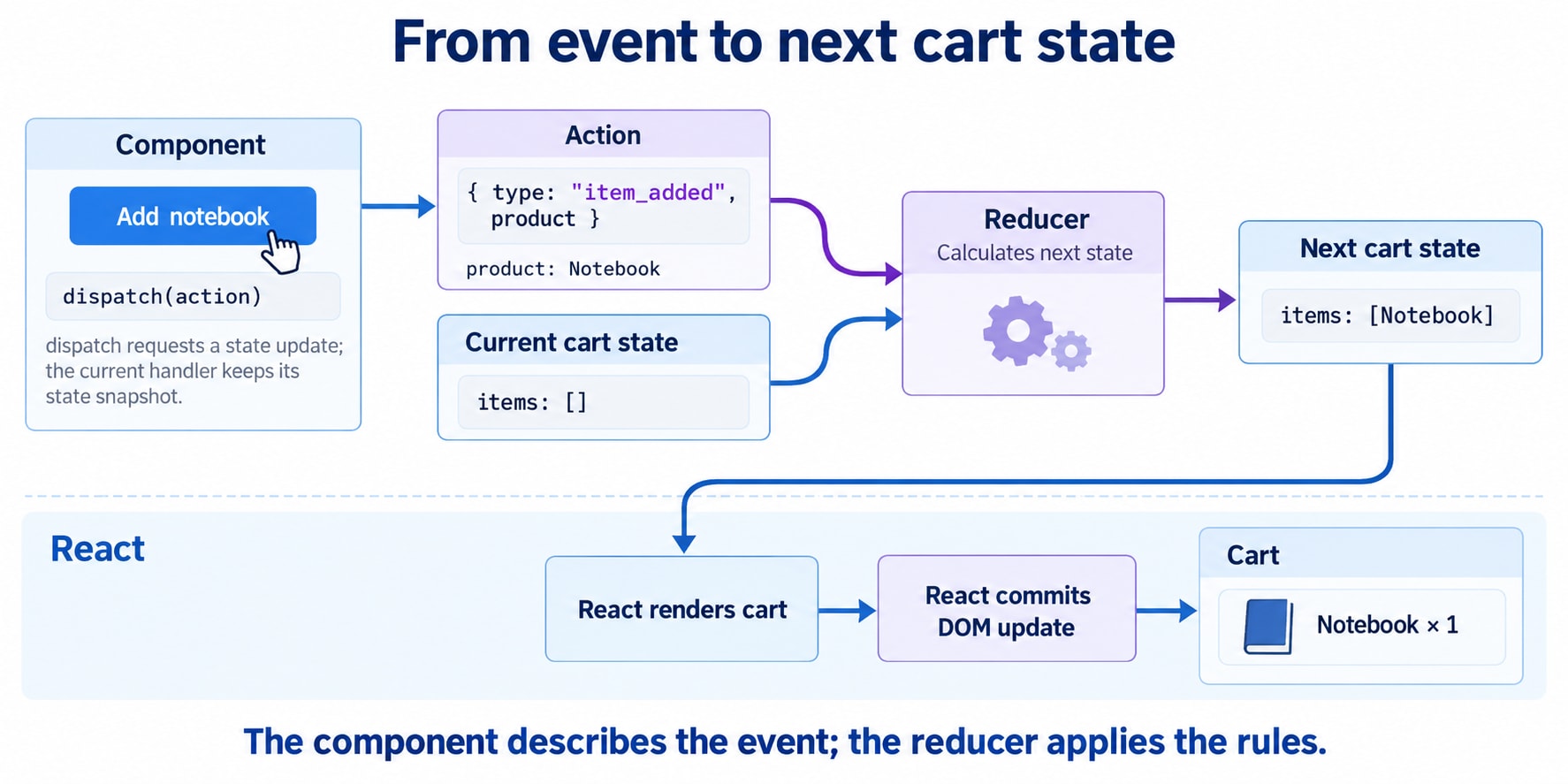
The component reports the interaction. The reducer applies the rules.
React then uses the resulting state when rendering the interface.
2. Start Small: A Counter with Explicit Actions
Before building the cart, let’s make the mechanism visible:
import { useReducer } from "react";

const initialState = {
  count: 0,
};

function countReducer(state, action) {
  switch (action.type) {
    case "incremented":
      return {
        ...state,
        count: state.count + 1,
      };

    case "decremented":
      return {
        ...state,
        count: state.count - 1,
      };

    default:
      throw new Error(`Unknown action: ${action.type}`);
  }
}

export default function Counter() {
  const [state, dispatch] = useReducer(
    countReducer,
    initialState
  );

  return (
    <section>
      <p>Count: {state.count}</p>

      <button
        type="button" => dispatch({ type: "incremented" })}
      >
        Increment
      </button>

      <button
        type="button" => dispatch({ type: "decremented" })}
      >
        Decrement
      </button>
    </section>
  );
}
The Hook returns two values:
const [state, dispatch] = useReducer(
  countReducer,
  initialState
);
state contains the current value.
dispatch lets us request an update by submitting an action.
Call useReducer at the top level of a component or custom Hook, rather than inside a condition or loop.
For this small counter, useState would require less code. The example introduces the mechanism; it does not establish that every counter needs a reducer.
3. What Happens When We Dispatch?
Suppose the current state is:
{ count: 0 }The user clicks Increment:
dispatch({ type: "incremented" });React processes the action using the reducer, which calculates:
{ count: 1 }The component can then render with the updated state.
An action is conventionally an object with a type property, but React does not require that exact shape. Names such as type and payload are conventions.
For our cart, this action carries additional information:
dispatch({
  type: "item_added",
  product: {
    id: "notebook",
    name: "Notebook",
    priceCents: 1200,
  },
});
We could call the additional property payload, but product communicates its purpose directly.
Choose one clear convention and use it consistently.
4. Dispatch Does Not Rewrite the Current Render’s State
This surprises people:
function handleIncrement() {
  dispatch({ type: "incremented" });

  console.log(state.count);
}
If this handler came from a render where count was 0, it still logs 0.
The handler sees the state from the render that created it. Requesting another state update does not rewrite that existing snapshot.
Now consider:
dispatch({ type: "incremented" });
dispatch({ type: "incremented" });
dispatch({ type: "incremented" });
Starting from 0, these actions produce a final count of 3. Each transition works from the pending result of the preceding transition.
React can batch the updates, so three dispatched actions do not imply three separate visible screen updates.
Also:
const result = dispatch({ type: "incremented" });does not give you the next state. dispatch has no return value, and its identity remains stable across renders.
5. Before Writing the Cart Reducer, Define the Rules
A reducer does not automatically produce a good state model.
We still need to decide what the cart means.
For this example:
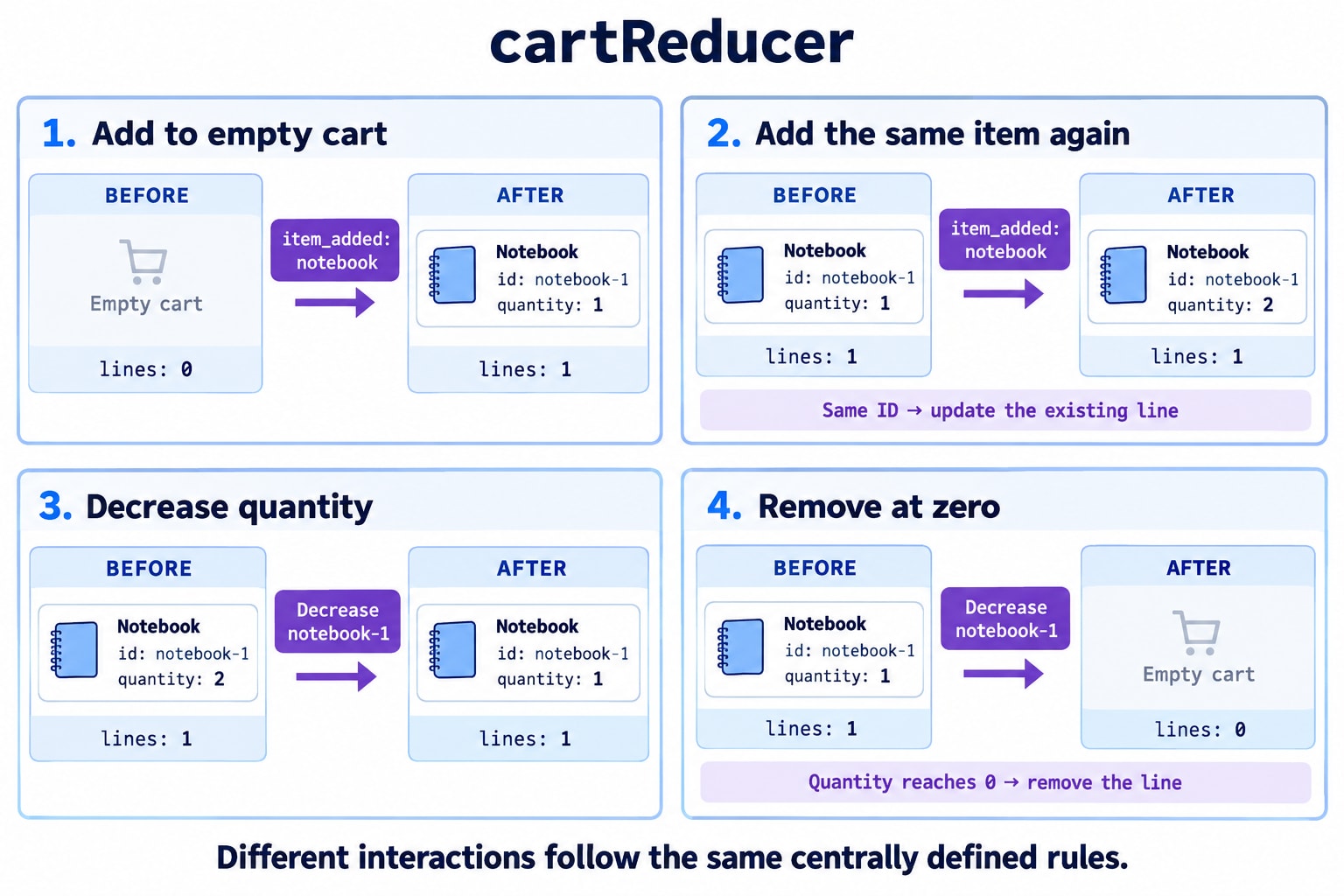
Each product ID appears at most once.
Adding an existing product increases its quantity.
Increasing a quantity adds one unit.
Decreasing a quantity from one removes the line.
Removing an item deletes the entire line.
Clearing an empty cart changes nothing.
These are invariants: conditions we want to remain true after every valid transition.
Our state will contain cart lines:
const initialCartState = {
  items: [],
};
A line looks like:
{
  id: "notebook",
  name: "Notebook",
  priceCents: 1200,
  quantity: 2,
}
For this small example, product ID also identifies the cart line. A real catalogue with variants or customizations may need a different line identifier.
We store prices in integer cents for this USD example. Checkout pricing, inventory, and discounts still need authoritative validation by the application’s backend.
6. The Cart Reducer
Here is the complete transition logic:
const initialCartState = {
  items: [],
};

function cartReducer(state, action) {
  switch (action.type) {
    case "item_added": {
      const product = action.product;

      const existingItem = state.items.find(
        (item) => item.id === product.id
      );

      if (existingItem) {
        return {
          ...state,
          items: state.items.map((item) =>
            item.id === product.id
              ? { ...item, quantity: item.quantity + 1 }
              : item
          ),
        };
      }

      return {
        ...state,
        items: [
          ...state.items,
          {
            id: product.id,
            name: product.name,
            priceCents: product.priceCents,
            quantity: 1,
          },
        ],
      };
    }

    case "quantity_increased": {
      const existingItem = state.items.find(
        (item) => item.id === action.productId
      );

      if (!existingItem) {
        return state;
      }

      return {
        ...state,
        items: state.items.map((item) =>
          item.id === action.productId
            ? { ...item, quantity: item.quantity + 1 }
            : item
        ),
      };
    }

    case "quantity_decreased": {
      const existingItem = state.items.find(
        (item) => item.id === action.productId
      );

      if (!existingItem) {
        return state;
      }

      if (existingItem.quantity === 1) {
        return {
          ...state,
          items: state.items.filter(
            (item) => item.id !== action.productId
          ),
        };
      }

      return {
        ...state,
        items: state.items.map((item) =>
          item.id === action.productId
            ? { ...item, quantity: item.quantity - 1 }
            : item
        ),
      };
    }

    case "item_removed": {
      const items = state.items.filter(
        (item) => item.id !== action.productId
      );

      if (items.length === state.items.length) {
        return state;
      }

      return {
        ...state,
        items,
      };
    }

    case "cart_cleared":
      return state.items.length === 0
        ? state
        : { ...state, items: [] };

    default:
      throw new Error(`Unknown action: ${action.type}`);
  }
}
This reducer assumes product actions originate from our trusted local catalogue and that the initial state follows our rules.
It does not fetch products or validate arbitrary external data.
Notice how little the caller needs to know:
dispatch({
  type: "quantity_decreased",
  productId: "notebook",
});
The caller does not decide whether that means decrementing a quantity or removing the line.
That rule lives in the reducer.
7. Why We Return New Objects
This would mutate the existing state:
state.items[0].quantity += 1;
return state;
So would this:
state.items.push(newItem);
return state;
Reducers should treat existing state as read-only.
Our implementation creates a new array and a new object for the changed line:
items: state.items.map((item) =>
  item.id === action.productId
    ? { ...item, quantity: item.quantity + 1 }
    : item
)
Unchanged lines keep their existing object references.
This is often called structural sharing: copy the parts that changed and reuse the parts that did not.
Array spread is only a shallow copy. Copying an array does not automatically copy the objects inside it. That is why the changed line also needs { ...item }.
The reducer’s return value becomes the next state. React does not automatically merge missing fields, so preserve other fields when returning a partial-looking object.
8. A Valid Action Can Produce No Change
What should happen if we remove a product that is not in the cart?
Our reducer returns the existing state:
return state;That is an intentional no-op.
React compares the next and previous state using Object.is. Returning the same state allows React to skip an unnecessary update, although it may still call the component before discarding the result.
We also throw for unknown actions:
throw new Error(`Unknown action: ${action.type}`);These are different cases:
A recognized action that changes nothing can return
state.An unrecognized action may indicate a programming error.
Returning state for every unknown action is possible, but it can hide misspelled action names in a local reducer.
9. Connecting the Reducer to the Interface
Place this component in the same file as the cart reducer and initial state above:
import { useReducer } from "react";

const products = [
  {
    id: "notebook",
    name: "Notebook",
    priceCents: 1200,
  },
  {
    id: "pen-set",
    name: "Pen set",
    priceCents: 800,
  },
];

const currencyFormatter = new Intl.NumberFormat("en-US", {
  style: "currency",
  currency: "USD",
});

function formatPrice(cents) {
  return currencyFormatter.format(cents / 100);
}

export default function ShoppingCart() {
  const [state, dispatch] = useReducer(
    cartReducer,
    initialCartState
  );

  const totalQuantity = state.items.reduce(
    (total, item) => total + item.quantity,
    0
  );

  const subtotalCents = state.items.reduce(
    (total, item) =>
      total + item.priceCents * item.quantity,
    0
  );

  return (
    <main>
      <h1>Stationery shop</h1>

      <section>
        <h2>Products</h2>

        <ul>
          {products.map((product) => (
            <li key={product.id}>
              <span>
                {product.name} — {formatPrice(product.priceCents)}
              </span>{" "}

              <button
                type="button" => {
                  dispatch({
                    type: "item_added",
                    product,
                  });
                }}
              >
                Add {product.name}
              </button>
            </li>
          ))}
        </ul>
      </section>

      <section>
        <h2>Your cart</h2>

        {state.items.length === 0 ? (
          <p>Your cart is empty.</p>
        ) : (
          <ul>
            {state.items.map((item) => (
              <li key={item.id}>
                <p>
                  {item.name} × {item.quantity} —{" "}
                  {formatPrice(
                    item.priceCents * item.quantity
                  )}
                </p>

                <button
                  type="button"
                  aria-label={`Decrease ${item.name} quantity`} => {
                    dispatch({
                      type: "quantity_decreased",
                      productId: item.id,
                    });
                  }}
                >
                  −
                </button>

                <button
                  type="button"
                  aria-label={`Increase ${item.name} quantity`} => {
                    dispatch({
                      type: "quantity_increased",
                      productId: item.id,
                    });
                  }}
                >
                  +
                </button>

                <button
                  type="button" => {
                    dispatch({
                      type: "item_removed",
                      productId: item.id,
                    });
                  }}
                >
                  Remove {item.name}
                </button>
              </li>
            ))}
          </ul>
        )}

        <p>Total units: {totalQuantity}</p>
        <p>Subtotal: {formatPrice(subtotalCents)}</p>

        <button
          type="button"
          disabled={state.items.length === 0} => {
            dispatch({ type: "cart_cleared" });
          }}
        >
          Clear cart
        </button>
      </section>
    </main>
  );
}
The JSX describes the interface. Event handlers describe interactions. The reducer contains the cart rules.
That separation becomes useful when another screen needs to dispatch the same actions.
10. Calculate Totals Instead of Storing Them Twice
Why does our state contain only items?
Why not also store:
{
  items: [],
  totalQuantity: 0,
  subtotalCents: 0
}
Because both totals can be calculated from the items.
Storing them separately gives every cart action more responsibilities. A future edit could update the quantity but forget the subtotal.
Deriving values from existing state avoids that synchronization problem. React recommends avoiding redundant state when a value can be calculated from other state or props.
A reducer centralizes transitions. It does not remove the need to choose a sensible state structure.
For this small cart, calculating totals during rendering is straightforward. Add caching only if measurement identifies a meaningful cost.
11. A Reducer Must Be Pure
A reducer calculates state. It must not perform external work.
Keep these out of it:
API requests.
Timers.
DOM operations.
Storage writes.
Mutations of existing state or action objects.
Also avoid generating unpredictable values inside a transition:
// Avoid inside the reducer:
const id = crypto.randomUUID();
Generate the identifier in an event handler and include it in the action instead:
dispatch({
  type: "note_added",
  id: crypto.randomUUID(),
  text,
});
Now the action contains the information required for the transition.
Given equivalent state and action inputs, a pure reducer calculates equivalent results. It does not have to return the same object reference every time.
Reducers run as part of React’s state calculation, so their purity matters when work is repeated. React’s development Strict Mode may call reducers and initializer functions twice to expose accidental impurities; one result is ignored.
12. Where Does Asynchronous Work Go?
Eventually, the cart needs a checkout request.
Do not make the reducer asynchronous:
// Incorrect design for a React reducer.
async function cartReducer(state, action) {
  const response = await fetch("/api/checkout");
  // ...
}
A reducer must return the next state, not a Promise.
For an operation initiated by a user, the event handler can perform the request and dispatch actions describing its progress:
async function handleSubmit() {
  dispatch({ type: "submission_started" });

  try {
    await submitForm();

    dispatch({ type: "submission_succeeded" });
  } catch {
    dispatch({
      type: "submission_failed",
      message: "Submission failed. Please try again.",
    });
  }
}
Here, submitForm represents an application-specific asynchronous function.
This fragment describes the separation of responsibilities, not a complete request lifecycle. An implementation that allows overlapping requests also needs a policy for stale responses, cancellation, and duplicate submissions.
The reducer interprets outcomes. The asynchronous operation happens outside it.
13. Forms: Keep Related Transitions Together
Forms reveal another benefit of reducers.
A submission can affect several values at once:
Current status.
Error message.
Whether editing is allowed.
Whether a confirmation is visible.
Instead of independent booleans such as:
{
  isLoading: true,
  isSuccess: true,
  hasError: true
}
consider one status:
const initialFormState = {
  name: "",
  email: "",
  status: "editing",
  error: null,
};
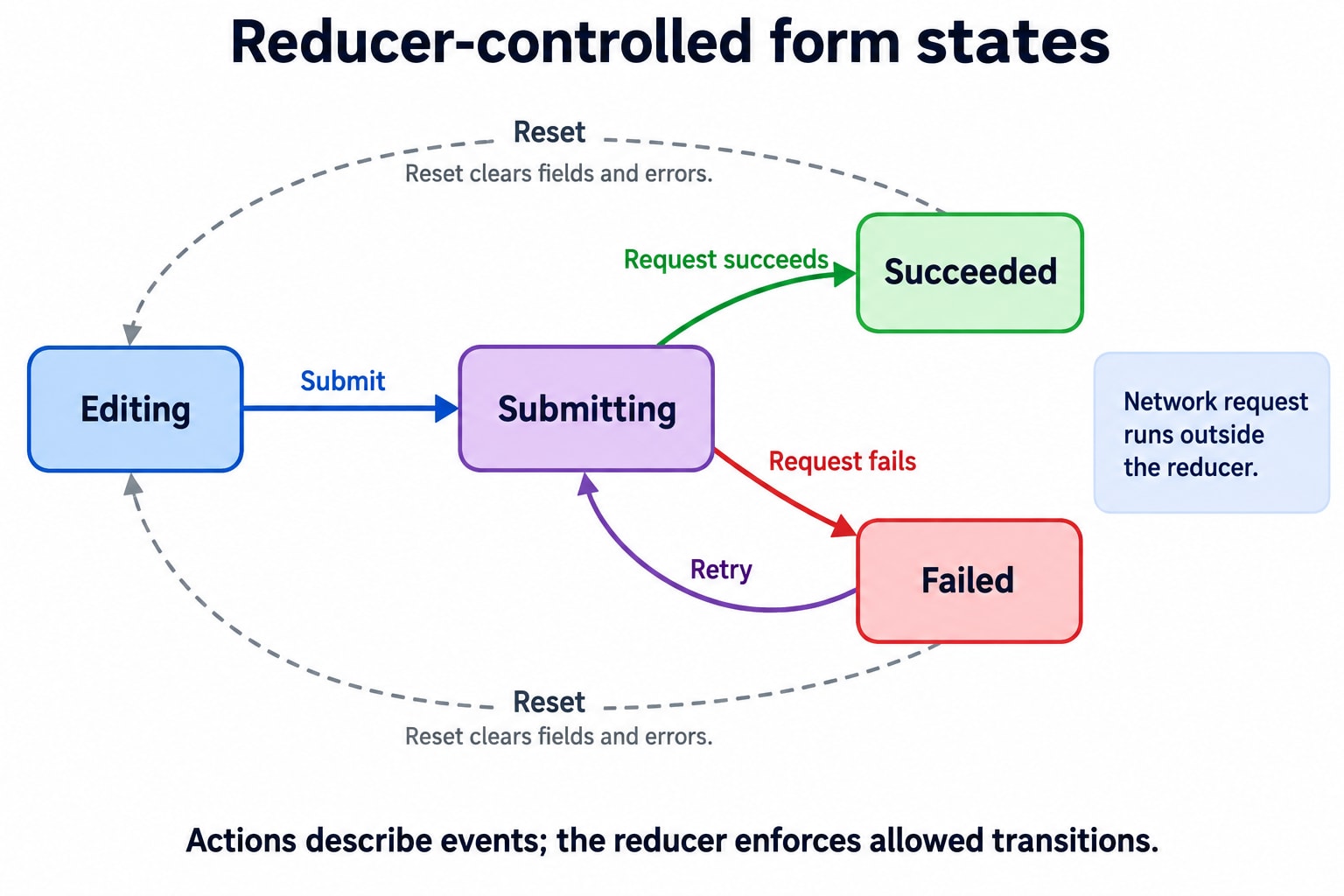
The intended transitions can be written explicitly:
Current status | Event | Next status | Related change |
|---|---|---|---|
Editing or failed | Submission started | Submitting | Clear previous error |
Submitting | Submission succeeded | Succeeded | Clear error |
Submitting | Submission failed | Failed | Store error |
Any | Form reset | Editing | Restore initial fields |
One action can update related fields together:
case "submission_started":
  return {
    ...state,
    status: "submitting",
    error: null,
  };
To enforce the table, the reducer must also check which transitions are allowed. Merely using useReducer does not turn an arbitrary switch statement into a correctly enforced state machine.
This is where reducers become more valuable than simply grouping many fields into one object.
14. Initial State and Lazy Initialization
The basic form uses the supplied value directly:
useReducer(cartReducer, initialCartState);If initial state requires calculation, use the optional third argument:
function initializeCart(initialItems) {
  return {
    items: initialItems.map((item) => ({ ...item })),
  };
}

const [state, dispatch] = useReducer(
  cartReducer,
  initialItems,
  initializeCart
);
React uses initializeCart(initialItems) to initialize the state.
This avoids eagerly performing that calculation on every ordinary render:
// initializeCart is evaluated whenever this expression runs.
useReducer(cartReducer, initializeCart(initialItems));
The initializer must remain pure.
Also, changing the initialItems prop later does not automatically reset the existing reducer state. Decide explicitly whether a change should dispatch a reset action or create a fresh component instance.
Initialization and ongoing synchronization are different operations.
15. Reducers Are Easy to Exercise Without Rendering a Component
A reducer is an ordinary function.
We can inspect a sequence of transitions directly:
const product = {
  id: "notebook",
  name: "Notebook",
  priceCents: 1200,
};

const first = cartReducer(initialCartState, {
  type: "item_added",
  product,
});

const second = cartReducer(first, {
  type: "item_added",
  product,
});

console.assert(second.items.length === 1);
console.assert(second.items[0].quantity === 2);

// Earlier state should remain unchanged.
console.assert(first.items[0].quantity === 1);
console.assert(initialCartState.items.length === 0);

const cleared = cartReducer(second, {
  type: "cart_cleared",
});

console.assert(cleared.items.length === 0);
Useful tests focus on behavior and invariants:
Repeated additions produce one line.
Decreasing one unit removes the line.
Missing-item actions leave state unchanged.
Earlier state objects are not mutated.
These tests are valuable because they check the cart’s rules independently of button labels or layout.
16. When Is useState Still the Better Choice?
useReducer is not automatically faster, more scalable, or more professional.
Both Hooks manage state. The difference is how you organize its transitions.
Situation | Often a good starting point |
|---|---|
One input value |
|
A simple open/closed toggle |
|
Several unrelated local values | Separate |
Repeated transitions with shared rules |
|
Several fields must change together consistently | Consider |
Complex form or workflow transitions | Consider |
A large object can still be simple to update.
A single status value can have complicated transition rules.
Choose based on the complexity of the transitions, not merely the number of fields.
It is also fine to use both Hooks in the same component—for example, a cart reducer alongside local state for whether a help panel is open.
17. Sharing a Reducer with Context
Calling useReducer creates state for that component instance. Calling it elsewhere does not automatically share the same state.
To share one cart across a subtree, put the Hook in a provider component:
import {
  createContext,
  useReducer,
} from "react";

const CartStateContext = createContext(null);
const CartDispatchContext = createContext(null);

function CartProvider({ children }) {
  const [state, dispatch] = useReducer(
    cartReducer,
    initialCartState
  );

  return (
    <CartStateContext.Provider value={state}>
      <CartDispatchContext.Provider value={dispatch}>
        {children}
      </CartDispatchContext.Provider>
    </CartStateContext.Provider>
  );
}
Context makes the state and dispatch function accessible to descendants. The reducer still defines the transitions.
Separate contexts let a component that only dispatches actions avoid subscribing to cart-state context changes. It may still render for other reasons, such as parent updates. React documents this reducer-and-context pattern for sharing state across a screen.
18. Does This Mean We Have Built Redux?
No.
useReducer provides component-owned state and a reducer-based update API. Context can distribute access to that state.
Redux provides a separate store with its own APIs and tooling ecosystem, including middleware and developer tools.
The choice depends on requirements such as debugging, shared-state patterns, subscriptions, and coordination—not simply whether the application is “small” or “large.”
Neither approach automatically provides persistence or server synchronization. Those require explicit design.
19. What Changed in Our Cart?
At the beginning, each handler needed to understand how to edit the cart.
Now a handler can say:
dispatch({
  type: "quantity_decreased",
  productId,
});
The reducer knows whether to decrease the quantity, remove the line, or leave the state unchanged.
The value of useReducer is that these decisions have one clear home.
Use a reducer when describing an event separately from calculating its state transition makes the code easier to understand, verify, and change.
The cart can gain new buttons and new screens while keeping the same rules.