State vs Props
Props, State, and Children in React: Who Owns the Data?
You are building a product page.
It displays a keyboard, lets the customer choose a quantity, and shows the order subtotal.
The first version looks simple. Then the questions begin.
Where should the quantity live? How does the subtotal know it changed? Can the quantity selector update a value it received from its parent? And how can several sections share the same card layout without becoming one giant component?
These are questions about data ownership.
React gives us three closely related tools:
Props supply a component with inputs.
State gives a component remembered data.
Children let a component receive content to place inside its layout.
We’ll build the product page one requirement at a time and see why each tool exists.
1. The product page needs to display something
A component is a reusable piece of an interface. In this example, it is a JavaScript function returning JSX—the HTML-like syntax React uses to describe UI.
Let’s start with product details:
function ProductDetails() {
  return (
    <section>
      <h2>Mechanical Keyboard</h2>
      <p>Price: $80</p>
    </section>
  );
}
This works for one product. But displaying a mouse would require changing the component itself.
Instead, the component can accept inputs:
function ProductDetails({ name, price }) {
  return (
    <section>
      <h2>{name}</h2>
      <p>Price: ${price}</p>
    </section>
  );
}
Another component supplies those inputs:
function ProductPage() {
  return (
    <ProductDetails
      name="Mechanical Keyboard"
      price={80}
    />
  );
}
ProductPage is the parent because it renders ProductDetails. ProductDetails is its child.
The values passed to the child are called props, short for properties.
The child does not need to know whether the product came from a server, a search result, or a constant in a file. It receives the information needed to do its job.
2. Props are the component’s inputs
A function component receives one props object.
These two versions read the same inputs:
function ProductDetails(props) {
  return <h2>{props.name}</h2>;
}function ProductDetails({ name }) {
return <h2>{name}</h2>;
}The second uses JavaScript destructuring: extracting a property into a variable.
Props can contain strings, numbers, objects, arrays, functions, or JSX. For example:
<ProductDetails
  product={{
    id: "keyboard-1",
    name: "Mechanical Keyboard",
    price: 80,
  }}
/>
The matching component reads product.name and product.price.
Props can also change between renders. A parent can supply a different product or an updated price. “Read-only” does not mean “permanently fixed.”
Read-only means the receiving component must not mutate them
This is not an appropriate way for a child to apply a discount:
function ProductDetails({ product }) {
  product.price = product.price * 0.9;

  return <p>${product.price}</p>;
}
The child is modifying an object supplied to it. Other components may hold a reference to that same object.
Instead, calculate a display value:
function ProductDetails({ product }) {
  const discountedPrice = product.price * 0.9;

  return <p>Sale price: ${discountedPrice}</p>;
}
Or ask the component that owns the data to update it, using a callback. We’ll introduce that shortly.
React treats props and state as immutable snapshots: use their values during rendering, and request updates through the appropriate mechanism.
3. The customer wants two keyboards
The product information comes from outside the details component. But the quantity changes when the user presses a button.
We need the component to remember that choice.
An ordinary local variable is insufficient:
function QuantityPicker() {
  let quantity = 1;

  function increase() {
    quantity += 1;
  }

  return (
    <button
      Quantity: {quantity}
    </button>
  );
}
Changing the variable does not ask React to update the interface. If React later calls the component again, quantity starts at 1 again.
We need state.
import { useState } from "react";

function QuantityPicker() {
  const [quantity, setQuantity] = useState(1);

  return (
    <div>
      <p>Quantity: {quantity}</p>

      <button
        type="button" => setQuantity(previous => previous + 1)}
      >
        Add one
      </button>
    </div>
  );
}
useState is a Hook: a function that connects a function component to a React feature.
It provides:
Value | Purpose |
|---|---|
| The state value for this render |
| A function that requests a state update |
| The initial state value |
React remembers the state between renders while the component retains its identity. It does not depend on an ordinary local variable surviving a function call.
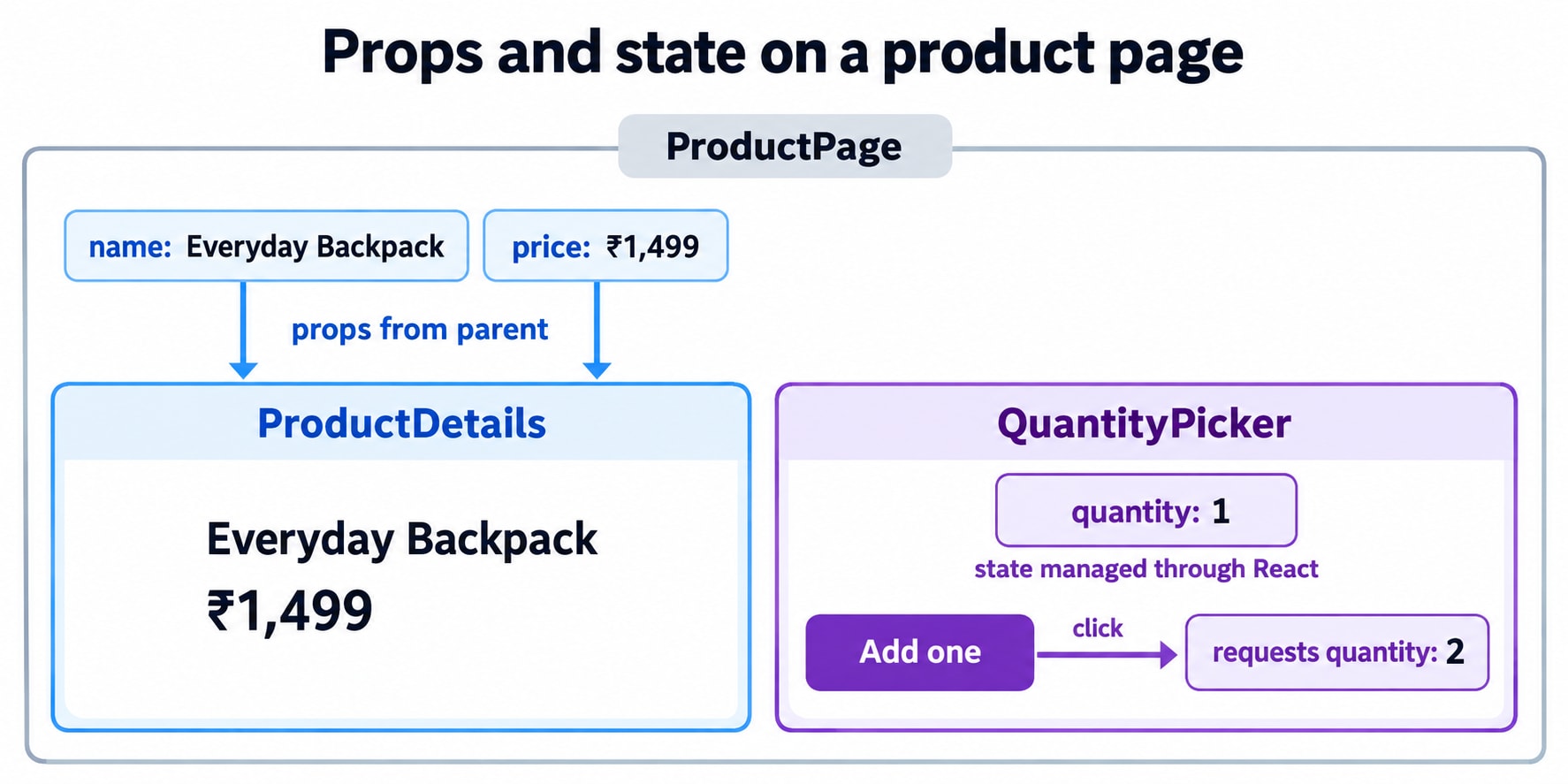
4. A state update is a request for another render
Suppose the quantity is 1:
function increase() {
  setQuantity(previous => previous + 1);
  console.log(quantity);
}
The log still prints the value from the current render.
The setter does not rewrite the quantity variable inside the already-running handler. React processes the update and supplies the new state in another render.
That is why state is often described as a snapshot. The event handler sees the values associated with the render that created it.
When the next value depends on the previous one, an updater function makes that dependency explicit:
setQuantity(previous => previous + 1);It also handles multiple queued increments:
function addTwo() {
  setQuantity(previous => previous + 1);
  setQuantity(previous => previous + 1);
}
React processes those updater functions in order. Starting from 1, the result is 3.
By contrast, these calls both use the same render’s value:
setQuantity(quantity + 1);
setQuantity(quantity + 1);
If quantity is 1, both request 2.
React can batch updates before rendering, so setter calls and renders do not have a one-to-one relationship.
5. The order summary exposes an ownership problem
The quantity selector works. Now we add a summary beside it:
function ProductPage() {
  return (
    <>
      <QuantityPicker />
      <OrderSummary />
    </>
  );
}
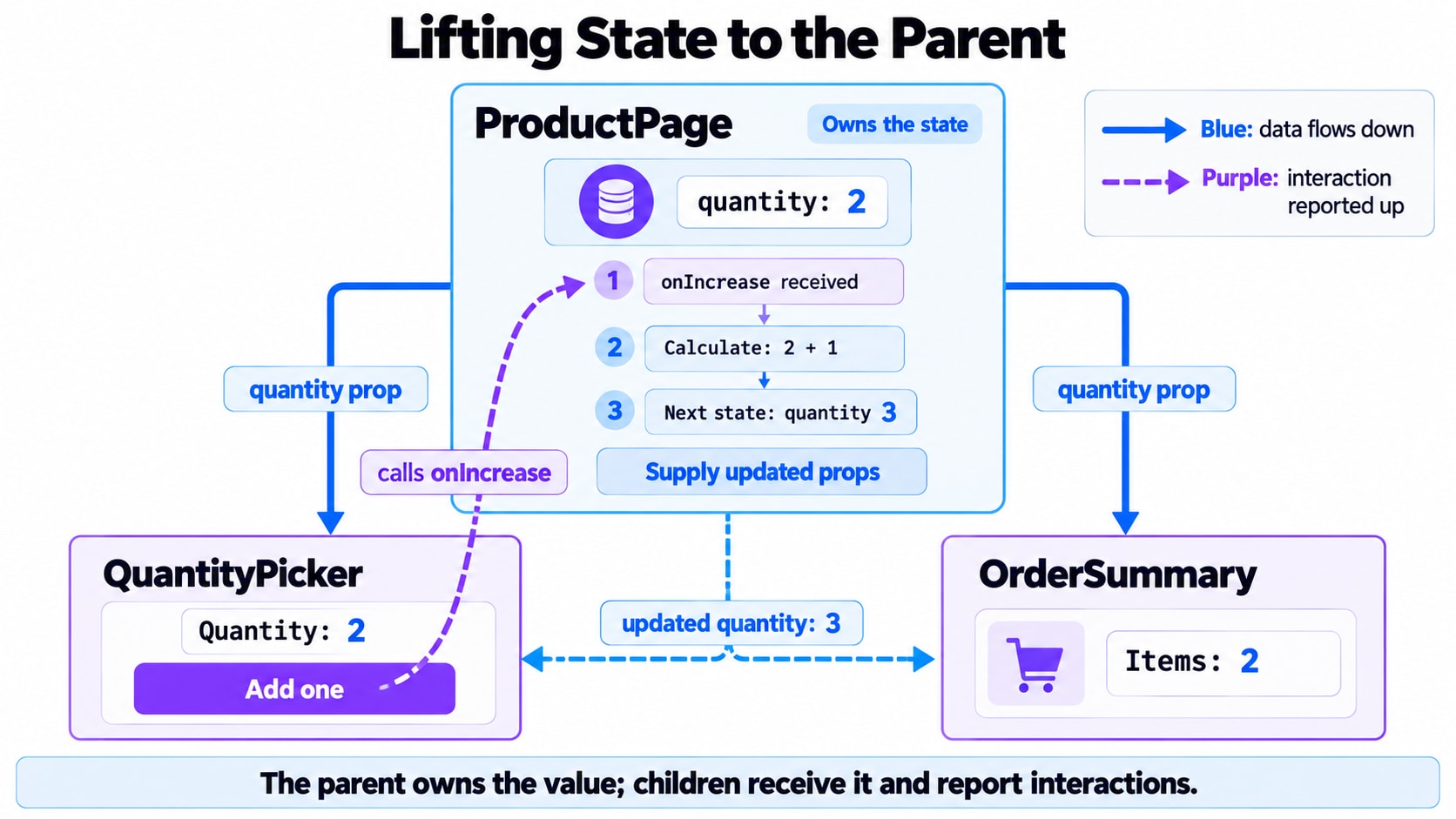
QuantityPicker owns the quantity, but OrderSummary also needs it.
We could give the summary another quantity state. That creates two values representing one customer choice.
Eventually, one can change without the other.
A better arrangement is to move the quantity to the closest parent that needs to coordinate both components.
This is called lifting state up. The parent becomes the owner of the shared value and passes it to its children.
import { useState } from "react";

function ProductPage() {
  const [quantity, setQuantity] = useState(1);
  const price = 80;

  function increaseQuantity() {
    setQuantity(previous => previous + 1);
  }

  return (
    <>
      <QuantityPicker
        quantity={quantity}
      />

      <OrderSummary
        quantity={quantity}
        price={price}
      />
    </>
  );
}
The children receive the information they need:
function QuantityPicker({ quantity, onIncrease }) {
  return (
    <div>
      <p>Quantity: {quantity}</p>

      <button type="button"
        Add one
      </button>
    </div>
  );
}

function OrderSummary({ quantity, price }) {
  return <p>Subtotal: ${quantity * price}</p>;
}
There is now one quantity to maintain.
6. The same value can be state and a prop
Look at the quantity from each component’s perspective:
Component | What is |
|---|---|
| State it owns |
| A prop it receives |
| A prop it receives |
A value is not permanently classified as “state” or “props” across an application.
Those terms describe its relationship to a particular component.
The parent remembers the quantity as state. Passing it to a child makes it a prop from that child’s perspective.
This is more useful than the misleading shortcut “props are fixed, state changes.” Both can have different values on a later render.
How does the child request a change?
onIncrease is a function passed through props.
Such a function is commonly called a callback because the receiving component can call it when something happens.
The sequence is:
The parent passes the quantity and callback.
The customer clicks the child’s button.
The child invokes the callback.
The callback requests an update to the parent’s state.
The parent supplies the updated quantity to both children.
This preserves one-way data flow: the owner supplies values down the tree. A callback lets a child report an interaction without mutating the supplied value.
7. Controlled does not mean the component has no state
Our first QuantityPicker managed its own quantity. Its parent could not directly choose the current value.
The revised picker receives quantity and callbacks from its parent. Its quantity is therefore controlled by the parent.
These terms describe a particular behavior:
An uncontrolled component manages that behavior internally.
A controlled component receives the relevant value from outside.
A component can mix both approaches. A quantity picker could receive its quantity through props while keeping a help-tooltip toggle in local state.
Choose ownership based on who needs to coordinate the value. Shared state belongs where its consumers can receive a consistent value; unrelated local interactions can stay local.
“One source of truth” means one authoritative owner for each value. It does not require putting all application state in one top-level component.
8. The subtotal does not need its own state
The page needs a quantity and a subtotal.
Should both use useState?
const [quantity, setQuantity] = useState(1);
const [subtotal, setSubtotal] = useState(80);
That arrangement creates another synchronization problem. Every quantity or price change must also update the subtotal.
For this page, calculate it instead:
const subtotal = quantity * price;This is derived data: a value calculated from other current values.
A useful question is:
Can I calculate this value from the props and state I already have?
If yes, it often does not need separate state.
The same reasoning applies to filtered lists, item counts, and simple validation messages. Store the information you need to remember, then derive what you can.
9. Copying a prop into state introduces another decision
Suppose we write:
function QuantityPicker({ quantity }) {
  const [localQuantity, setLocalQuantity] = useState(quantity);

  return <p>{localQuantity}</p>;
}
This does not keep localQuantity synchronized with the prop.
The argument initializes the state. Later changes to quantity do not automatically replace the remembered value.
There are two different intentions we might have:
Always display the parent’s current quantity:
function QuantityPicker({ quantity }) {
  return <p>{quantity}</p>;
}
Start from a suggested quantity, then manage it independently:
function QuantityPicker({ initialQuantity = 1 }) {
  const [quantity, setQuantity] = useState(initialQuantity);

  // Local interactions can update quantity.
}
The name initialQuantity communicates that later prop changes are not intended to synchronize the state.
An editable draft can legitimately differ from its source data. But that should be a deliberate product decision, with clear rules for saving, cancelling, and resetting.
10. The customer opens a different product
The customer selected three keyboards, then opens a mouse.
Should the quantity remain 3 or reset to 1?
Changing a prop alone does not necessarily reset component state. If React sees the same component identity at the same position, it can preserve its state.
If each product should start a fresh purchase selection, express that identity explicitly:
function ProductScreen({ product }) {
  return (
    <ProductPurchase
      key={product.id}
      product={product}
    />
  );
}
ProductPurchase owns the quantity state.
When product.id changes, the key changes. React creates a new component identity, so its local state starts again.
This resets the whole keyed subtree, including any other local state beneath it. Use it when that full reset matches the intended behavior.
11. Several sections need the same card layout
The product details and order summary need matching borders, spacing, and headings.
We could create separate wrappers for every kind of content. But their surrounding structure is the same.
Instead, the wrapper can accept content:
function Card({ title, children }) {
  return (
    <section className="card">
      <h2>{title}</h2>
      <div className="card-content">{children}</div>
    </section>
  );
}
Use it like this:
<Card title="Product details">
  <p>Mechanical Keyboard</p>
  <p>Price: $80</p>
</Card>
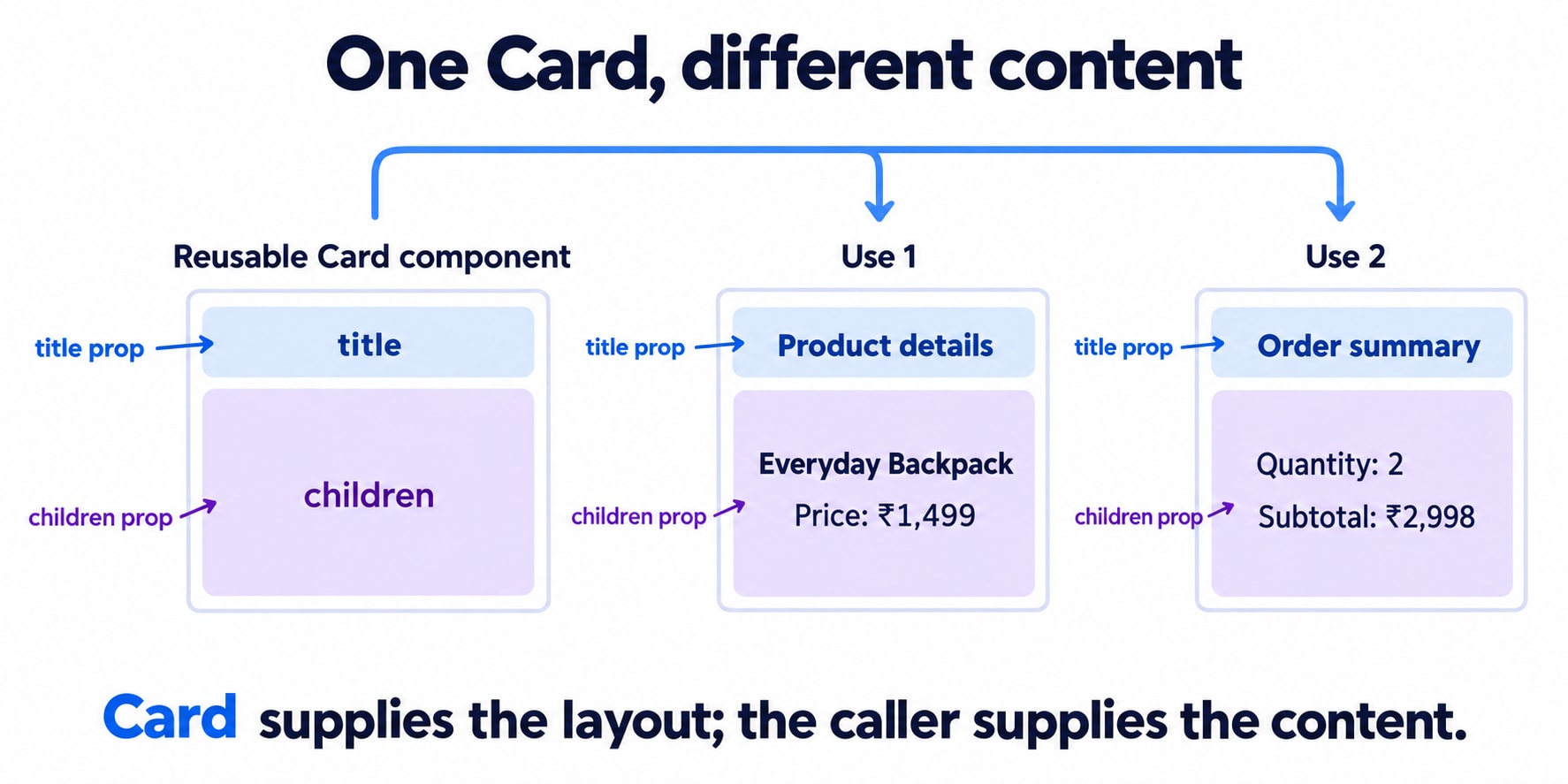
The nested content becomes the children prop.
Conceptually, Card receives:
{
  title: "Product details",
  children: [
    <p>Mechanical Keyboard</p>,
    <p>Price: $80</p>
  ]
}
That illustration shows the relationship; avoid assuming children always has an array shape. It may contain a single element, text, multiple nodes, or no content.
Most wrappers can simply render {children} without inspecting or transforming it.
This is composition
Composition means building an interface by combining components.
Card owns the surrounding layout. The component using it supplies the content.
<Card title="Order summary">
  <OrderSummary quantity={quantity} price={price} />
</Card>
The card does not need to know how a subtotal works. The summary does not need to know how the card is styled.
Also, placing a component inside Card does not automatically give it the card’s props. Inputs such as quantity must still be supplied explicitly.
12. Put the product page together
Here is a complete example combining props, state, callbacks, derived data, and children:
import { useState } from "react";

const product = {
  id: "keyboard-1",
  name: "Mechanical Keyboard",
  price: 80,
};

const money = new Intl.NumberFormat("en-US", {
  style: "currency",
  currency: "USD",
});

export default function App() {
  return (
    <ProductPurchase
      key={product.id}
      product={product}
    />
  );
}

function ProductPurchase({ product }) {
  const [quantity, setQuantity] = useState(1);

  function increaseQuantity() {
    setQuantity(previous => previous + 1);
  }

  function decreaseQuantity() {
    setQuantity(previous => Math.max(1, previous - 1));
  }

  return (
    <main>
      <h1>Choose your quantity</h1>

      <Card title="Product details">
        <ProductDetails product={product} />
      </Card>

      <Card title="Quantity">
        <QuantityPicker
          quantity={quantity}
        />
      </Card>

      <Card title="Order summary">
        <OrderSummary
          price={product.price}
          quantity={quantity}
        />
      </Card>
    </main>
  );
}

function Card({ title, children }) {
  return (
    <section className="card">
      <h2>{title}</h2>
      <div>{children}</div>
    </section>
  );
}

function ProductDetails({ product }) {
  return (
    <>
      <p>{product.name}</p>
      <p>Unit price: {money.format(product.price)}</p>
    </>
  );
}

function QuantityPicker({
  quantity,
  onIncrease,
  onDecrease,
}) {
  return (
    <div>
      <p>Quantity: {quantity}</p>

      <button
        type="button"
        disabled={quantity <= 1}
      >
        Remove one
      </button>

      <button type="button"
        Add one
      </button>
    </div>
  );
}

function OrderSummary({ price, quantity }) {
  const subtotal = price * quantity;

  return (
    <p>
      {quantity} × {money.format(price)}
      {" = "}
      <strong>{money.format(subtotal)}</strong>
    </p>
  );
}
Follow one click through this example:
The customer presses Add one. QuantityPicker calls its onIncrease prop. That function requests an update to the state owned by ProductPurchase.
React renders with the new quantity. The picker receives it, and the summary calculates a new subtotal from it.
The cards provide the layout without participating in quantity management.
Each component has a clear responsibility.
13. The same distinction exists in class components
You may encounter equivalent code written as a class:
import { Component } from "react";

class ProductPurchase extends Component {
  state = {
    quantity: 1,
  };

  increaseQuantity = () => {
    this.setState(previous => ({
      quantity: previous.quantity + 1,
    }));
  };

  render() {
    const { product } = this.props;
    const { quantity } = this.state;

    return (
      <>
        <ProductDetails product={product} />

        <button type="button"
          Quantity: {quantity}
        </button>

        <OrderSummary
          price={product.price}
          quantity={quantity}
        />
      </>
    );
  }
}
The syntax differs:
Concept | Function component | Class component |
|---|---|---|
Read props | Function argument |
|
Read state | Value returned by |
|
Request an update | State setter |
|
Read nested content |
|
|
A class can render a function component, and a function component can render a class. Their data ownership rules are the same.
One update detail differs: class setState shallowly merges an object update, while a useState setter replaces that particular stored value.
14. What happens when the page becomes larger?
Imagine the quantity selector and summary now sit beneath several layout components.
Passing props through those layers is often called prop drilling.
It is explicit: reading the code shows where the data comes from. A few forwarding layers are not automatically a design problem.
If unrelated layers repeatedly carry the same data, reconsider the component arrangement. Composition may let the state owner create the relevant content directly. For broadly shared values, Context or a dedicated store may become appropriate.
The first question remains the same:
Which part of the application should own this value, and which parts only need to read it or request a change?
Moving data into a different mechanism does not remove the need to answer that question.
The product page now has clear ownership
We started with a product name and a button. Adding a summary and reusable cards revealed the larger design:
Tool | Responsibility |
|---|---|
Props | Supply inputs to a component |
State | Remember data for a component |
Callback props | Let a component report an interaction |
Derived values | Calculate results from existing inputs |
| Supply content to a reusable layout |
Keys | Help express component identity and intentional resets |
The quantity belongs to the component coordinating the purchase. Its children receive that quantity through props. The subtotal is calculated. The cards accept content through children.
That is the practical value of understanding props and state: you can decide where data belongs, follow how it changes, and prevent multiple components from maintaining competing versions of the same fact.