Rendering Process – Virtual DOM & Diffing Algorithm
How React Actually Renders: From Your First Click to Interrupted Rendering
You open a shopping website and click Add to cart.
The number in the cart logo changes from 0 to 1. The product image stays where it was. The search box keeps its text. The rest of the page looks untouched.
That small change raises several questions:
How did React know which part to update? Did it recreate the page? What happens if another click arrives before React finishes its work?
To answer them, we’ll follow one shopping application as it grows—from a cart button to editable product rows and a busy search interface.
Along the way, we’ll meet React’s rendering phases, reconciliation, keys, and the machinery that lets some rendering work pause or be abandoned.
1. A button, a number, and two ways to update the page
Let’s begin without React.
Our page contains a paragraph and a button:
<p id="cart-count">Items in cart: 0</p>
<button id="add-button">Add to cart</button>
We can connect them using JavaScript:
let count = 0;

const paragraph = document.getElementById("cart-count");
const button = document.getElementById("add-button");

button.addEventListener("click", () => {
  count += 1;
  paragraph.textContent = `Items in cart: ${count}`;
});
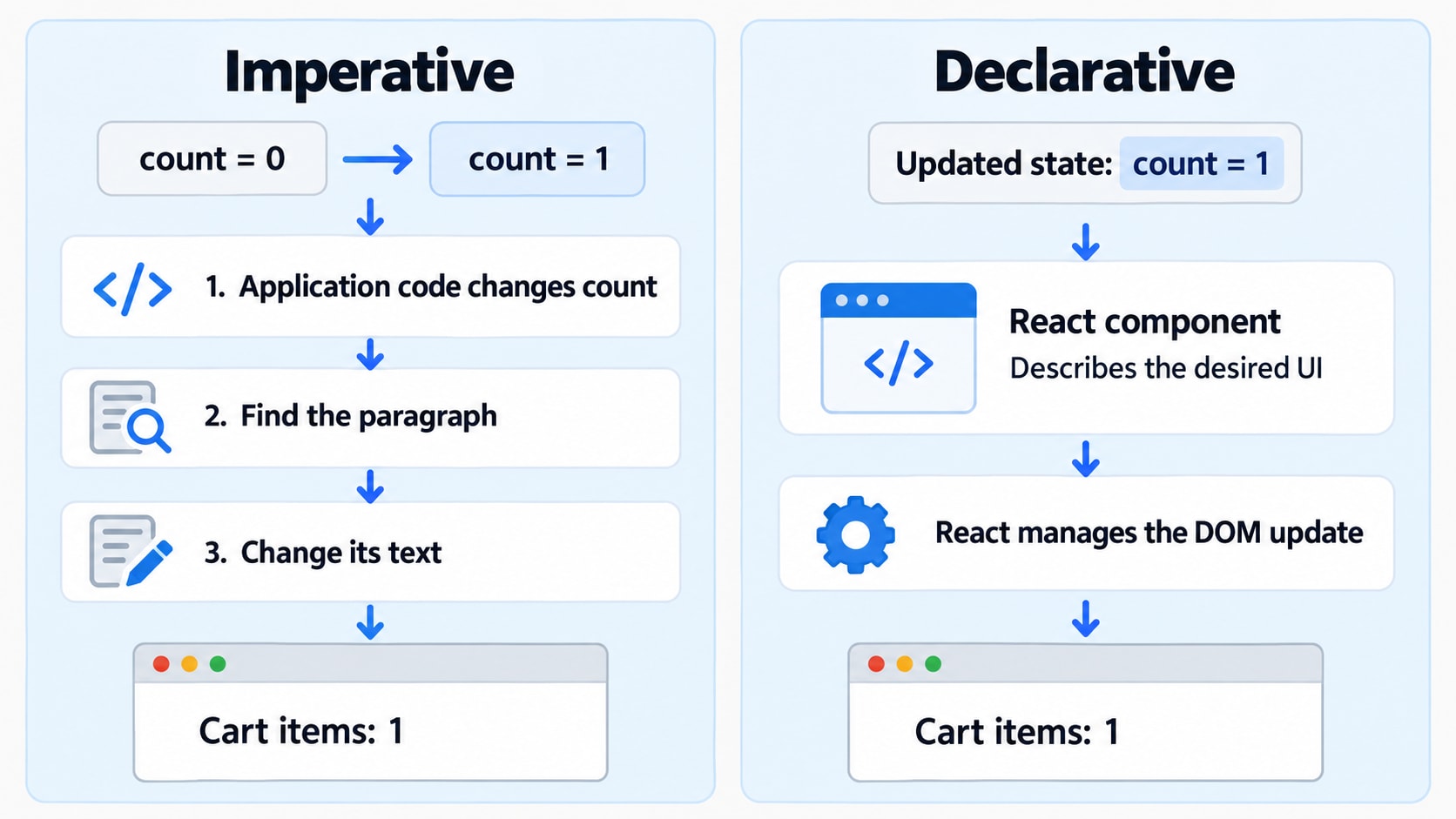
Each click does two things: changes the data and explicitly changes the paragraph.
This is an imperative approach. We write the instructions for performing the update.
It works well here. But imagine the cart count also affects a checkout summary, a discount message, and the enabled state of a button. We now need to keep several parts of the interface consistent.
React lets us express that relationship differently.
import { useState } from "react";

function CartCounter() {
  const [count, setCount] = useState(0);

  return (
    <section>
      <p>Items in cart: {count}</p>

      <button => setCount(current => current + 1)}>
        Add to cart
      </button>
    </section>
  );
}
A component is a reusable piece of UI. Here, it is a JavaScript function that describes a cart counter.
useState gives the component a value React remembers between renders:
countis the value for the current render.setCountrequests an update.0is the initial value.
The function passed to setCount calculates the next count from the pending previous count.
We describe what the paragraph should display for any given count. React manages the updates needed to make the page match.
This is declarative UI: describe the desired interface for the current data.
Declarative code still contains logic and event handlers. The difference is that we express the relationship between data and appearance instead of manually maintaining every affected DOM element.
2. What does the component return?
The HTML-like syntax inside our component is called JSX.
<p>Items in cart: {count}</p>Tooling transforms JSX into JavaScript. When that JavaScript runs, it creates React elements—objects describing the requested UI.
With count equal to 0, a simplified description looks like:
{
  type: "p",
  props: {
    children: ["Items in cart: ", 0]
  }
}
Here, type describes the kind of element, and props contains its inputs, including its children. This is an illustration, not the complete internal object format.
The description is not yet a paragraph in the browser.
The browser maintains the DOM, a structure of objects representing the document’s elements and text. Those objects support operations such as changing text, inserting children, and removing elements.
React elements describe the interface; DOM nodes are part of the actual browser document.
You’ll often hear React’s in-memory UI representation called the Virtual DOM. This is useful shorthand, but understanding React requires more than imagining a second copy of the browser DOM.
React also needs to remember state, match old and new elements, and organize pending work. We’ll introduce that bookkeeping when our application needs it.
3. React works in two main phases
React separates rendering work into two main phases:
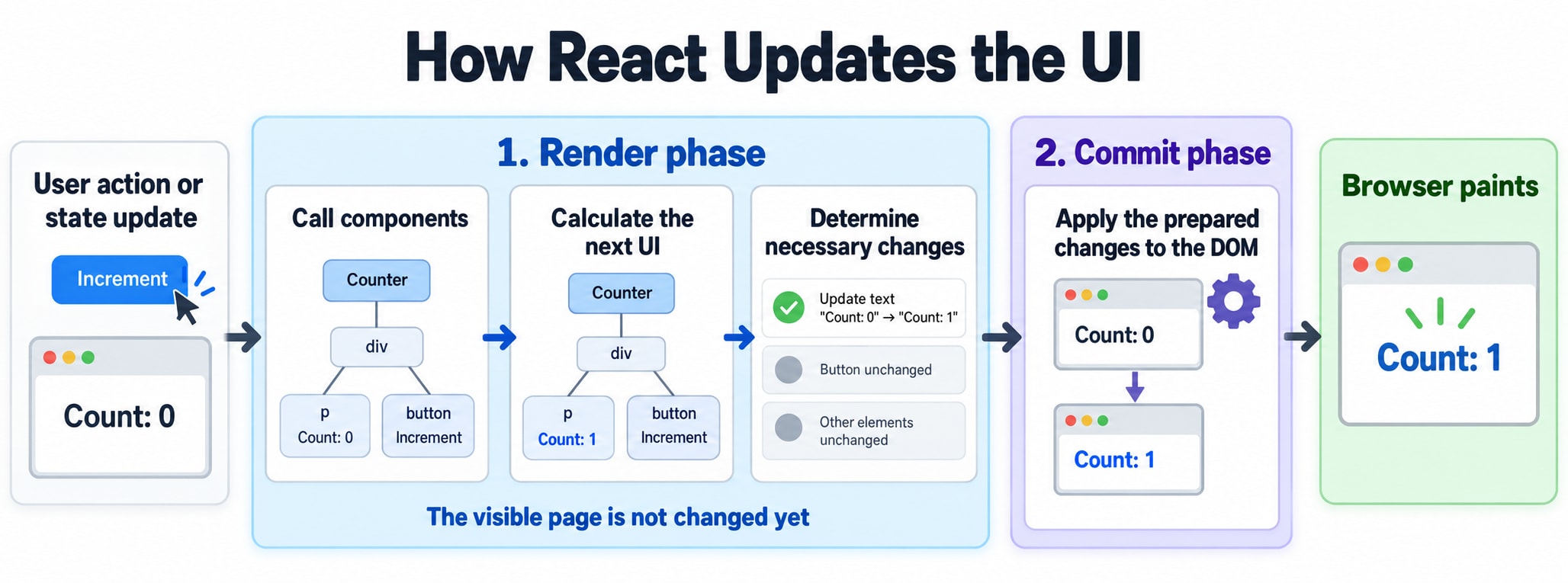
Phase | Its job |
|---|---|
Render | Calculate the next UI and determine the necessary changes. |
Commit | Apply the prepared changes to the browser DOM. |
Something first triggers this process, such as initially rendering the application or requesting a state update.
The trigger starts the work. It is not a third rendering phase.
The first time the counter appears
For this example, assume we are mounting the application into an empty browser container.
During rendering, React calls CartCounter. Its initial state is 0, so its output describes the paragraph and button.
React prepares the required DOM nodes. During commit, it inserts them into the document.
The browser then performs the work needed to display the page. Browser painting is separate from React’s render and commit phases.
The first click
The user clicks Add to cart.
setCount(current => current + 1);This queues an update. It does not change the count variable inside the already-running event handler. Each render’s handlers see that render’s state snapshot.
When React processes the update, it calls the component again. This time, the output describes:
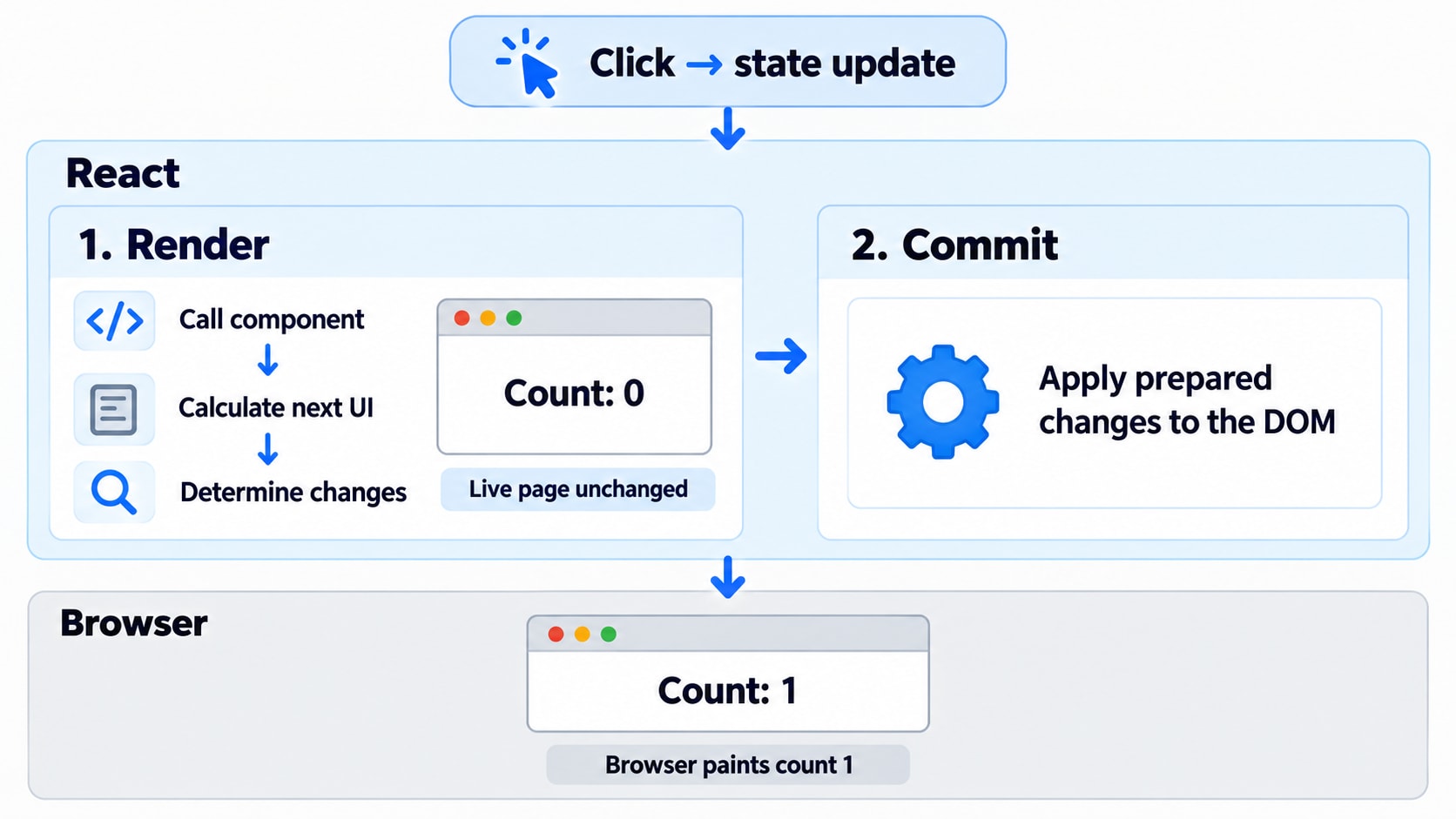
<p>Items in cart: 1</p>React determines the required change during rendering and applies it during commit.
4. A new description does not require a new DOM node
Our component ran again and returned new React elements.
Did React replace the paragraph?
For this update, it can keep the existing paragraph DOM node and change the relevant text. The button can remain too.
This distinction matters:
Re-rendering means React calculates the component’s output again.
Updating the DOM means React changes the browser document.
A component can re-render without producing any DOM changes. Running the component and replacing its visible elements are different operations.
But React still needs to decide whether the new paragraph represents the same paragraph as before.
That decision brings us to reconciliation.
5. How React matches the next UI with the previous UI
Imagine our page contains:
function Shop() {
  return (
    <main>
      <CartCounter />
      <ProductList />
    </main>
  );
}
React processes the interface a part at a time.
Calling Shop reveals its children. As React processes a child that needs rendering, calling that component reveals more of the interface.
At each relevant part, React checks how the new output matches the existing structure.
Calculating the next UI and checking it against the previous UI happen together as React works through the components.
This matching and update process is called reconciliation.
The word diffing usually refers to the comparisons used to find differences. The terms overlap in everyday explanations; they are not two completely independent passes.
To understand React’s matching decisions, start with element type and position.
Same type at the same position
Consider:
// Previous output
<p className="normal">Items in cart: 0</p>

// Next output
<p className="highlighted">Items in cart: 1</p>
Both describe a paragraph at the same position.
React can preserve the paragraph DOM node while updating its class and text.
Different type at the same position
Now replace:
<div>
  <CartCounter />
</div>
with:
<section>
  <CartCounter />
</section>
Changing the wrapper’s type replaces that subtree. The previous counter is removed, and a new counter is mounted with new state.
React does not search for visually similar output elsewhere and transfer the old state to it. Its matching rules establish which UI identity continues to exist.
The same principle applies to custom component types. Replacing <ProductCard /> with <ProductEditor /> changes the component identity, even if they happen to return similar HTML.
6. Sorting products exposes the importance of identity
Our application now lets users write a note beside each product.
function ProductRow({ product }) {
  const [note, setNote] = useState("");

  return (
    <li>
      <span>{product.name}</span>

      <input
        aria-label={`Note for ${product.name}`}
        value={note} => setNote(event.target.value)}
      />
    </li>
  );
}
product is a prop: an input supplied by the parent component. note is state belonging to this particular row.
We initially render the list like this:
{products.map((product, index) => (
  <ProductRow key={index} product={product} />
))}
A key helps React identify an item among its siblings across renders.
But these keys identify array positions:
Key | Product | Note |
|---|---|---|
| Keyboard | For my desk |
| Mouse | Travel bag |
The user reverses the order.
Key | Product after sorting | State retained at that key |
|---|---|---|
| Mouse | For my desk |
| Keyboard | Travel bag |
The notes now appear beside the wrong products.
React preserved the row identities we supplied. Our application needed identity to follow products, but our keys followed positions.
Use stable product IDs instead:
{products.map(product => (
  <ProductRow key={product.id} product={product} />
))}
Now each row’s identity can follow its product when siblings reorder.
Keys should be stable and unique among siblings. Generating a random key during each render creates changing identities and can reset local state. React also does not pass key through as an ordinary component prop.
A key is not a global tracking ID. Moving a component beneath a different parent does not generally preserve it just because its key stayed the same.
State preservation depends on where the component belongs in the tree, its type, and its key where applicable.
7. The page is correct, but the search box feels slow
The catalogue grows to contain many products. Each search renders cards with prices, badges, and other details.
Users notice that letters appear late while typing.
React may be making few DOM changes, yet preparing the next interface can still take substantial time.
That work can include:
Running component functions.
Filtering and sorting data.
Creating React element descriptions.
Matching children.
Preparing DOM updates.
A small visible change does not imply a small computation.
In a typical browser application, this JavaScript work shares the main thread with other important activity. A long uninterrupted task delays opportunities to handle input and display updates.
React therefore needs to answer another question:
Can less urgent rendering work wait while the browser handles a new interaction?
8. To pause work, React needs to remember its progress
Imagine completing a long checklist.
If you stop halfway through, you need to remember what is finished, what comes next, and whether a newer request has changed the remaining work.
React needs similar bookkeeping.
It maintains internal records describing parts of the interface and the work associated with them. These records hold information such as component type, state, pending updates, and links to related records.
React calls this kind of internal record a Fiber.
The connected records form a structure React can work through. You do not create or manipulate them in ordinary application code.
Fiber helps React represent rendering as manageable units of work instead of relying only on one uninterrupted chain of function calls.
Two terms help explain the arrangement:
Current tree: React’s representation of the committed interface.
Work-in-progress tree: the next result React is preparing.
These are internal records, not two complete browser DOM copies.
The existing interface can remain available while React prepares a possible replacement.
The precise structure of these records is an implementation detail. The useful idea is that React explicitly tracks rendering work, including unfinished work.
9. Another keystroke arrives before the results are ready
Suppose the input now contains r.
Updating the input promptly matters. Rebuilding a large result list may be less urgent.
React provides APIs for expressing that distinction. For example, useDeferredValue lets a part of the UI temporarily use an older value while React prepares an update using the newer one.
Conceptually, a search component can have:
const [query, setQuery] = useState("");
const deferredQuery = useDeferredValue(query);
The input uses query. The result list uses deferredQuery.
For this to help, the expensive results must also be able to skip unnecessary work during the urgent input update—for example, through an appropriate memoization boundary. Deferring a value alone does not make all surrounding component code cheap.
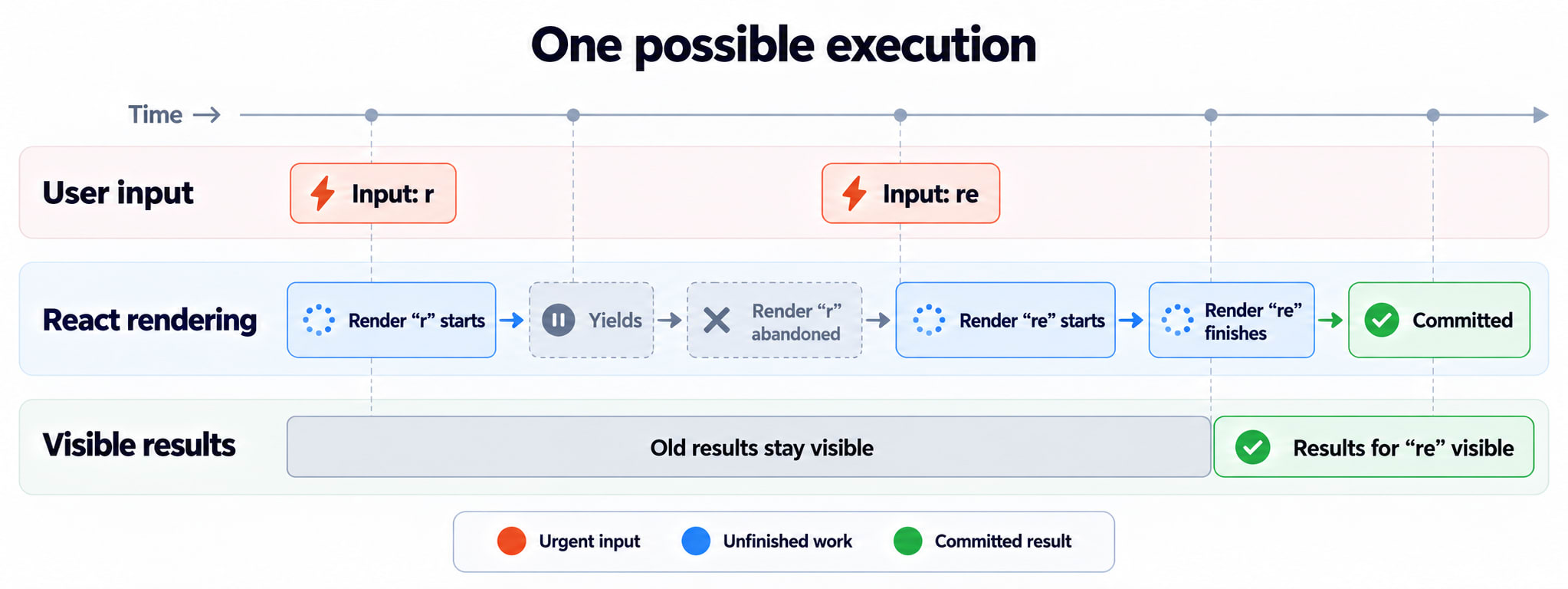
Now suppose React is preparing results for r, and the user types e.
One possible sequence is:
Step | What happens |
|---|---|
1 | The input update to |
2 | React starts preparing results for |
3 | React yields, giving the browser an opportunity to handle other work. |
4 | The next input update is processed; the input shows |
5 | React abandons the unfinished results for |
6 | React prepares and commits results for |
The previously committed results can remain visible while their replacement is prepared.
This background rendering is interruptible. “Background” describes how the work is scheduled; it does not mean the component code runs on a separate thread.
Deferring rendering also does not automatically debounce network requests.
10. Pausing, resuming, and abandoning are different
The phrase “React can pause rendering” leaves out several possibilities.
Term | Meaning |
|---|---|
Pause | Stop advancing the current rendering work for now. |
Resume | Continue work that remains useful. |
Restart | Begin another rendering attempt using the relevant updates. |
Abandon | Discard an unfinished result that will never be committed. |
React does not promise to resume every attempt exactly where it stopped. A newer update can make an unfinished result obsolete.
This ability to coordinate overlapping work is part of concurrent rendering.
Not every update is rendered in this interruptible way. Features such as transitions and deferred values let React use this capability where appropriate.
A transition marks applicable state updates as work that can give way to more urgent updates. For example, a results update can be a transition while the text input itself updates urgently.
11. React cannot pause your function at any arbitrary line
Consider this component:
function ProductResults({ products, query }) {
  const matches = expensiveSearch(products, query);

  return matches.map(product => (
    <ProductRow key={product.id} product={product} />
  ));
}
Suppose expensiveSearch runs synchronously for 200 milliseconds.
React cannot stop that ordinary JavaScript call halfway through and resume it later. The function must return control before React can make another scheduling decision.
React yields cooperatively at boundaries in its own rendering work.
The same caution applies to startTransition. Its callback executes immediately; it marks applicable state updates as transitions. Placing an expensive calculation inside the callback does not move that calculation to another thread.
Different bottlenecks therefore need different fixes:
Bottleneck | Possible direction |
|---|---|
Repeated unnecessary component work | Improve state placement or memoization. |
Expensive synchronous calculation | Improve the algorithm, cache results, divide the task, or use a Web Worker. |
Too many mounted list items | Consider virtualization: render only the relevant visible portion. |
Expensive DOM and layout work | Reduce the affected elements and investigate browser performance. |
Scheduling changes when work happens. It does not make the work disappear.
12. Interrupted rendering explains why components must be pure
Imagine sending analytics directly inside a component:
function ProductCard({ product }) {
  analytics.track("product-viewed", product.id);

  return <h2>{product.name}</h2>;
}
React starts rendering the card. The analytics event is sent.
Then React abandons that rendering attempt.
The user never saw the result, but the analytics system recorded a view.
This is why a component’s rendering logic should be pure: calculating its output should not produce observable changes outside that calculation.
Rendering may run again, and an attempt may never be committed. User-triggered actions belong in event handlers; synchronization with external systems may require an Effect. Tracking actual visibility can require additional visibility logic.
Purity makes repeating or abandoning rendering safe.
13. The result is ready—now React commits it
React has finished preparing the new results.
It now applies the required DOM changes.
The DOM mutation portion of a commit is synchronous; React does not spread those mutations across interruptible rendering slices.
Keeping preparation separate from publication allows React to discard unfinished work without exposing that unfinished result to the user.
However, a commit can still be expensive. Many DOM mutations can take time, and the resulting browser layout and painting can add more work.
“Concurrent rendering” does not guarantee that every interaction will be smooth.
It gives React more flexibility during preparation. Application code, commit work, and browser work still need to fit the performance needs of the interface.
14. What about React’s famous O(n) diffing?
You may have read that general tree comparison costs O(n³) while React uses an O(n) algorithm.
React’s legacy documentation presents this comparison to explain its practical matching heuristics: different types represent different trees, and keys help identify stable children.
The useful lesson is that React avoids searching exhaustively for the globally optimal transformation between arbitrary trees.
It does not mean every application update takes linear time overall. Your component calculations, repeated rendering attempts, DOM operations, and browser work also have costs.
Similarly, the Virtual DOM does not make React inherently faster than every carefully written direct DOM update. Its value includes letting developers describe complex interfaces while React manages their updates.
Following one update from beginning to end
Return to our original cart button.
The user clicks. A state update is queued. React processes the update and calls the component to calculate its next output.
As it works through the interface, React reconciles the new descriptions with existing identities. The paragraph can stay; its text needs to change.
React commits that change. The browser displays the updated count.
The larger search example follows the same broad model, but its preparation can involve scheduling, interrupted attempts, and work that never reaches commit.
The distinctions to remember are:
Concept | Question it answers |
|---|---|
Declarative UI | What should the interface look like for this data? |
React elements | How is that desired interface described? |
Render phase | What should the next interface be? |
Reconciliation | Which existing identities can continue, and what changes are needed? |
Fiber | How does React keep track of the structure and rendering work? |
Scheduling | Which pending work should React process now? |
Commit phase | Which prepared changes are applied to the DOM? |
Browser painting | When and how does the updated interface become pixels? |
Understanding these relationships lets you explain more than a counter update. It helps you diagnose misplaced state, slow typing, repeated component calls, and expensive work that a transition cannot fix.
The next step is to examine how React queues state updates and chooses which work to process first.