useEffect Hook
Understanding React useEffect: Keeping Your UI Connected to the Outside World
You are building a support dashboard.
An agent opens a customer’s profile. The page loads their information, starts an activity timer, and listens for browser events.
Everything works—until the agent switches customers quickly.
The previous customer’s request finishes late and replaces the current profile. A timer keeps running after the panel closes. A small tooltip briefly appears in the wrong position.
These problems share a common question:
When the interface changes, what should happen to the external work connected to it?
useEffect helps us describe that relationship. To use it well, we need to understand setup, cleanup, dependencies, and when an Effect is unnecessary.
We’ll build that understanding through the dashboard, one requirement at a time.
1. Calculating an interface is different from starting external work
A React component describes what should appear:
function CustomerName({ name }) {
  return <h2>{name}</h2>;
}
Here, name is a prop: an input supplied by another component.
Calling the function calculates a UI description. It does not need to open a connection, start a timer, or send a request.
Those operations interact with systems outside the rendering calculation. They are called side effects.
Examples include:
Requesting data from a server.
Starting a browser timer.
Subscribing to messages.
Attaching a browser event listener.
Updating a third-party widget.
Starting such work directly in the component body is risky:
function CustomerProfile({ customerId }) {
  // Avoid starting requests during rendering.
  fetch(`/api/customers/${customerId}`);

  return <p>Customer profile</p>;
}
React can render the component repeatedly. Some rendering attempts may never become visible.
External work needs a deliberate relationship to the committed interface. Effects provide one way to establish that relationship.
An Effect is synchronization caused by the component being displayed with particular inputs. A specific user action may instead belong directly in an event handler.
2. Start with a timer we can see
The dashboard needs a small counter that increases at regular intervals.
import { useEffect, useState } from "react";

function ActivityCounter({ intervalMs = 1000 }) {
  const [ticks, setTicks] = useState(0);

  useEffect(() => {
    const timerId = setInterval(() => {
      setTicks(previous => previous + 1);
    }, intervalMs);

    return () => {
      clearInterval(timerId);
    };
  }, [intervalMs]);

  return <p>Activity ticks: {ticks}</p>;
}
useState gives the component remembered data. useEffect connects it to the browser timer.
There are three parts to the Effect:
useEffect(
  () => {
    // Set up synchronization.

    return () => {
      // Clean up that setup.
    };
  },
  [intervalMs]
);
Part | Responsibility |
|---|---|
Setup function | Start the external work |
Cleanup function | Stop or undo that setup |
Dependencies | Describe the reactive inputs the work uses |
Here, a positive intervalMs determines how often the timer requests an increment.
The counter measures timer callbacks, not precise elapsed time. Browsers can delay callbacks, particularly when a tab is inactive.
3. Follow the timer through its lifetime
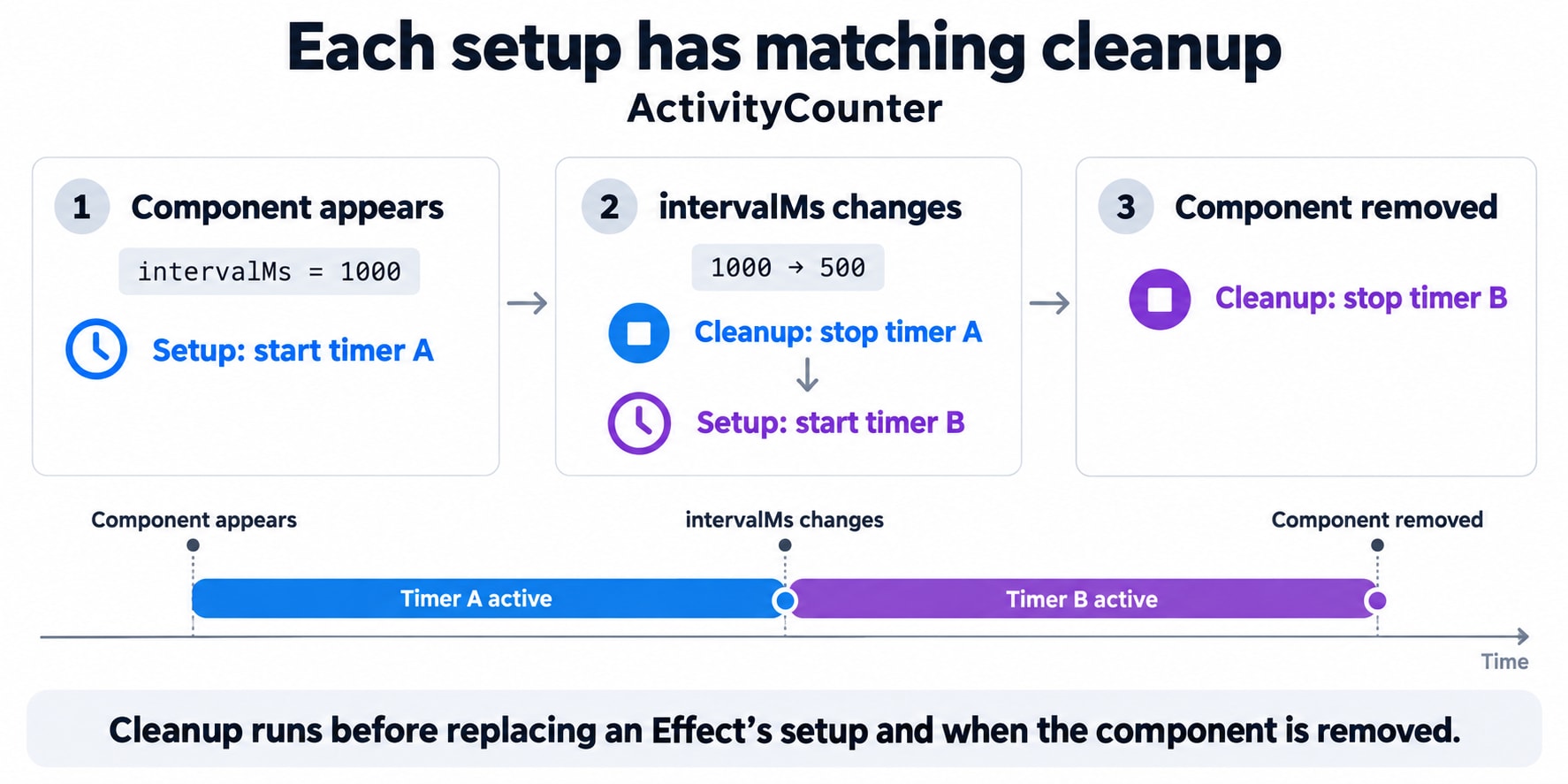
When the counter is first displayed, React commits its UI and runs the Effect’s setup.
The browser now has an interval.
Each callback requests a state update. React can render the new count, but the interval does not need replacing just because ticks changed.
The Effect depends on intervalMs, which is unchanged.
Now the dashboard changes the interval from 1000 to 500.
React handles the synchronization in this order:
Clean up the previous setup.
Create the new setup using the updated interval.
Finally, when the counter is removed, React cleans up the active timer.
An Effect can therefore start and stop several times while its component remains mounted. Cleanup is not exclusively an unmount event.
Cleanup remembers the setup it belongs to
The cleanup closes over the timerId created by that particular setup.
It does not need to look up a shared “latest timer” variable:
useEffect(() => {
  const timerId = setInterval(() => {
    setTicks(previous => previous + 1);
  }, intervalMs);

  return () => clearInterval(timerId);
}, [intervalMs]);
Each setup creates a timer and a matching cleanup.
This pairing is the foundation of reliable Effects.
4. Dependencies describe what the synchronization uses
The timer reads intervalMs from the component’s inputs:
}, [intervalMs]);That makes it a dependency.
A reactive value is a value from the component’s rendering scope that can differ between renders, such as a prop, state value, or a locally declared object or function.
When a dependency changes, the previous synchronization may no longer match the interface.
React compares dependencies individually using Object.is. It does not deeply inspect the contents of objects.
The three dependency forms
Form | Ordinary behavior |
|---|---|
No array | Setup runs after every commit in which this component rendered; previous cleanup runs first |
| Setup runs on mount, without dependency-driven reruns |
| Setup runs on mount and reruns after commits where |
These descriptions do not mean setup runs for abandoned renders. They also do not mean an empty array guarantees one execution for the application’s entire lifetime.
Remounting and development checks still matter.
Dependencies are not an arbitrary scheduling preference
This Effect reads customerId:
useEffect(() => {
  console.log("Selected customer:", customerId);
}, [customerId]);
Removing it from the array does not make the Effect independent of it. It hides the relationship from React.
React’s Hooks linter helps detect missing dependencies. Treat warnings as clues about the code’s data flow rather than instructions to suppress.
5. Why the timer does not depend on ticks
The timer increments state using:
setTicks(previous => previous + 1);The updater receives the pending previous value.
The Effect does not read the ticks variable from its render, so it does not need ticks as a dependency.
Compare this version:
useEffect(() => {
  const timerId = setInterval(() => {
    setTicks(ticks + 1);
  }, intervalMs);

  return () => clearInterval(timerId);
}, [intervalMs]);
Now the callback reads ticks, but the dependency array omits it.
The callback retains the value from the render that created it. That can make it repeatedly request the same next count.
This is a stale closure problem: a callback keeps using an earlier captured value when the intended behavior requires something newer.
Using an updater changes the calculation so it no longer needs to read that captured ticks value. It is a genuine removal of a dependency, not a workaround for the linter.
6. A freshly created object can restart an Effect
Suppose the dashboard creates an options object on every render:
const options = {
  intervalMs,
};

useEffect(() => {
  const timerId = setInterval(() => {
    setTicks(previous => previous + 1);
  }, options.intervalMs);

  return () => clearInterval(timerId);
}, [options]);
Each render creates a different object reference.
Even when intervalMs is unchanged, options is different. The Effect can therefore keep replacing the timer.
Prefer depending directly on the value the work needs:
useEffect(() => {
  const timerId = setInterval(() => {
    setTicks(previous => previous + 1);
  }, intervalMs);

  return () => clearInterval(timerId);
}, [intervalMs]);
The same issue occurs with functions created inside the component. Sometimes moving a helper inside the Effect makes its actual dependencies clearer.
Memoization is not the first required response to every dependency problem. Simplifying the relationship is often enough.
7. The profile starts loading customer data
The dashboard now needs a server request whenever the selected customer changes.
A successful request is only one outcome. We also need to handle:
Loading.
HTTP failure.
An unexpected response.
A customer change before completion.
Removal of the component before completion.
The example below assumes an application endpoint returning:
{
  name: "Asha",
  email: "asha@example.com"
}
It is an illustrative client-side data loader, not a complete caching layer.
import { useEffect, useState } from "react";

export default function CustomerProfile({ customerId }) {
  const [result, setResult] = useState(null);

  useEffect(() => {
    const controller = new AbortController();
    let active = true;

    setResult({
      customerId,
      status: "loading",
    });

    async function loadCustomer() {
      try {
        const response = await fetch(
          `/api/customers/${encodeURIComponent(customerId)}`,
          { signal: controller.signal }
        );

        if (!response.ok) {
          throw new Error(`Request failed: ${response.status}`);
        }

        const customer = await response.json();

        if (
          !customer ||
          typeof customer.name !== "string" ||
          typeof customer.email !== "string"
        ) {
          throw new Error("Unexpected customer response");
        }

        if (active) {
          setResult({
            customerId,
            status: "success",
            customer,
          });
        }
      } catch (error) {
        if (!active || controller.signal.aborted) {
          return;
        }

        setResult({
          customerId,
          status: "error",
        });
      }
    }

    loadCustomer();

    return () => {
      active = false;
      controller.abort();
    };
  }, [customerId]);

  if (
    result === null ||
    result.customerId !== customerId ||
    result.status === "loading"
  ) {
    return <p role="status">Loading customer…</p>;
  }

  if (result.status === "error") {
    return <p role="alert">We couldn’t load this customer.</p>;
  }

  return (
    <section>
      <h2>{result.customer.name}</h2>
      <p>{result.customer.email}</p>
    </section>
  );
}
The result includes customerId so the component can tell which selection it belongs to.
When the prop changes, the component can render before the new Effect setup runs. Checking the ID prevents the previous customer’s data from appearing as the newly selected profile during that interval.
8. Two requests finish in the wrong order
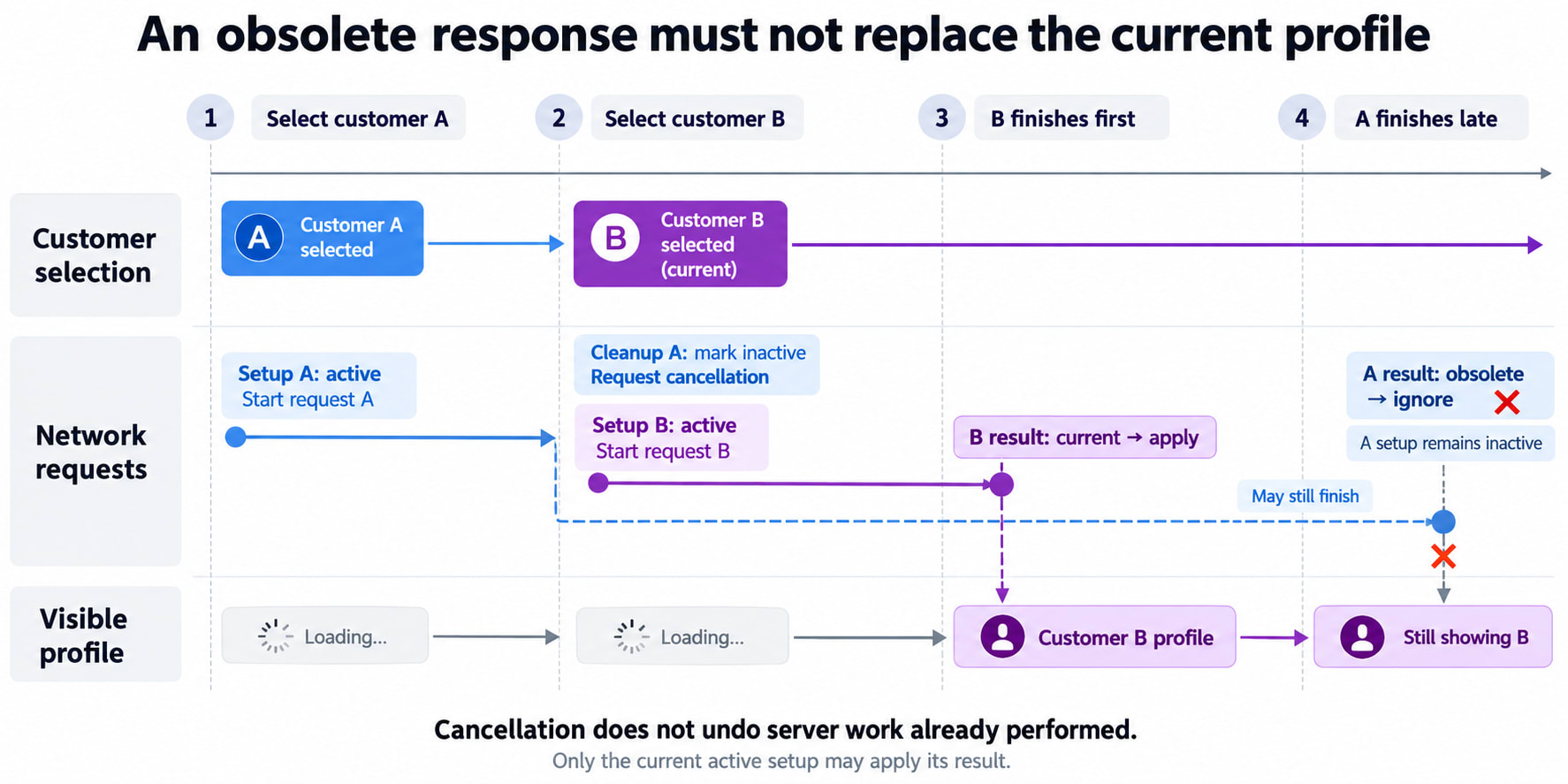
Imagine this sequence:
Customer A is selected.
Request A starts.
Customer B is selected.
Request B starts and finishes.
The slower request A finishes afterward.
Without protection, A could overwrite B.
Our cleanup addresses this in two ways:
return () => {
  active = false;
  controller.abort();
};
active = false makes that setup’s result ineligible to update state.
controller.abort() requests cancellation of the fetch operation.
They have related but different purposes: one guards publishing a result, and the other cancels unnecessary work where supported.
Aborting a browser request does not undo work that a server has already performed.
This is why cleanup matters even when a request is only reading data. The request’s result must still belong to the interface that needs it.
Why not make the Effect callback async?
Avoid:
useEffect(async () => {
  // ...
}, [customerId]);
An async function returns a Promise.
React expects the setup function to return either a cleanup function or nothing. Declaring and calling an async function inside the setup preserves that contract.
For larger applications, framework data loading or a query library can also provide caching, deduplication, retries, and other behavior that manual Effects do not supply automatically.
9. Event listeners need the same ownership discipline
The dashboard also displays the browser window width.
import { useEffect, useState } from "react";

function WindowWidth() {
  const [width, setWidth] = useState(null);

  useEffect(() => {
    function handleResize() {
      setWidth(window.innerWidth);
    }

    handleResize();
    window.addEventListener("resize", handleResize);

    return () => {
      window.removeEventListener("resize", handleResize);
    };
  }, []);

  return (
    <p>
      Window width: {width === null ? "Measuring…" : `${width}px`}
    </p>
  );
}
The setup creates one handler and registers it.
The cleanup removes that same handler from the same event target.
No changing component value is read inside this Effect, so an empty dependency array is appropriate.
The browser access happens in the Effect, rather than during rendering. Effects run on the client, not during server rendering.
Subscriptions and WebSocket connections follow the same ownership principle: establish the resource, then stop that specific resource when its setup is no longer needed.
10. Development seems to start everything twice
You run the dashboard locally and observe:
Set up timer
Clean up timer
Set up timer
Where Strict Mode’s Effect checks are enabled, React performs an additional setup-and-cleanup cycle in development.
This helps reveal code that starts resources but does not properly stop them.
A correct timer Effect should leave one active timer after that sequence. A missing cleanup may leave two.
Do not solve this by adding a “has already run” flag that merely prevents the second setup. The resource should behave correctly when setup and cleanup are exercised again.
The useful question is:
Can this synchronization be stopped and started again without leaving duplicate or obsolete work behind?
11. Some updates do not need an Effect
The profile displays a full name.
It might be tempting to synchronize another state variable:
const [fullName, setFullName] = useState("");

useEffect(() => {
  setFullName(`${firstName} ${lastName}`);
}, [firstName, lastName]);
But this is a calculation from existing inputs:
const fullName = `${firstName} ${lastName}`;There is no external system to synchronize.
Similarly, sending a message because the agent clicked Send usually belongs in that button’s event handler:
async function handleSend() {
  await sendMessage(customerId, message);
}
An Effect should not become a general mechanism for routing every event through state first.
Requirement | Typical location |
|---|---|
Calculate a display value | During rendering |
Perform work caused by a specific click | Event handler |
Keep a timer, subscription, or external widget synchronized | Effect |
This separation prevents unnecessary renders and makes the cause of an operation easier to follow.
12. Why an Effect can produce an infinite loop
Consider:
useEffect(() => {
  setCount(previous => previous + 1);
});
There is no dependency array.
The Effect updates state, which produces another render and commit. The Effect runs again and requests another update.
A dependency array alone is not a universal fix. This also loops:
useEffect(() => {
  setCount(previous => previous + 1);
}, [count]);
The Effect changes its own dependency.
When investigating a loop, ask:
Does the Effect update state?
Does that update cause the Effect to run again?
Is this external synchronization, or a calculation that belongs elsewhere?
Keep separate synchronization responsibilities in separate Effects when they have different inputs and cleanup needs.
13. A tooltip introduces useLayoutEffect
Our dashboard now shows a tooltip above a customer badge.
To position it correctly, we need its rendered height.
The sequence is:
Render the tooltip.
Measure the resulting DOM element.
Calculate the correct position.
Display the correctly positioned result.
If the browser paints between the first and corrected positions, the user may see a jump.
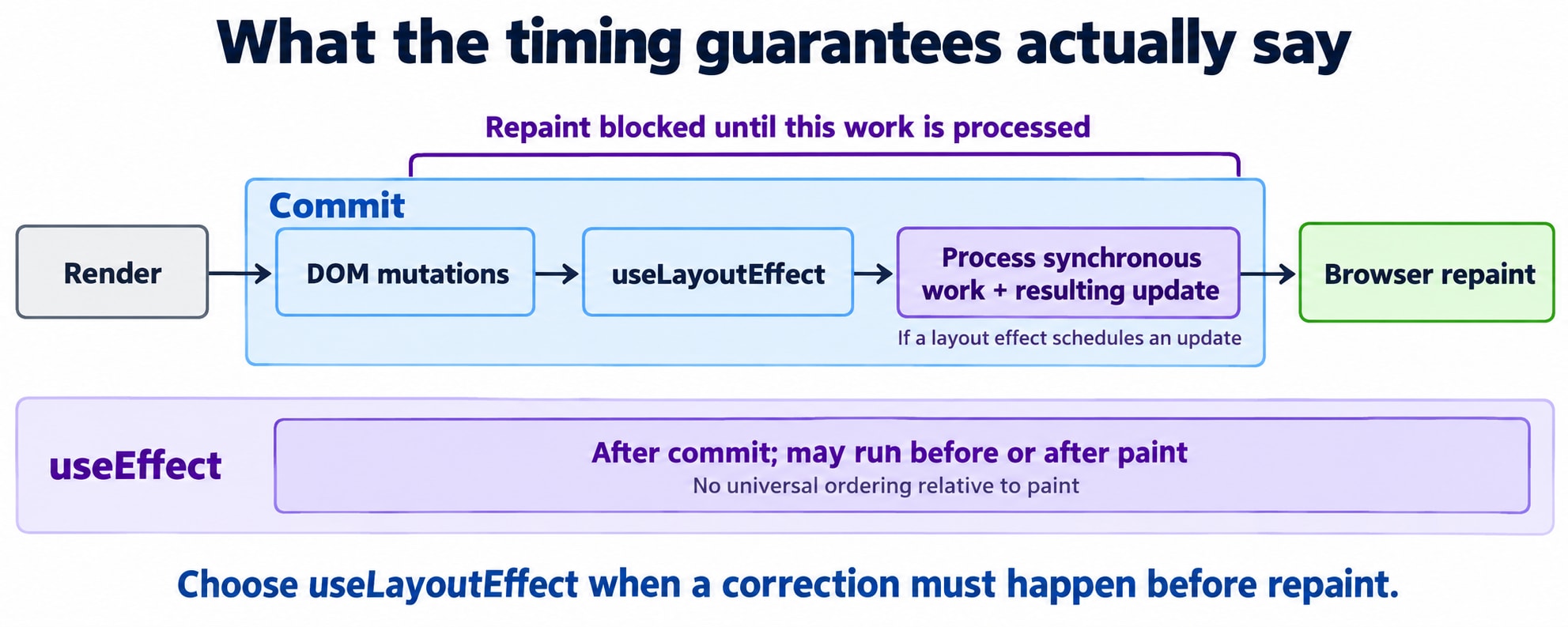
useLayoutEffect is designed for work that must happen after DOM mutations but before the browser repaints.
A simplified example:
import { useLayoutEffect, useRef, useState } from "react";

function Tooltip({ text, anchorTop, anchorBottom, left }) {
  const tooltipRef = useRef(null);
  const [height, setHeight] = useState(0);

  useLayoutEffect(() => {
    const nextHeight =
      tooltipRef.current.getBoundingClientRect().height;

    setHeight(nextHeight);
  }, [text]);

  const fitsAbove = anchorTop - height - 8 >= 0;

  const top = fitsAbove
    ? anchorTop - height - 8
    : anchorBottom + 8;

  return (
    <div
      ref={tooltipRef}
      role="tooltip"
      style={{
        position: "fixed",
        top,
        left,
        width: 220,
        padding: 8,
        boxSizing: "border-box",
      }}
    >
      {text}
    </div>
  );
}
The parent supplies the anchor’s viewport coordinates. This example measures on mount and when text changes; a complete tooltip also needs to handle movement, resizing, accessibility relationships, and other layout changes.
useLayoutEffect and state updates scheduled from it block painting until React processes that work. Use it when the pre-paint correction matters—not merely because you want to log an element’s size.
14. useEffect does not guarantee “after paint”
A common diagram shows:
Render → DOM changes → Layout Effect → Paint → EffectThat can describe an execution, but it is not a universal timing guarantee.
For work not caused by an interaction, React generally lets the browser paint before running passive Effects—the Effects declared with useEffect.
For interaction-related work, an Effect may run before paint. Other scheduling details can also affect the order.
The dependable distinction is:
Hook | Timing property to rely on |
|---|---|
| Synchronizes committed UI; not an API for guaranteeing work happens after paint |
| Runs after DOM mutations and blocks repaint while its synchronous work is processed |
If both hooks log during the same normal mount, the layout Effect’s setup runs before the passive Effect’s setup. Those logs alone do not prove when the browser painted.
15. Effects are not exact lifecycle-method translations
Class components organize related work across methods such as:
componentDidMountcomponentDidUpdatecomponentWillUnmount
For a timer, these might start it, replace it when configuration changes, and stop it.
An Effect groups the relationship differently:
useEffect(() => {
  // Establish synchronization for these inputs.

  return () => {
    // Stop this particular setup.
  };
}, [dependencies]);
useEffect(..., [customerId]) runs on mount as well as on relevant updates. Its cleanup can run before replacement, not only when the component is removed.
The better question is therefore:
What external work should be active for the current inputs, and how do I stop that work when it is no longer valid?
The dashboard now knows how to stop what it starts
The timer has a matching cleanup. Requests cannot publish obsolete results. Event listeners are removed using the handlers that were registered.
Simple calculations remain in rendering. User-triggered operations remain in event handlers. Layout measurement uses a pre-paint hook only when the visible result requires it.
Before writing an Effect, ask:
What external system am I synchronizing with?
Which values does that synchronization use?
What makes the current setup obsolete?
How does cleanup stop or undo it?
Can an old callback or response still affect the current interface?
Does this work actually require pre-paint timing?
An Effect becomes easier to reason about when it describes one clear relationship, with explicit inputs and cleanup that belongs to its setup.