useEffect Polyfill
Can We Build Our Own useEffect? A React Experiment That Reveals More Than Expected
The dashboard looks finished.
A small activity counter increases every second. A dropdown changes its speed. A text field lets the user rename the dashboard.
Then someone asks:
“If
useEffectjust checks whether dependencies changed, couldn’t we write it ourselves?”
It sounds reasonable.
Remember the previous values. Compare them with the current values. Run a function when something changes.
Perhaps twenty lines of JavaScript?
Let’s try.
Along the way, we will discover why remembering values is only a small part of the problem—and how to build useful custom Hooks without accidentally taking over responsibilities that belong to React.
1. First, What Are We Trying to Reproduce?
A React component is a function that describes part of the interface.
A Hook is a function that lets a component use React features, such as state or Effects.
An Effect connects a component to something outside React’s UI calculations: a timer, browser event listener, network connection, or another external system.
Here is our activity counter:
import { useEffect, useState } from "react";

function ActivityCounter({ intervalMs }) {
  const [ticks, setTicks] = useState(0);

  useEffect(() => {
    const timerId = setInterval(() => {
      setTicks((current) => current + 1);
    }, intervalMs);

    return () => {
      clearInterval(timerId);
    };
  }, [intervalMs]);

  return <p>Activity ticks: {ticks}</p>;
}
There are three parts to the Effect:
Setup: start the timer.
Cleanup: stop that timer.
Dependencies: declare the changing values used by the setup and cleanup code.
Here, intervalMs determines the timer’s delay.
If it changes, the existing timer must stop and a new one must start. When the component leaves the screen, its timer must stop too.
Our custom implementation must preserve that behavior.
Already, “run a callback when values change” sounds slightly incomplete.
2. The First Challenge: Remembering Previous Values
Suppose we write:
let previousDependencies = [];inside our custom Hook.
That variable is created again whenever the Hook’s function executes. It does not automatically remember what happened during the previous render.
Moving it outside the Hook creates a different problem: every component using the Hook would share the same variable.
We need memory associated with one mounted component instance.
React provides useRef for values that should persist without triggering a render when they change:
const previousDependencies = useRef(null);Conceptually, the returned value looks like:
{
  current: null
}
React preserves this ref object across re-renders. Assigning to .current does not ask React to update the interface.
A ref is useful for things such as timer identifiers or DOM references. State is appropriate when changing a value should update what the user sees. Also, refs are not unrestricted storage during rendering: generally, read and write them in event handlers or Effects, rather than during render.
Question | State | Ref |
|---|---|---|
Does the value survive re-renders of the same mounted instance? | Yes | Yes |
Does changing it request a render? | Through the state setter, subject to React’s update behavior | No |
Typical example | Visible tick count | Timer identifier |
A ref gives us memory.
It does not give us an Effect scheduler.
That distinction will matter shortly.
3. The Tempting First Attempt
We might write this:
// Intentionally incorrect.
// Do not use this implementation in an application.

function useCustomEffect(setup, dependencies) {
  const isFirstRender = useRef(true);
  const previousDependencies = useRef([]);

  if (isFirstRender.current) {
    isFirstRender.current = false;
    setup();
    return;
  }

  const changed =
    dependencies === undefined ||
    JSON.stringify(dependencies) !==
      JSON.stringify(previousDependencies.current);

  if (changed) {
    setup();
  }

  previousDependencies.current = dependencies ?? [];
}
The first argument, setup, is simply a function.
Passing it into another function does not execute it:
useCustomEffect(() => {
  console.log("Starting");
}, []);
Calling setup() executes it.
The second argument contains the values we want to compare.
At first glance, the code seems to cover the essential cases:
First render? Run setup.
Dependencies changed? Run setup.
No dependency array? Run setup again.
But it contains several separate problems.
A small bug: the first dependencies are never saved
The first-render branch returns before this line:
previousDependencies.current = dependencies ?? [];If the initial dependencies are [1000], the stored dependencies remain [].
The next render can incorrectly report a change even if the interval is still 1000.
That is easy to fix.
The next problem is much more fundamental.
4. The Bigger Bug: Setup Runs During Rendering
When React calls our component, the component calls our custom Hook.
Our Hook immediately calls setup().
That means the timer starts while React is calculating the interface.
To understand why this is unsafe, distinguish two phases:
Render: React calls components and calculates the next UI.
Commit: React applies the necessary changes to the browser’s DOM.
The DOM is the browser’s representation of the page. Rendering a component does not itself mean that its calculated result has been committed.
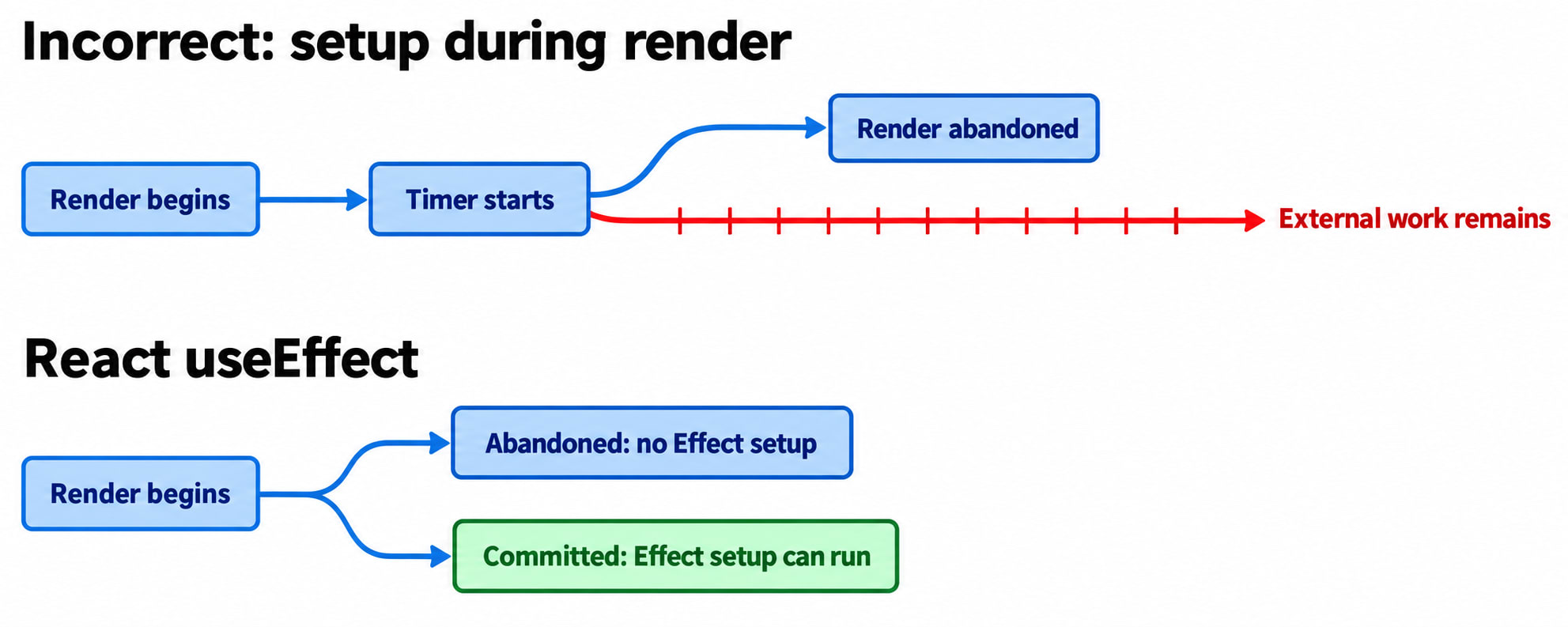
React can repeat rendering work or abandon a render attempt. External actions performed during that calculation have already happened, even if React never uses its result.
Imagine this sequence:
React starts rendering a dashboard with a new interval.
Our custom Hook starts a timer immediately.
React abandons that render attempt.
The timer continues running.
Our Hook has started work for a UI that never became active.
React expects rendering to remain pure: calculating the UI should not start timers, subscribe to services, or otherwise modify external systems. Moving those operations into a function named useCustomEffect does not change where they execute.
A custom Hook runs as part of its component’s execution. Its name does not give its callback special timing.
5. Comparing Dependencies: Why JSON Gives the Wrong Answer
Even if we corrected the timing, this comparison would still be unsuitable:
JSON.stringify(next) !== JSON.stringify(previous)Serialization converts values into a textual representation.
Dependency comparison asks whether each value is the same according to React’s comparison rule.
Those are different questions.
Consider two objects:
const first = { intervalMs: 1000 };
const second = { intervalMs: 1000 };

JSON.stringify(first) === JSON.stringify(second);
// true

Object.is(first, second);
// false
Their serialized contents match, but they are distinct objects.
Functions reveal another problem:
JSON.stringify([() => "first"]);
// "[null]"

JSON.stringify([() => "second"]);
// "[null]"
Different callbacks become identical JSON.
Other problematic cases include:
JSON.stringify([undefined]);
// "[null]"

JSON.stringify([NaN]);
// "[null]"
Circular references cause serialization to throw. BigInt values also throw by default. These are normal consequences of JSON’s serialization rules, not useful dependency semantics.
React compares corresponding dependencies using Object.is.
Some useful examples:
Object.is(1000, 1000); // true
Object.is("fast", "fast"); // true

Object.is({}, {}); // false
Object.is([], []); // false

const settings = { intervalMs: 1000 };
Object.is(settings, settings); // true

Object.is(NaN, NaN); // true
Object.is(0, -0); // false
For objects and functions, identity matters. Two separately created objects do not become the same object because their properties match.
6. An Experiment We Can Safely Build: The Comparator
We can study dependency comparison without pretending to implement an Effect.
This ordinary JavaScript function has no React lifecycle responsibilities:
function haveDependenciesChanged(previous, next) {
  // No dependency array: request another setup cycle.
  if (next === undefined) {
    return true;
  }

  // No previous dependency list: initial comparison.
  if (previous === undefined) {
    return true;
  }

  // Defensive handling for this standalone exercise.
  if (previous.length !== next.length) {
    return true;
  }

  return next.some(
    (dependency, index) =>
      !Object.is(dependency, previous[index])
  );
}
Try it:
haveDependenciesChanged(undefined, []);
// true: initial comparison

haveDependenciesChanged([], []);
// false

haveDependenciesChanged([1000], [1000]);
// false

haveDependenciesChanged([1000], [500]);
// true

haveDependenciesChanged([1000], undefined);
// true

const settings = { intervalMs: 1000 };

haveDependenciesChanged([settings], [settings]);
// false

haveDependenciesChanged(
  [{ intervalMs: 1000 }],
  [{ intervalMs: 1000 }]
);
// true
This is a comparison exercise, not React’s internal implementation.
In actual Effect code, write a dependency array inline with a fixed number and order of entries. Do not dynamically switch its shape.
Also, an empty array is not detected using:
dependencies === []Each [] creates a different array object.
For our comparator, two empty arrays compare as unchanged because there are no differing entries.
The three public forms of useEffect mean:
Declaration | Normal setup behavior |
|---|---|
| After each commit involving that component’s render |
| On mount; no reruns caused by dependency changes |
| On mount and after commits where |
Before replacement setup, React runs the previous cleanup. Cleanup also runs when the component unmounts. Development checks can add a setup/cleanup cycle. Effects run on the client, and their timing relative to browser paint can vary.
Our comparator answers one question:
“Do these dependency values differ?”
It cannot answer:
“Has React committed this result, and when should the previous resource be released?”
7. The Second Attempt: A Fix That Quietly Stops the Timer
We recognize the rendering problem and move our logic inside the real useEffect.
Surely that fixes it?
Here is a simplified version of the second approach:
// Still incorrect.
// Demonstrates a cleanup bug.

function useCustomEffect(setup, dependencies) {
  const previousDependencies = useRef(undefined);

  useEffect(() => {
    const changed = haveDependenciesChanged(
      previousDependencies.current,
      dependencies
    );

    if (changed) {
      previousDependencies.current = dependencies;
      return setup();
    }
  });
}
Notice that the outer useEffect has no dependency array.
Now return to our dashboard.
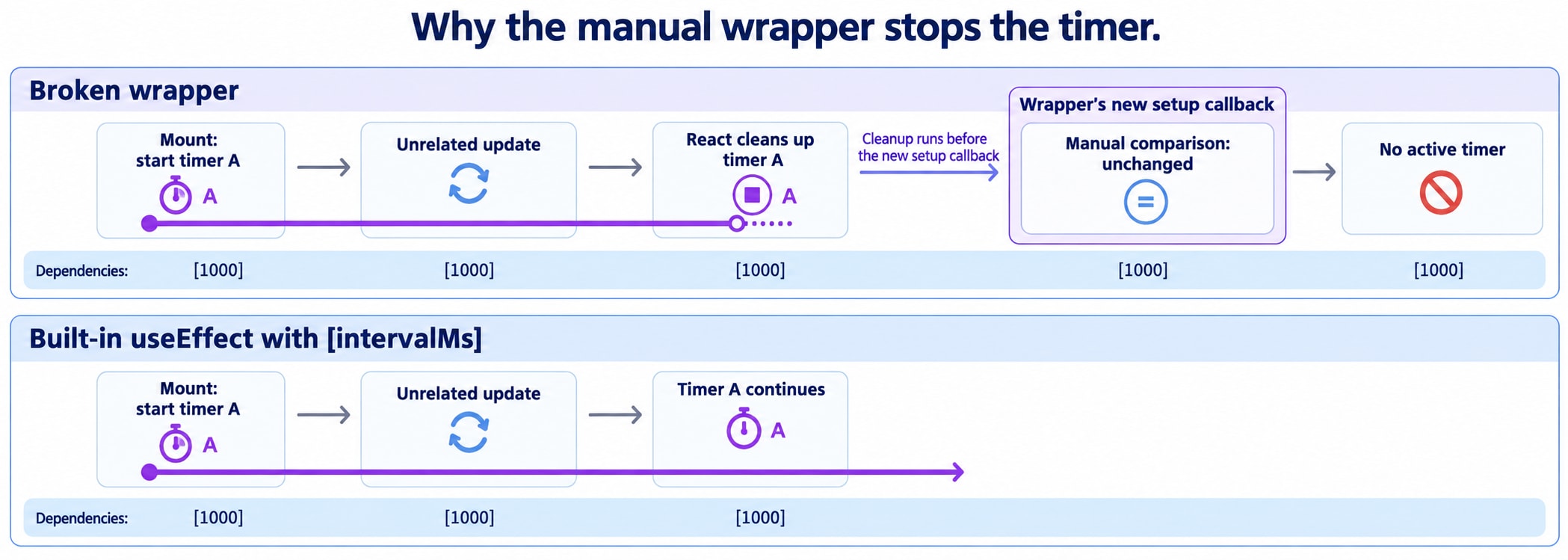
Its timer delay is 1000, and the user types a new dashboard name. That updates unrelated state and causes another render.
Here is what happens:
Step | Outer React Effect | Our manual comparison |
|---|---|---|
Initial mount | Runs setup | Starts timer A |
Dashboard name changes | Runs previous cleanup | Timer A stops |
New outer setup runs | Calls our comparison |
|
Comparison returns unchanged | No replacement setup is returned | No timer is running |
The comparison is correct.
The behavior is wrong.
React already stopped the timer before our comparison decided to skip restarting it.
With a tick counter, the timer’s own first state update can trigger this failure. The counter may advance once and then stop.
This conclusion follows directly from the wrapper’s code and React’s cleanup ordering: the wrapper asks React to restart the outer Effect on every commit, while its inner condition sometimes suppresses the replacement setup.
Setup and cleanup must follow the same lifecycle decision.
8. Strict Mode Reveals the Same Design Problem
React’s Strict Mode enables additional development checks.
Where the extra Effect check applies, React exercises an initial sequence of:
Setup.
Cleanup.
Setup again.
This checks whether cleanup properly reverses setup.
Our wrapper can fail that check:
First setup stores
[1000]and starts a timer.Cleanup stops the timer.
The next setup sees the same stored dependencies.
The wrapper skips starting another timer.
A “first render” flag does not solve this. A component’s first render and an Effect’s need to start synchronizing are different concepts.
Nor should we add a ref flag merely to suppress Strict Mode’s repeated setup. That can hide missing or incorrect cleanup rather than make the resource lifecycle reliable.
The important property is:
After cleanup, setup must be able to establish a working resource again.
9. The Better Goal: Build a Custom Hook for the Feature
The dashboard does not actually need a new Effect engine.
It needs reusable timer behavior.
A custom Hook is a function whose name starts with use and that can call other Hooks. It packages reusable React logic.
Rather than expose an arbitrary callback and dependency array, we can expose the choices our feature actually needs:
const ticks = useTickCounter(intervalMs, enabled);That API describes the feature:
How frequently should it tick?
Should it currently be running?
What is the current count?
React’s documentation recommends custom Hooks that express a concrete purpose. Each call gets its own state; extracting a Hook shares logic, not one global state value. Call Hooks at the top level of components or other Hooks, before conditional returns.
Here is the implementation:
import { useEffect, useState } from "react";

function useTickCounter(intervalMs, enabled) {
  const [ticks, setTicks] = useState(0);

  useEffect(() => {
    if (!enabled) {
      return;
    }

    const timerId = setInterval(() => {
      setTicks((current) => current + 1);
    }, intervalMs);

    return () => {
      clearInterval(timerId);
    };
  }, [intervalMs, enabled]);

  return ticks;
}
This Hook assumes intervalMs is a positive, valid timer delay.
There is no manual dependency storage, no first-render flag, and no JSON comparison.
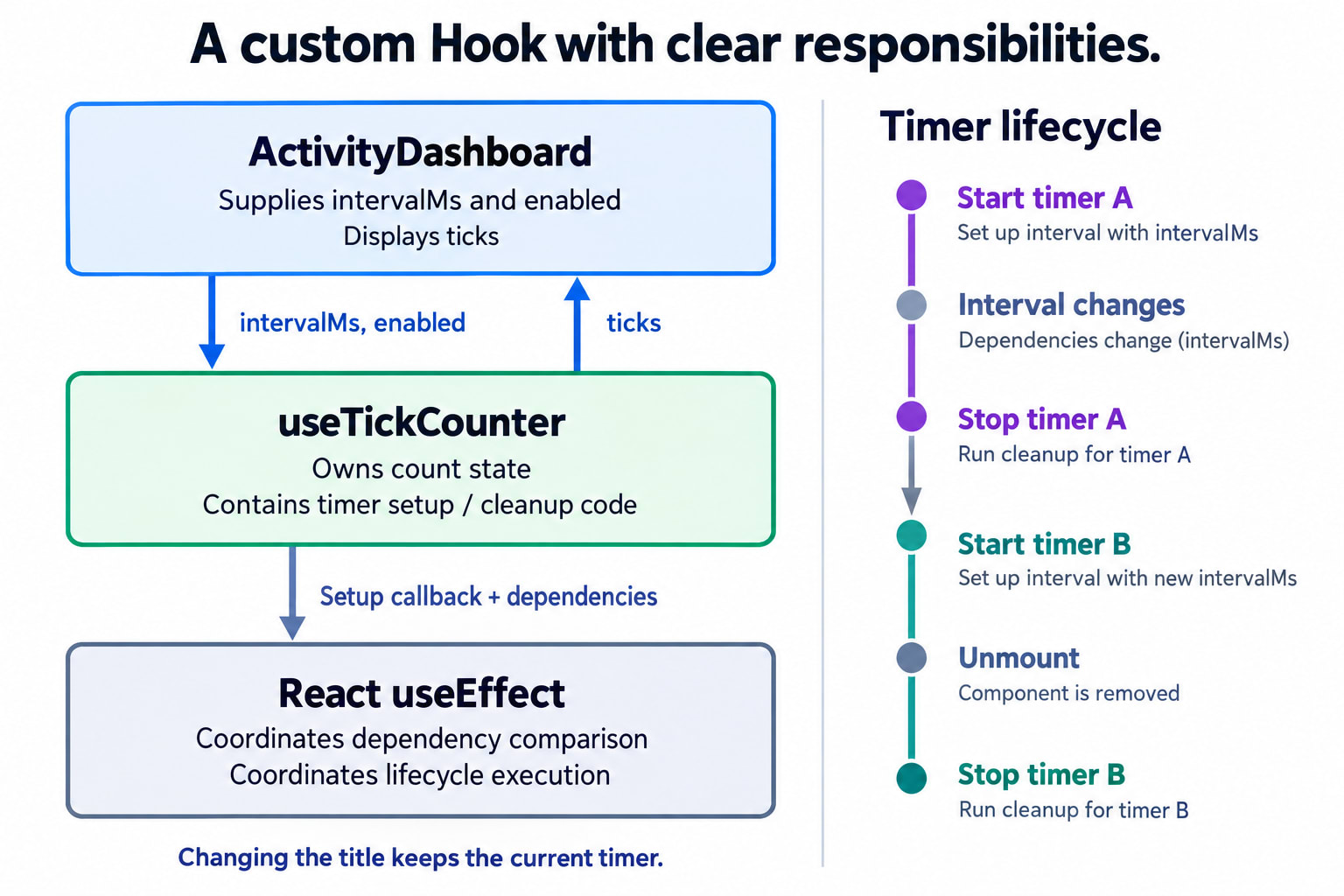
The Hook owns the feature logic. React owns the Effect lifecycle.
Why no ref for the timer identifier?
The cleanup function already remembers the timerId created by its corresponding setup.
That is a JavaScript closure: a function retains access to variables from the surrounding function execution.
We would need a ref if other code, such as an event handler, needed access to the identifier across renders.
For this design, keeping the identifier local makes ownership straightforward: each setup creates one timer, and its cleanup stops that exact timer.
10. The Complete Dashboard
Here is a complete example you can place in a React application:
import { useEffect, useState } from "react";

function useTickCounter(intervalMs, enabled) {
  const [ticks, setTicks] = useState(0);

  useEffect(() => {
    if (!enabled) {
      return;
    }

    const timerId = setInterval(() => {
      setTicks((current) => current + 1);
    }, intervalMs);

    return () => {
      clearInterval(timerId);
    };
  }, [intervalMs, enabled]);

  return ticks;
}

export default function ActivityDashboard() {
  const [title, setTitle] = useState("Team activity");
  const [intervalMs, setIntervalMs] = useState(1000);
  const [enabled, setEnabled] = useState(true);

  const ticks = useTickCounter(intervalMs, enabled);

  return (
    <section>
      <h1>{title || "Untitled dashboard"}</h1>

      <label>
        Dashboard name
        <input
          value={title} => {
            setTitle(event.target.value);
          }}
        />
      </label>

      <label>
        Tick interval
        <select
          value={intervalMs} => {
            setIntervalMs(Number(event.target.value));
          }}
        >
          <option value={1000}>Every second</option>
          <option value={500}>Every half-second</option>
          <option value={2000}>Every two seconds</option>
        </select>
      </label>

      <button
        type="button" => {
          setEnabled((current) => !current);
        }}
      >
        {enabled ? "Pause" : "Resume"}
      </button>

      <p>Activity ticks: {ticks}</p>
      <p>Status: {enabled ? "Running" : "Paused"}</p>
    </section>
  );
}
The component calls the Hook unconditionally. The decision to start a timer lives inside the Effect.
Our intended behavior is now explicit:
Action | Result |
|---|---|
Edit the dashboard name | Existing timer continues |
Receive a timer tick | Count increases; timer continues |
Change the interval | Old timer stops; replacement starts |
Pause | Timer stops; count remains |
Resume | A new timer starts; counting continues |
Remove the dashboard | Active timer is cleaned up |
Pause preserves the count, not the remaining fraction of a timer interval. Resume starts a fresh interval.
Also, this counts timer callbacks. It is not a precise elapsed-time clock: browser timers can be delayed.
11. Why the Dependency List Matters to the API
Inside our Effect, two changing values control the timer:
intervalMs
enabled
Both appear in the dependency list:
[intervalMs, enabled]The timer callback uses a functional state updater:
setTicks((current) => current + 1);It does not read ticks from the render that created the callback.
That matters because capturing and depending on ticks would make each tick restart the timer.
React’s dependency lint rule helps detect missing values. Wrapping Effects in a generic callback-and-dependencies API adds tooling responsibilities: custom Effect-style Hooks may require explicit linter configuration. A feature-specific Hook keeps the actual Effect and its dependencies together where the standard rule can inspect them.
Dependencies describe what an Effect reads. They should not be edited merely to force a preferred execution schedule.
12. What This Experiment Actually Teaches
We started with a plausible idea:
“Remember dependencies, compare them, and call a function.”
The experiment uncovered several independent responsibilities:
Responsibility | What we learned |
|---|---|
Persistent memory | Refs can remember non-visual values across re-renders |
Dependency comparison | Compare corresponding values with |
Render safety | External work must not start during UI calculation |
Cleanup ownership | Each resource needs matching cleanup |
Restart behavior | Skipping setup after cleanup can leave the feature inactive |
React integration | A comparison helper does not know which render commits |
Abstraction design | A useful custom Hook exposes the feature’s meaningful inputs |
You can implement a dependency comparator in ordinary JavaScript.
You can implement reusable timer behavior with a custom Hook.
But refs and a comparison function alone cannot reproduce React’s Effect lifecycle. A normal custom Hook must compose React’s lifecycle primitives to participate in that lifecycle correctly.
The dashboard now keeps ticking while the user edits its name. It changes speed correctly. It pauses, resumes, and releases its timer when removed.
The useful abstraction turned out to be:
const ticks = useTickCounter(intervalMs, enabled);Small enough to understand. Specific enough to use correctly. Built on the lifecycle React already provides.