Functional vs Class Components
React Class Components vs Function Components: Understanding the Change Beyond Syntax
You join a team maintaining a React application.
One component begins like this:
class PhotoGallery extends Component {
  // ...
}
Another begins like this:
function PhotoGallery() {
  // ...
}
Both display photos. Both remember user interactions. Both load data.
At first, the difference looks cosmetic: one uses a class, the other uses a function.
Then you try to move some code between them.
A state update removes a field you expected to preserve. A timer repeatedly uses an old value. A request finishes after the user has already opened another album.
These surprises reveal the real lesson: moving from classes to functions changes how we organize state and describe work that interacts with the outside world.
We’ll build that understanding through a counter, an automatic timer, and a photo gallery. Each new requirement will introduce the next concept.
React still supports class components, but its documentation recommends function components for new code. Learning both helps you understand existing applications and make careful changes to them.
1. Two components, the same responsibility
A component is a reusable part of an interface. It receives inputs and describes what React should display.
Those inputs are called props.
Here is a class component:
import { Component } from "react";

class GalleryTitle extends Component {
  render() {
    return <h2>{this.props.title}</h2>;
  }
}
Here is the same component written as a function:
function GalleryTitle({ title }) {
  return <h2>{title}</h2>;
}
Both can be used like this:
<GalleryTitle title="Travel photos" />The HTML-like syntax is JSX. It produces descriptions of the interface that React uses to prepare and apply updates.
In the class, React calls the render() method to obtain that description. In the function component, React calls the function itself.
Neither form should change props or perform external work while calculating its output.
The distinction becomes more interesting when the component needs memory.
2. The counter needs to remember something
Suppose the gallery includes a button that counts how many times it has been clicked.
An ordinary local variable will not provide React-managed memory:
function ClickCounter() {
  let count = 0;

  function increment() {
    count += 1;
  }

  return <button
}
Changing count does not request another React render. A later call to the component also starts with count = 0 again.
We need state: data React preserves for a component and uses when calculating its interface.
Let’s first give that memory to a class.
3. A class keeps state on its component instance
import { Component } from "react";

class ClickCounter extends Component {
  state = {
    count: 0,
  };

  increment = () => {
    this.setState(previous => ({
      count: previous.count + 1,
    }));
  };

  render() {
    return (
      <button
        Clicks: {this.state.count}
      </button>
    );
  }
}
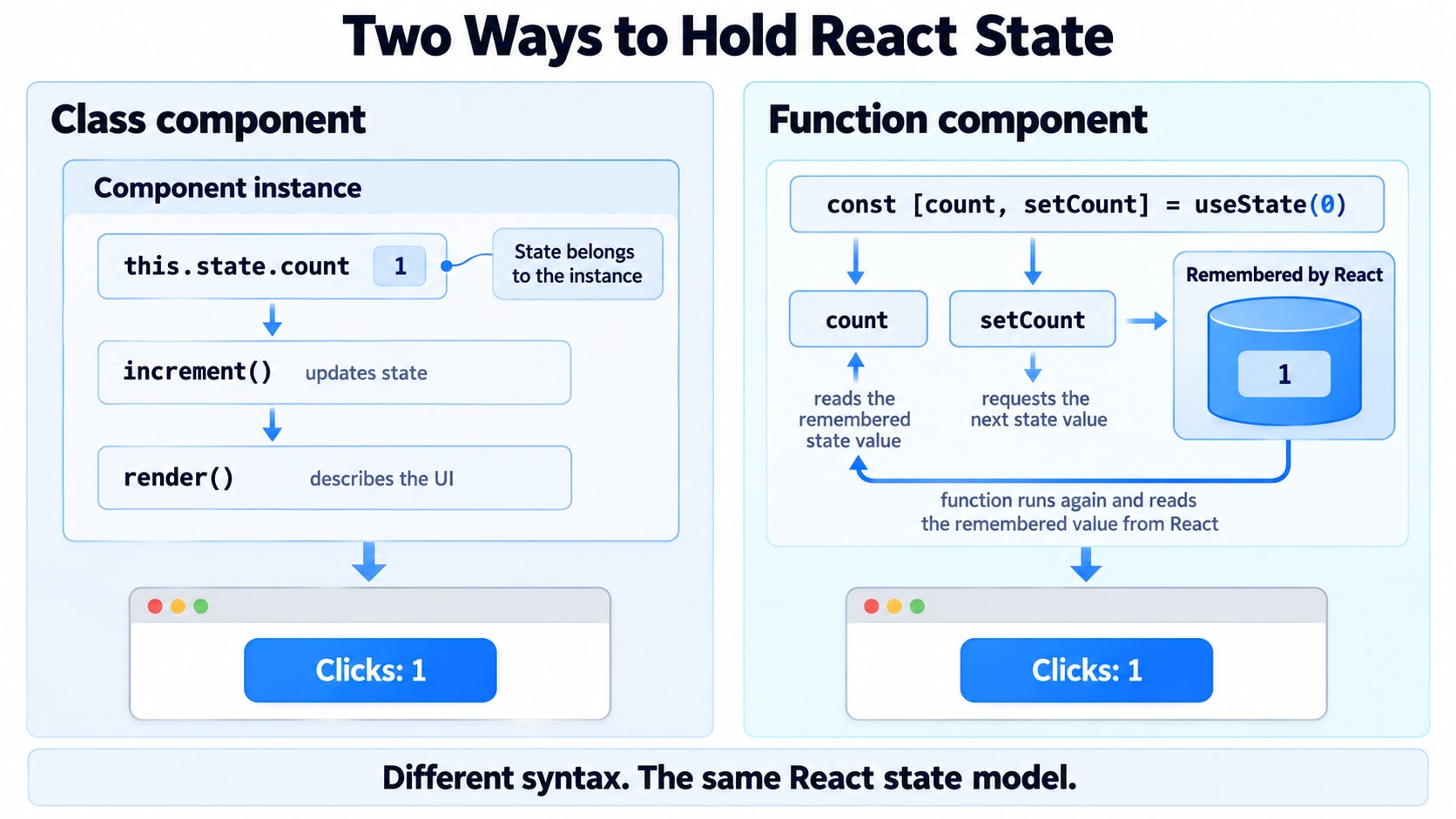
An instance is the object created from a class. Here, this refers to that component instance.
The component reads its remembered data through this.state.
Calling this.setState() queues an update. In this example, the updater receives the pending previous state and calculates the next count.
We use that form because the next value depends on the previous one.
We do not directly mutate the state:
// Do not update React state this way.
this.state.count += 1;
React needs to receive the update through its state API.
Why is increment an arrow function?
The button receives this.increment as a callback to run later.
An ordinary class method does not automatically keep its instance as this when passed around separately.
The arrow function in this class field captures the instance’s this:
increment = () => {
  // `this` refers to this component instance.
};
Older code often achieves the same result by explicitly binding a method:
this.increment = this.increment.bind(this);This is JavaScript behavior, rather than a special React rule.
4. Where do constructor and super(props) fit?
You may encounter the same initialization written like this:
class ClickCounter extends Component {
  constructor(props) {
    super(props);

    this.state = {
      count: 0,
    };
  }

  render() {
    return <p>Clicks: {this.state.count}</p>;
  }
}
A constructor initializes a newly created class instance.
Because this class extends another class, its constructor must call super() before accessing this. That call runs the parent class’s constructor.
Passing props lets the React base constructor initialize this.props, including for use inside our constructor.
Modern class-field syntax lets us initialize state without explicitly writing a constructor:
state = {
  count: 0,
};
A constructor is therefore not mandatory in every class component.
It is also not a place to start requests, subscriptions, or timers. Initialization and external work have different responsibilities.
5. The same counter, written as a function
import { useState } from "react";

function ClickCounter() {
  const [count, setCount] = useState(0);

  function increment() {
    setCount(previous => previous + 1);
  }

  return (
    <button
      Clicks: {count}
    </button>
  );
}
useState is a Hook: a function that gives a function component access to a React capability.
It returns two values:
Value | Meaning |
|---|---|
| The state value for this render |
| A function that requests an update |
The 0 provides the initial state.
React preserves the state while the component retains its identity. Calling the component function again does not reset it to zero.
A setter affects a future render. It does not change the state variable inside the function call or event handler that is already running.
6. The first migration trap: state merging
Suppose the class remembers both a count and a label:
state = {
  count: 0,
  label: "Gallery clicks",
};
This update preserves the label:
this.setState({
  count: 1,
});
Class setState shallowly merges the update into the existing state object.
Now consider a function component:
const [counter, setCounter] = useState({
  count: 0,
  label: "Gallery clicks",
});
This setter replaces the whole stored value:
setCounter({
  count: 1,
});
The next state no longer contains label.
To preserve it, construct the complete next object:
setCounter(previous => ({
  ...previous,
  count: previous.count + 1,
}));
The spread syntax copies the existing top-level properties before overriding count.
Alternatively, separate independent values:
const [count, setCount] = useState(0);
const [label, setLabel] = useState("Gallery clicks");
Neither a spread nor class state merging automatically copies or merges every nested object. Updating nested state requires preserving the relevant levels explicitly.
7. The next requirement introduces a lifecycle
Now the counter should increase automatically at a configurable interval.
A timer is different from calculating JSX. It creates ongoing activity in the browser.
The component must manage that activity:
Start it when the component appears.
Replace it when the interval changes.
Stop it when the component is removed.
These events introduce the component’s lifecycle:
Stage | Meaning |
|---|---|
Mount | React adds the component to the interface |
Update | React commits an update to the component |
Unmount | React removes the component |
Classes provide methods for responding to these stages.
import { Component } from "react";

class AutoCounter extends Component {
  state = {
    count: 0,
  };

  startTimer() {
    this.timerId = setInterval(() => {
      this.setState(previous => ({
        count: previous.count + 1,
      }));
    }, this.props.intervalMs);
  }

  componentDidMount() {
    this.startTimer();
  }

  componentDidUpdate(previousProps) {
    if (previousProps.intervalMs !== this.props.intervalMs) {
      clearInterval(this.timerId);
      this.startTimer();
    }
  }

  componentWillUnmount() {
    clearInterval(this.timerId);
  }

  render() {
    return <p>Ticks: {this.state.count}</p>;
  }
}
Use it with a positive interval in milliseconds:
<AutoCounter intervalMs={1000} />This counts timer callbacks; it is not a precise elapsed-time clock.
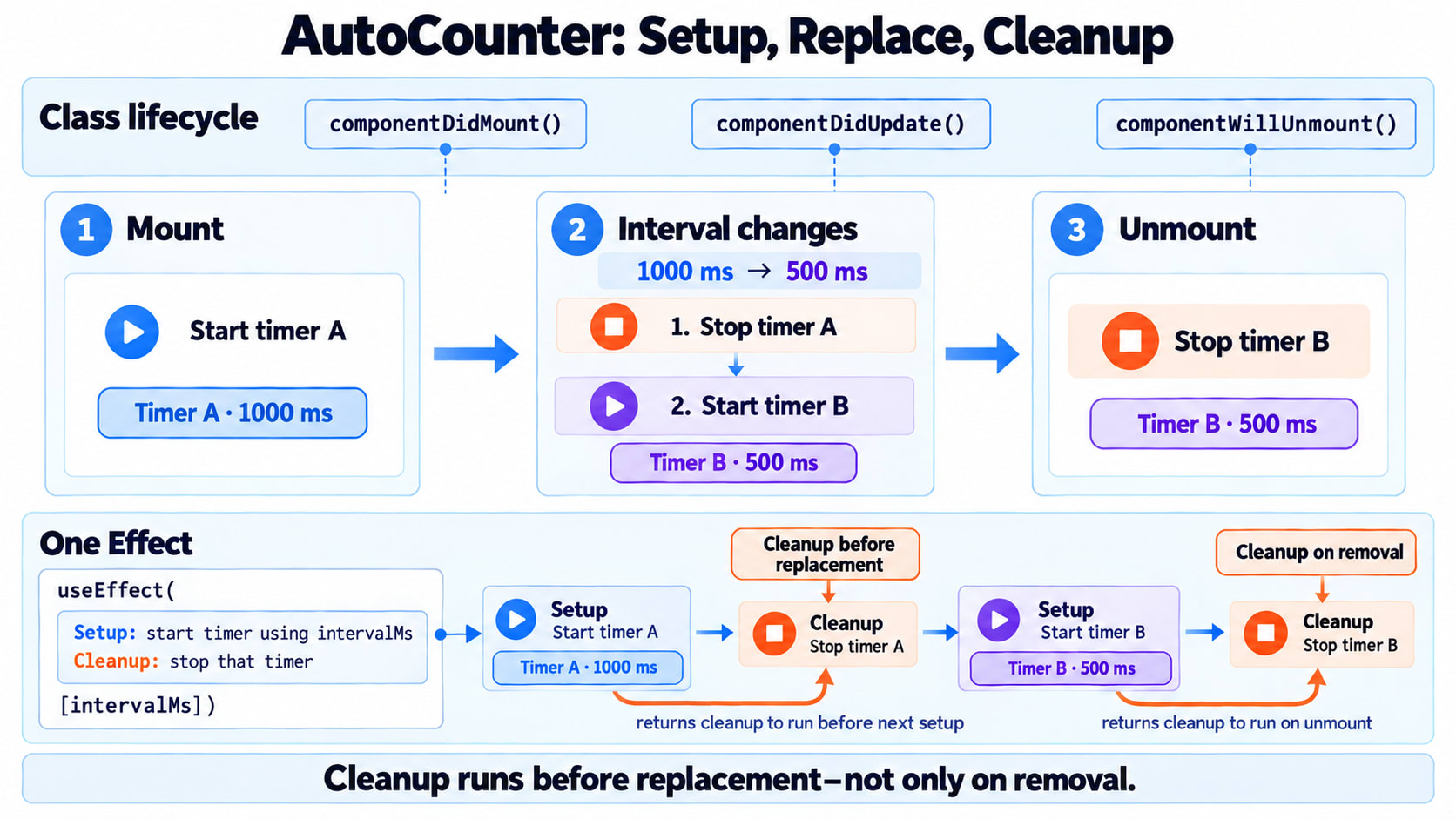
componentDidMount starts the timer. componentDidUpdate checks whether the interval changed before replacing it. componentWillUnmount stops it.
The timer ID belongs on the instance because changing that ID does not need to update the visible interface.
Notice how one responsibility—maintaining the timer—is spread across three methods.
That observation leads us to Effects.
8. A function component describes the timer’s relationship to its input
A function component can express the same timer behavior with useEffect:
import { useEffect, useState } from "react";

function AutoCounter({ intervalMs }) {
  const [count, setCount] = useState(0);

  useEffect(() => {
    const timerId = setInterval(() => {
      setCount(previous => previous + 1);
    }, intervalMs);

    return () => {
      clearInterval(timerId);
    };
  }, [intervalMs]);

  return <p>Ticks: {count}</p>;
}
An Effect synchronizes a component with something outside React’s rendering calculation. Here, that external system is a browser timer.
The first function sets up the timer.
The function it returns is cleanup: it undoes the setup by clearing that timer.
The array [intervalMs] lists a value used by the Effect that can change between renders.
For this example:
After the component is committed, React sets up the timer.
If
intervalMschanges, React cleans up the old timer and sets up another.When the component unmounts, React cleans up the active timer.
React compares dependency values using Object.is. Include the component values used by the Effect rather than selecting dependencies merely to force a preferred schedule.
9. An Effect is more than a renamed lifecycle method
It is tempting to memorize:
componentDidMount → useEffect with []That shortcut leaves out the relationship we actually need to maintain.
Our timer should exist with the current interval. When the interval changes, the old timer becomes obsolete.
Class lifecycle methods ask us to handle that relationship at several component events. The Effect keeps its setup, dependencies, and cleanup together.
One Effect can start and stop synchronization multiple times while the component remains mounted.
For that reason, cleanup does not mean only “the component is going away.” It also runs when React needs to replace that Effect’s previous setup.
10. Why the timer uses a functional state updater
What happens if we write this instead?
useEffect(() => {
  const timerId = setInterval(() => {
    setCount(count + 1);
  }, intervalMs);

  return () => clearInterval(timerId);
}, [intervalMs]);
The callback reads count from the render that created it, but count is missing from the dependency array.
Suppose that render had count = 0. The callback can keep requesting 0 + 1.
This happens because JavaScript functions retain access to variables from the scope where they were created. That behavior is called a closure.
Each render has its own state values and functions. A callback does not automatically switch to the values from a later render.
For this timer, the calculation only needs the previous pending count:
setCount(previous => previous + 1);That removes the need to read count inside the Effect.
It does not mean dependencies can generally be omitted. We changed the calculation so it no longer depends on that render’s count.
11. Why does setup appear twice during development?
You add a log and see the timer being started, stopped, and started again.
If development Strict Mode checks are enabled for this tree, React can run an additional Effect setup-and-cleanup cycle to expose missing cleanup.
The desired behavior is:
Setup creates a timer.
Cleanup removes that timer.
Setup creates one working timer again.
If the counter suddenly runs twice as fast, the extra cycle may have revealed a cleanup bug.
An empty dependency array therefore should not be described as “run exactly once forever.” Remounting creates another setup, and development checks may exercise setup and cleanup again.
Does useEffect always run after the browser paints?
No. Its timing relative to painting can vary, including for interaction-driven updates.
If an operation must measure layout and update the UI before the browser paints, useLayoutEffect is the relevant tool. It blocks painting while its work and associated updates run, so use it for that specific requirement.
Effects also do not run during server rendering. Their setup belongs to the client.
12. The photo gallery introduces unfinished requests
A timer makes cleanup easy to see. A request introduces another problem: its result may arrive after it is no longer relevant.
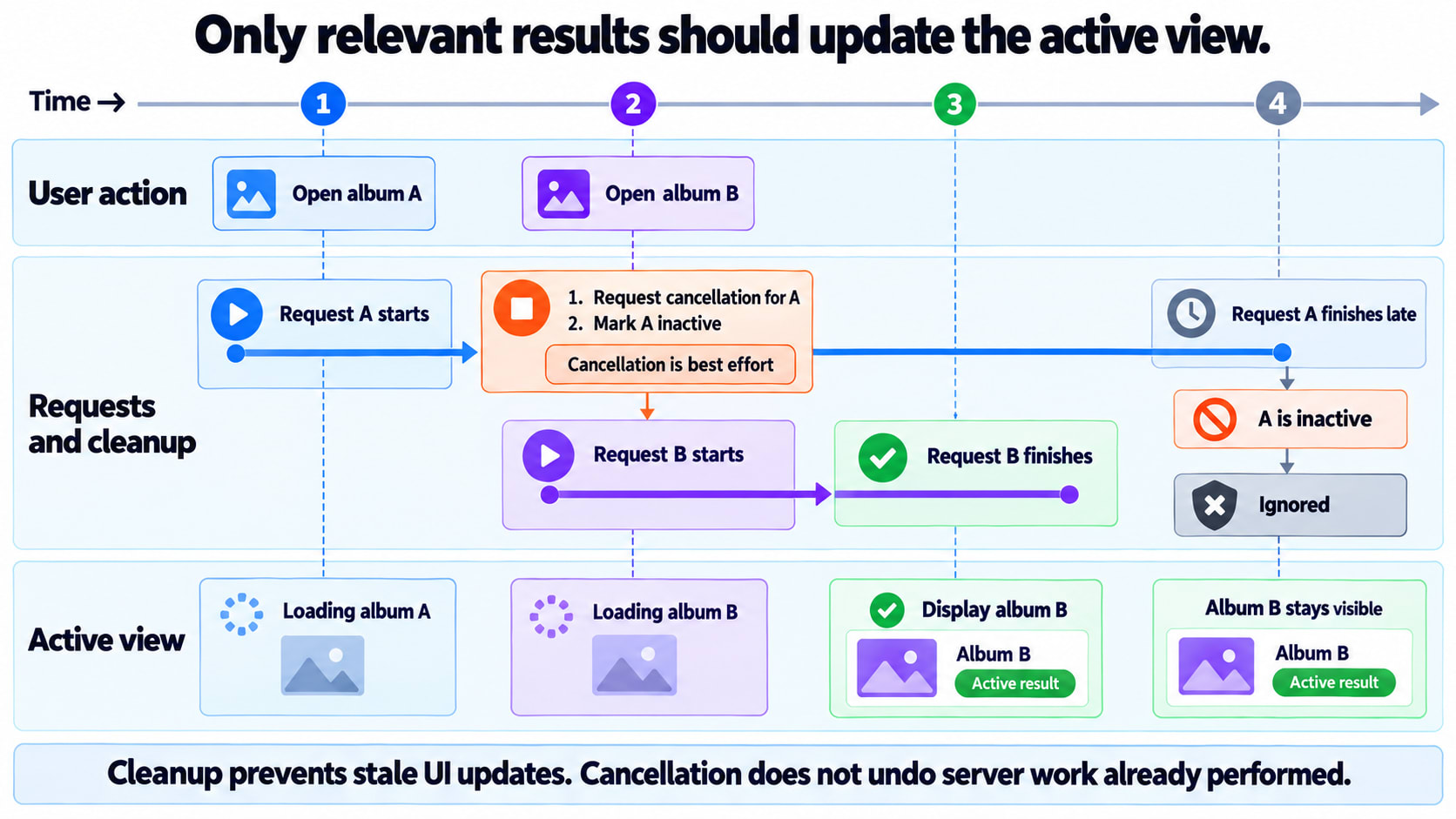
Imagine this sequence:
The user opens album A.
Its request starts.
The user opens album B.
B’s request finishes.
A’s slower request finishes afterward.
If every response writes into the same current state, album A may overwrite album B.
The required behavior is clear: an obsolete request must not publish its result into the active view.
Below is an illustrative gallery. It assumes your application provides an endpoint returning an array of objects with id, title, and thumbnailUrl.
import { useEffect, useState } from "react";

export default function PhotoGallery({ albumId }) {
  return (
    <AlbumPhotos
      key={albumId}
      albumId={albumId}
    />
  );
}

function AlbumPhotos({ albumId }) {
  const [result, setResult] = useState({
    status: "loading",
    photos: [],
  });

  useEffect(() => {
    const controller = new AbortController();
    let active = true;

    async function loadPhotos() {
      try {
        const response = await fetch(
          `/api/albums/${encodeURIComponent(albumId)}/photos`,
          { signal: controller.signal }
        );

        if (!response.ok) {
          throw new Error(`Request failed: ${response.status}`);
        }

        const photos = await response.json();

        if (!Array.isArray(photos)) {
          throw new Error("Expected an array of photos");
        }

        if (active) {
          setResult({
            status: "success",
            photos,
          });
        }
      } catch (error) {
        if (!active || controller.signal.aborted) {
          return;
        }

        setResult({
          status: "error",
          photos: [],
        });
      }
    }

    loadPhotos();

    return () => {
      active = false;
      controller.abort();
    };
  }, [albumId]);

  if (result.status === "loading") {
    return <p role="status">Loading photos…</p>;
  }

  if (result.status === "error") {
    return <p role="alert">We couldn’t load this album.</p>;
  }

  if (result.photos.length === 0) {
    return <p>This album has no photos.</p>;
  }

  return (
    <section>
      <h2>Album photos</h2>

      <ul>
        {result.photos.slice(0, 5).map(photo => (
          <li key={photo.id}>
            <img
              src={photo.thumbnailUrl}
              alt={photo.title}
              width={150}
              height={150}
            />
          </li>
        ))}
      </ul>
    </section>
  );
}
Several decisions are deliberate:
response.okcatches unsuccessful HTTP responses.Cleanup marks the old Effect as inactive, preventing it from publishing a result.
AbortControllerrequests cancellation of the fetch.Changing
key={albumId}creates a fresh album view with fresh loading state.Loading, failure, and a successfully empty album have different messages.
The key also resets any other local state inside AlbumPhotos. Use that behavior only when a fresh view is what the product needs.
This example checks that the response is an array; a real API boundary should also validate the item fields it relies on.
Manual Effect-based fetching illustrates synchronization and cleanup. Framework data loading or a query library can additionally handle concerns such as caching, request deduplication, and server rendering.
13. Hooks let us reuse behavior without forcing the same markup
Suppose several components need the automatic counter.
We can extract its state and timer into a custom Hook: a function whose name starts with use and which calls other Hooks.
import { useEffect, useState } from "react";

function useAutoCount(intervalMs) {
  const [count, setCount] = useState(0);

  useEffect(() => {
    const timerId = setInterval(() => {
      setCount(previous => previous + 1);
    }, intervalMs);

    return () => clearInterval(timerId);
  }, [intervalMs]);

  return count;
}
Different components can use the behavior with different interfaces:
function TickLabel() {
  const count = useAutoCount(1000);

  return <p>Timer ticks: {count}</p>;
}function TickBadge() {
const count = useAutoCount(2000);
return <strong>{count} updates</strong>;
}Each call gets its own state and timer. The Hook shares the implementation of the behavior; it does not create shared state between those components.
That ability to reuse stateful logic is a major reason Hooks matter beyond reducing syntax.
14. Hooks need a predictable calling order
Hooks such as useState and useEffect should be called at the top level of a function component or custom Hook.
Do not put them inside conditions, loops, event handlers, or after a conditional early return.
For example:
// Incorrect
function Counter({ visible }) {
  if (visible) {
    const [count, setCount] = useState(0);
  }

  return null;
}
React associates these Hook calls with component state based on their order. Skipping a call would change that correspondence.
Instead, make the calls consistently:
function Counter({ visible }) {
  const [count, setCount] = useState(0);

  if (!visible) {
    return null;
  }

  return (
    <button => setCount(previous => previous + 1)}>
      {count}
    </button>
  );
}
Returning null here produces no visible output, but the Counter component itself still exists in the parent’s tree. Removing <Counter /> from the parent is a different operation.
15. Converting a class requires preserving behavior
A useful migration begins with questions:
Which values are inputs?
Which values need to be remembered?
Which work interacts with something outside React?
What starts that work, and what makes it obsolete?
What must be cleaned up?
Which state should survive a change of props?
Then choose the appropriate structure.
Concern | Class component | Function component |
|---|---|---|
Read inputs |
| Function props |
Store UI state |
|
|
Update an object |
| A state setter replaces its stored value |
Describe the interface |
| Function return value |
Maintain an external connection | Related lifecycle methods | Effect with dependencies and cleanup |
Reuse stateful behavior | Component patterns or helper abstractions | Custom Hooks |
There is no perfect one-to-one translation for every lifecycle method.
An error boundary, for example, catches errors in descendant rendering and can display a fallback interface. React’s built-in API for defining one still uses class methods such as getDerivedStateFromError and componentDidCatch; there is no direct Hook equivalent. A function-based application can render a class-based boundary.
Classes and functions can coexist in the same application. Rewriting a working component is valuable when it improves the code or enables needed changes, rather than merely making its syntax newer.
The difference that matters
Both forms describe UI from props and state.
A class organizes behavior around a persistent instance and lifecycle methods.
A function component calculates its output using the values for a particular render. Hooks let React preserve state and let the component describe synchronization with external systems.
Understanding those differences helps explain the bugs we began with:
A field disappeared because a Hook setter replaced an object.
A timer used an old value because its callback captured an earlier render.
An obsolete request needed cleanup so it could not publish its result.
Related setup and cleanup became easier to reuse when grouped in a custom Hook.
Once you can explain those behaviors, class and function components stop looking like competing syntax styles. You can read either form, identify its responsibilities, and change it without losing the behavior users depend on.