Prototype in js
Prototypes & Prototype Chain in JavaScript
Understanding How Objects Inherit Properties and Methods
Imagine you're building an application with thousands of users.
Every user has their own name, email, and age. But all users also need common methods such as login(), logout(), and updateProfile().
One approach would be to create these methods separately inside every user object.
But imagine having 10,000 users.
Would we really want to create 10,000 copies of the same methods?
That would be unnecessary.
JavaScript solves this problem using something called Prototypes.
Instead of copying common properties and methods into every object, JavaScript allows objects to share behavior through a special relationship between objects.
To understand this properly, let's start with how JavaScript objects work.
1. The Problem: Sharing Common Methods Between Objects
Consider the following example:
const user1 = {
  name: "Alex",
  role: "Developer",

  login() {
    console.log(`${this.name} logged in`);
  }
};

const user2 = {
  name: "John",
  role: "Designer",

  login() {
    console.log(`${this.name} logged in`);
  }
};
Both objects have the same login() method.
The only difference is the data they contain.
Now imagine creating hundreds or thousands of objects like these.
We would repeatedly define the same methods.
Instead, wouldn't it be better if we could define the common behavior once and allow multiple objects to use it?
This is where prototypes become useful.
JavaScript allows one object to delegate property and method lookups to another object.
This mechanism is called Prototypal Inheritance, or more precisely, prototypal delegation.
2. What Is a Prototype?
In JavaScript, an object can have an internal reference to another object.
This reference is called its [[Prototype]].
When we try to access a property on an object, JavaScript first checks whether that property exists directly on the object.
If it doesn't, JavaScript looks at the object's prototype.
If the property still isn't found, JavaScript continues searching through the prototype's prototype.
This continues until the property is found or the chain ends.
Let's understand this with a simple example.
const user = {
  name: "Alex"
};

console.log(user.name);
console.log(user.toString());
Output:
Alex
[object Object]
But notice something.
We never defined toString() inside our user object.
So where did it come from?
It comes from Object.prototype.
JavaScript automatically provides ordinary objects with access to properties and methods through their prototype chain.
We can inspect this relationship using:
Object.getPrototypeOf(user);This returns the prototype object associated with user.
We can also check:
Object.getPrototypeOf(user) === Object.prototype;Output:
trueThis means the prototype of our user object is Object.prototype.
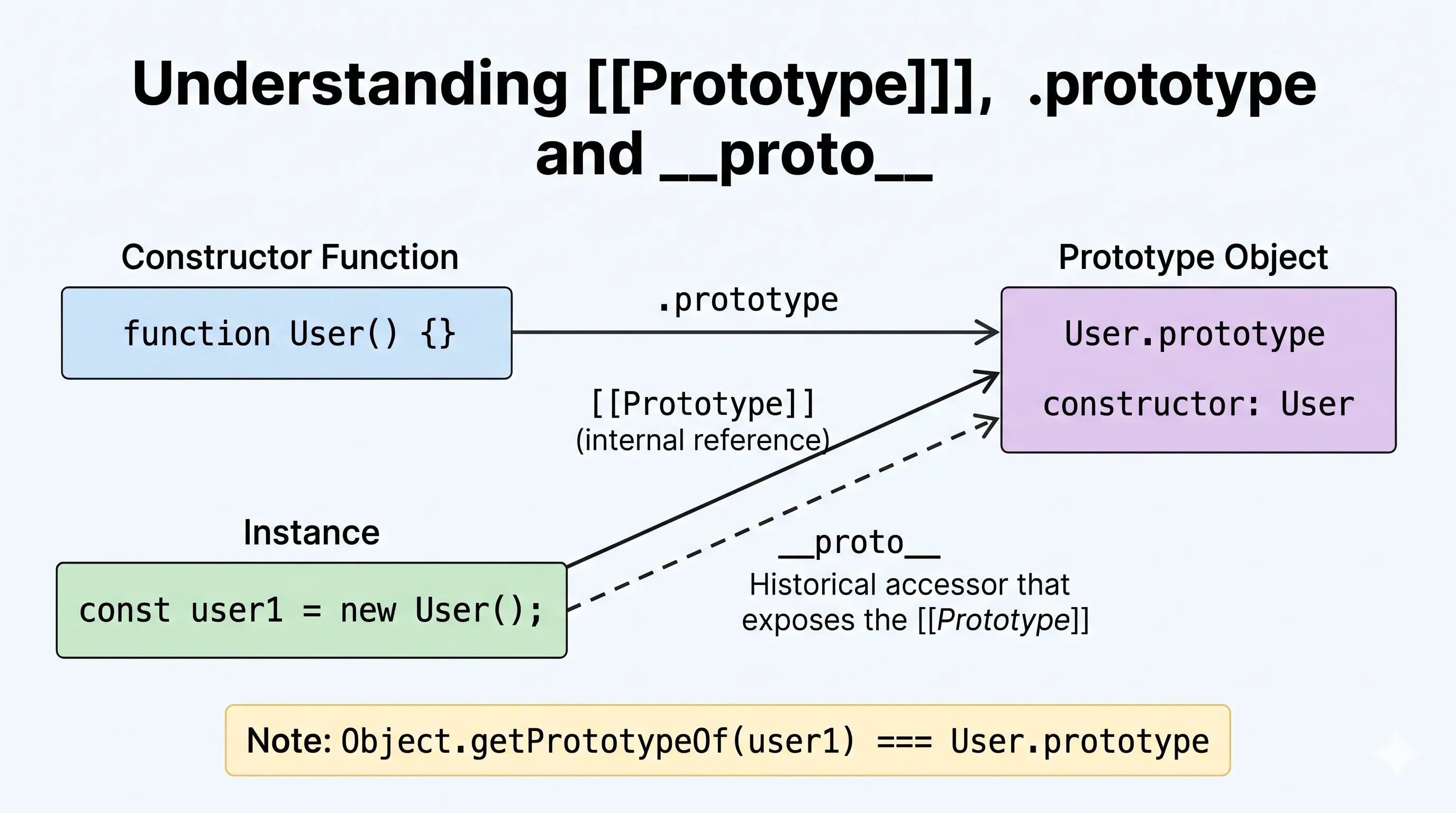
3. Understanding the Three Important Prototype Terms
This is one of the most confusing parts of JavaScript.
Developers often see these three terms and assume they mean the same thing:
[[Prototype]].prototype__proto__
They are related, but they have different meanings.
Let's understand them separately.
A. [[Prototype]]
[[Prototype]] is an internal property of an object.
It stores a reference to another object from which properties can be inherited or delegated.
It is not directly accessible like a normal JavaScript property.
To inspect it, use:
Object.getPrototypeOf(obj);For example:
const user = {
  name: "Alex"
};

console.log(Object.getPrototypeOf(user) === Object.prototype);
Output:
trueB. __proto__
__proto__ is a historical accessor that provides access to an object's internal prototype.
For example:
const user = {
  name: "Alex"
};

console.log(user.__proto__ === Object.prototype);
Output:
trueAlthough it is widely encountered in JavaScript code and browser consoles, prefer:
Object.getPrototypeOf(user);for reading prototypes, and:
Object.setPrototypeOf(user, anotherObject);for changing them when necessary.
The __proto__ accessor is standardized for compatibility but is deprecated in favor of the explicit prototype APIs.
C. .prototype
Now this one is different.
The .prototype property is found on functions that can be used as constructors, such as ordinary functions and classes.
It becomes important when we create objects using the new keyword.
Consider:
function User(name) {
  this.name = name;
}

User.prototype.login = function () {
  console.log(`${this.name} logged in`);
};

const user1 = new User("Alex");
const user2 = new User("John");
Here:
console.log(Object.getPrototypeOf(user1) === User.prototype);Output:
trueWhy?
Because when we create an object using:
new User("Alex");JavaScript creates a new object and sets its internal [[Prototype]] to User.prototype.
This is the connection between .prototype and [[Prototype]].
Quick comparison
Term | Meaning |
|---|---|
| Internal prototype reference of an object |
| Historical accessor for an object's prototype |
| Property of constructor functions and classes, used when creating instances with |
Remember: An instance's [[Prototype]] points to the constructor function's .prototype object.
4. How Does the Prototype Chain Work?
Now let's understand what happens when we access a property that doesn't exist directly on an object.
Consider:
const user = {
  name: "Alex"
};

console.log(user.name);
console.log(user.toString());
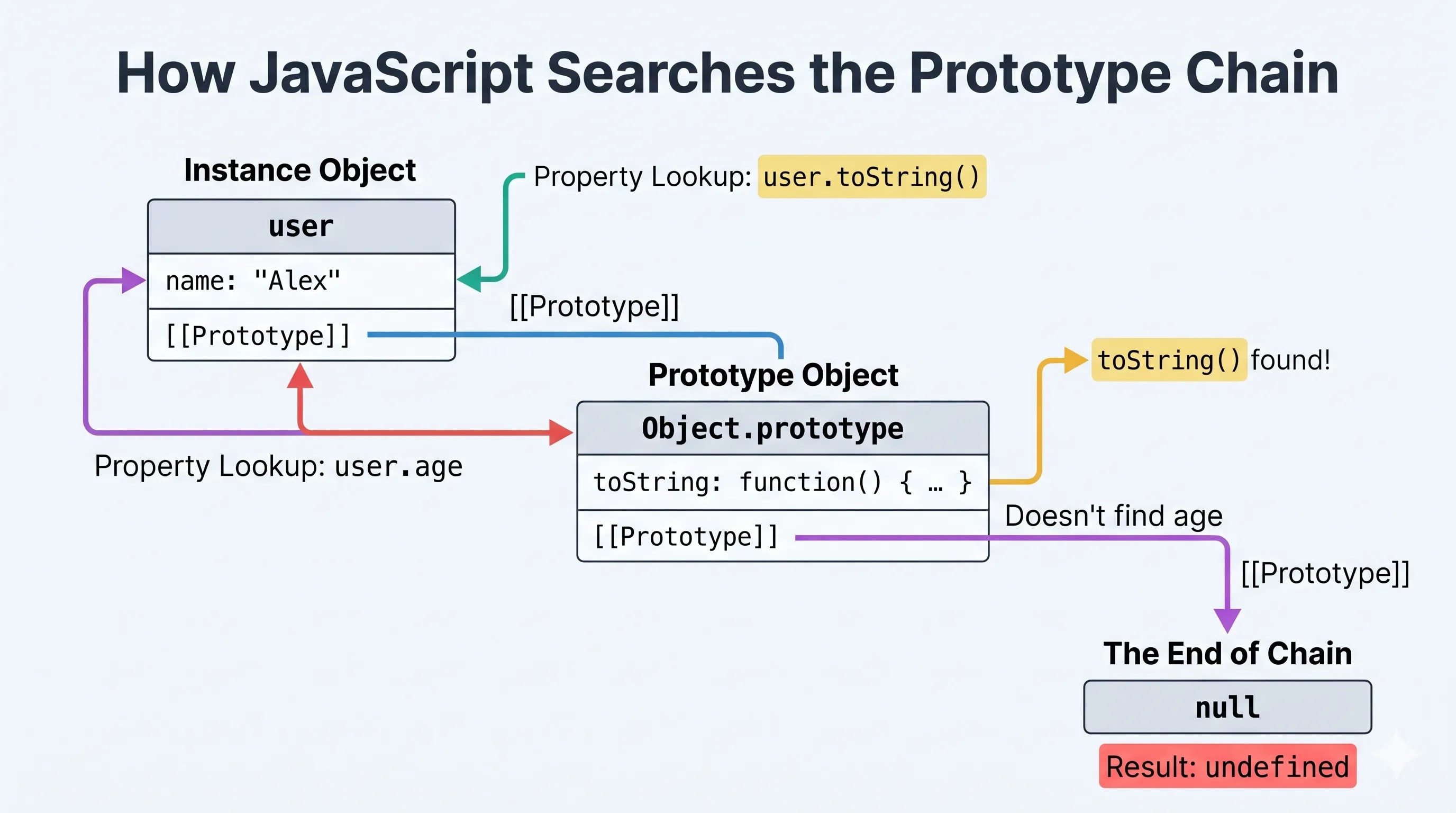
JavaScript follows a property lookup process.
For:
user.nameJavaScript checks the user object.
It finds name, so the lookup stops.
But for:
user.toString()JavaScript checks the user object.
It doesn't find toString().
So it checks:
Object.getPrototypeOf(user);That is Object.prototype.
It finds toString() there, so JavaScript uses that method.
This is how the prototype chain works.
What if the property doesn't exist anywhere?
const user = {
  name: "Alex"
};

console.log(user.age);
Output:
undefinedJavaScript searches the entire prototype chain.
If it cannot find the requested property, the lookup returns undefined.
Understanding the chain visually
For a normal object:
user
  |
  ↓
Object.prototype
  |
  ↓
null
The prototype of Object.prototype is null.
We can verify this:
console.log(
  Object.getPrototypeOf(Object.prototype)
);
Output:
nullThis is the end of the ordinary object prototype chain.
5. Creating Objects Using Constructor Functions
Now that we understand how prototypes work, let's see how they help us share methods between objects.
Before ES6 classes were introduced, constructor functions were commonly used to create objects.
Consider:
function User(name, role) {
  this.name = name;
  this.role = role;
}

User.prototype.login = function () {
  console.log(`${this.name} logged in`);
};

User.prototype.logout = function () {
  console.log(`${this.name} logged out`);
};

const user1 = new User("Alex", "Developer");
const user2 = new User("John", "Designer");
Now both objects can access the same methods.
user1.login();
user2.login();
Output:
Alex logged in
John logged in
But notice something important.
We defined login() and logout() only once:
User.prototype.login = function () {
  console.log(`${this.name} logged in`);
};
Both objects delegate their method lookups to the same prototype object.
We can verify this:
console.log(
  Object.getPrototypeOf(user1) ===
  Object.getPrototypeOf(user2)
);
Output:
trueBoth instances share the same prototype.
Why is this useful?
Imagine creating 10,000 user objects.
Instead of defining 10,000 separate copies of login() and logout(), we define those methods once on User.prototype.
Every instance can access them through the prototype chain.
This is one of the main benefits of prototypal delegation.
6. Understanding the new Keyword
We have repeatedly used:
const user1 = new User("Alex", "Developer");But what actually happens when we use new?
JavaScript performs several operations.
Conceptually, the process looks like this:
Step 1: Create a new empty object.
const user = {};Step 2: Link the new object's prototype to the constructor's .prototype.
Conceptually:
Object.setPrototypeOf(user, User.prototype);Step 3: Execute the constructor with the new object as this.
The constructor initializes the new object's properties:
User.call(user, "Alex", "Developer");Step 4: Return the new object.
There is one important detail: these are conceptual steps, not the literal JavaScript implementation.
Also, if a constructor explicitly returns an object, that object becomes the result of the new expression. A primitive return value is ignored.
This explains why constructor functions and the new keyword work together with prototypes.
7. Understanding Own Properties vs Inherited Properties
Now that we understand how objects access properties through prototypes, let's learn how to distinguish properties that belong directly to an object from those inherited through its prototype chain.
Consider:
function User(name) {
  this.name = name;
}

User.prototype.login = function () {
  console.log("Logged in");
};

const user = new User("Alex");
Here:
namebelongs directly touser.loginbelongs toUser.prototype.
We can check this using Object.hasOwn().
console.log(Object.hasOwn(user, "name"));
console.log(Object.hasOwn(user, "login"));
Output:
true
false
Why?
Because name is an own property, while login is inherited.
Using the in operator
JavaScript also provides the in operator.
console.log("name" in user);
console.log("login" in user);
Output:
true
true
Notice the difference.
Object.hasOwn() checks only properties directly owned by the object.
The in operator checks both own properties and properties available anywhere in the prototype chain.
Comparison
Method | Checks own properties | Checks inherited properties |
|---|---|---|
| Yes | No |
| Yes | Yes |
8. Object.create() — Creating Objects with a Specific Prototype
So far, we have created objects using constructor functions and the new keyword.
But JavaScript also provides another way to create objects with a specific prototype: Object.create().
Consider:
const userMethods = {
  login() {
    console.log(`${this.name} logged in`);
  }
};

const user = Object.create(userMethods);

user.name = "Alex";

user.login();
Output:
Alex logged inWhat happened?
When we wrote:
Object.create(userMethods);JavaScript created a new object whose internal [[Prototype]] points directly to userMethods.
We can verify this:
console.log(
  Object.getPrototypeOf(user) === userMethods
);
Output:
trueNotice that we didn't need a constructor function.
We directly created an object that delegates property lookups to another object.
Understanding Object.create(null)
There is another interesting variation:
const dictionary = Object.create(null);This creates an object with no prototype.
Let's verify:
console.log(Object.getPrototypeOf(dictionary));Output:
nullUnlike ordinary objects, it doesn't inherit methods from Object.prototype.
For example:
console.log(dictionary.toString);Output:
undefinedThis can be useful when creating dictionary-like objects where we don't want inherited properties to participate in lookups.
For general key-value storage, Map is often an even better choice.
9. Prototypal Inheritance with Constructor Functions
Let's now build a small inheritance example.
Imagine we have a general Animal constructor.
Dogs and cats are also animals, so they should be able to reuse common animal behavior.
Instead of duplicating methods, we can connect their prototypes.
Step 1: Create the Parent Constructor
function Animal(name) {
  this.name = name;
}

Animal.prototype.speak = function () {
  return `${this.name} makes a sound.`;
};
Step 2: Create the Child Constructor
function Dog(name, breed) {
  Animal.call(this, name);

  this.breed = breed;
}
Notice:
Animal.call(this, name);This invokes the Animal constructor using the new Dog instance as this.
It initializes the instance's own name property.
However, this alone doesn't establish prototype inheritance.
We still need to connect the prototype objects.
Step 3: Connect the Prototype Chain
Dog.prototype = Object.create(Animal.prototype);Now:
dog instance
    |
    ↓
Dog.prototype
    |
    ↓
Animal.prototype
    |
    ↓
Object.prototype
    |
    ↓
null
The Dog instances can now access methods defined on Animal.prototype.
Step 4: Restore the Constructor Property
There is one small detail.
When we assign:
Dog.prototype = Object.create(Animal.prototype);We replace the original Dog.prototype object.
The new object inherits from Animal.prototype, but its own constructor property is no longer Dog.
So we restore it:
Dog.prototype.constructor = Dog;Step 5: Add Dog-Specific Behavior
Dog.prototype.bark = function () {
  return `${this.name} barks loudly!`;
};
Complete Example
function Animal(name) {
  this.name = name;
}

Animal.prototype.speak = function () {
  return `${this.name} makes a sound.`;
};

function Dog(name, breed) {
  Animal.call(this, name);

  this.breed = breed;
}

Dog.prototype = Object.create(Animal.prototype);
Dog.prototype.constructor = Dog;

Dog.prototype.bark = function () {
  return `${this.name} barks loudly!`;
};

const buddy = new Dog("Buddy", "Golden Retriever");

console.log(buddy.bark());
console.log(buddy.speak());
console.log(buddy.toString());

console.log(Object.hasOwn(buddy, "breed"));
console.log(Object.hasOwn(buddy, "speak"));
Output:
Buddy barks loudly!
Buddy makes a sound.
[object Object]
true
false
Let's understand where each method comes from.
Property / Method | Found on |
|---|---|
|
|
|
|
|
|
|
|
|
|
This is prototypal inheritance in action.
10. How ES6 Classes Use Prototypes
You might be wondering:
If JavaScript already had constructor functions and prototypes, why did ES6 introduce classes?
Classes provide a cleaner and more familiar syntax for defining constructors and prototype-based behavior.
Let's rewrite our previous example using classes.
class Animal {
  constructor(name) {
    this.name = name;
  }

  speak() {
    return `${this.name} makes a sound.`;
  }
}

class Dog extends Animal {
  constructor(name, breed) {
    super(name);

    this.breed = breed;
  }

  bark() {
    return `${this.name} barks loudly!`;
  }
}

const buddy = new Dog("Buddy", "Golden Retriever");

console.log(buddy.bark());
console.log(buddy.speak());
Output:
Buddy barks loudly!
Buddy makes a sound.
But here's the important part:
JavaScript classes still use prototypes behind the scenes.
The extends keyword establishes the prototype relationship.
We can verify:
console.log(
  Object.getPrototypeOf(Dog.prototype) === Animal.prototype
);
Output:
trueAnd:
console.log(
  Object.getPrototypeOf(buddy) === Dog.prototype
);
Output:
trueThe class syntax doesn't replace the prototype system. It provides a cleaner way to work with it.
One important distinction: JavaScript classes also have stricter rules than traditional constructor functions. For example, classes must be called with new, and class methods are non-enumerable.
11. Common Pitfalls and Interview Traps
Mistake 1: Confusing .prototype with [[Prototype]]
function User() {}

const user = new User();
These are different:
User.prototype;This is the prototype object associated with the constructor.
Object.getPrototypeOf(user);This returns the internal prototype of the instance.
They refer to the same object in this example, but they are accessed through different references.
Mistake 2: Modifying Object.prototype Directly
Consider:
Object.prototype.isAdmin = false;Now almost every ordinary object can access isAdmin through its prototype chain.
This can create unexpected behavior and security problems, particularly when application code relies on inherited properties.
Avoid modifying built-in prototypes globally.
Mistake 3: Forgetting to Restore the Constructor
After:
Dog.prototype = Object.create(Animal.prototype);Restore:
Dog.prototype.constructor = Dog;Otherwise, the inherited or default constructor property may not point to the expected constructor.
Remember that .constructor is just a property, not a reliable proof of how an object was created.
Mistake 4: Assuming Inherited Methods Are Copied
When an object accesses an inherited method, JavaScript doesn't copy that method into the object.
It finds the method through the prototype chain.
For example:
Object.hasOwn(buddy, "speak");Returns:
falseThe method remains on Animal.prototype.
Mistake 5: Using Object.create(null) Like a Normal Object
const dictionary = Object.create(null);This object doesn't inherit methods such as:
dictionary.toString();
dictionary.hasOwnProperty();
Use:
Object.hasOwn(dictionary, "key");when checking own properties.
Mistake 6: Confusing Prototype Inheritance with Property Assignment
Suppose:
const parent = {
  role: "Developer"
};

const child = Object.create(parent);
Now:
console.log(child.role);Returns:
DeveloperBut if we assign:
child.role = "Designer";We create an own property on child.
We don't modify the parent's property.
This is an important behavior of property lookup and assignment.
12. Interview Questions
Q1. What is a prototype in JavaScript?
A prototype is an object that another object can delegate property and method lookups to through its internal [[Prototype]] reference.
Q2. What is the prototype chain?
The prototype chain is the sequence of objects JavaScript searches when a property isn't found directly on the current object.
Q3. What is the difference between __proto__ and .prototype?
__proto__ is a historical accessor for an object's internal prototype. .prototype is a property on constructor functions and classes that is used as the prototype of instances created with new.
Q4. What happens when we use the new keyword?
JavaScript creates a new object, connects its prototype to the constructor's .prototype, executes the constructor with the new object as this, and returns the object unless the constructor explicitly returns another object.
Q5. What is Object.create()?
Object.create(proto) creates a new object whose internal prototype is the specified object.
Q6. What is the difference between Object.hasOwn() and the in operator?
Object.hasOwn() checks only own properties. The in operator checks both own and inherited properties.
Q7. Where does the prototype chain end?
For ordinary objects, it eventually reaches Object.prototype, whose own prototype is null.
Q8. Do JavaScript classes use prototypes?
Yes. Classes use the same underlying prototype-based mechanism. The extends keyword establishes prototype relationships.
Q9. Are inherited methods copied into objects?
No. They remain on the prototype object and are accessed through delegation.
Q10. What is Object.create(null)?
It creates an object without a prototype. It doesn't inherit properties or methods from Object.prototype.
13. Quick Revision Cheat Sheet
Concept | Meaning |
|---|---|
| Internal prototype reference of an object |
| Constructor/class property used for instance prototype linking |
| Historical accessor for an object's prototype |
Prototype Chain | Sequence of objects searched during property lookup |
| Reads an object's prototype |
| Creates an object with a specified prototype |
| Checks whether a property belongs directly to an object |
| Checks own and inherited properties |
| Common prototype of ordinary objects |
| End of the prototype chain |
| Creates an instance and links it to the constructor's prototype |
| Establishes prototype-based inheritance using class syntax |
The most important things to remember
JavaScript uses prototypal delegation rather than copying methods into every instance.
Every ordinary object has an internal
[[Prototype]]reference.Constructor functions and classes have a
.prototypeproperty used when creating instances withnew.Object.getPrototypeOf()is the preferred way to inspect an object's prototype.JavaScript searches the prototype chain when a property isn't found directly on an object.
Object.hasOwn()checks only own properties, whileinalso checks inherited properties.Object.create()lets us create objects with a specific prototype.ES6 classes are built on the same prototype system.
What's Next?
Now we understand how JavaScript objects share properties and methods through prototypes.
But there is another important question:
If JavaScript uses prototypes for inheritance, how does the this keyword know which object it should refer to when a method is called?
And why can the same function behave differently depending on how we invoke it?
To understand that, we need to explore the behavior of this, along with call(), apply(), and bind().
In the next chapter, we'll connect our understanding of functions, objects, and prototypes to understand how JavaScript determines the value of this.