compose and pipe in js
Compose and Pipe in JavaScript
Building Complex Operations from Simple Functions
Imagine you're building a data-processing system.
A user enters their name:
ALEX_DEVBefore storing it in the database, we want to perform three operations:
Remove unnecessary spaces.
Convert the text to lowercase.
Wrap it inside an HTML tag.
We could write:
const username = "   ALEX_DEV   ";

const trimmed = username.trim();
const lowercased = trimmed.toLowerCase();
const result = `<span>${lowercased}</span>`;

console.log(result);
Output:
<span>alex_dev</span>This works perfectly.
But imagine having ten or twenty operations that need to be performed one after another.
Our code could become difficult to organize and maintain.
Wouldn't it be better if we could combine these small operations into one reusable function?
This is where Function Composition comes in.
1. What Is Function Composition?
Function composition is a functional programming technique in which we combine multiple functions to create a new function.
The output of one function becomes the input of the next function.
Instead of manually calling each function, we create a pipeline through which data passes.
For example:
const trim = (str) => str.trim();

const toLowerCase = (str) => str.toLowerCase();

const wrapInTag = (str) => `<span>${str}</span>`;
We can combine these operations into a single function:
const sanitizeUsername = (username) => {
  return wrapInTag(
    toLowerCase(
      trim(username)
    )
  );
};

console.log(sanitizeUsername("   ALEX_DEV   "));
Output:
<span>alex_dev</span>Notice how each function performs only one responsibility.
trim()removes extra spaces.toLowerCase()converts text to lowercase.wrapInTag()wraps the result inside an HTML element.
This is the basic idea behind function composition.
But JavaScript developers commonly use two patterns to create these pipelines:
compose()pipe()
Both combine functions, but they differ in the order in which those functions execute.
2. Understanding Pipe and Compose
Let's use a simple example to understand the difference.
We have three functions:
const addFive = (num) => {
  return num + 5;
};

const subtractTwo = (num) => {
  return num - 2;
};

const multiplyFour = (num) => {
  return num * 4;
};
Now suppose our initial value is 5.
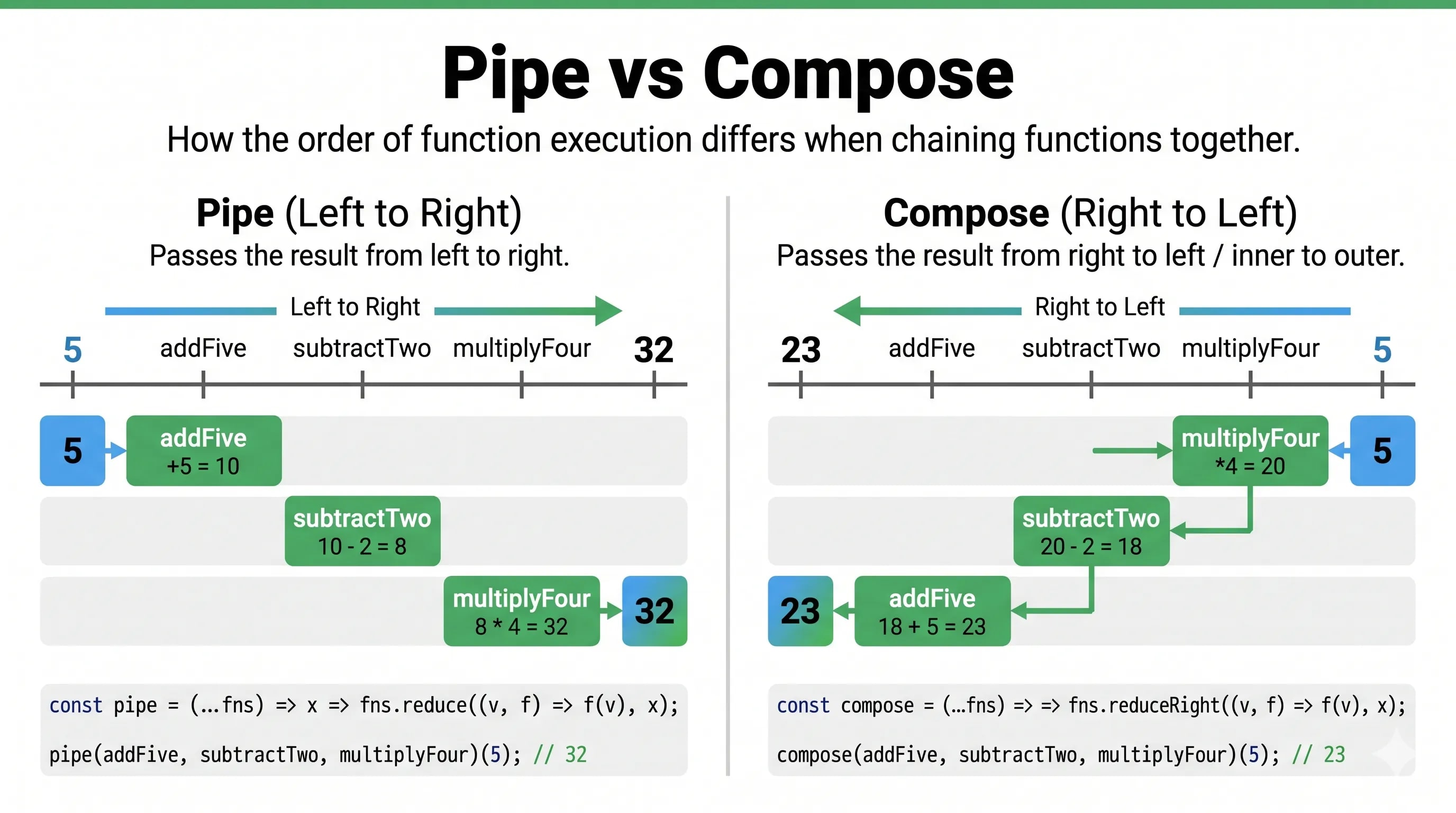
Pipe: Left to Right
Pipe executes functions in the same order in which we pass them.
pipe(addFive, subtractTwo, multiplyFour)(5);Let's calculate the result step by step:
Initial value: 5

addFive(5)
= 5 + 5
= 10

subtractTwo(10)
= 10 - 2
= 8

multiplyFour(8)
= 8 × 4
= 32
<text color="success" weight="semibold">Final output: 32</text>
The execution order is:
5 → addFive → subtractTwo → multiplyFour → 32Pipe follows a natural left-to-right reading order.
Compose: Right to Left
Compose executes functions in the reverse order in which we pass them.
compose(addFive, subtractTwo, multiplyFour)(5);Let's calculate:
Initial value: 5

multiplyFour(5)
= 5 × 4
= 20

subtractTwo(20)
= 20 - 2
= 18

addFive(18)
= 18 + 5
= 23
<text color="success" weight="semibold">Final output: 23</text>
The execution order is:
5 → multiplyFour → subtractTwo → addFive → 23Compose follows the mathematical order of function composition.
Understanding the difference
Pipe | Compose |
|---|---|
Executes left to right | Executes right to left |
Uses | Uses |
Natural reading order | Mathematical composition order |
|
|
3. Mathematical Foundation of Compose
Function composition comes from mathematics.
Suppose we have two functions:
[
f(x) = x + 5
]
[
g(x) = x \times 4
]
Their composition is written as:
[
(f \circ g)(x) = f(g(x))
]
This means we execute the inner function first and then pass its result to the outer function.
For example:
[
g(2) = 2 \times 4 = 8
]
Then:
[
f(8) = 8 + 5 = 13
]
Therefore:
[
(f \circ g)(2) = 13
]
This is why mathematical composition naturally follows a right-to-left execution order.
In JavaScript, compose() follows the same convention.
4. Implementing Pipe Using reduce()
Now that we understand the difference, let's implement both utilities ourselves.
First, let's implement pipe().
We know that pipe executes functions from left to right.
Consider:
const pipe = (...fns) => {
  return function (initialValue) {
    return fns.reduce((acc, fn) => {
      return fn(acc);
    }, initialValue);
  };
};
Let's understand this implementation.
Step 1: Accept Multiple Functions
(...fns)We use rest parameters to collect all functions into an array.
For example:
pipe(addFive, subtractTwo, multiplyFour);The fns array becomes:
[
  addFive,
  subtractTwo,
  multiplyFour
]
Step 2: Accept the Initial Value
return function (initialValue) {The returned function accepts the value that will enter our pipeline.
For example:
const evaluate = pipe(
  addFive,
  subtractTwo,
  multiplyFour
);

evaluate(5);
Here, 5 is our initial value.
Step 3: Use reduce()
return fns.reduce((acc, fn) => {
  return fn(acc);
}, initialValue);
Remember that reduce() processes an array from left to right.
During every iteration:
acccontains the previous function's result.fnis the current function.fn(acc)executes the current function with the accumulated value.
Let's visualize the iterations:
Iteration | Current function | Accumulator |
|---|---|---|
Initial | — | 5 |
1 |
| 10 |
2 |
| 8 |
3 |
| 32 |
The final result is 32.
Complete implementation
function pipe(...fns) {
  return function (initialValue) {
    return fns.reduce((acc, fn) => {
      return fn(acc);
    }, initialValue);
  };
}

const evaluate = pipe(
  addFive,
  subtractTwo,
  multiplyFour
);

console.log(evaluate(5)); // 32
5. Implementing Compose Using reduceRight()
Now let's implement compose().
Remember, compose executes functions from right to left.
We can achieve this using reduceRight().
function compose(...fns) {
  return function (initialValue) {
    return fns.reduceRight((acc, fn) => {
      return fn(acc);
    }, initialValue);
  };
}
The implementation looks almost identical to pipe().
The only difference is:
reduceRight()Instead of:
reduce()Understanding the execution
const evaluate = compose(
  addFive,
  subtractTwo,
  multiplyFour
);

console.log(evaluate(5)); // 23
The functions are processed from right to left:
Iteration | Current function | Accumulator |
|---|---|---|
Initial | — | 5 |
1 |
| 20 |
2 |
| 18 |
3 |
| 23 |
The final result is 23.
Complete implementation
function compose(...fns) {
  return function (initialValue) {
    return fns.reduceRight((acc, fn) => {
      return fn(acc);
    }, initialValue);
  };
}

const evaluate = compose(
  addFive,
  subtractTwo,
  multiplyFour
);

console.log(evaluate(5)); // 23
The key difference is simply the direction in which we process the function array.
6. A Practical Example: Formatting and Sanitizing User Input
Let's use function composition in a more realistic scenario.
Imagine we're building a registration form for Consistcode.
Before processing a username, we want to:
Remove leading and trailing spaces.
Convert it to lowercase.
Wrap it inside an HTML tag.
First, define our individual functions:
const trim = (str) => str.trim();

const toLowerCase = (str) => str.toLowerCase();

const wrapInTag = (tag) => {
  return (content) => `<${tag}>${content}</${tag}>`;
};
Notice something interesting about wrapInTag().
It returns another function:
wrapInTag("span");Output:
(content) => `<span>${content}</span>`This technique is called Currying.
Instead of accepting both arguments at once, we transform a function so that it accepts one argument at a time.
This makes it easier to use functions that need configuration inside a pipeline.
Now let's implement our utilities:
const pipe = (...fns) => (initialValue) =>
  fns.reduce((acc, fn) => fn(acc), initialValue);

const compose = (...fns) => (initialValue) =>
  fns.reduceRight((acc, fn) => fn(acc), initialValue);
Create our pipeline:
const sanitizeUsername = pipe(
  trim,
  toLowerCase,
  wrapInTag("span")
);

console.log(sanitizeUsername("   ALEX_DEV   "));
Output:
<span>alex_dev</span>We can also write the same transformation using compose():
const sanitizeUsername = compose(
  wrapInTag("span"),
  toLowerCase,
  trim
);

console.log(sanitizeUsername("   ALEX_DEV   "));
Output:
<span>alex_dev</span>Notice that the function order changes.
With pipe(), we write the operations in execution order.
With compose(), we write them in reverse execution order.
7. Understanding the Unary Function Constraint
You'll often hear that functions inside a simple compose or pipe implementation should be unary.
What does unary mean?
A unary function accepts one argument.
For example:
const double = (num) => num * 2;

const trim = (str) => str.trim();
Both are unary functions.
But consider:
const add = (a, b) => a + b;This function accepts two arguments, so it is binary.
Our current pipeline implementation calls every function like this:
fn(acc);It passes only one argument.
Therefore, if we directly pass a binary function:
const result = pipe(
  add
)(5);

console.log(result);
The second argument will be undefined.
The result will be:
NaNHow can we use multi-argument functions?
We can adapt them using currying or partial application.
For example:
const add = (a, b) => a + b;

const addFive = (num) => add(num, 5);

const result = pipe(
  addFive,
  (num) => num * 2
)(10);

console.log(result); // 30
Now every function in the pipeline accepts a single value.
This makes the functions compatible with our simple implementation.
Remember: The unary constraint applies to the simple pipeline implementations we've built. More advanced composition utilities can support different argument patterns at their entry point.
8. What Is Point-Free Style?
Function composition is also commonly associated with a programming style called Point-Free Programming.
In this style, we define a function by combining other functions without explicitly mentioning the value that will be passed through them.
Let's compare.
Normal style
const sanitizeUsername = (username) => {
  return wrapInTag("span")(
    toLowerCase(
      trim(username)
    )
  );
};
Here, we explicitly declare username and pass it through each operation.
Point-free style
const sanitizeUsername = pipe(
  trim,
  toLowerCase,
  wrapInTag("span")
);
We don't explicitly mention the input parameter.
The pipeline already describes what should happen to the incoming value.
This can make transformations more declarative and reusable.
However, point-free style isn't automatically better. If a pipeline becomes difficult to understand, a normal function with clearly named intermediate variables may be easier to maintain.
9. Common Pitfalls and Interview Traps
Mistake 1: Confusing the Execution Order
pipe(addFive, subtractTwo, multiplyFour)(5);Produces:
32But:
compose(addFive, subtractTwo, multiplyFour)(5);Produces:
23Remember the direction of execution.
Mistake 2: Passing Functions Instead of Their Results
Correct:
pipe(
  trim,
  toLowerCase
);
Incorrect:
pipe(
  trim(),
  toLowerCase()
);
Why?
Because our pipeline expects function references, not the results of calling those functions.
Mistake 3: Passing Multi-Argument Functions Directly
Our basic implementation passes the accumulated value as a single argument.
Adapt multi-argument functions using currying or wrapper functions.
Mistake 4: Mutating Data Inside a Pipeline
Consider:
const addItem = (items) => {
  items.push("JavaScript");
  return items;
};
This modifies the original array.
If we pass mutable data through multiple operations, one function can unexpectedly affect the data used by another.
Prefer transformations that return new values when immutability is important.
For example:
const addItem = (items) => {
  return [...items, "JavaScript"];
};
Pure functions are especially useful in functional pipelines because they make each operation easier to reason about and test.
Mistake 5: Forgetting the Empty Function Case
Our implementation also handles an empty list of functions:
const result = pipe()(10);

console.log(result); // 10
This works because reduce() and reduceRight() return the initial accumulator when the array is empty and an initial value is provided.
10. Interview Questions
Q1. What is function composition in JavaScript?
Function composition is a functional programming technique in which multiple functions are combined into one function, with the output of one function becoming the input of the next.
Q2. What is the difference between pipe and compose?
pipe() executes functions from left to right, while compose() executes them from right to left.
Q3. How do you implement pipe in JavaScript?
We can use reduce() to process functions from left to right.
const pipe = (...fns) => (value) =>
  fns.reduce((acc, fn) => fn(acc), value);
Q4. How do you implement compose in JavaScript?
We can use reduceRight() to process functions from right to left.
const compose = (...fns) => (value) =>
  fns.reduceRight((acc, fn) => fn(acc), value);
Q5. Why should functions in a simple pipeline be unary?
Because our implementation passes the previous result as a single argument to the next function.
Q6. How can we use a function that accepts multiple arguments?
We can use currying or a wrapper function to adapt it into a unary function.
Q7. What is point-free programming?
Point-free programming is a style in which we define functions by composing other functions without explicitly naming or passing the input value in the function definition.
Q8. Does function composition require pure functions?
No. Composition itself doesn't require purity, but pure functions make pipelines more predictable, reusable, and easier to test.
11. Quick Revision Cheat Sheet
Concept | Meaning |
|---|---|
Function Composition | Combining multiple functions into one |
| Executes functions left to right |
| Executes functions right to left |
| Processes the function array from left to right |
| Processes the function array from right to left |
Unary Function | A function accepting one argument |
Currying | Transforming a multi-argument function into a sequence of single-argument functions |
Point-Free Style | Defining transformations without explicitly naming the input |
The most important things to remember
Function composition combines simple functions into larger transformations.
pipe()executes left to right.compose()executes right to left.reduce()implements pipe.reduceRight()implements compose.Simple pipelines pass one accumulated value to each function.
Currying helps adapt multi-argument functions.
Pure functions make pipelines easier to maintain.
What's Next?
We now understand how to combine multiple functions into reusable transformations using composition.
But there's another interesting functional programming concept.
What if we want to transform an array without manually writing loops? What if we want to create new arrays by applying transformations, filtering values, or reducing collections into a single result?
That's where JavaScript's functional array methods become useful.
In the next chapter, we'll explore Map, Filter, and Reduce in JavaScript, understand how they work, and learn how to use them