Closures In Depth
Closures in JavaScript
Closures are one of those JavaScript concepts that might initially seem confusing. You understand functions, you understand scope, and you understand how variables work. But then someone asks:
How can a function access a variable from another function even after that other function has finished executing?
That is where closures come into the picture.
Closures are not just an interview topic. They are used in real-world JavaScript applications for data privacy, state management, event handling, memoization, currying, and much more.
To understand closures properly, we first need to understand something called Lexical Scope.
1. Understanding Lexical Scope
Imagine you are working in a company.
You have your own desk, your team has a shared workspace, and the entire company has a common resource area.
When you need something, you first look at your own desk. If you cannot find it, you look in your team's workspace. If it is still unavailable, you check the company's shared resources.
JavaScript follows a similar approach when resolving variables.
This behavior is related to Lexical Scope.
Lexical scope means that the accessibility of a variable is determined by where a function is written in the source code, not where that function is called.
Let's understand this with an example.
const username = "Global User";

function local() {
  const username = "Local User";

  console.log(username);
}

local();
Output:
Local UserWhy does JavaScript print Local User instead of Global User?
Because JavaScript first searches for the variable in the current local scope.
It finds username inside local(), so it uses that value.
Now let's remove the local variable.
const username = "Global User";

function local() {
  console.log(username);
}

local();
Output:
Global UserThis time, JavaScript cannot find username inside local(), so it searches in its outer lexical environment.
It finds the variable in the global scope.
This process of searching through outer environments is called the Scope Chain.
Understanding the Scope Chain
const a = 10;

function outer() {
  const b = 20;

  function inner() {
    const c = 30;

    console.log(a, b, c);
  }

  inner();
}

outer();
Output:
10 20 30When inner() tries to access variables:
It first checks its own scope and finds
c.It checks its outer scope and finds
b.It checks the global scope and finds
a.
JavaScript follows the lexical environment chain until it finds the variable or reaches the end of the chain.
Important: Scope lookup follows where a function is defined, not where it is invoked.
2. What Exactly Is a Closure?
Now that we understand lexical scope, let's explore the interesting part.
Consider this example:
function outer() {
  const message = "Hello JavaScript";

  function inner() {
    console.log(message);
  }

  return inner;
}

const myFunction = outer();

myFunction();
Output:
Hello JavaScriptSomething interesting happened here.
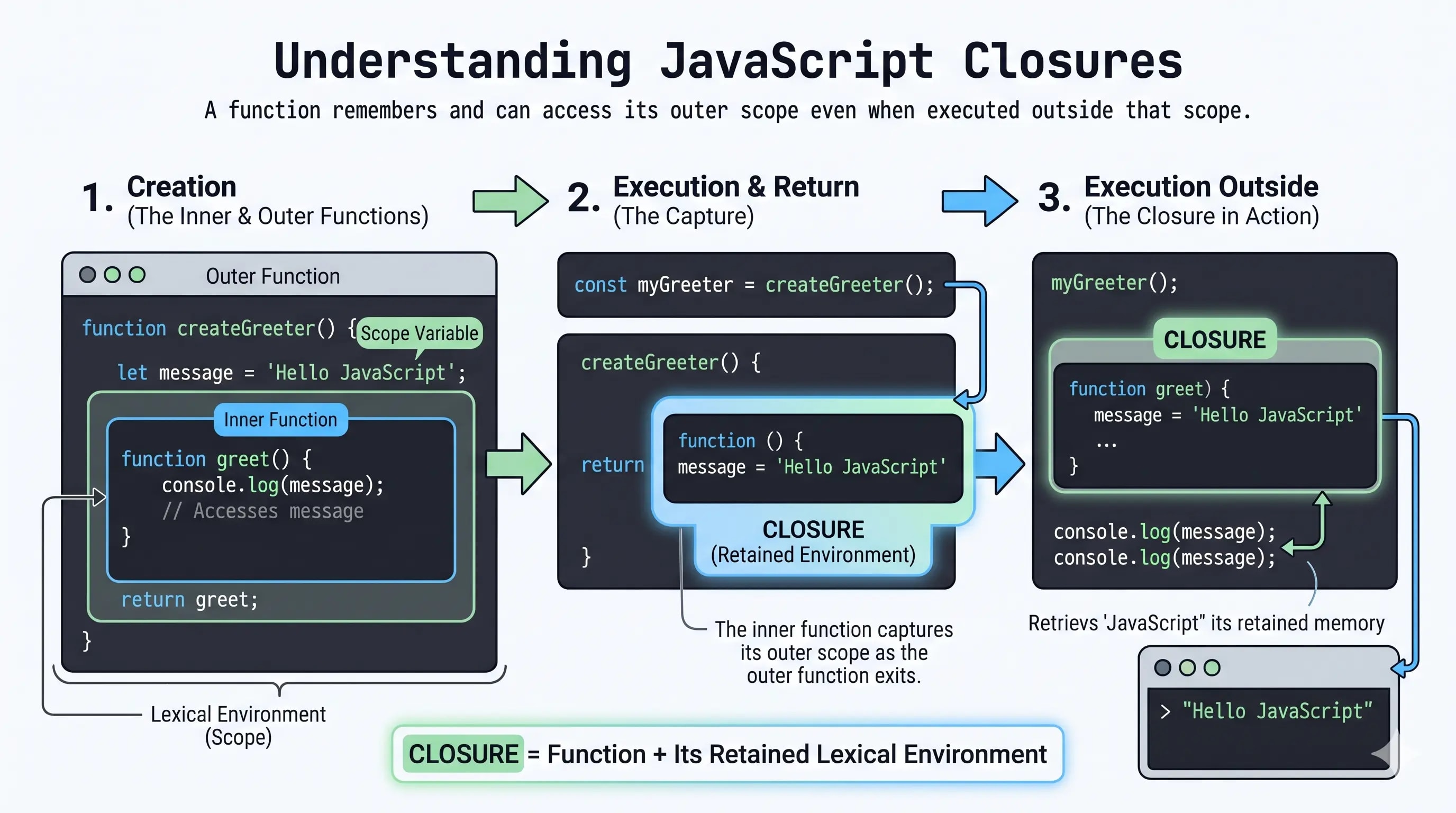
Let's break down the execution.
Step 1: We call outer().
JavaScript creates its execution context and initializes the variable message.
Step 2: The function inner() is created inside outer().
Since inner() is lexically defined inside outer(), it has access to the variables available in its outer lexical environment.
Step 3: outer() returns inner.
Notice that we return the function itself, not the result of executing it.
return inner;Step 4: The execution of outer() finishes.
Normally, we might expect its local variables to become eligible for garbage collection once they are no longer reachable.
But here, inner() still needs access to message.
Step 5: We call myFunction() outside outer().
Even though outer() has finished executing, inner() can still access message.
How?
Because of closures.
A closure is the combination of a function and its surrounding lexical environment.
The inner function retains access to the variables from its lexical environment, even when the outer function has completed execution.
Let's Understand Another Example
function x() {
  const a = 7;

  function y() {
    console.log(a);
  }

  return y;
}

const z = x();

z(); // 7
Here:
x()creates the variablea.y()is created insidex().y()referencesa.x()returnsy.znow holds the returned function.Calling
z()prints7.
The important thing to understand is that the returned function retains access to its lexical environment.
It doesn't need to execute inside the original outer function to access those variables.
A Closure Can Access Multiple Outer Scopes
Closures are not limited to accessing only the immediate parent function.
Consider this example:
function z() {
  const b = 900;

  function x() {
    const a = 7;

    function y() {
      console.log(a, b);
    }

    return y;
  }

  return x;
}

const result = z()();

result(); // 7 900
The function y() can access:
afrom its immediate outer functionx().bfrom the outer functionz().
This happens because JavaScript follows the lexical environment chain.
A closure can retain access to variables across multiple outer scopes.
3. How Closures Work Under the Hood
Let's understand what happens to variables when a function returns another function.
Consider:
function outer() {
  let count = 10;

  function inner() {
    console.log(count);
  }

  return inner;
}

const fn = outer();
fn();
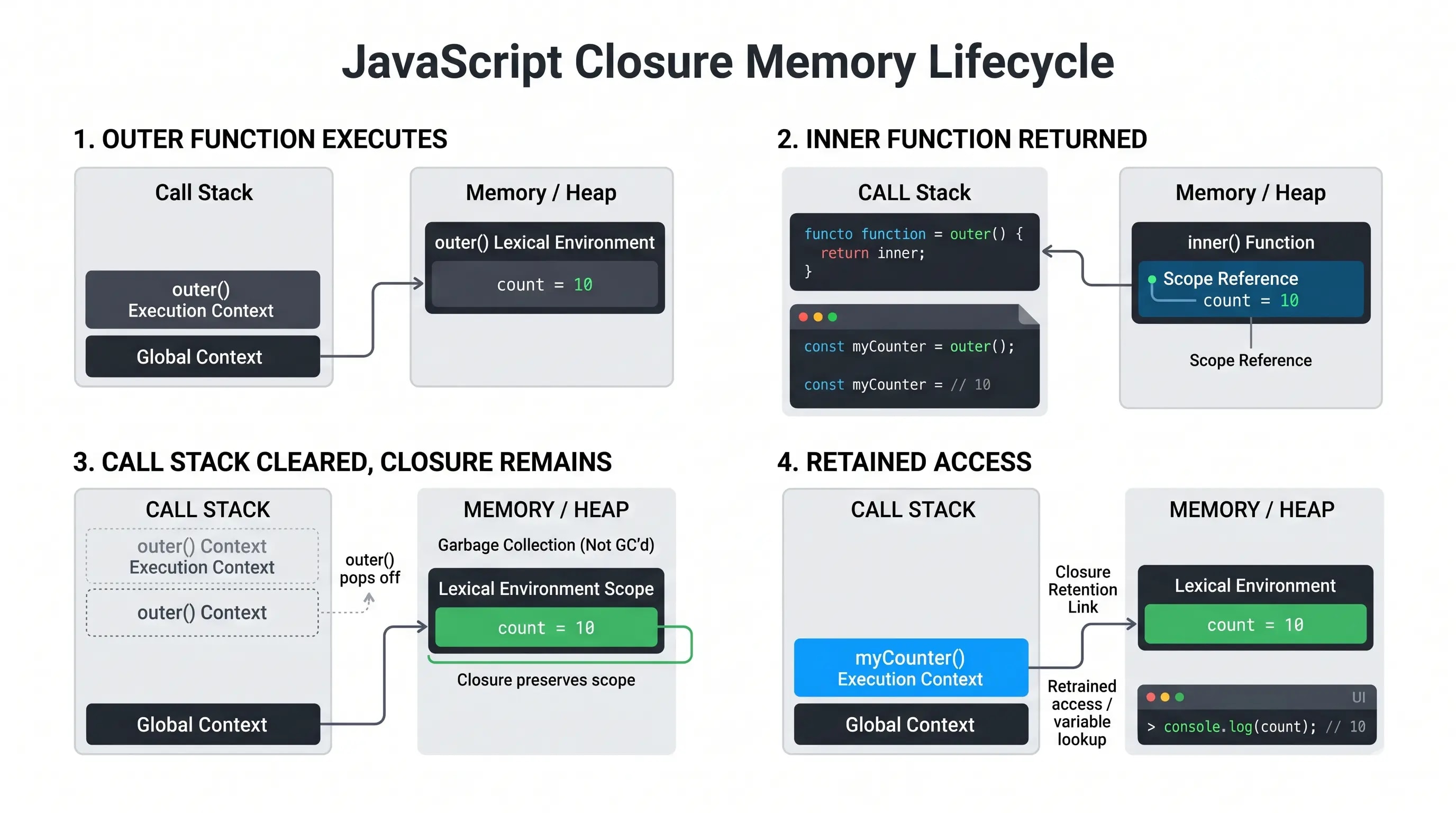
When outer() executes, JavaScript creates its execution context and a lexical environment containing count.
When inner is created, it has access to its surrounding lexical environment.
When outer() returns, its execution context is removed from the call stack.
However, the lexical environment containing count remains reachable because the returned function still needs it.
This is the important distinction:
An execution context can disappear from the call stack while its lexical environment remains accessible through a closure.
Understanding the Memory Lifecycle
Step 1: Function execution
outer() executes and creates count.
Step 2: Inner function creation
inner() is created and references count.
Step 3: Returning the function
outer() returns inner.
Step 4: Outer execution completes
The execution context of outer() is removed from the call stack.
Step 5: Closure remains reachable
The returned function still has access to count.
Does a Closure Store a Copy of a Variable?
This is another important question.
A closure does not simply take a snapshot of the variable's value when the outer function returns.
Instead, it retains access to the variable binding in its lexical environment.
Let's see what that means.
function counter() {
  let count = 0;

  return function () {
    count++;
    console.log(count);
  };
}

const increment = counter();

increment(); // 1
increment(); // 2
increment(); // 3
Why does the value keep increasing?
Because every time we call increment(), the function accesses and updates the same count variable.
The closure retains access to the variable, not just its initial value.
This is why we can maintain persistent state using closures.
Multiple Functions Can Share the Same Closure
function counter() {
  let count = 0;

  function increment() {
    count++;
    console.log(count);
  }

  function decrement() {
    count--;
    console.log(count);
  }

  return {
    increment,
    decrement
  };
}

const c = counter();

c.increment(); // 1
c.increment(); // 2
c.decrement(); // 1
Both increment() and decrement() access the same count variable.
They share the same surrounding lexical environment.
4. Practical Applications of Closures
Now we understand what closures are and how they work.
But why are they useful?
Why does JavaScript need this feature?
Let's explore some real-world applications.
4.1 Data Hiding and Encapsulation
Imagine you are building a banking application.
You have a variable called balance.
If you declare it globally, anyone with access to that scope can modify it.
let balance = 1000;

function deposit(amount) {
  balance += amount;
}

balance = 0; // Anyone can modify it directly
This is not a good way to manage sensitive application state.
What if we could keep balance private and allow access only through specific functions?
Closures make this possible.
function createBankAccount(initialBalance) {
  let balance = initialBalance;

  return {
    deposit(amount) {
      balance += amount;
      return balance;
    },

    withdraw(amount) {
      if (amount > balance) {
        return "Insufficient funds";
      }

      balance -= amount;
      return balance;
    },

    getBalance() {
      return balance;
    }
  };
}

const account = createBankAccount(1000);

console.log(account.deposit(500)); // 1500
console.log(account.withdraw(200)); // 1300
console.log(account.getBalance()); // 1300

console.log(account.balance); // undefined
Notice that we cannot directly access balance through the returned object.
It is accessible only through the methods we expose.
This is called Data Encapsulation.
We keep internal state private and expose only the operations that are necessary.
This pattern is useful for:
Banking applications.
Shopping cart state.
User session management.
Counters and configuration.
Managing internal application state.
Closures provide encapsulation, but they are not a security boundary against malicious code that already has access to the surrounding application.
4.2 The Module Pattern
As applications grow, we need a way to organize related functionality.
For example, an authentication module might contain:
Login functionality.
Logout functionality.
Current user information.
Internal authentication state.
We don't want every variable and helper function to be accessible globally.
Closures help us implement the Module Pattern.
const authModule = (function () {
  let loggedInUser = null;

  function login(username) {
    loggedInUser = username;
    console.log("Logged in:", username);
  }

  function logout() {
    loggedInUser = null;
    console.log("Logged out");
  }

  function getUserInfo() {
    return loggedInUser;
  }

  return {
    login,
    logout,
    getUserInfo
  };
})();

authModule.login("Alice");

console.log(authModule.getUserInfo()); // Alice

authModule.logout();
Let's understand the pattern:
We create an immediately invoked function expression (IIFE).
The IIFE creates a private lexical environment.
It returns an object containing selected public methods.
Those methods retain access to the private variables through closures.
Notice that loggedInUser cannot be directly accessed through authModule.
This is how closures help organize code and prevent unnecessary global variables.
Note: Modern JavaScript also provides ES Modules and private class fields. The Module Pattern is still useful for understanding closures and older JavaScript codebases.
4.3 Currying
Currying is a technique in which a function that accepts multiple arguments is transformed into a sequence of functions, each accepting one argument at a time.
Let's first look at a normal function.
function add(a, b, c) {
  return a + b + c;
}

console.log(add(10, 20, 30)); // 60
Now let's write the same logic using currying.
function add(a) {
  return function (b) {
    return function (c) {
      return a + b + c;
    };
  };
}

console.log(add(10)(20)(30)); // 60
But how does each function remember the previous arguments?
That's where closures come in.
The second function remembers
a.The third function remembers both
aandb.The final function uses all three values.
We can also write this using arrow functions.
const calculateTotalPrice = (taxRate) => (price) =>
  price + price * (taxRate / 100);

const calculateSalesTax = calculateTotalPrice(8);

console.log(calculateSalesTax(100)); // 108
console.log(calculateSalesTax(200)); // 216
Here, calculateSalesTax remembers the tax rate through a closure.
This allows us to create reusable specialized functions.
4.4 Memoization
Imagine you have an expensive function that performs a complicated calculation.
If you call it with the same inputs repeatedly, why should JavaScript calculate the result every time?
What if we could remember the previous result and return it whenever the same input appears again?
This technique is called Memoization.
Closures make it possible to maintain a private cache between function calls.
function memoize(fn) {
  const cache = {};

  return function (...args) {
    const key = JSON.stringify(args);

    if (Object.hasOwn(cache, key)) {
      console.log("Fetching from cache");
      return cache[key];
    }

    console.log("Calculating result");

    const result = fn.apply(this, args);

    cache[key] = result;

    return result;
  };
}

function multiply(a, b) {
  return a * b;
}

const memoizedMultiply = memoize(multiply);

console.log(memoizedMultiply(10, 20));
// Calculating result
// 200

console.log(memoizedMultiply(10, 20));
// Fetching from cache
// 200
Why does the cache survive between calls?
Because the returned function retains access to the cache variable through its closure.
The cache is created once when memoize() runs, not every time the returned function is called.
Where is memoization useful?
Expensive calculations.
Recursive algorithms.
Repeated API-derived computations.
Data transformations.
Caching results based on function arguments.
This simplified implementation assumes arguments can be safely serialized using JSON. Production memoization often needs a more robust cache key strategy and a Map.
4.5 setTimeout and Asynchronous Callbacks
Closures are also extremely important when working with asynchronous JavaScript.
Consider this example:
function x() {
  let i = 1;

  setTimeout(function () {
    console.log(i);
  }, 3000);

  console.log("JavaScript");
}

x();
Output:
JavaScript

1 // After approximately 3 seconds
Why doesn't JavaScript wait for three seconds before printing the message?
Because setTimeout() schedules a callback and allows JavaScript to continue executing the remaining code.
The callback forms a closure over i.
Even after x() finishes executing, the callback can still access i.
After the timer expires, the callback becomes eligible to execute and is eventually processed by the event loop.
This is one of the most important connections between closures and asynchronous JavaScript.
5. The Famous setTimeout and Closure Interview Question
Now let's explore one of the most frequently asked JavaScript interview questions.
Question: Print 1 after 1 second, 2 after 2 seconds, and continue until 5 after 5 seconds.
A developer might initially write this:
function x() {
  for (var i = 1; i <= 5; i++) {
    setTimeout(function () {
      console.log(i);
    }, i * 1000);
  }

  console.log("JavaScript");
}

x();
You might expect the output to be:
1
2
3
4
5
But the actual output is:
JavaScript

6
6
6
6
6
Why?
Let's understand.
Step 1: Understanding var
The variable i is declared using var.
Remember that var is function-scoped, not block-scoped.
This means all five callbacks share the same variable i.
Step 2: Understanding Closures
Each callback forms a closure over the same variable i.
The callbacks don't capture five separate copies of the value.
They retain access to the same variable.
Step 3: Understanding the Loop
The loop executes very quickly.
It schedules five timers and increments i until the loop condition becomes false.
At that point:
i === 6Step 4: Callback Execution
After their respective timers expire, the callbacks execute.
All five callbacks access the same variable, whose final value is 6.
That's why we get:
6
6
6
6
6
Solution 1: Using let
The easiest solution is to replace var with let.
function x() {
  for (let i = 1; i <= 5; i++) {
    setTimeout(function () {
      console.log(i);
    }, i * 1000);
  }

  console.log("JavaScript");
}

x();
Output:
JavaScript
1 // After 1 second
2 // After 2 seconds
3 // After 3 seconds
4 // After 4 seconds
5 // After 5 seconds
Why does this work?
Unlike var, let is block-scoped.
In a for loop, JavaScript creates a separate binding for each iteration when the loop uses let.
Each callback therefore retains access to its own iteration's i.
Solution 2: Using an IIFE with var
But what if the interviewer says:
"You cannot use let. Solve this using var."
We can use an Immediately Invoked Function Expression (IIFE).
function x() {
  for (var i = 1; i <= 5; i++) {
    (function (j) {
      setTimeout(function () {
        console.log(j);
      }, j * 1000);
    })(i);
  }

  console.log("JavaScript");
}

x();
Why does this work?
Every time the loop runs, the IIFE executes immediately and receives the current value of i through the parameter j.
Each IIFE invocation creates its own lexical environment.
Therefore, each callback closes over a different j.
The output is:
JavaScript
1
2
3
4
5
Key takeaway: The problem is not with setTimeout(). The problem is that all callbacks share the same function-scoped variable when var is used.
6. Closures and Garbage Collection
We have seen that closures allow variables to remain accessible even after their outer functions finish executing.
But this raises an important question.
If closures keep variables alive, when does JavaScript release that memory?
JavaScript uses a mechanism called Garbage Collection to automatically reclaim memory that is no longer reachable.
For example:
function outer() {
  let value = 100;

  return function inner() {
    console.log(value);
  };
}

let fn = outer();

fn(); // 100
As long as fn is reachable, its closure can access value.
Now consider:
fn = null;If there are no other references to the returned function or its lexical environment, the associated memory becomes eligible for garbage collection.
Notice the wording: eligible for garbage collection.
JavaScript engines decide when to actually reclaim memory.
Do Closures Always Keep Every Outer Variable in Memory?
No.
Consider:
function outer() {
  const a = 10;
  const b = 20;

  return function inner() {
    console.log(a);
  };
}
The returned function uses a, but not b.
JavaScript engines can optimize which variables need to remain available.
We should not assume that every variable from an outer scope must remain in memory for the lifetime of a closure.
Accidental Memory Retention
Closures can contribute to memory problems when long-lived references keep unnecessary objects alive.
For example:
function attachHandler(element) {
  const largeData = new Array(1000000).fill("data");

  element.addEventListener("click", function () {
    console.log(largeData.length);
  });
}
The event listener retains access to largeData.
If the element and listener remain reachable, the referenced data may remain reachable too.
When the event listener is no longer needed, remove it and release unnecessary references.
This is particularly important in long-running applications and component-based UI frameworks.
7. Common Interview Questions on Closures
Now let's test our understanding with some frequently asked interview questions.
Question 1: What is the output?
function outer() {
  function inner() {
    console.log(a);
  }

  const a = 10;

  return inner;
}

outer()();
Output:
10Explanation:
The inner function forms a closure with its outer lexical environment.
The position of the variable declaration relative to the inner function's definition doesn't prevent the closure from accessing it. The function executes after a has been initialized.
Question 2: Does changing var to let make any difference?
function outer() {
  let a = 10;

  function inner() {
    console.log(a);
  }

  return inner;
}

outer()();
Output:
10Explanation:
Both var and let variables can be accessed through closures.
The difference is their scoping behavior, not whether they support closures.
Question 3: Can an inner function access its outer function's arguments?
function outer(str) {
  const a = 10;

  function inner() {
    console.log(a, str);
  }

  return inner;
}

outer("Hello There")();
Output:
10 Hello ThereExplanation:
The inner function can access both local variables and parameters from its outer lexical environment.
Question 4: Can a closure access multiple outer scopes?
function outest() {
  const c = 20;

  function outer(str) {
    const a = 10;

    function inner() {
      console.log(a, c, str);
    }

    return inner;
  }

  return outer;
}

outest()("Hello There")();
Output:
10 20 Hello ThereExplanation:
The inner function can access variables from both its immediate outer function and the more distant outer function.
Question 5: What happens when variable names conflict?
function outest() {
  const c = 20;

  function outer() {
    const a = 10;

    function inner() {
      console.log(a, c);
    }

    return inner;
  }

  return outer;
}

const a = 100;

outest()()();
Output:
10 20Explanation:
JavaScript first searches the immediate lexical environment.
It finds a = 10 inside outer().
Therefore, it never needs to search the global scope where a = 100 exists.
This behavior is called variable shadowing.
Question 6: What is the output?
let count = 0;

(function printCount() {
  if (count === 0) {
    let count = 1;
    console.log(count);
  }

  console.log(count);
})();
Output:
1
0
Explanation:
There are two different variables named count.
The inner
countexists inside theifblock.The outer
countexists in the global scope.
The inner variable shadows the outer variable within its block.
Question 7: Create a function that adds six to any number.
function createBase(num) {
  return function (innerNum) {
    return innerNum + num;
  };
}

const addSix = createBase(6);

console.log(addSix(10)); // 16
console.log(addSix(21)); // 27
Explanation:
addSix remembers the value 6 through a closure.
We can reuse this function with different arguments without passing 6 again.
Question 8: Create a private counter.
function counter() {
  let _counter = 0;

  function add(increment) {
    _counter += increment;
  }

  function retrieve() {
    return `Counter = ${_counter}`;
  }

  return {
    add,
    retrieve
  };
}

const c = counter();

c.add(5);
c.add(10);

console.log(c.retrieve()); // Counter = 15
Explanation:
The _counter variable cannot be directly accessed through the returned object.
Both add() and retrieve() share access to it through closures.
Question 9: Create a function that runs only once.
function like() {
  let called = false;

  return function () {
    if (!called) {
      console.log("Subscribed!");
      called = true;
    } else {
      console.log("Already subscribed!");
    }
  };
}

const isSubscribed = like();

isSubscribed(); // Subscribed!
isSubscribed(); // Already subscribed!
isSubscribed(); // Already subscribed!
Explanation:
The called variable is preserved by the returned function.
Once it becomes true, subsequent calls can access the updated value.
Question 10: Implement a once() utility.
A reusable version of the previous example is a once() function.
It accepts another function and ensures that the supplied function executes only once.
function once(fn) {
  let result;
  let called = false;

  return function (...args) {
    if (!called) {
      result = fn.apply(this, args);
      called = true;
    }

    return result;
  };
}

const hello = once((a, b) => {
  console.log("Hello", a, b);
  return a + b;
});

console.log(hello(10, 20)); // Hello 10 20, then 30
console.log(hello(10, 20)); // 30
console.log(hello(10, 20)); // 30
Explanation:
The returned function remembers two things:
Whether the original function has already executed.
The result returned by the original function.
Both are maintained using closures.
Question 11: Implement a Memoize Utility.
Let's revisit memoization with a reusable implementation.
function memoize(fn) {
  const cache = new Map();

  return function (...args) {
    const key = JSON.stringify(args);

    if (cache.has(key)) {
      return cache.get(key);
    }

    const result = fn.apply(this, args);

    cache.set(key, result);

    return result;
  };
}

const clumsyProduct = (num1, num2) => {
  for (let i = 1; i <= 1000000; i++) {
    // Simulating expensive work
  }

  return num1 * num2;
};

const memoizedProduct = memoize(clumsyProduct);

console.time("First call");
console.log(memoizedProduct(9467, 7649));
console.timeEnd("First call");

console.time("Second call");
console.log(memoizedProduct(9467, 7649));
console.timeEnd("Second call");
Explanation:
The first call performs the calculation and stores the result.
The second call finds the result in the cache and returns it without repeating the expensive work.
The cache survives because the returned function retains access to it.
Question 12: What is the difference between Scope and Closure?
These two concepts are related, but they are not the same.
Scope determines where a variable can be accessed in a program.
Closure allows a function to retain access to variables from its surrounding lexical environment, even after the outer function has completed execution.
In simple terms:
Scope is about variable accessibility.
Closure is about a function retaining access to its surrounding lexical environment.
Every closure relies on lexical scope, but not every example of variable access needs an outer function to have returned.
8. Common Closure Mistakes
Mistake 1: Thinking Closures Store Snapshots
Closures retain access to variable bindings, not frozen copies of values.
function outer() {
  let count = 0;

  return function () {
    count++;
    console.log(count);
  };
}

const fn = outer();

fn(); // 1
fn(); // 2
Mistake 2: Thinking Outer Variables Are Always Preserved Forever
Variables remain available while they are reachable through references.
Once the relevant closures and other references become unreachable, the engine can reclaim the memory.
Mistake 3: Confusing var and let in Loops
var shares one function-scoped binding across loop iterations, whereas let creates a separate binding for each iteration of a for loop.
Mistake 4: Assuming Every Callback Is Asynchronous
Callbacks can execute synchronously or asynchronously.
For example, map() executes its callback synchronously, while setTimeout() schedules its callback for later.
9. Quick Revision Cheat Sheet
Concept | Explanation |
|---|---|
Lexical Scope | Scope determined by where code is written |
Scope Chain | Mechanism for resolving variables through outer environments |
Closure | A function combined with access to its lexical environment |
Persistent State | Maintaining variables between function calls |
Data Encapsulation | Hiding internal state and exposing selected operations |
Module Pattern | Organizing private and public functionality |
Currying | Transforming a function into a sequence of functions |
Memoization | Caching previous function results |
Garbage Collection | Reclaiming memory that is no longer reachable |
30-Second Interview Revision
A closure is a function bundled with references to its surrounding lexical environment.
Closures are created when functions are created.
A returned inner function can access outer variables even after the outer function finishes.
Closures retain access to variable bindings, not just snapshots of values.
Multiple functions can share the same lexical environment.
Closures are useful for data privacy, modules, currying, and memoization.
letcreates a separate loop binding for each iteration in a traditionalforloop.varshares one function-scoped binding.Garbage collection depends on reachability, not simply whether a function has returned.
What's Next?
We have now explored how JavaScript functions can retain access to their surrounding environments.
We have also seen how closures help implement persistent state, encapsulation, and reusable function patterns.
But there is another important question:
How does JavaScript actually execute asynchronous code?
What happens when we use setTimeout(), Promises, async/await, and event listeners?
To answer these questions, our next chapter will explore:
The JavaScript Event Loop
JavaScript Runtime Environment
Call Stack
Web APIs
Callback Queue (Task Queue)
Microtask Queue
Event Loop
Promises and asynchronous execution
Understanding these concepts will complete the connection between functions, closures, and asynchronous JavaScript.