Polyfills in JavaScript: Map,Filter,Reduce
Imagine you're working on an application that needs to run in an older JavaScript environment.
Your code uses Array.prototype.map(), but that environment doesn't support it. Your application cannot perform the operation it depends on.
How can we solve this?
One solution is to provide our own implementation of the missing functionality. This is where polyfills come in.
1. What is a Polyfill?
A polyfill is a piece of JavaScript code that provides functionality that may be missing from an older environment.
In simple terms, it allows older environments to use features they don't natively support.
For example, imagine an environment that doesn't support Array.prototype.map().
We can write our own implementation that behaves similarly to the native method.
function mapPolyfill(array, callback) {
  const result = [];

  for (let i = 0; i < array.length; i++) {
    result.push(callback(array[i], i, array));
  }

  return result;
}

const numbers = [1, 2, 3];

const doubled = mapPolyfill(numbers, (num) => num * 2);

console.log(doubled); // [2, 4, 6]
This is a basic implementation of the behaviour of map().
However, a proper polyfill needs to account for more than the basic use case. We'll build towards that in this chapter.
2. Before Writing Polyfills: Understand the Callback
Array methods such as map(), filter(), and reduce() accept callback functions.
These callbacks receive different arguments depending on the method.
For map() and filter(), the callback receives:
The current element.
The current index.
The original array.
const numbers = [10, 20, 30];

numbers.map((value, index, array) => {
  console.log(value, index, array);
});
Output:
10 0 [10, 20, 30]
20 1 [10, 20, 30]
30 2 [10, 20, 30]
reduce() works differently. Its callback receives:
The accumulator.
The current element.
The current index.
The original array.
const numbers = [10, 20, 30];

const total = numbers.reduce((acc, current, index, array) => {
  console.log(acc, current, index);
  return acc + current;
}, 0);

console.log(total); // 60
Understanding these callback arguments is essential because our implementations must provide them just like the native methods.
3. Understanding map() Before Implementing It
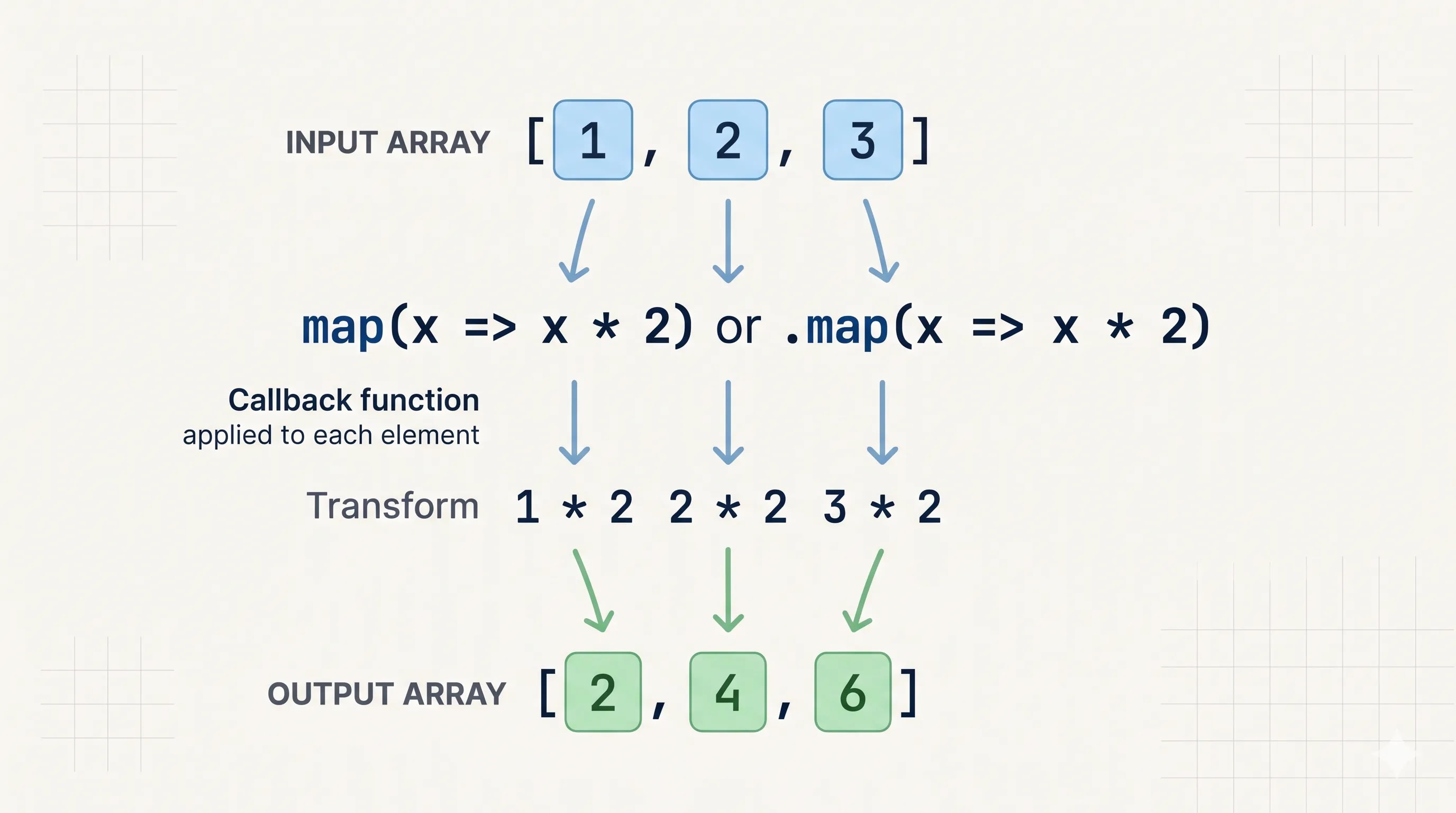
The map() method creates a new array by applying a callback to every existing element.
const numbers = [1, 2, 3, 4];

const result = numbers.map((num) => num * 2);

console.log(result);  // [2, 4, 6, 8]
console.log(numbers); // [1, 2, 3, 4]
The original array remains unchanged.
Our implementation needs to:
Create a new result array.
Visit each existing element.
Pass the value, index, and original array to the callback.
Store the callback's returned value in the result array.
Implementing map()
Array.prototype.myMap= function (callback, thisArg) {
  // Validate that the callback is a function
  if (typeof callback !== "function") {
    throw new TypeError("Callback must be a function");
  }

  // Store the original array (this refers to the array on which mymap is called)
  const arr = Object(this);

  // Store the original length because map() should iterate
  // only over the length captured when the method was called
  const length = arr.length;

  // Create a new array with the same length as the original array
  const result = new Array(length);

  // Iterate through the original array
  for (let i = 0; i < length; i++) {

    // Check whether the current index exists.
    // This is important for sparse arrays (arrays with empty slots).
    // Empty slots should remain empty in the resulting array.
    if (i in arr) {

      // Execute the callback with:
      // 1. arr[i]  -> Current element
      // 2. i       -> Current index
      // 3. arr     -> Original array
      //
      // call() allows us to pass thisArg as the callback's this value.
      result[i] = callback.call(thisArg, arr[i], i, arr);
    }
  }

  // Return the newly created array without modifying the original array
  return result;
};
Let's test it:
const numbers = [1, 2, 3];

const result = myMap(numbers, (num, index) => {
  return num * index;
});

console.log(result); // [0, 2, 6]
Why do we use i in array?
Consider an array with an empty slot:
const numbers = [1, , 3];

console.log(numbers.length); // 3
The second position is empty. Native map() skips empty slots rather than calling the callback with undefined.
const result = numbers.map((num) => num * 2);

console.log(result); // [2, empty, 6]
Using i in array helps preserve this behaviour in our implementation.
4. Understanding filter() Before Implementing It
The filter() method creates a new array containing only the elements that satisfy a condition.
const numbers = [1, 2, 3, 4, 5, 6];

const result = numbers.filter((num) => num % 2 === 0);

console.log(result); // [2, 4, 6]
Unlike map(), which transforms every element, filter() decides whether an element should be included in the result.
Our implementation needs to:
Create a new result array.
Visit each existing element.
Pass the value, index, and original array to the callback.
Include the original element if the callback returns a truthy value.
Implementing filter()
Array.prototype.myFilter = function (callback, thisArg) {

  // Validate that the callback is a function
  if (typeof callback !== "function") {
    throw new TypeError("Callback must be a function");
  }

  // Store the original array (this refers to the array on which myFilter is called)
  const arr = Object(this);

  // Capture the original array length
  const length = arr.length;

  // Store elements that pass the callback condition
  const result = [];

  // Iterate through the original array
  for (let i = 0; i < length; i++) {

    // Check whether the current index exists.
    // This skips empty slots in sparse arrays.
    if (i in arr) {

      // Execute callback with:
      // 1. arr[i] -> Current element
      // 2. i      -> Current index
      // 3. arr    -> Original array
      //
      // call() also allows us to pass thisArg.
      if (callback.call(thisArg, arr[i], i, arr)) {

        // Add the original element if the callback returns a truthy value
        result.push(arr[i]);
      }
    }
  }

  // Return a new array containing only matching elements
  return result;
};
Let's test it:
const numbers = [1, 2, 3, 4, 5];

const result = myFilter(numbers, (num) => num > 3);

console.log(result); // [4, 5]
Notice something important: filter() stores the original element, not the callback's returned value.
For example:
const result = filterPolyfill([1, 2, 3], (num) => num * 2);

console.log(result); // [1, 2, 3]
Every callback result is truthy, so every original element is included.
5. Understanding reduce() Before Implementing It
The reduce() method processes an array and combines its elements into a single accumulated result.
For example, let's calculate the sum of an array:
const numbers = [10, 20, 30, 40];

const total = numbers.reduce((acc, current) => {
  return acc + current;
}, 0);

console.log(total); // 100
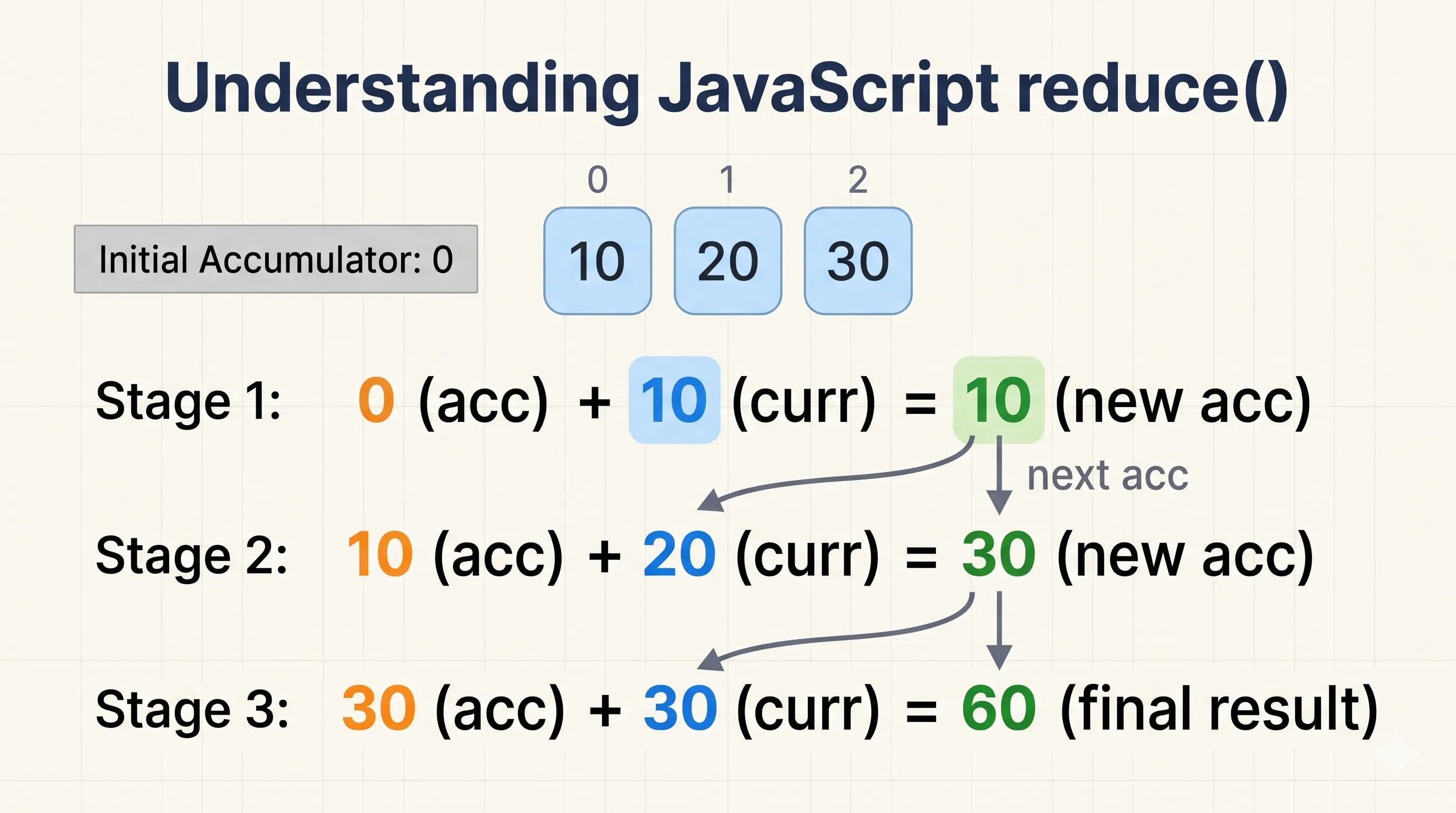
Here is how the accumulator changes:
Iteration | Accumulator | Current value | Result |
|---|---|---|---|
1 | 0 | 10 | 10 |
2 | 10 | 20 | 30 |
3 | 30 | 30 | 60 |
4 | 60 | 40 | 100 |
The accumulator carries the result from one iteration to the next.
What happens if we don't provide an initial value?
This is an important behaviour to understand.
const numbers = [10, 20, 30];

const result = numbers.reduce((acc, current) => {
  return acc + current;
});

console.log(result); // 60
When no initial value is provided, reduce() uses the first existing element as the initial accumulator and starts processing from the next existing element.
For an empty array without an initial value, it throws a TypeError.
Implementing reduce()
Array.prototype.myReduce = function (callback, initialValue) {

  // Validate that the callback is a function
  if (typeof callback !== "function") {
    throw new TypeError("Callback must be a function");
  }

  // Convert this into an object (original array)
  const arr = Object(this);

  // Capture the original array length
  const length = arr.length;

  // Stores the current accumulator value
  let accumulator;

  // Starting index for iteration
  let currIndex = 0;

  // Check whether initialValue was explicitly provided
  // arguments.length > 1 is important because initialValue can be 0, null, undefined, etc.
  if (arguments.length > 1) {

    // Use the provided initial value as the accumulator
    accumulator = initialValue;

  } else {

    // If no initial value is provided,
    // find the first existing element in the array
    while (currIndex < length && !(currIndex in arr)) {
      currIndex++;
    }

    // If no existing element is found, throw an error
    if (currIndex >= length) {
      throw new TypeError("Reduce of empty array with no initial value");
    }

    // Use the first existing element as the accumulator
    // Start iteration from the next index
    accumulator = arr[currIndex++];
  }

  // Iterate through the remaining array elements
  for (let i = currIndex; i < length; i++) {

    // Skip empty slots in sparse arrays
    if (i in arr) {

      // Execute callback with:
      // 1. accumulator -> Previous accumulated result
      // 2. arr[i]      -> Current element
      // 3. i           -> Current index
      // 4. arr         -> Original array
      //
      // Store the callback result as the new accumulator
      accumulator = callback(accumulator, arr[i], i, arr);
    }
  }

  // Return the final accumulated value
  return accumulator;
};
Both return 60, but the accumulator is initialized differently.
6. Important Details When Building Polyfills
Our implementations cover the core behaviour, but there are a few important details worth remembering.
1. Validate the callback
Native array methods throw a TypeError if the callback is not callable.
2. Capture the array length
The native methods determine the length before starting iteration. If the callback appends new elements, those elements beyond the original length aren't visited during that iteration.
3. Skip empty slots
Methods such as map(), filter(), and reduce() skip holes in sparse arrays. This is why we check i in array.
4. Don't modify the original array unnecessarily
map() and filter() create new arrays. reduce() returns the accumulated result. Their normal implementations don't mutate the original array.
5. An initial value matters in reduce()
An empty array without an initial value throws an error. An empty array with an initial value returns that initial value.
These implementations focus on the core behaviour for learning and interview practice. They are not complete replacements for the ECMAScript specification. Native methods also handle details such as array-like objects, result construction, and other edge cases.
7. How Are Polyfills Actually Used?
So far, we've written standalone functions to understand the algorithms.
In real applications, a polyfill usually provides a missing method through the relevant built-in object. For example, a map() polyfill provides Array.prototype.map when the environment doesn't already support it.
The general idea looks like this:
if (!Array.prototype.someMethod) {
  // Provide a compatible implementation
}
We will explore how methods are attached to prototypes, how JavaScript resolves them, and how this works in the next chapter.
For now, remember that the important job of a polyfill is to provide compatible functionality when native support is unavailable.
Quick Revision
Method | Purpose | Returns |
|---|---|---|
| Transform every existing element | New array |
| Keep elements that pass a condition | New array |
| Accumulate elements into one result | Accumulated value |
The key idea is simple:
map()transforms.filter()selects.reduce()accumulates.
When writing polyfills, don't just reproduce the output of a simple example. Try to understand the native method's behaviour, including its callback arguments, sparse arrays, and edge cases.