call apply bind in js
Explicit context control, function borrowing, and partial application mechanics.
1. The Story Behind call(), apply(), and bind()
The Race Car Driver and the Rental Agency
Imagine you are a professional race car driver, but you don't own a car.
You walk into a luxury car rental agency and find a Ferrari.
The agency gives you three different ways to use the car.
Option 1: call() — Rent and drive immediately
You rent the Ferrari right now. You tell the agency exactly which equipment you need, one item at a time.
drive.call(ferrari, "helmet", "gloves");You get the car and start driving immediately.
Option 2: apply() — Rent and drive immediately with a packed bag
You rent the same Ferrari, but instead of listing your equipment individually, you hand over a bag containing everything you need.
drive.apply(ferrari, ["helmet", "gloves"]);You still drive immediately. The only difference is how you provide the arguments.
Option 3: bind() — Reserve the Ferrari for later
You don't want to drive today. Instead, you sign a contract that creates a function already associated with that Ferrari.
const myDrive = drive.bind(ferrari);You can call myDrive() later, and it will still use the bound Ferrari as its this value.
This is the basic idea behind these three JavaScript methods.
All three allow us to control the this value of a function, but they behave differently.
Method | Execution | How arguments are passed |
|---|---|---|
| Immediately | Individually |
| Immediately | As an array or array-like object |
| Later | Individually, with optional preset arguments |
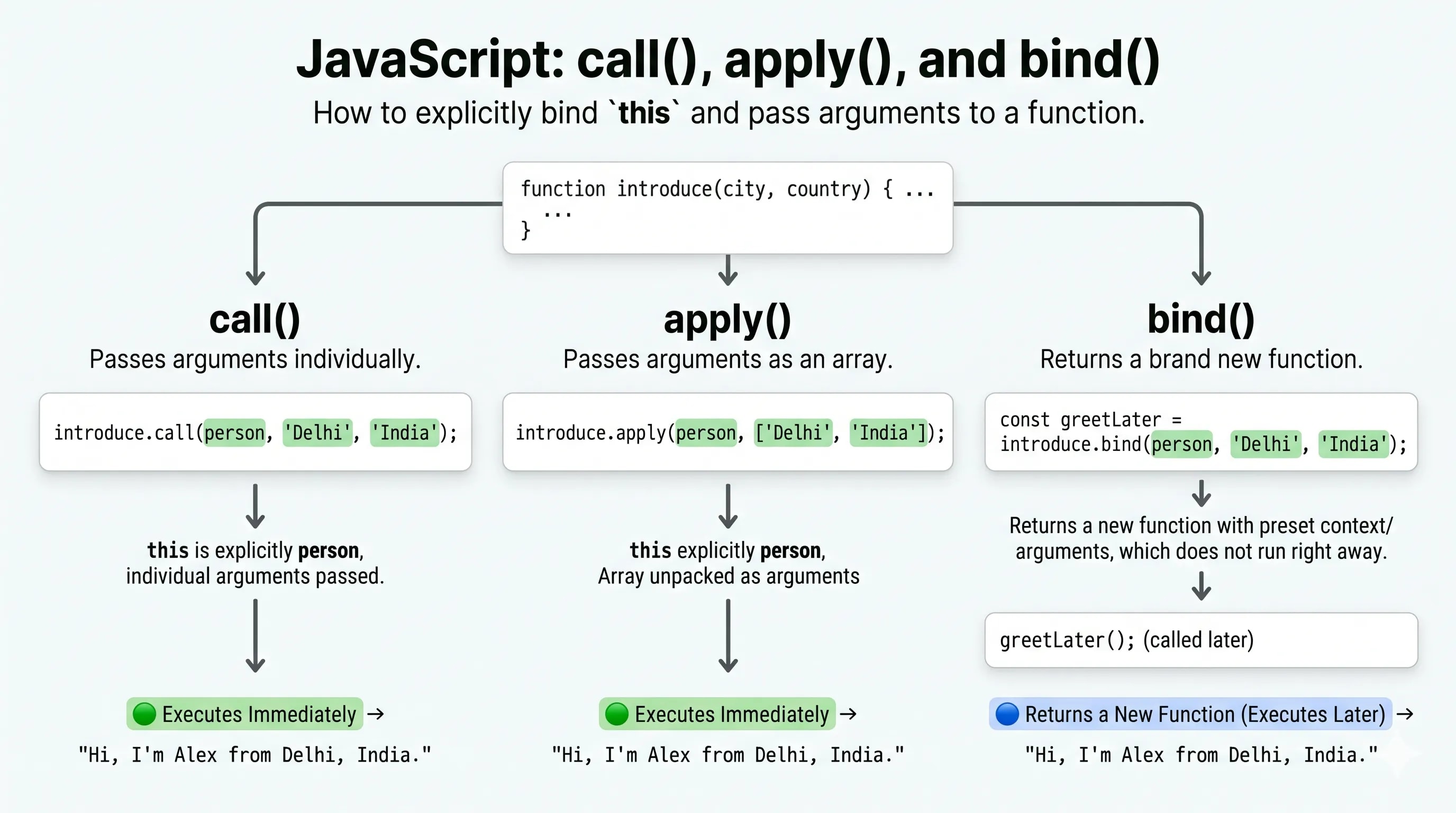
The key difference: call() and apply() execute a function immediately, while bind() returns a new function for later execution.
2. Understanding call()
The call() method allows us to invoke a function while explicitly specifying its this value.
Its syntax is:
functionName.call(thisArg, arg1, arg2, arg3);Let's understand it with an example.
function sayHello() {
  return "Hello " + this.name;
}

const user = {
  name: "Alex"
};

console.log(sayHello.call(user));
Output:
Hello AlexWhy does this work?
Normally, if we call:
sayHello();The function uses default binding.
But when we write:
sayHello.call(user);We explicitly tell JavaScript to use user as the this value.
Inside the function:
this.name;is effectively accessing:
user.name;Passing arguments with call()
We can also pass arguments individually.
function introduce(city, country) {
  return `${this.name} lives in ${city}, ${country}`;
}

const user = {
  name: "Alex"
};

console.log(
  introduce.call(user, "Delhi", "India")
);
Output:
Alex lives in Delhi, IndiaNotice that the first argument is the object we want to use as this. The remaining arguments are passed individually to the function.
3. Understanding apply()
The apply() method works almost exactly like call().
The difference is how we pass arguments.
With call(), we pass arguments individually.
With apply(), we pass them together as an array or array-like object.
Syntax:
functionName.apply(thisArg, [arg1, arg2, arg3]);Example:
function introduce(city, country) {
  return `${this.name} lives in ${city}, ${country}`;
}

const user = {
  name: "Alex"
};

console.log(
  introduce.apply(user, ["Delhi", "India"])
);
Output:
Alex lives in Delhi, IndiaCompare both methods:
// call()
introduce.call(user, "Delhi", "India");

// apply()
introduce.apply(user, ["Delhi", "India"]);
Both produce the same result.
A simple trick to remember:
apply()starts with A — Array.call()takes comma-separated arguments.
4. Understanding bind()
Now let's understand the third method.
Unlike call() and apply(), bind() does not execute the function immediately.
Instead, it creates and returns a new function with a bound this value.
Syntax:
const newFunction = originalFunction.bind(thisArg);Example:
function sayHello() {
  return "Hello " + this.name;
}

const user = {
  name: "Alex"
};

const helloFn = sayHello.bind(user);

console.log(helloFn());
Output:
Hello AlexWhat happened here?
sayHello.bind(user)created a new function.That function remembers
useras itsthisvalue.We stored the returned function inside
helloFn.When we called
helloFn(), it used the previously bound object.
This is useful when we need to pass a function somewhere and execute it later without losing its original this.
Passing arguments with bind()
bind() can also accept arguments in advance.
function introduce(city, country) {
  return `${this.name} lives in ${city}, ${country}`;
}

const user = {
  name: "Alex"
};

const introduceAlex = introduce.bind(user, "Delhi");

console.log(introduceAlex("India"));
Output:
Alex lives in Delhi, IndiaNotice something interesting:
introduce.bind(user, "Delhi");We already supplied the first argument, city.
Later, when we called:
introduceAlex("India");The remaining argument was supplied.
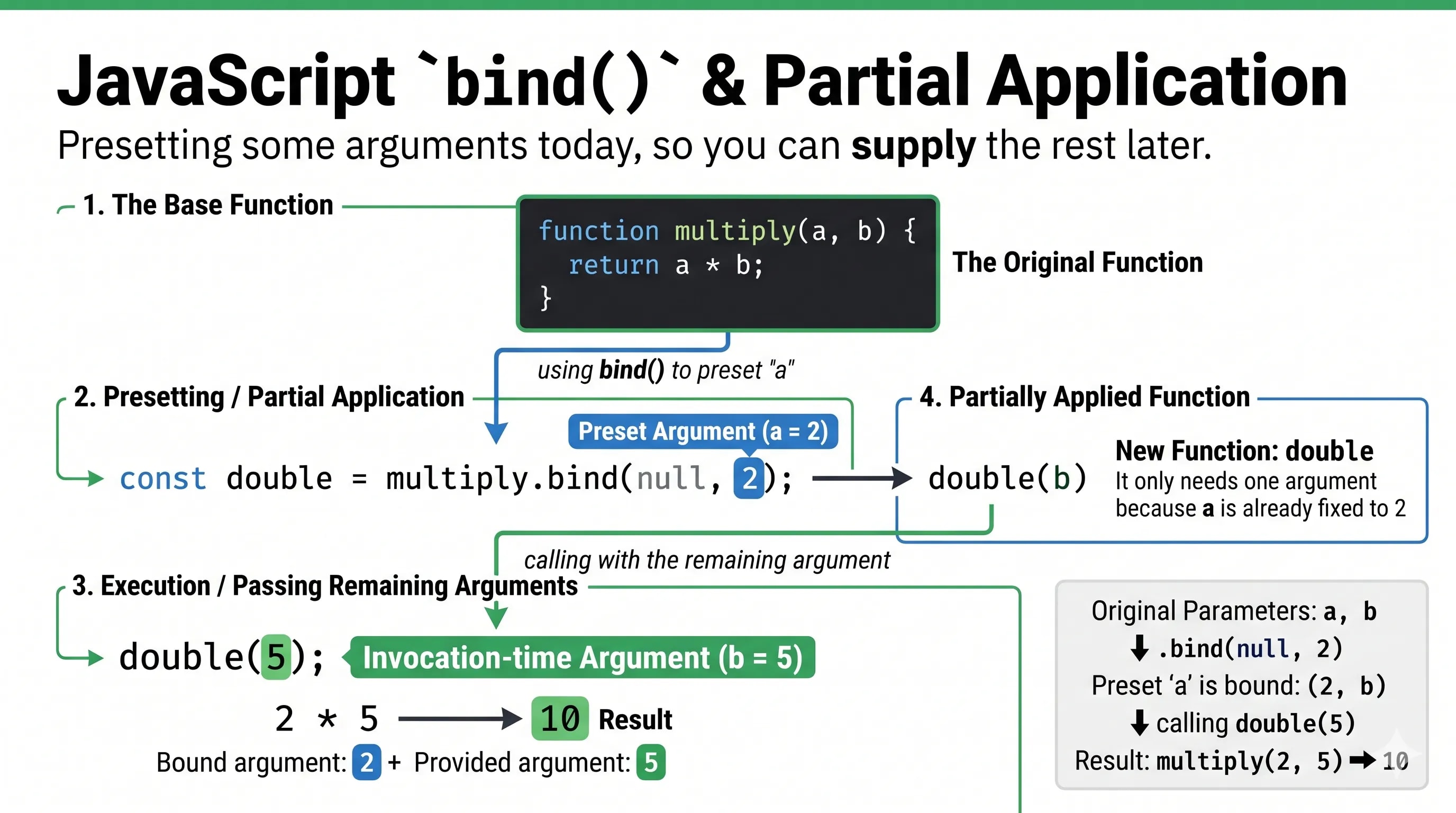
This behavior is called partial application.
5. Partial Application: Passing Arguments in Advance
Partial application means creating a new function by fixing some of the arguments of an existing function.
Let's understand this without this.
function multiply(a, b) {
  return a * b;
}

const multiplyByTwo = multiply.bind(null, 2);

console.log(multiplyByTwo(5));  // 10
console.log(multiplyByTwo(10)); // 20
What happened?
Originally, multiply() needs two arguments:
multiply(2, 5);But we created a new function where the first argument is already fixed:
const multiplyByTwo = multiply.bind(null, 2);Now we only need to provide the second argument:
multiplyByTwo(5);Output:
10Why did we use null?
Because this example does not use this inside the function. We only want to preset the first argument.
Important: bind() is not the same thing as currying.
Partial application fixes some arguments and returns a function that accepts the remaining arguments.
Currying transforms a function with multiple arguments into a sequence of functions that each take arguments in stages.
They are related concepts, but they are not identical.
6. Method Borrowing
One of the most useful applications of call() and apply() is method borrowing.
Imagine we have two objects:
const user1 = {
  name: "Alex",

  greet() {
    console.log(`Hello, ${this.name}`);
  }
};

const user2 = {
  name: "Jordan"
};
user2 does not have a greet() method.
But we can borrow the method from user1:
user1.greet.call(user2);Output:
Hello, JordanWe did not copy the method into user2.
We simply called the existing method and told JavaScript to use user2 as this.
This is called method borrowing.
Borrowing built-in methods
JavaScript also allows us to borrow methods from built-in objects.
For example:
const numbers = [10, 20, 30, 40];

const result = Array.prototype.slice.call(numbers, 1, 3);

console.log(result);
Output:
[20, 30]Here, we are explicitly calling the slice() method with numbers as its this value.
Another example:
const user = {
  name: "Alex"
};

console.log(
  Object.prototype.hasOwnProperty.call(user, "name")
);
Output:
trueThis technique is useful when we want to safely call a built-in method without relying on the object having that method directly.
7. Interactive Code Walkthrough
Let's combine everything in one example.
const chef = {
  name: "Gordon Ramsay"
};

function prepareDish(spice, dessert) {
  return `${this.name} cooked with ${spice} and served ${dessert}`;
}

// 1. call()
console.log(
  prepareDish.call(chef, "Paprika", "Soufflé")
);

// 2. apply()
console.log(
  prepareDish.apply(chef, ["Oregano", "Tiramisu"])
);

// 3. bind()
const gordonSpecial = prepareDish.bind(chef, "Truffle Oil");

console.log(gordonSpecial("Lava Cake"));
Output:
Gordon Ramsay cooked with Paprika and served Soufflé

Gordon Ramsay cooked with Oregano and served Tiramisu

Gordon Ramsay cooked with Truffle Oil and served Lava Cake
Notice how all three methods use the same original function.
The difference is how they control this, how they receive arguments, and when the function executes.
8. Common Pitfalls and Interview Traps
Trap 1: Trying to change the this of an already bound function
Consider:
function greet() {
  console.log(this.name);
}

const user1 = {
  name: "Alex"
};

const user2 = {
  name: "Jordan"
};

const greetAlex = greet.bind(user1);

greetAlex(); // Alex

greetAlex.call(user2); // Alex
Why does the second call still print "Alex"?
Because greetAlex is already a bound function.
Once a regular function has been bound using bind(), subsequent calls to call(), apply(), or another bind() cannot change its bound this value.
For example:
const greetJordan = greetAlex.bind(user2);

greetJordan(); // Alex
The original binding is still used.
Important exception: Calling a bound constructor function with new can create a new instance and override the bound this for that constructor invocation.
Trap 2: Forgetting that bind() returns a function
function greet() {
  return "Hello " + this.name;
}

const user = {
  name: "Alex"
};

console.log(greet.call(user));
console.log(greet.apply(user));
console.log(greet.bind(user));
The first two statements print:
Hello Alex
Hello Alex
The third statement prints a function representation because bind() returns a new function instead of executing the original function.
To get the result, we must invoke it:
console.log(greet.bind(user)());Output:
Hello AlexTrap 3: Understanding null and undefined as thisArg
Consider:
function showThis() {
  console.log(this);
}

showThis.call(null);
What happens?
It depends on whether the function is running in strict mode.
In non-strict mode,
nullandundefinedare replaced with the global object.In strict mode, the supplied
nullorundefinedis preserved.
This is why bind(null, ...) is commonly used for partial application when the function does not need this.
9. Interview Questions and Output-Based Examples
Let's test our understanding with practical questions.
Question 1: What is call()?
function sayHello() {
  return "Hello " + this.name;
}

const user = {
  name: "Alex"
};

console.log(sayHello.call(user));
Output:
Hello AlexExplanation: call() invokes the function immediately and sets this to the supplied object.
Question 2: What is apply()?
function sayHello(day) {
  return "Hello " + this.name + " today is " + day;
}

const user = {
  name: "Alex"
};

console.log(sayHello.apply(user, ["Monday"]));
Output:
Hello Alex today is MondayExplanation: apply() invokes the function immediately. The second argument is an array containing the function's arguments.
Question 3: What is bind()?
function sayHello() {
  return "Hello " + this.name;
}

const user = {
  name: "Alex"
};

const helloFn = sayHello.bind(user);

console.log(helloFn());
Output:
Hello AlexExplanation: bind() returns a new function with this bound to user. We invoke that returned function separately.
Question 4: What is the output?
const person = {
  name: "Alex"
};

function sayHi(age) {
  return `${this.name} is ${age}`;
}

console.log(sayHi.call(person, 24));
console.log(sayHi.bind(person, 24));
Output:
Alex is 24
[Function: bound sayHi]
The exact function representation varies between JavaScript environments and developer tools.
Explanation:
call()immediately invokes the function and returns its result.bind()returns a new function. It does not execute the original function immediately.
To get the same string from bind(), we need:
console.log(sayHi.bind(person, 24)());Question 5: What is the output?
const person = {
  name: "Alex",
  age: 20,

  getAge() {
    return this.age;
  }
};

const person2 = {
  age: 24
};

console.log(person.getAge.call(person2));
Output:
24Explanation: Although getAge() belongs to person, we explicitly set this to person2 using call().
Therefore, this.age returns 24.
Question 6: What is the output?
var status = "😎";

setTimeout(() => {
  const status = "😍";

  const data = {
    status: "🥑",

    getStatus() {
      return this.status;
    }
  };

  console.log(data.getStatus());
  console.log(data.getStatus.call(this));
}, 0);
First output:
🥑Why?
The first call is:
data.getStatus();So this refers to data, and data.status is "🥑".
Second output:
This depends on the surrounding environment.
The callback passed to setTimeout() is an arrow function. It inherits this from the scope in which it was created.
The local variable:
const status = "😍";does not determine this.status. It is a lexical variable, not a property of the this object.
In a browser classic script, the top-level arrow callback generally inherits the global object as this. If the global object has a status property with value "😎", the second output is:
😎In an ES module, top-level this is undefined, so passing it to call() results in different behavior depending on the method's strictness. Do not assume the second output is universally "😎".
Question 7: Use call() to print all animals.
const animals = [
  { species: "Lion", name: "King" },
  { species: "Whale", name: "Queen" }
];

function printAnimals(i) {
  this.print = function () {
    console.log(
      "#" + i + " " + this.species + ": " + this.name
    );
  };

  this.print();
}

for (let i = 0; i < animals.length; i++) {
  printAnimals.call(animals[i], i);
}
Output:
#0 Lion: King
#1 Whale: Queen
Explanation:
We use:
printAnimals.call(animals[i], i);For each iteration:
animals[i]becomesthis.iis passed as the function argument.The function adds a
printmethod to the current animal and invokes it.
This demonstrates how call() can be used to borrow an execution context for a function.
Question 8: Use apply() to append one array to another.
const array = ["a", "b"];
const elements = [0, 1, 2];

array.push.apply(array, elements);

console.log(array);
Output:
["a", "b", 0, 1, 2]Explanation:
Normally, push() accepts individual elements:
array.push(0, 1, 2);But apply() lets us pass an array of arguments.
array.push.apply(array, elements);Here:
arrayis thethisvalue forpush().elementssupplies the arguments topush().
A modern alternative is:
array.push(...elements);Both produce the same result in this example.
Question 9: Use apply() to find the minimum and maximum values.
const numbers = [5, 6, 2, 3, 7];

console.log(Math.max.apply(null, numbers));
console.log(Math.min.apply(null, numbers));
Output:
7
2
Explanation:
Math.max() and Math.min() expect individual arguments:
Math.max(5, 6, 2, 3, 7);But we have the values inside an array.
Using apply() passes the array elements as individual arguments.
Modern alternative:
console.log(Math.max(...numbers)); // 7
console.log(Math.min(...numbers)); // 2
For very large arrays, spreading or applying all elements at once can exceed the engine's argument limits. A loop or reduction is safer in that situation.
Question 10: What is the output?
function f() {
  console.log(this);
}

const user = {
  g: f.bind(null)
};

user.g();
Answer: This depends on strict mode.
In a browser classic script, if f is non-strict, bind(null) results in the global object being used as this.
In strict mode, the bound this remains null.
Explanation: The method call user.g() cannot replace the this value already bound by bind().
Question 11: What happens with bind chaining?
function f() {
  console.log(this.name);
}

f = f.bind({ name: "John" })
     .bind({ name: "Ann" });

f();
Output:
JohnExplanation:
The first bind() creates a function whose this is bound to:
{ name: "John" }The second bind() cannot replace that binding.
Therefore, the output remains "John".
Question 12: Fix the code.
We want to call loginSuccessful() or loginFailed() while preserving the correct user object as this.
function checkPassword(success, failed) {
  const password = prompt("Password?", "");

  if (password === "Consistcode") {
    success();
  } else {
    failed();
  }
}

const user = {
  name: "Alex Morgan",

  loginSuccessful() {
    console.log(`${this.name} logged in`);
  },

  loginFailed() {
    console.log(`${this.name} failed to log in`);
  }
};

checkPassword(
  user.loginSuccessful.bind(user),
  user.loginFailed.bind(user)
);
Explanation:
If we passed the methods directly:
checkPassword(
  user.loginSuccessful,
  user.loginFailed
);
Their original object receiver would be lost when checkPassword() invokes them.
Using bind(user) creates new functions that preserve the intended this.
Question 13: Partial application for login.
This question combines bind() and partial application.
We want to pass one function for successful login and another for failed login.
function checkPassword(ok, fail) {
  const password = prompt("Password?", "");

  if (password === "Consistcode") {
    ok();
  } else {
    fail();
  }
}

const user = {
  name: "Alex Morgan",

  login(result) {
    console.log(
      this.name +
      (result ? " login successful" : " login failed")
    );
  }
};

checkPassword(
  user.login.bind(user, true),
  user.login.bind(user, false)
);
Explanation:
Look at this expression:
user.login.bind(user, true);We are doing two things:
Binding
thistouser.Presetting the
resultargument totrue.
When checkPassword() calls ok(), it executes the bound function with true.
Similarly:
user.login.bind(user, false);creates a function for the failed-login case.
This is a practical example of partial application.
Question 14: Can call() change the this value of an arrow function?
const age = 10;

const person = {
  name: "Alex",
  age: 20,

  getAgeArrow: () => {
    console.log(this.age);
  },

  getAge() {
    console.log(this.age);
  }
};

const person2 = {
  age: 24
};

person.getAgeArrow.call(person2);
person.getAge.call(person2);
Output depends on the surrounding environment.
In a browser classic script, assuming the global object has no age property:
undefined
24
Why?
First call:
person.getAgeArrow.call(person2);Arrow functions do not have their own this.
Calling call(person2) cannot change the arrow function's lexical this. It continues to use the this value from the surrounding scope.
Also, the top-level const age = 10 does not create a window.age property.
Second call:
person.getAge.call(person2);This is a regular function, so call() can explicitly set its this value.
Therefore:
this.age; // 24Interview takeaway: call(), apply(), and bind() cannot change the lexical this of an arrow function.
10. Implementing Custom Polyfills
Now that we understand how the built-in methods work, let's try implementing simplified versions ourselves.
A polyfill is a piece of JavaScript code that provides an implementation of a feature when it is not available in an environment.
Here, we will create:
myCall()myApply()myBind()
These implementations are useful for understanding the mechanics. They are educational approximations, not complete replacements for the native methods and all their specification-level edge cases.
Question 15: Implement myCall()
First, let's understand the behavior we want.
const car = {
  color: "Red",
  company: "Ferrari"
};

function purchaseCar(currency, price) {
  console.log(
    `I purchased a ${this.color} ${this.company} for ${currency}${price}`
  );
}

purchaseCar.call(car, "₹", "60,00,000");
Expected output:
I purchased a Red Ferrari for ₹60,00,000Now let's implement a simplified version.
Function.prototype.myCall = function (context, ...args) {
  if (typeof this !== "function") {
    throw new TypeError("myCall must be called on a function");
  }

  context = context == null ? globalThis : Object(context);

  const uniqueKey = Symbol("function");

  context[uniqueKey] = this;

  try {
    return context[uniqueKey](...args);
  } finally {
    delete context[uniqueKey];
  }
};
Usage:
const car = {
  color: "White",
  company: "Mercedes"
};

purchaseCar.myCall(car, "₹", "60,00,000");
Output:
I purchased a White Mercedes for ₹60,00,000Let's understand the implementation.
Step 1: Check whether the target is a function.
if (typeof this !== "function") {
  throw new TypeError("myCall must be called on a function");
}
Inside myCall(), this refers to the function on which we called the method.
For example:
purchaseCar.myCall(car);Here, this inside myCall() refers to purchaseCar.
Step 2: Prepare the context.
context = context == null ? globalThis : Object(context);If the supplied context is null or undefined, we use globalThis for this simplified implementation.
Otherwise, we convert primitive values into objects.
Step 3: Temporarily attach the function.
context[uniqueKey] = this;We use a Symbol as the property key to reduce the chance of accidentally overwriting an existing property.
Step 4: Invoke the function.
context[uniqueKey](...args);Because the function is called as a method of context, it receives that object as its this value.
Step 5: Remove the temporary property.
finally {
  delete context[uniqueKey];
}
We clean up the temporary property even if the function throws an error.
Important limitation: This educational implementation does not perfectly reproduce native call() semantics, particularly for strict functions, primitive contexts, and unusual objects. Native call() handles these cases according to the JavaScript specification.
Question 16: Implement myApply()
The logic is similar to myCall().
The difference is that apply() accepts an array or array-like object containing arguments.
Function.prototype.myApply = function (context, argsArray) {
  if (typeof this !== "function") {
    throw new TypeError("myApply must be called on a function");
  }

  context = context == null ? globalThis : Object(context);

  const args = argsArray == null
    ? []
    : Array.from(argsArray);

  const uniqueKey = Symbol("function");

  context[uniqueKey] = this;

  try {
    return context[uniqueKey](...args);
  } finally {
    delete context[uniqueKey];
  }
};
Usage:
const car = {
  color: "Blue",
  company: "BMW"
};

purchaseCar.myApply(car, ["₹", "50,00,000"]);
Output:
I purchased a Blue BMW for ₹50,00,000Let's understand the difference:
// myCall()
purchaseCar.myCall(car, "₹", "50,00,000");

// myApply()
purchaseCar.myApply(car, ["₹", "50,00,000"]);
The function receives the same arguments. Only the way we provide them changes.
Question 17: Implement myBind()
Finally, let's implement a simplified version of bind().
Remember:
bind()does not execute immediately.It returns a new function.
It preserves the bound
thisvalue.It can preset arguments.
First, let's see the expected behavior:
const car = {
  color: "Red",
  company: "Ferrari"
};

function purchaseCar(currency, price) {
  console.log(
    `I purchased a ${this.color} ${this.company} for ${currency}${price}`
  );
}

const purchaseFerrari = purchaseCar.bind(
  car,
  "₹",
  "1,00,00,000"
);

purchaseFerrari();
Output:
I purchased a Red Ferrari for ₹1,00,00,000Now let's implement it.
Function.prototype.myBind = function (context, ...boundArgs) {
  if (typeof this !== "function") {
    throw new TypeError("myBind must be called on a function");
  }

  const originalFn = this;

  function boundFunction(...callArgs) {
    const allArgs = [...boundArgs, ...callArgs];

    // Support constructor calls with new
    if (new.target) {
      return Reflect.construct(originalFn, allArgs, new.target);
    }

    return Reflect.apply(originalFn, context, allArgs);
  }

  return boundFunction;
};
Usage:
const car = {
  color: "Red",
  company: "Ferrari"
};

const purchaseFerrari = purchaseCar.myBind(
  car,
  "₹",
  "1,00,00,000"
);

purchaseFerrari();
Output:
I purchased a Red Ferrari for ₹1,00,00,000Let's understand what happens.
Step 1: Store the original function.
const originalFn = this;The this value inside myBind() refers to the original function.
Step 2: Return a new function.
function boundFunction(...callArgs) {We don't execute the original function immediately. Instead, we return a new function.
Step 3: Combine the arguments.
const allArgs = [...boundArgs, ...callArgs];Arguments supplied during binding come first. Arguments supplied when invoking the returned function come afterward.
Step 4: Invoke the original function.
return Reflect.apply(originalFn, context, allArgs);For an ordinary function call, we invoke the original function with the bound context and combined arguments.
The new.target branch handles constructor invocation so that new creates an instance instead of using the bound object as this.
Important limitation: This is still a simplified educational polyfill. A fully specification-compatible native bind() also handles details such as function metadata, prototype behavior, and more complex constructor semantics.
11. Quick Revision: Call, Apply, and Bind
Feature |
|
|
|
|---|---|---|---|
Executes immediately | Yes | Yes | No |
Returns | Function's result | Function's result | New function |
Sets | Yes | Yes | Yes |
Arguments | Individual | Array or array-like | Individual |
Partial application | No built-in preset stage | No built-in preset stage | Yes |
30-Second Cheat Sheet
call()invokes a function immediately with a specifiedthisand comma-separated arguments.apply()invokes a function immediately with a specifiedthisand an array or array-like collection of arguments.bind()returns a new function with a boundthisand optional preset arguments.Method borrowing lets one object use a method defined on another object.
Partial application means fixing some arguments in advance.
Rebinding a bound function does not change its original
this.Arrow functions do not have their own
this, so explicit binding cannot change their lexicalthis.
What's Next?
We have now explored how JavaScript functions can borrow methods, control their execution context, and reuse arguments through partial application.
But how does JavaScript actually organize objects internally? How can one object access methods and properties defined on another object without copying them?
In the next chapter, we'll explore Prototypes and Prototypal Inheritance, including the prototype chain and how JavaScript performs property lookup.