useMemo & useCallback Hook
React Memoization: Understanding memo, useMemo, and useCallback
The product dashboard works perfectly with twenty products.
Then the catalogue grows.
The page still works, but opening the help panel feels sluggish. Selecting a product makes the table hesitate. Someone notices repeated console messages and proposes a fix:
“Let’s wrap everything in
memoand every function inuseCallback.”
It sounds plausible. But which work is actually slow?
Filtering the catalogue? Rendering rows? Updating the browser’s layout? Fetching data?
And why should opening a help panel affect the product table at all?
Understanding React memoization begins with answering those questions.
Version note: This chapter follows the React 19.3 documentation. React Compiler can automate much of the memoization described here when configured in your build. The manual examples explain the mechanisms and remain useful for applications without compiler coverage.
1. A Re-render Is a Calculation, Not a Complete DOM Rebuild
A React component is a function that describes UI.
When React renders it, React calls that function to calculate what the interface should look like.
React then commits the necessary changes to the DOM, the browser’s representation of the page.
A component can render without producing any DOM changes. Repeated component calls and repeated browser updates are different kinds of work.
Consider:
import { useState } from "react";

function ProductSummary({ total }) {
  return <p>{total} products available</p>;
}

function Dashboard() {
  const [helpOpen, setHelpOpen] = useState(false);

  return (
    <>
      <button
        type="button" => setHelpOpen((open) => !open)}
      >
        Toggle help
      </button>

      {helpOpen && <p>Select a product to inspect it.</p>}

      <ProductSummary total={1000} />
    </>
  );
}
In ordinary unoptimized rendering, updating helpOpen causes Dashboard to render, and React also evaluates its child component.
ProductSummary does not need changed props to be called again through that parent render.
Its output is still the same paragraph, so that paragraph may require no DOM update.
This small calculation is probably inexpensive.
A large table or chart may be a different story.
2. First Identify the Work Worth Avoiding
A component can participate in rendering because of:
Its own state updates.
A parent rendering it, potentially supplying different props.
Updates to context it consumes.
A subscription that schedules an update.
These are normal mechanisms.
The useful performance question is:
“Which interaction repeats expensive work whose inputs have not meaningfully changed?”
For our dashboard, suppose profiling identifies this pattern:
Opening help reruns catalogue filtering.
Filtering creates a new array.
The product table receives that new array.
The table rebuilds its row descriptions.
This is a hypothetical diagnosis, not a benchmark result. The next step is to inspect those specific boundaries.
Memoization means reusing previously calculated work when the relevant inputs are unchanged.
React exposes three related tools:
Tool | What it reuses | Where it helps |
|---|---|---|
| A component’s previous rendering work | Parent-driven updates with equivalent props |
| A calculation result | Repeated calculations or stable value references |
| A function reference | Consumers that benefit from function identity remaining stable |
They address different parts of the same chain.
3. memo: Give React a Component Boundary It Can Reuse
memo is an API, not a Hook:
import { memo } from "react";

const ProductSummary = memo(function ProductSummary({
  total,
}) {
  return <p>{total} products available</p>;
});
React compares the previous and next props. By default, it compares each prop with Object.is.
When the props are unchanged, React can reuse the previous rendering work.
This is an optimization, not a guarantee that the function will never run again.
The component’s own state and consumed context can still cause updates.
Define the memoized component outside its parent:
// Define once at module scope.
const ProductTable = memo(function ProductTable(props) {
  // ...
});
Creating component definitions inside another component’s render can change component identity across renders. That is a different problem from comparing props.
For our table, the next question is: are its props actually unchanged?
4. The Surprise: Equal Contents Do Not Mean Equal References
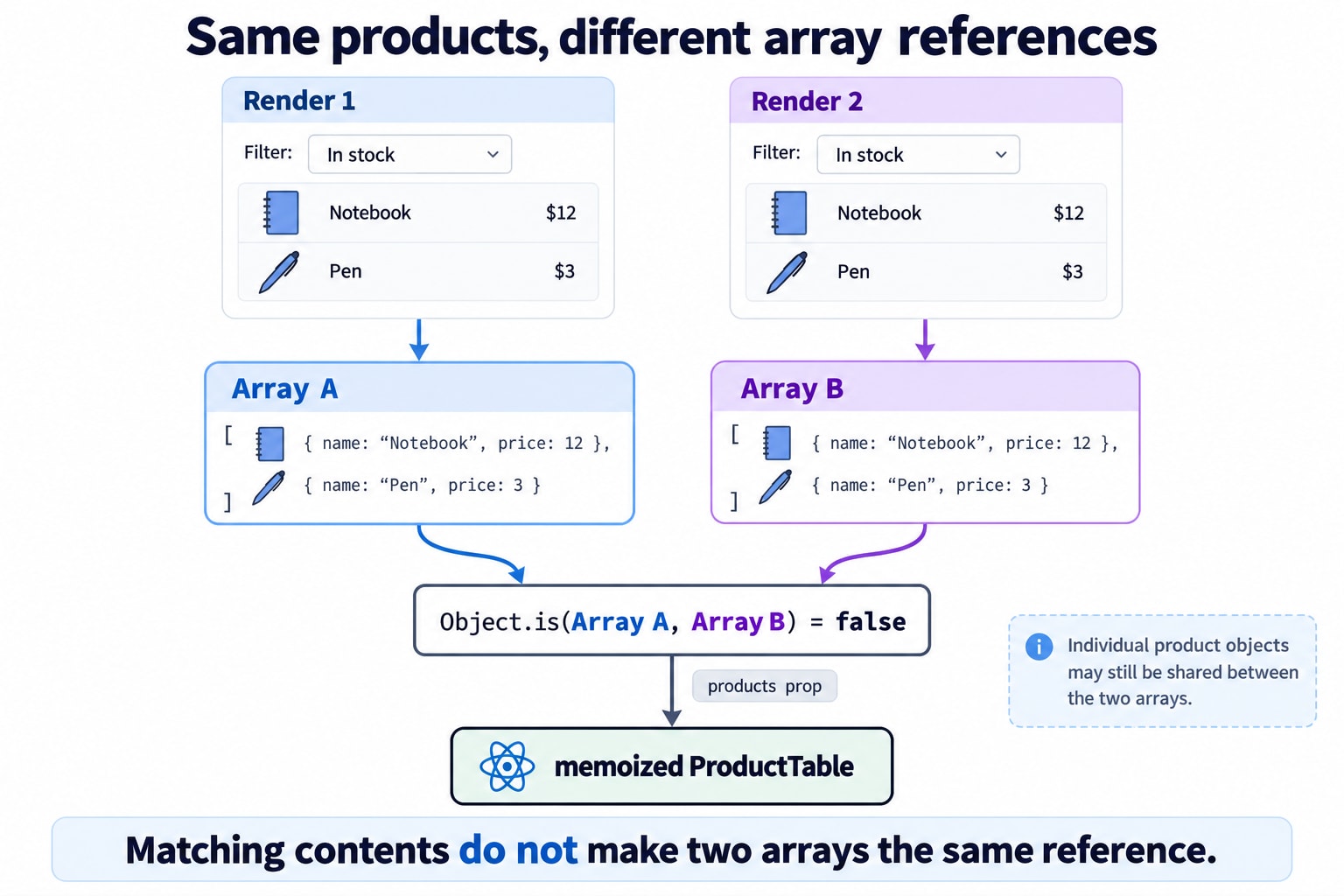
Consider two arrays:
const first = ["Notebook", "Pen"];
const second = ["Notebook", "Pen"];

Object.is(first, second);
// false
They contain matching values, but they are different arrays.
Objects and functions behave similarly:
Object.is({ theme: "dark" }, { theme: "dark" });
// false

Object.is(() => {}, () => {});
// false
Now consider filtering:
const visibleProducts = products.filter(
  (product) => product.inStock
);
Every evaluation creates a new result array.
If we pass it to a memoized table:
<ProductTable products={visibleProducts} />the products prop has a new reference.
The table’s default prop comparison cannot conclude that it is unchanged merely because the array happens to contain the same products.
One always-new prop can prevent reuse at that component boundary.
5. useMemo: Reuse a Calculation Result
We can express which values determine the filtering result:
import { useMemo } from "react";

const visibleProducts = useMemo(() => {
  const normalizedQuery = query.trim().toLowerCase();

  return products.filter((product) =>
    product.name.toLowerCase().includes(normalizedQuery)
  );
}, [products, query]);
The array at the end is the dependency list.
React compares its entries using Object.is. During ordinary updates, if they are unchanged and the cache is retained, React returns the previous result instead of rerunning the calculation.
This can provide two benefits:
Avoid the filtering work.
Preserve the result array’s identity for a memoized child.
If query changes, recalculation is expected. The requested results have changed.
useMemo does not make filtering faster when it must run. It avoids some repeated executions.
Sorting works similarly:
const sortedProducts = useMemo(
  () => [...products].sort((a, b) => a.price - b.price),
  [products]
);
Copying before sort avoids mutating the supplied array.
6. The Dependency That Accidentally Defeats the Cache
This looks reasonable:
const options = {
  query,
  inStockOnly,
};

const visibleProducts = useMemo(
  () => filterProducts(products, options),
  [products, options]
);
But options is recreated on every render.
The memo calculation therefore sees a changed dependency each time.
Instead, create the object inside the calculation:
const visibleProducts = useMemo(() => {
  const options = {
    query,
    inStockOnly,
  };

  return filterProducts(products, options);
}, [products, query, inStockOnly]);
Or avoid the object if the calculation does not need it.
This points to an architectural question:
“What are the smallest meaningful inputs to this calculation?”
Making those inputs clear often helps more than adding another layer of caching.
7. useCallback: Stabilize the Function Passed Across a Boundary
Our table receives another prop:
<ProductTable
  products={visibleProducts} => setSelectedId(id)}
/>
That arrow function is new each time the parent executes.
Even with a stable product array, onSelect can prevent the table from reusing its previous work.
Use useCallback when preserving that function reference serves a purpose:
const handleSelect = useCallback((id) => {
  setSelectedId(id);
}, []);
Then:
<ProductTable
  products={visibleProducts}
/>
A crucial distinction:
useCallback does not prevent the function expression from being created. React can return the previously cached function rather than the newly supplied one.
It also does not cache the function’s result or make its body faster.
Conceptually:
useCallback(fn, dependencies);is similar to:
useMemo(() => fn, dependencies);The dedicated API makes the intention clearer.
8. A Complete Dashboard Example
The following example demonstrates the three boundaries together.
The small sample dataset makes it easy to run. It does not establish that memoization is worthwhile for three products.
import {
  memo,
  useCallback,
  useMemo,
  useState,
} from "react";

const initialProducts = [
  { id: "notebook", name: "Notebook", inStock: true },
  { id: "pen-set", name: "Pen set", inStock: true },
  { id: "desk-lamp", name: "Desk lamp", inStock: false },
];

const ProductRow = memo(function ProductRow({
  product,
  onSelect,
}) {
  return (
    <li>
      <span>{product.name}</span>{" "}

      <button
        type="button" => onSelect(product.id)}
      >
        Inspect {product.name}
      </button>
    </li>
  );
});

const ProductTable = memo(function ProductTable({
  products,
  onSelect,
}) {
  if (products.length === 0) {
    return <p>No matching products.</p>;
  }

  return (
    <ul>
      {products.map((product) => (
        <ProductRow
          key={product.id}
          product={product}
        />
      ))}
    </ul>
  );
});

export default function ProductDashboard() {
  const [products, setProducts] = useState(initialProducts);
  const [query, setQuery] = useState("");
  const [inStockOnly, setInStockOnly] = useState(false);
  const [helpOpen, setHelpOpen] = useState(false);
  const [selectedId, setSelectedId] = useState(null);

  const visibleProducts = useMemo(() => {
    const normalizedQuery = query.trim().toLowerCase();

    return products.filter((product) => {
      const matchesQuery = product.name
        .toLowerCase()
        .includes(normalizedQuery);

      const matchesStock =
        !inStockOnly || product.inStock;

      return matchesQuery && matchesStock;
    });
  }, [products, query, inStockOnly]);

  const handleSelect = useCallback((id) => {
    setSelectedId(id);
  }, []);

  const selectedProduct = products.find(
    (product) => product.id === selectedId
  );

  function toggleLampStock() {
    setProducts((current) =>
      current.map((product) =>
        product.id === "desk-lamp"
          ? { ...product, inStock: !product.inStock }
          : product
      )
    );
  }

  return (
    <main>
      <h1>Product dashboard</h1>

      <label>
        Search products
        <input
          value={query} => setQuery(event.target.value)}
        />
      </label>

      <label>
        <input
          type="checkbox"
          checked={inStockOnly} => {
            setInStockOnly(event.target.checked);
          }}
        />
        In-stock products only
      </label>

      <button
        type="button" => setHelpOpen((open) => !open)}
      >
        {helpOpen ? "Hide help" : "Show help"}
      </button>

      {helpOpen && (
        <p>
          Search the catalogue, then inspect a product.
        </p>
      )}

      <button type="button"
        Toggle desk lamp availability
      </button>

      <p>
        Selected: {selectedProduct?.name ?? "None"}
      </p>

      <ProductTable
        products={visibleProducts}
      />
    </main>
  );
}
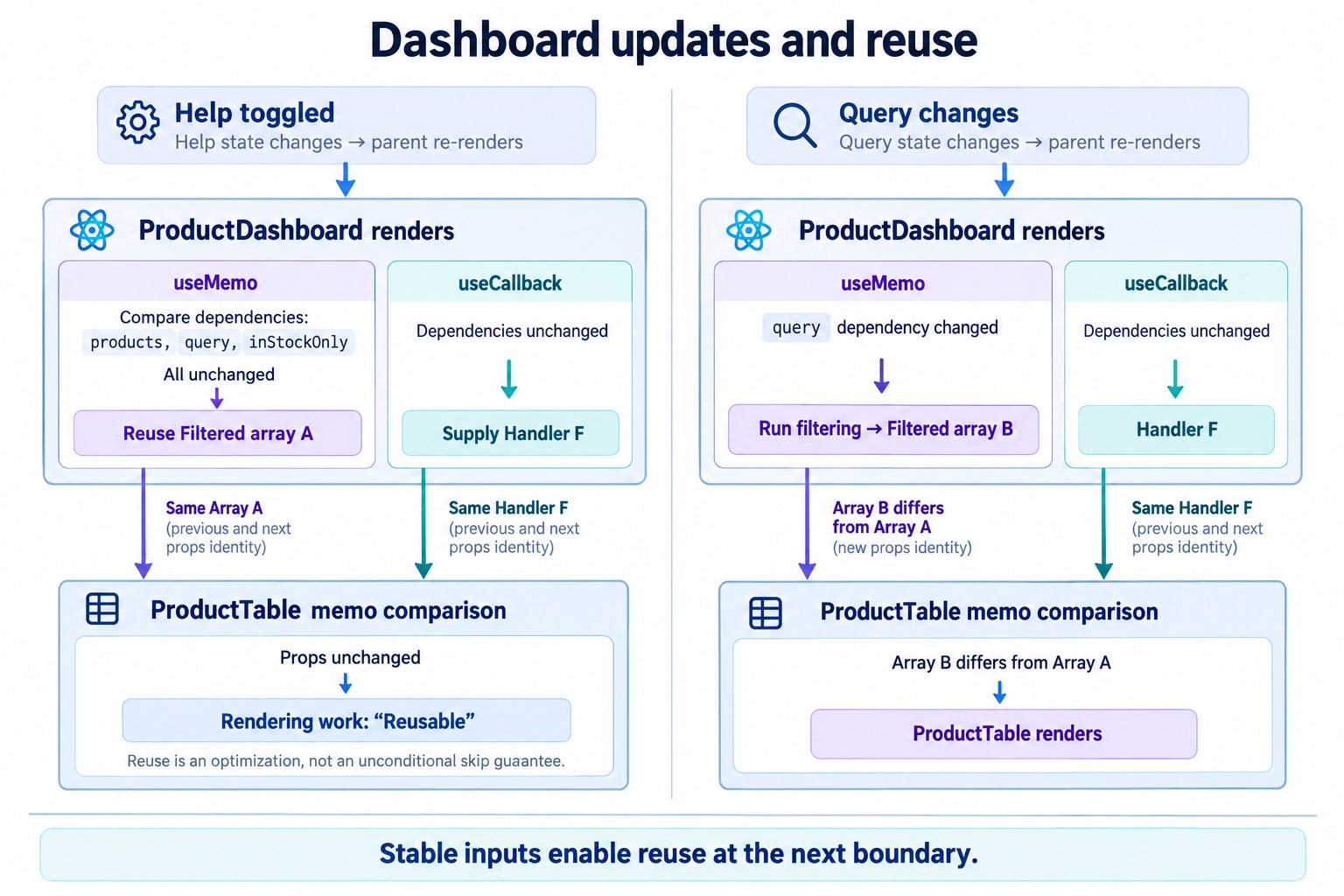
Here is the expected reuse pattern during ordinary updates with retained caches:
Interaction | Filtering | Table |
|---|---|---|
Toggle help | Can reuse result | Can skip parent-driven render |
Select a product | Can reuse result | Can skip parent-driven render |
Change search | Recalculates | Receives new result |
Toggle stock filter | Recalculates | Receives new result |
Change a product | Recalculates | Receives new result |
The table does not display selection, so selection is not a table prop.
If the table needed to highlight the selected row, we would pass that information. Then selection changes should update the relevant UI.
Optimization must preserve the feature’s actual dependencies.
9. Why the Arrow Function Inside ProductRow Is Fine
You may have noticed:
<button => onSelect(product.id)}>Have we recreated the original problem?
No—the important detail is where the function crosses a comparison boundary.
The parent passes a stable onSelect into ProductRow. The row creates its browser-button handler only when the row itself renders.
Compare that with:
<ProductRow
  product={product} => handleSelect(product.id)}
/>
Now the parent supplies a fresh function to the memoized row whenever the parent renders.
The goal is not to eliminate arrow functions. It is to preserve references where comparison can avoid meaningful work.
10. Stable References Depend on Immutable Updates
Our stock update creates a new object only for the changed product:
setProducts((current) =>
  current.map((product) =>
    product.id === "desk-lamp"
      ? { ...product, inStock: !product.inStock }
      : product
  )
);
Unchanged products retain their object identities.
That allows their memoized rows to recognize unchanged props even when the table receives a new array.
Avoid both extremes:
// Incorrect: mutate existing state.
products[0].inStock = false;// Often unnecessary: recreate every product object.
products.map((product) => ({ ...product }));The first can hide a real change behind an unchanged reference.
The second discards useful identity for every item.
Copy changed paths and preserve unchanged values. React’s immutable update guidance supports both correctness and efficient comparisons.
11. Dependency Lists Are Correctness Requirements
This callback is wrong:
const handleAdd = useCallback(() => {
  setCount(count + 1);
}, []);
It reads count, but the dependency list does not include it.
The cached function can keep using the value captured by an earlier render. This is a stale closure.
A closure is a function’s access to variables from the execution in which it was created.
Correct options include:
const handleAdd = useCallback(() => {
  setCount(count + 1);
}, [count]);
or:
const handleAdd = useCallback(() => {
  setCount((current) => current + 1);
}, []);
The second version no longer reads the render’s count.
Similarly, if deleteProduct is a prop:
const handleDelete = useCallback(
  (id) => deleteProduct(id),
  [deleteProduct]
);
Do not omit dependencies to make a reference appear stable. React’s exhaustive-deps lint rule exists to detect these stale-data errors.
12. A Memo Cache Is Not Permanent Storage
This does not mean “execute exactly once forever”:
const value = useMemo(() => calculateSomething(), []);React can discard a memo cache. Documented cases include editing the component during development and suspension during initial mounting.
Development Strict Mode can also invoke the calculation twice to check purity.
Therefore:
Keep the calculation pure.
Do not start timers, subscriptions, or requests inside it.
Do not use it as storage whose preservation is required for correctness.
Expect the application to remain correct if the calculation runs again.
Treat the Hook as a local reuse opportunity, not a historical lookup table.
If the query changes from "pen" to "lamp" and back to "pen", do not assume React remembers all previous search results.
A shared, multi-key cache requires a separate design, including memory limits and invalidation rules.
13. Sometimes Removing a Dependency Is Better Than Caching It
Suppose an Effect connects to a service:
const options = { roomId };

useEffect(() => {
  const connection = connect(options);
  return () => connection.disconnect();
}, [options]);
The new object can cause reconnection on each render.
One response is to memoize options.
A simpler design is often:
useEffect(() => {
  const options = { roomId };
  const connection = connect(options);

  return () => connection.disconnect();
}, [roomId]);
The Effect now depends directly on the value that determines the connection.
connect here represents an imported service API.
Reducing unnecessary object and function dependencies can remove the need for memoization altogether.
14. Custom Comparators: A Powerful Way to Introduce Subtle Bugs
memo accepts an optional comparison function:
const MemoizedChart = memo(Chart, arePropsEqual);Returning true means the old and new props are equivalent for both output and behavior.
A dangerous example is:
const ProductRow = memo(
  Row,
  (previous, next) =>
    previous.product.id === next.product.id
);
The product name could change while its ID stays the same.
The callback could change while the ID stays the same.
The comparator would hide those updates.
A correct comparator must account for every prop that affects output or behavior, including functions. Deep comparison can also cost more than the rendering work it avoids.
Prefer simpler props and preserved identities before writing custom comparison logic.
15. Move State Before Adding More Caches
Why does the entire dashboard own helpOpen?
If only the help panel uses it, move that state:
function HelpPanel() {
  const [open, setOpen] = useState(false);

  return (
    <aside>
      <button
        type="button" => setOpen((current) => !current)}
      >
        Toggle help
      </button>

      {open && <p>Select a product to inspect it.</p>}
    </aside>
  );
}
Now changing this state starts work in HelpPanel, rather than in the dashboard that owns the catalogue.
For a larger dashboard, similar boundaries can separate:
Live activity updates.
Chart data.
Filter controls.
Temporary editor state.
Memoization can skip repeated work. Better state placement can prevent unrelated work from being requested in the first place.
16. Why Search Can Remain Slow After Memoization
Our filter depends on query.
Every meaningful search edit changes that dependency.
So a cache cannot eliminate the work for each new query.
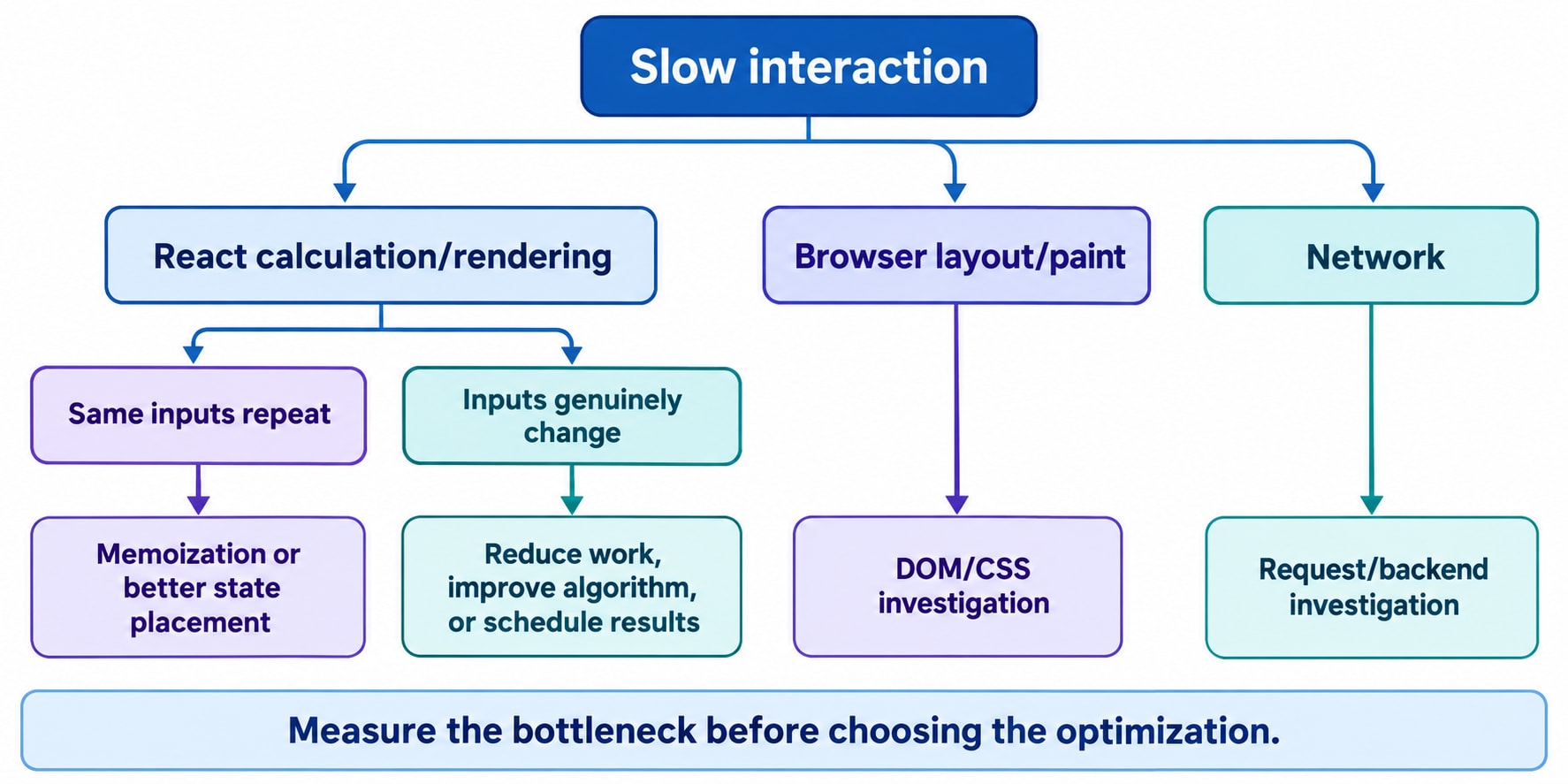
Different bottlenecks need different approaches:
Bottleneck | Direction to investigate |
|---|---|
Repeated work for unchanged inputs | Memoization |
Too many mounted rows | Pagination or virtualization |
Expensive filtering for new inputs | Better algorithms, indexing, or server-side search |
CPU-heavy independent processing | A Web Worker where appropriate |
Input delayed by result rendering | Deferred or transition updates |
Slow network response | Request and backend design |
Expensive layout or painting | DOM and CSS work |
Virtualization means mounting a limited window of list items rather than the entire dataset.
A Web Worker runs suitable JavaScript work outside the main UI thread.
useDeferredValue can let an input update while an expensive results subtree temporarily uses an older value. It is not a fixed-delay debounce, and it does not automatically reduce network requests.
Memoization, scheduling, and reducing total work are separate techniques.
17. React Compiler Changes the Starting Point
React Compiler is a stable build-time optimization tool. Its stable 1.0 release was announced in October 2025.
When enabled, it can automatically reuse component rendering work and calculations, reducing the need to write memo, useMemo, and useCallback manually.
But installing React 19.3 alone does not establish that your application is compiled.
Check your framework or build configuration and verify which code is covered.
Current React guidance recommends relying on the compiler for new code where appropriate, using manual memoization when more precise control is needed. For existing code, leave memoization in place or test carefully before removing it.
The compiler also does not turn every ordinary function into a shared application-wide cache. Its memoization is not shared across separate component or Hook instances.
Understanding these APIs remains useful because you still need to diagnose:
Which input actually changed.
Whether data was mutated.
Whether state lives too high.
Whether a computation should exist at all.
Whether the bottleneck is React rendering.
Automation changes how optimizations are implemented. It does not remove the need to understand the workload.
18. Measure an Interaction, Not a Console Message
A console message proves that code executed. It does not tell you whether the execution matters to the user.
Start with a reproducible interaction:
“Opening help is slow with this dataset on this device.”
Then compare before and after under equivalent conditions.
React’s <Profiler> can report rendering measurements:
import { Profiler } from "react";

function reportRender(
  id,
  phase,
  actualDuration,
  baseDuration
) {
  console.table({
    id,
    phase,
    actualDuration,
    baseDuration,
  });
}
Wrap the subtree you want to inspect:
<Profiler id="ProductTable"
  <ProductTable
    products={visibleProducts}
  />
</Profiler>
actualDuration measures rendering time for that update in the profiled subtree. baseDuration estimates rendering cost without optimizations using recent component durations.
Neither is the total time from interaction to completed browser paint.
Profiling adds overhead and requires an appropriate profiling build for production-style measurement.
Current React Performance tracks can also align React work with browser timeline information. They are available in development and profiling builds, with coverage depending on the build and tooling.
19. The Economics of a Cache
Memoization has costs:
Comparing inputs.
Retaining cached values and captured data.
Maintaining dependency lists.
Adding code that future developers must understand.
A useful reasoning model is:
Expected saved work should exceed comparison, cache-management, and maintenance costs.
This is not an exact React runtime formula.
A cheap calculation that always receives different inputs is a poor candidate.
An expensive subtree that repeatedly receives equivalent inputs is a stronger candidate.
A stable reference has value when something downstream uses that stability.
That is why neither “memoize everything” nor “memoize nothing” is a sufficient engineering policy.
20. Questions You Should Be Able to Answer
Does memo stop local state updates?
No. It helps with equivalent props during parent-driven work.
Does useMemo prevent the component from rendering?
No. It can reuse a calculation result within that render.
Does useCallback cache function results?
No. It caches the function reference returned by the Hook.
Does an empty dependency array guarantee one execution?
No. Cache lifetime and development behavior make that claim too strong.
Can a new object defeat memoization?
Yes, when that object crosses a dependency or prop comparison boundary.
Can a stable reference hide a real change?
Yes, if the underlying object was incorrectly mutated.
Do keys replace memoization?
No. Keys identify sibling elements across updates; they do not establish that props are unchanged.
Should existing memoization be deleted after enabling the compiler?
Not automatically. Verify coverage and test the change.
21. What We Learned from the Dashboard
Opening help originally involved work that had nothing to do with help.
We could address that in several ways:
Move help state into its own component.
Reuse filtering results when filter inputs are unchanged.
Keep callbacks stable across meaningful component boundaries.
Preserve unchanged product identities.
Let the compiler perform suitable automatic optimization.
Measure whether the change improves the interaction.
The useful question is no longer:
“Which Hook should I add?”
It is:
“What changed, what work must follow from that change, and which previous work is still valid?”
That question makes memo, useMemo, and useCallback easier to use—and makes it clearer when none of them is the right solution.