useMemo Polyfill
Can We Build Our Own useMemo? Understanding Caches, Dependencies, and React Rendering
Your product catalogue has a search box and a help panel.
Typing into search filters the products. Opening help displays instructions.
Then you notice something: opening help runs the product filter again, even though neither the products nor the search query changed.
React provides useMemo for situations where reusing a calculation would be worthwhile:
const visibleProducts = useMemo(
  () => filterProducts(products, query),
  [products, query]
);
But what is it remembering?
And could we build something similar ourselves?
The basic caching algorithm is small. Making that algorithm behave correctly inside React is the more interesting part.
Let’s build the algorithm, examine the tempting custom Hook, and discover where their responsibilities differ.
1. What Are We Actually Trying to Remember?
A useful cache needs two pieces of information:
{
  value: previouslyCalculatedResult,
  dependencies: inputsThatProducedIt
}
The result alone is not enough.
Suppose we remember:
value: 25Was that the square of 5? The number of matching products? A total calculated using an old price?
The inputs tell us whether the result is still relevant.
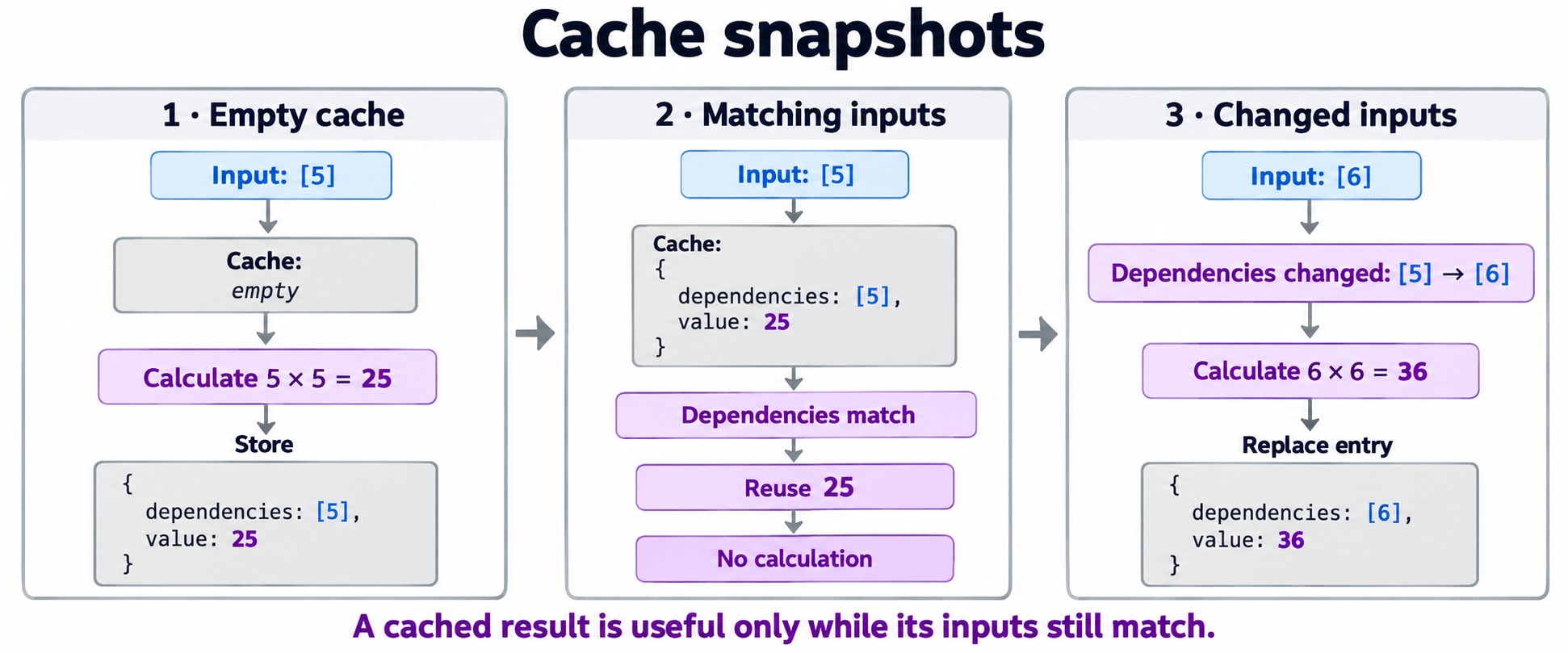
For a square calculation:
{
  value: 25,
  dependencies: [5]
}
When the next input is still 5, we can reuse 25.
When it becomes 6, we calculate 36 and replace the entry.
This is memoization: reusing a previously calculated result when its relevant inputs are unchanged.
The square example makes the behavior easy to inspect. Multiplication itself is too cheap to justify this cache in an application.
2. Start with React’s Public Contract
React’s built-in Hook accepts:
const result = useMemo(calculate, dependencies);calculateis a pure function that returns the result.dependencieslists the reactive values used by that calculation.
A reactive value here includes props, state, and values declared inside the component that the calculation reads.
React compares corresponding dependency entries with Object.is. When they are unchanged and the cache is retained, it can return the previous result.
The dependency list should be written inline with a constant number of entries.
For our catalogue:
const visibleProducts = useMemo(() => {
  const normalizedQuery = query.trim().toLowerCase();

  return products.filter((product) =>
    product.name.toLowerCase().includes(normalizedQuery)
  );
}, [products, query]);
Both products and query affect the result.
Opening help changes neither one.
The component can still render while this particular calculation is reused.
3. Build the Dependency Comparator First
The original draft compares dependencies using !==.
That is close for many values, but React uses Object.is.
These comparisons differ in two notable cases:
NaN === NaN;
// false

Object.is(NaN, NaN);
// true

0 === -0;
// true

Object.is(0, -0);
// false
For objects, arrays, and functions, identity still matters:
Object.is({ name: "Notebook" }, { name: "Notebook" });
// false

const product = { name: "Notebook" };

Object.is(product, product);
// true
Matching contents do not make separately created objects the same object.
Here is our comparator:
function areDependenciesEqual(previous, next) {
  if (previous.length !== next.length) {
    return false;
  }

  return previous.every((value, index) =>
    Object.is(value, next[index])
  );
}
Examples:
areDependenciesEqual([5], [5]);
// true

areDependenciesEqual([5], [6]);
// false

areDependenciesEqual([5, "active"], [5, "active"]);
// true

areDependenciesEqual([{}], [{}]);
// false
The length check makes this standalone helper defensive. It is not an invitation to change a real Hook’s dependency-list length dynamically.
4. Build a Standalone Cache Before Building a Hook
We can study the caching mechanism without involving React at all:
function createMemoSlot() {
  let entry = null;

  return function readMemo(calculate, dependencies) {
    if (!Array.isArray(dependencies)) {
      throw new TypeError("Expected a dependency array");
    }

    if (
      entry !== null &&
      areDependenciesEqual(
        entry.dependencies,
        dependencies
      )
    ) {
      return entry.value;
    }

    const value = calculate();

    entry = {
      value,
      dependencies: [...dependencies],
    };

    return value;
  };
}
A slot here means storage for one cached entry.
This is ordinary JavaScript. It is not a React Hook and should not be called during component rendering as a substitute for useMemo.
The returned function remembers entry through a closure: a function retains access to variables from the execution that created it.
Unlike a component-local variable recreated on every render, this variable belongs to the particular cache instance created by createMemoSlot().
Why calculate before replacing the entry?
const value = calculate();If the calculation throws an error, assignment to entry never happens. The last successful entry remains intact.
Why copy the dependency array?
dependencies: [...dependencies]This prevents later edits to the caller’s array structure from silently rewriting the stored dependency list.
It is only a shallow copy. Objects inside that array are still shared references.
Why use an entry object?
A cached result can legitimately be:
0
false
""
null
undefined
Checking whether the result is truthy would confuse some valid results with an empty cache.
Our separate entry === null check avoids that ambiguity.
5. Walk Through the Cache
Create one cache:
const readSquare = createMemoSlot();First call:
readSquare(() => 5 * 5, [5]);
// 25: calculate and store
Same dependency:
readSquare(() => 5 * 5, [5]);
// 25: reuse
Changed dependency:
readSquare(() => 6 * 6, [6]);
// 36: calculate and replace
Returning to the earlier dependency:
readSquare(() => 5 * 5, [5]);
// 25: calculate again
Why calculate again?
The slot currently contains the entry for 6. It does not retain every previously seen input.
Call | Input | Previous entry | Behavior |
|---|---|---|---|
1 |
| Empty | Calculate |
2 |
|
| Reuse |
3 |
|
| Calculate |
4 |
|
| Calculate |
This is a single-entry cache, not a lookup table containing the entire history.
6. The Cache Cannot Detect Missing Dependencies
There is a deliberate limitation:
const readValue = createMemoSlot();

readValue(() => 10, []);
// 10

readValue(() => 20, []);
// 10
The cache trusts the dependency list.
It does not inspect the function body to discover that the calculation changed.
In a React component, this mistake often looks like:
const total = useMemo(
  () => price * quantity,
  [price]
);
Changing quantity can leave the result stale because the dependency list is incomplete.
The important engineering principle is:
A cache is correct only if its key captures every input that can change the result.
A dependency array is the cache key in this model.
Function identity is not automatically an additional dependency. If the calculation reads a changing function supplied through props, include that function in the dependency list.
7. Now Comes the Tempting React Implementation
We need storage that survives component renders.
useRef appears to fit:
const cacheRef = useRef(null);It returns a persistent object whose .current property can change without requesting a render.
That leads to this implementation:
// Intentionally unsupported pattern.
// Do not use this as a replacement for useMemo.

function useCustomMemo(calculate, dependencies) {
  const cacheRef = useRef(null);

  if (
    cacheRef.current === null ||
    !areDependenciesEqual(
      cacheRef.current.dependencies,
      dependencies
    )
  ) {
    cacheRef.current = {
      value: calculate(),
      dependencies: [...dependencies],
    };
  }

  return cacheRef.current.value;
}
For a simple sequence of renders, it may appear to work.
But persistence is not the only requirement.
This Hook reads a mutable ref to decide its output and rewrites that ref during rendering.
React explicitly advises against reading or writing .current during rendering, apart from a narrow predictable initialization exception. A dependency-sensitive cache that updates repeatedly is not that exception.
Calling the function useCustomMemo does not give it React’s internal cache-management behavior.
8. Why Render-Time Ref Mutation Matters
React rendering is the process of calculating the next UI.
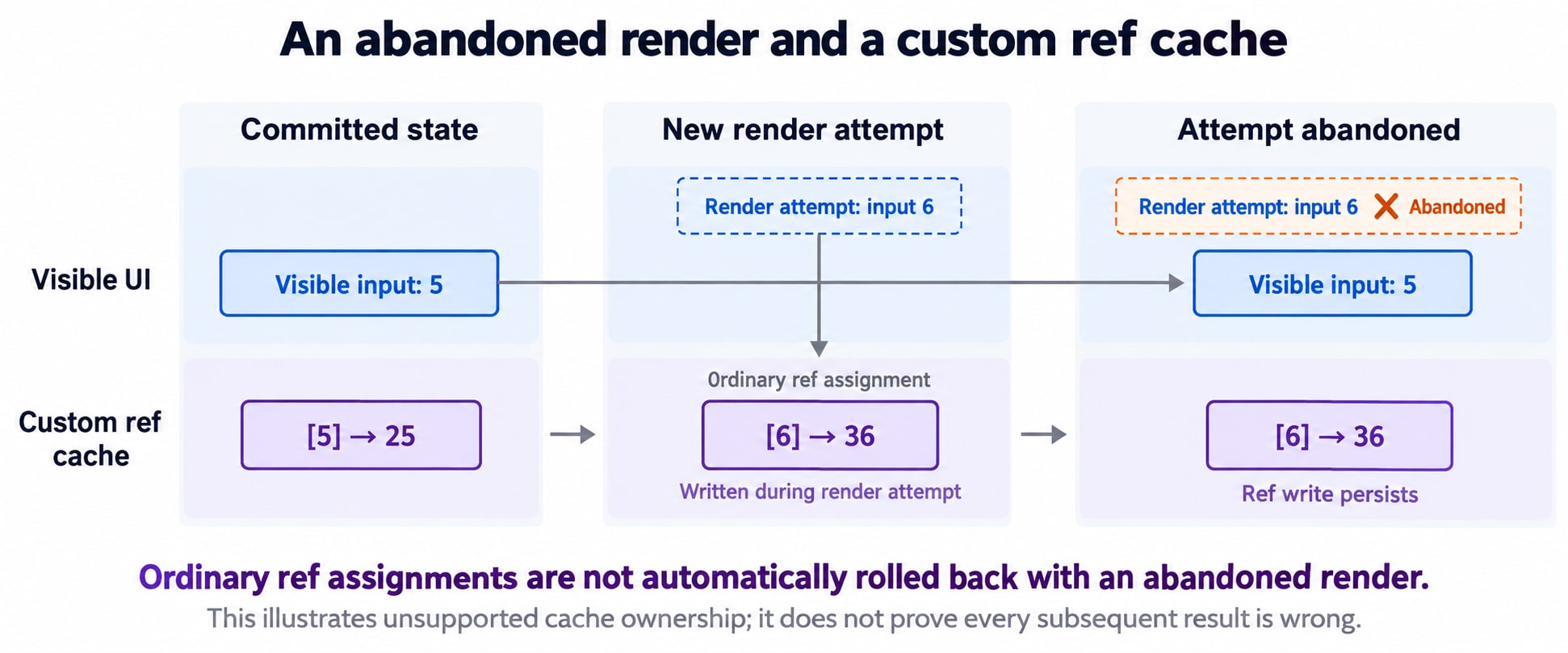
That calculation is not guaranteed to become the visible result. React can abandon a render attempt and try again.
Consider this illustrative sequence:
The visible component corresponds to input
5.React starts an update for input
6.Our custom Hook overwrites its shared ref with
[6] → 36.React abandons that render attempt.
The ref assignment was an ordinary JavaScript mutation. It is not a commit-aware update managed by this custom Hook.
The cache may now describe work from an abandoned attempt.
Does this particular square example necessarily display the wrong number next?
No. A later dependency comparison might simply cause another calculation.
That does not make the design a supported replacement. We have no sound basis for promising React’s cache behavior, rendering guarantees, or compatibility with tooling from this implementation.
React’s built-in useMemo manages memoized data as part of its own rendering machinery. User code follows its public contract instead of maintaining a render-time mutable ref cache.
9. Why useState or useEffect Does Not Repair the Design
Could we store the calculated value in state?
State updates participate in rendering, but using state to duplicate a value already derivable from current inputs introduces a different synchronization problem.
Could we move the calculation into an Effect?
An Effect runs after a commit. The value needed by the current render would not be available through that Effect yet.
We might display an older result, run the Effect, update state, and render again.
That can be appropriate when synchronizing with an external system. It is not an equivalent implementation of a synchronous render-time calculation.
The distinction is:
Need | Appropriate mechanism |
|---|---|
Calculate a value from current render inputs | Ordinary calculation |
Reuse an expensive render calculation | Built-in |
Remember operational data for handlers or Effects |
|
Store information whose changes drive UI | State |
Synchronize with an external system | An Effect or event-driven integration |
10. A Cache Does Not Need an Effect Just to Clear It
The draft includes:
useEffect(() => {
  return () => {
    cacheRef.current = null;
  };
}, []);
For ordinary cached JavaScript data, this is generally unnecessary.
Once a cache is no longer reachable, it becomes eligible for garbage collection. Assigning null does not force immediate memory reclamation.
More importantly, Effect cleanup is not exclusively an unmount callback. Development Strict Mode can exercise an extra setup-and-cleanup cycle.
Now distinguish cached data from an external resource:
const result = calculateReport(data);is different from:
const connection = openConnection();A connection may need explicit disconnection.
Do not create such resources inside a memo calculation and expect cache cleanup to manage them. Memoization does not provide resource lifecycle ownership.
11. The Safe Custom Hook: Name the Calculation
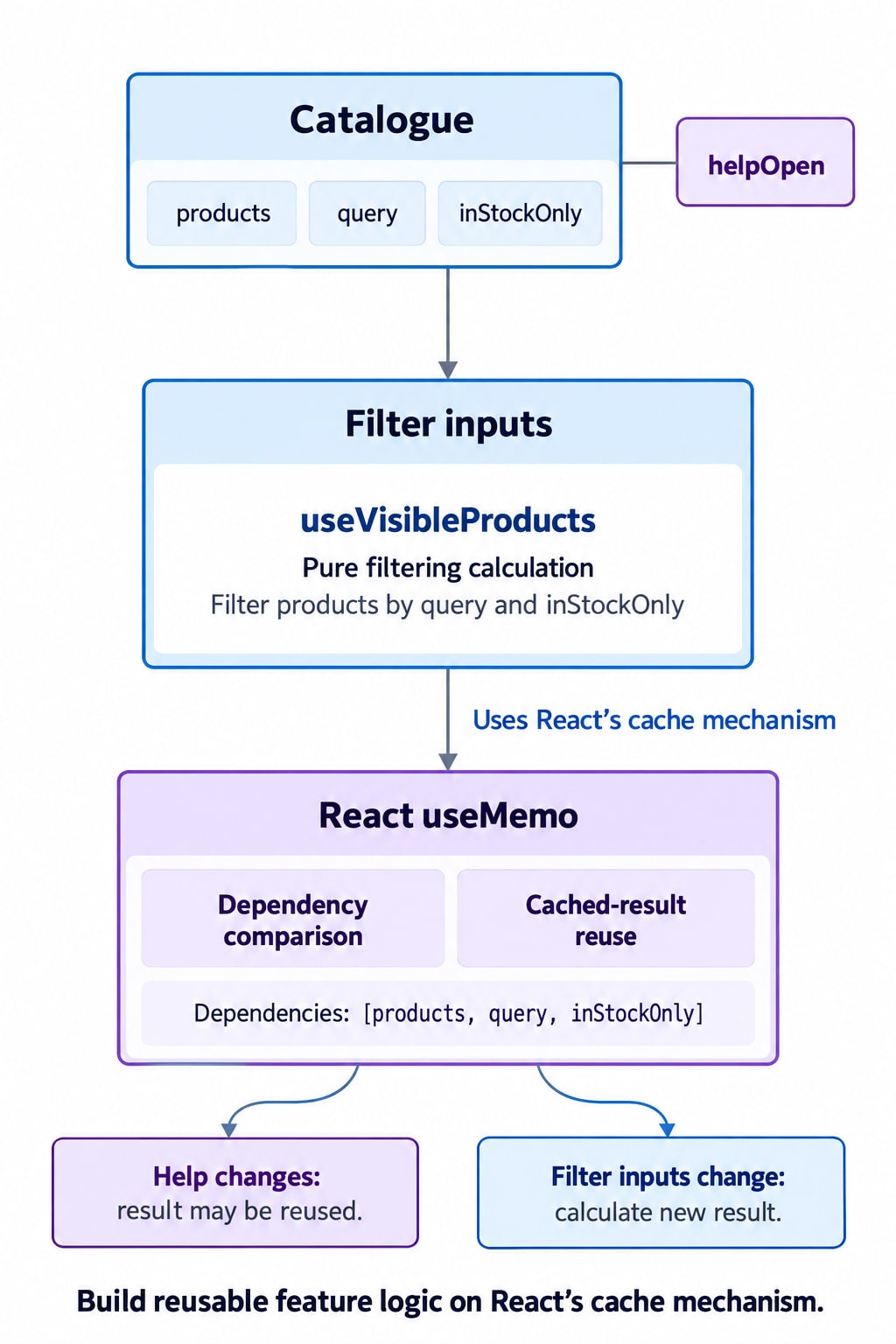
Our application needs reusable product-filtering logic.
It does not need a new implementation of React’s cache mechanism.
We can write:
import { useMemo } from "react";

function useVisibleProducts(products, query, inStockOnly) {
  return useMemo(() => {
    const normalizedQuery = query.trim().toLowerCase();

    return products.filter((product) => {
      const matchesQuery = product.name
        .toLowerCase()
        .includes(normalizedQuery);

      const matchesStock =
        !inStockOnly || product.inStock;

      return matchesQuery && matchesStock;
    });
  }, [products, query, inStockOnly]);
}
This custom Hook exposes meaningful inputs and keeps the calculation beside its dependencies.
It shares logic, not a global cache. Separate component instances calling this Hook have their own Hook state.
12. A Complete Catalogue Example
import { useMemo, useState } from "react";

const products = [
  { id: "notebook", name: "Notebook", inStock: true },
  { id: "pen-set", name: "Pen set", inStock: true },
  { id: "desk-lamp", name: "Desk lamp", inStock: false },
];

function useVisibleProducts(products, query, inStockOnly) {
  return useMemo(() => {
    const normalizedQuery = query.trim().toLowerCase();

    return products.filter((product) => {
      const matchesQuery = product.name
        .toLowerCase()
        .includes(normalizedQuery);

      return (
        matchesQuery &&
        (!inStockOnly || product.inStock)
      );
    });
  }, [products, query, inStockOnly]);
}

export default function Catalogue() {
  const [query, setQuery] = useState("");
  const [inStockOnly, setInStockOnly] = useState(false);
  const [helpOpen, setHelpOpen] = useState(false);

  const visibleProducts = useVisibleProducts(
    products,
    query,
    inStockOnly
  );

  return (
    <main>
      <h1>Product catalogue</h1>

      <label>
        Search products
        <input
          value={query} => setQuery(event.target.value)}
        />
      </label>

      <label>
        <input
          type="checkbox"
          checked={inStockOnly} => {
            setInStockOnly(event.target.checked);
          }}
        />
        In-stock products only
      </label>

      <button
        type="button" => setHelpOpen((open) => !open)}
      >
        {helpOpen ? "Hide help" : "Show help"}
      </button>

      {helpOpen && (
        <p>Search by name or limit results to available items.</p>
      )}

      <p>{visibleProducts.length} matching products</p>

      <ul>
        {visibleProducts.map((product) => (
          <li key={product.id}>
            {product.name}
            {!product.inStock && " — Out of stock"}
          </li>
        ))}
      </ul>
    </main>
  );
}
Opening help leaves the filtering inputs unchanged, so React can reuse the result while the cache is retained.
Changing the query or stock filter requires a new result.
The list’s JSX is still evaluated when Catalogue renders. Caching the filtered array does not, by itself, skip the entire component.
For three products, plain filtering would be sufficient. This example demonstrates ownership and behavior, not a measured performance improvement.
13. Questions: What Makes This Cache Correct?
A cache design needs more than a comparison function.
Are all inputs represented?
Omitting a dependency produces stale results.
Hidden inputs—such as a mutable module variable read by the calculation—also undermine the model.
Are inputs treated as immutable?
If an object changes internally but keeps its reference, identity comparison cannot detect that mutation:
product.price = 200;Use immutable updates when those objects are React state or props.
Is the cached result treated as read-only?
Mutating a cached array changes what future callers receive:
visibleProducts.push(extraProduct);The cache may then return data that no longer represents the calculation.
Who owns the cache?
One component? One ordinary function instance? A shared module? A server request?
Those scopes have different isolation and lifetime requirements.
What is retained?
A single entry limits the number of entries, not the size of the retained object graph.
A cached result or dependency can retain a large dataset.
What happens if calculation fails?
Our toy cache keeps the last successful entry and propagates the error. That is an explicit design choice, not a complete reproduction of React’s error handling.
Is recomputation acceptable?
It must be acceptable for useMemo.
If losing the value breaks the application’s meaning, it probably belongs in state, a ref used appropriately, or a separately designed store.
14. React’s Cache Is an Optimization, Not a Lifetime Guarantee
Do not interpret:
useMemo(calculate, []);as “run exactly once forever.”
React documents situations where it discards caches, including initial-mount suspension and development edits. Strict Mode can also call a calculation twice to check purity.
A correct calculation should tolerate re-execution without external consequences.
That is why a memo calculation should not send a request, charge a payment, subscribe to a service, or mutate existing data.
Cache reuse changes how much work occurs. It must not determine whether the program behaves correctly.
15. Where React Compiler Fits
Current React Compiler documentation describes automatic memoization of suitable component and Hook work when the compiler is enabled.
That can reduce the need for manual useMemo calls. It does not make ref mutation during rendering an acceptable substitute.
For new code, consider compiler-provided optimization and profile meaningful interactions. For existing manual memoization, avoid removing it indiscriminately; React recommends retaining it or testing changes carefully.
The cache concepts remain useful either way:
Complete inputs.
Pure calculations.
Immutable data.
Clear ownership.
Measured benefit.
16. What We Actually Built
We built a standalone JavaScript cache that:
Stores one result and its dependencies.
Uses
Object.isfor comparison.Reuses matching entries.
Replaces entries after successful recalculation.
Handles valid falsy results correctly.
Then we identified what that algorithm does not provide: integration with React’s rendering lifecycle.
The useful custom React abstraction was therefore:
const visibleProducts = useVisibleProducts(
  products,
  query,
  inStockOnly
);
It packages application logic while delegating caching to React.
Building a cache teaches how memoization works. Building a custom Hook means composing React’s supported primitives—not assuming persistent mutable storage has the same guarantees as React’s rendering machinery.