useContext Hook
Understanding React useContext: Sharing Data Without Passing It Everywhere
Your dashboard starts with three components.
The application knows the current theme. A toolbar contains a button. The button needs to know whether it should display “Switch to dark” or “Switch to light.”
Passing that information is straightforward:
<Toolbar theme={theme} />Then the dashboard grows.
The toolbar moves inside a header. The header moves inside a layout. An account menu needs the current user. A settings panel needs the theme too.
Soon, several components receive information only to pass it somewhere else.
Nothing is broken. But changing one shared feature now means editing components that have no real interest in that feature.
React Context gives us another way to make that information available.
To use it well, we need to understand three things:
Who owns the value?
Which components can read it?
What happens when it changes?
1. The Dashboard Before Context
In React, props are values passed into a component by its parent.
Here is a simplified dashboard:
function DashboardLayout({ theme, onToggleTheme }) {
  return (
    <Header
      theme={theme}
    />
  );
}

function Header({ theme, onToggleTheme }) {
  return (
    <Toolbar
      theme={theme}
    />
  );
}

function Toolbar({ theme, onToggleTheme }) {
  return (
    <ThemeButton
      theme={theme}
    />
  );
}

function ThemeButton({ theme, onToggleTheme }) {
  return (
    <button type="button"
      Switch to {theme === "light" ? "dark" : "light"}
    </button>
  );
}
Only ThemeButton uses the theme information.
The other components act as delivery points.
This is commonly called prop drilling: passing information through intermediate components so that a deeper component can receive it.
Prop drilling is not automatically a design mistake. Explicit props often make components easy to understand and reuse.
The problem becomes noticeable when many unrelated components repeatedly forward the same shared information.
2. Before Context, Consider Composition
Sometimes we can remove the forwarding without introducing Context:
function DashboardLayout({ toolbar }) {
  return <header>{toolbar}</header>;
}
The caller supplies the already-configured content:
<DashboardLayout
  toolbar={
    <ThemeButton
      theme={theme}
    />
  }
/>
This is composition: assembling a component from other components supplied by its caller.
The layout no longer needs to know about themes.
Context becomes useful when shared information belongs to a broader part of the application and many descendants need access to it. React recommends considering props and composition before adding Context.
For our dashboard, the theme will be used by the toolbar, settings panel, navigation, and content area.
That makes it a reasonable Context candidate.
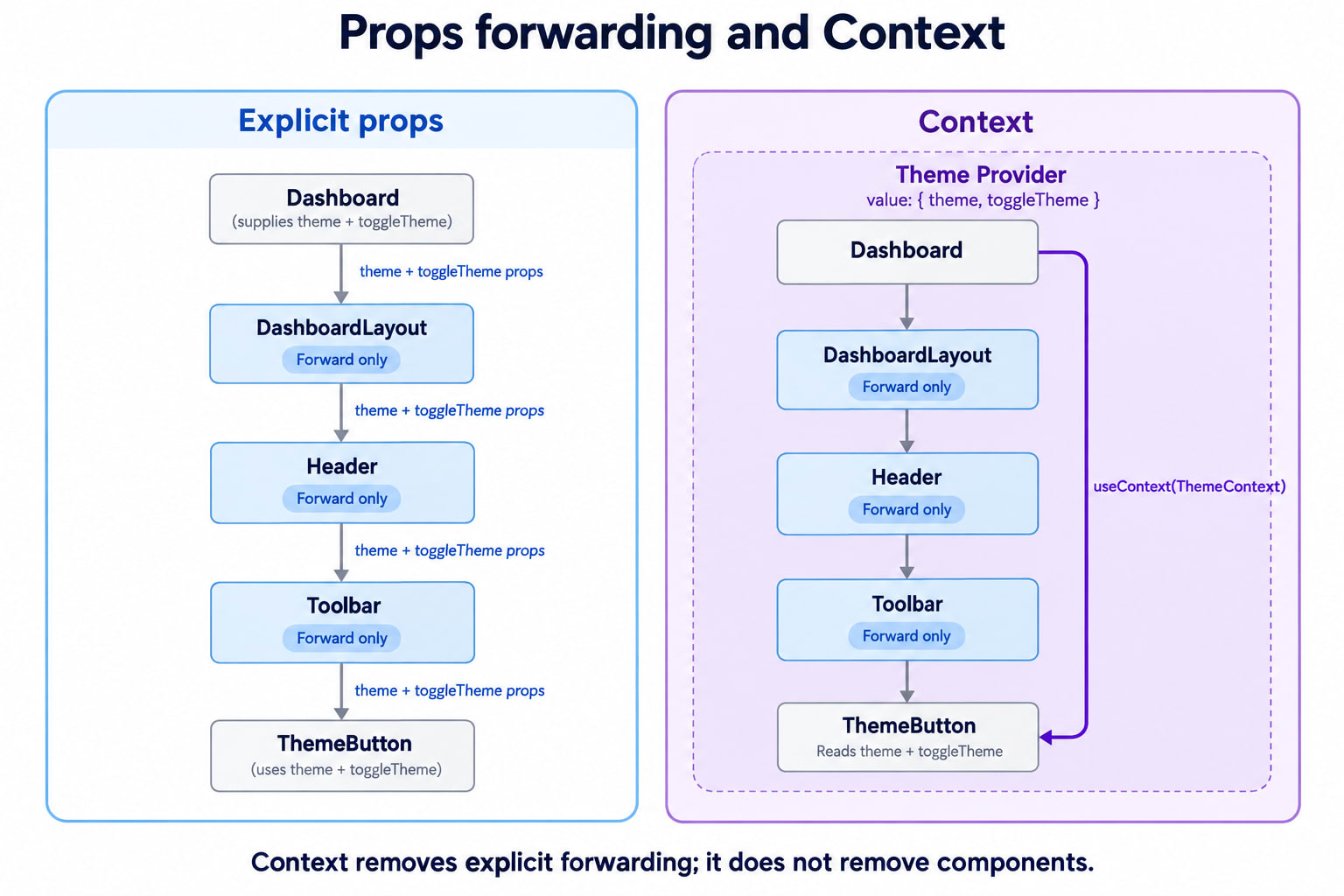
3. Three Pieces: Context, Provider, Consumer
The Context API has three roles.
Piece | Responsibility |
|---|---|
Context object | Identifies the shared information |
Provider | Supplies a value to a subtree |
Consumer | Reads that value |
A subtree means a component and the descendants rendered beneath it.
A consumer is simply a component that reads a context.
The useContext Hook lets a function component read and subscribe to that context.
Start with a small example:
import { createContext, useContext } from "react";

const ThemeNameContext = createContext("light");

function ThemeLabel() {
  const theme = useContext(ThemeNameContext);

  return <p>Current theme: {theme}</p>;
}

export default function App() {
  return (
    <ThemeNameContext.Provider value="dark">
      <ThemeLabel />
    </ThemeNameContext.Provider>
  );
}
ThemeLabel displays:
Current theme: darkThe context object identifies which value it wants. The provider supplies that value.
Creating a context does not create state.
4. What the Default Value Actually Means
In this declaration:
const ThemeNameContext = createContext("light");"light" is a fallback.
React uses it when there is no matching provider above the consumer.
It is not the initial value of every provider, and it does not update itself. Contexts should normally be created outside components so that providers and consumers use the same context object.
Consider these cases:
Situation | Value read by the consumer |
|---|---|
No matching provider above it |
|
Provider supplies |
|
Provider supplies |
|
Provider supplies |
|
An explicitly provided undefined does not activate the fallback.
This also means the fallback must fit how consumers use the value.
These two lines describe incompatible expectations:
const ThemeContext = createContext("light");

// Expects an object, but the fallback is a string.
const { theme, toggleTheme } = useContext(ThemeContext);
Inside a correctly configured provider, that mistake can remain hidden. Outside it, the consumer will not receive the object it expects.
For a required provider, we can make missing configuration explicit.
5. Give the Dashboard a Clear Context Contract
Our dashboard needs both the current theme and an action to change it.
We will use this value shape:
{
  theme: "light",
  toggleTheme: function
}
Create the context with null as a deliberate “provider missing” marker:
const ThemeContext = createContext(null);Then create a small custom Hook:
function useTheme() {
  const context = useContext(ThemeContext);

  if (context === null) {
    throw new Error(
      "useTheme must be used inside ThemeProvider"
    );
  }

  return context;
}
A custom Hook is a function whose name begins with use and that can call other Hooks.
Here, it gives consumers a convenient API and a useful error message.
Our application’s contract is that ThemeProvider always supplies an object. Therefore, null means that a required provider is missing.
Consumers can now write:
const { theme, toggleTheme } = useTheme();Call this Hook at the top level of a component, before conditional returns.
6. Context Shares State; It Does Not Own It
Now we need somewhere to store the theme:
function ThemeProvider({ children }) {
  const [theme, setTheme] = useState("light");

  function toggleTheme() {
    setTheme((current) =>
      current === "light" ? "dark" : "light"
    );
  }

  return (
    <ThemeContext.Provider value={{ theme, toggleTheme }}>
      {children}
    </ThemeContext.Provider>
  );
}
children is the content placed inside <ThemeProvider>.
There are two different responsibilities here:
useStatestores and updates the theme.Context makes the current theme and action available to descendants.
A deeply nested button can request a change:
function ThemeButton() {
  const { theme, toggleTheme } = useTheme();

  return (
    <button type="button"
      Switch to {theme === "light" ? "dark" : "light"}
    </button>
  );
}
The button does not directly modify the context object.
It calls an action. That action updates state in ThemeProvider. The next provider value reflects the new state.
The direction of ownership remains clear even though we have removed intermediate props.
7. Adding User Information Without Mixing Concerns
The account menu now needs to display the current user.
Should we put the user inside ThemeContext?
We could technically provide any object, but the concerns have different purposes.
Instead:
const UserContext = createContext(null);Our user context will provide:
{
  user,
  toggleDemoUser
}
The sample uses a local demonstration user. It does not implement authentication.
A component can consume both contexts:
function AccountMenu() {
  const { theme } = useTheme();
  const { user, toggleDemoUser } = useUser();

  return (
    <section>
      <p>{user ? `Hello, ${user.name}` : "Guest user"}</p>
      <p>Theme: {theme}</p>

      <button type="button"
        {user ? "Clear demo user" : "Load demo user"}
      </button>
    </section>
  );
}
Each context lookup is independent.
The theme provider supplies theme information. The user provider supplies user information. Neither has to know how the other works.
8. The Complete Dashboard
This example uses .Provider syntax, which works in React 18 and React 19. React 19 also supports writing <ThemeContext value={...}> directly.
import {
  createContext,
  useContext,
  useState,
} from "react";

const ThemeContext = createContext(null);
const UserContext = createContext(null);

function useTheme() {
  const context = useContext(ThemeContext);

  if (context === null) {
    throw new Error(
      "useTheme must be used inside ThemeProvider"
    );
  }

  return context;
}

function useUser() {
  const context = useContext(UserContext);

  if (context === null) {
    throw new Error(
      "useUser must be used inside UserProvider"
    );
  }

  return context;
}

function ThemeProvider({ children }) {
  const [theme, setTheme] = useState("light");

  function toggleTheme() {
    setTheme((current) =>
      current === "light" ? "dark" : "light"
    );
  }

  return (
    <ThemeContext.Provider value={{ theme, toggleTheme }}>
      {children}
    </ThemeContext.Provider>
  );
}

function UserProvider({ children }) {
  const [user, setUser] = useState(null);

  function toggleDemoUser() {
    setUser((current) =>
      current === null
        ? { id: "demo-user", name: "Asha" }
        : null
    );
  }

  return (
    <UserContext.Provider value={{ user, toggleDemoUser }}>
      {children}
    </UserContext.Provider>
  );
}

function ThemeButton() {
  const { theme, toggleTheme } = useTheme();

  return (
    <button type="button"
      Switch to {theme === "light" ? "dark" : "light"}
    </button>
  );
}

function AccountMenu() {
  const { theme } = useTheme();
  const { user, toggleDemoUser } = useUser();

  return (
    <section aria-label="Account">
      <p>{user ? `Hello, ${user.name}` : "Guest user"}</p>
      <p>Current theme: {theme}</p>

      <button type="button"
        {user ? "Clear demo user" : "Load demo user"}
      </button>
    </section>
  );
}

function Toolbar() {
  return (
    <nav aria-label="Dashboard controls">
      <ThemeButton />
      <AccountMenu />
    </nav>
  );
}

function Header() {
  return (
    <header>
      <h1>Team dashboard</h1>
      <Toolbar />
    </header>
  );
}

function DashboardLayout() {
  const { theme } = useTheme();
  const isDark = theme === "dark";

  return (
    <div
      style={{
        minHeight: "100vh",
        padding: 24,
        backgroundColor: isDark ? "#172033" : "#f8fafc",
        color: isDark ? "#f8fafc" : "#172033",
      }}
    >
      <Header />

      <main>
        <h2>Workspace overview</h2>
        <p>Your dashboard content goes here.</p>
      </main>
    </div>
  );
}

export default function App() {
  return (
    <ThemeProvider>
      <UserProvider>
        <DashboardLayout />
      </UserProvider>
    </ThemeProvider>
  );
}
Header and Toolbar do not forward theme or user props.
DashboardLayout reads the theme because it uses that value. ThemeButton reads it because it displays and changes the theme. AccountMenu reads both contexts.
The dependencies now live where they are used.
9. Which Provider Does a Consumer Read?
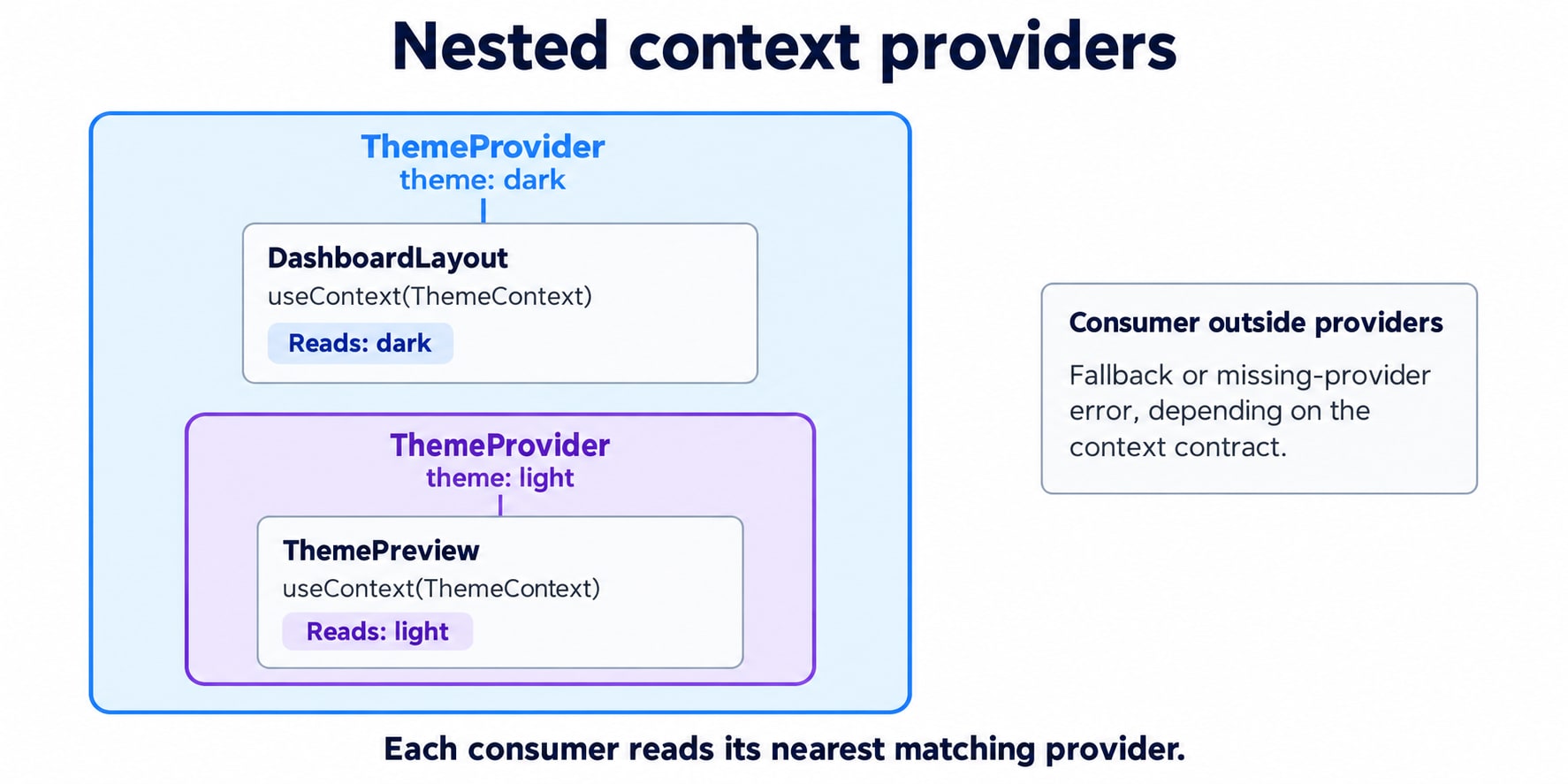
The nearest matching provider above the consumer wins.
Imagine that the dashboard contains a theme preview:
<ThemeProvider>
  <DashboardLayout />

  <ThemeProvider>
    <ThemePreview />
  </ThemeProvider>
</ThemeProvider>
These are two instances of ThemeProvider, each with independent state.
DashboardLayout reads the outer provider.
ThemePreview reads the inner provider.
Toggling the preview’s theme does not update the outer provider’s state.
For object values, providers do not automatically merge their values. An inner provider supplies the entire value read by its consumers.
Also, a provider returned by a component does not affect useContext calls made by that same component. Those calls look above it, not inside its returned JSX.
That is why separating ThemeProvider from its consuming components is useful.
10. Context Is Scoped, Not Automatically Global
Our providers wrap the dashboard, but they could wrap a smaller area.
Examples include:
A theme provider for one preview.
A form provider for one multi-step form.
A selection provider for one table.
A workspace provider for one section of an application.
Place a provider above the components that need to share its value.
Putting every provider at the application root increases the area that can depend on it. That may be appropriate for locale or session information, but unnecessary for one editor’s temporary selection.
Provider placement also defines the lifetime of state stored in that provider component. Removing and mounting a fresh provider can reset that state.
Context does not persist data across page reloads.
11. What Actually Re-renders When Context Changes?
Return to this provider value:
value={{ theme, toggleTheme }}React compares the previous and next context values using Object.is.
A changed value causes consumers of that provider’s context to re-render. Wrapping a consumer in React.memo does not block an update from context it reads.
There are two details to separate.
Reading one property does not create a property subscription
Consider:
function ThemeActionOnly() {
  const { toggleTheme } = useTheme();

  return (
    <button type="button"
      Toggle theme
    </button>
  );
}
This component reads ThemeContext, even though it only uses one field.
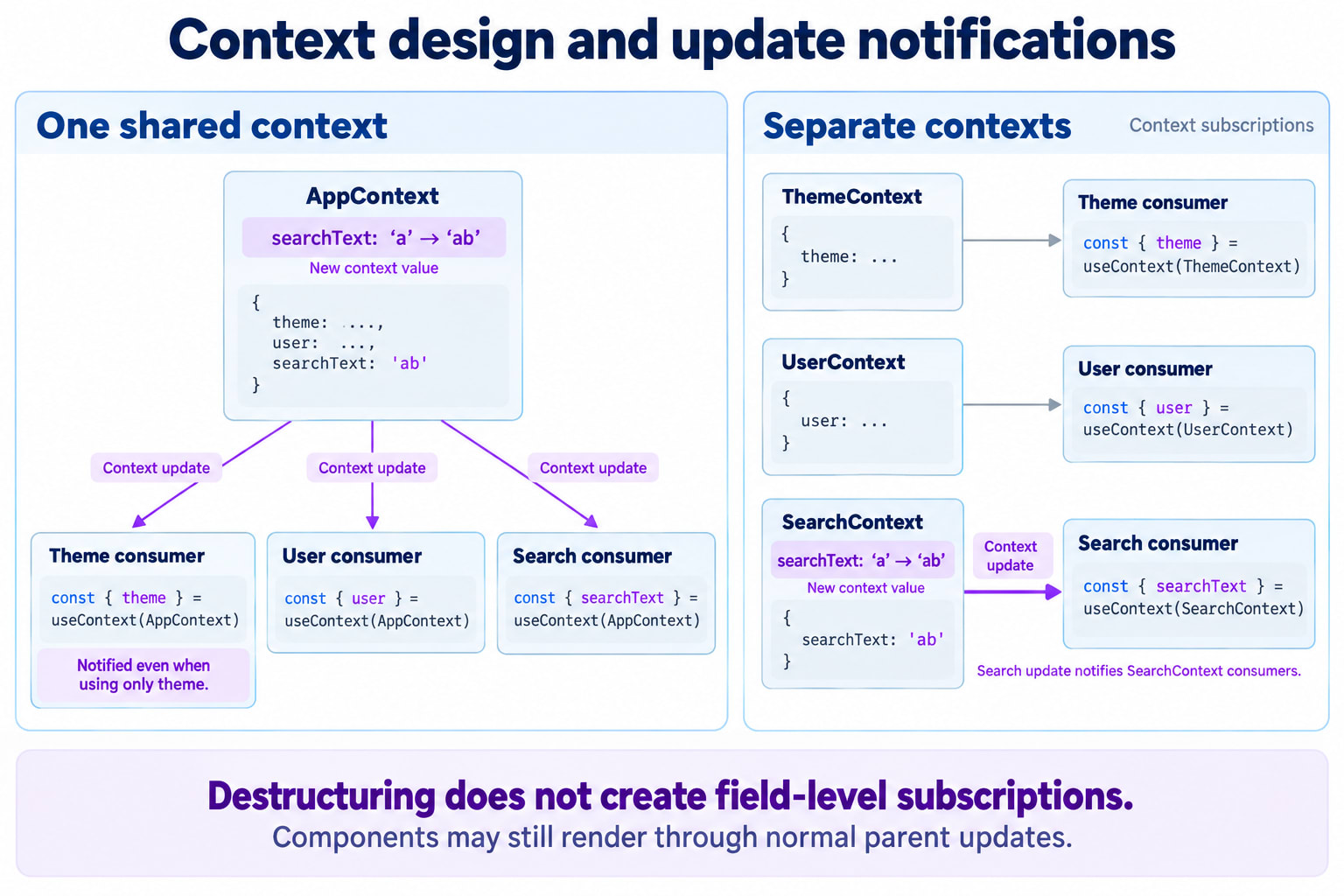
Destructuring is ordinary JavaScript. It does not tell React to subscribe only to toggleTheme.
When the context object changes, this component receives the update too.
Non-consumers can still render for other reasons
Context does not mean “only consumers can ever render.”
A component can also render because its own state changes or because an ancestor renders it through the normal parent-child path.
Therefore, distinguish:
Updates caused by a changed context value.
Ordinary rendering caused by parent or local state updates.
Context removes prop forwarding. It does not automatically optimize the entire subtree.
12. Why a New Object Can Trigger Unnecessary Updates
This creates a fresh object whenever the provider component renders:
value={{ theme, toggleTheme }}Even when two objects contain matching information, they have different identities:
Object.is(
  { theme: "light" },
  { theme: "light" }
);
// false
Suppose a provider also contains unrelated search state. Each keystroke can render that provider and create a new context object, even though the theme has not changed.
First, consider keeping unrelated state outside the provider.
If reference stability still matters, React provides two optimization Hooks:
useCallbackcaches a function reference between renders while its dependencies remain unchanged.useMemocaches a calculated value while its dependencies remain unchanged.
Here is an optimized replacement for our theme provider:
import {
  useCallback,
  useMemo,
  useState,
} from "react";

function ThemeProvider({ children }) {
  const [theme, setTheme] = useState("light");

  const toggleTheme = useCallback(() => {
    setTheme((current) =>
      current === "light" ? "dark" : "light"
    );
  }, []);

  const value = useMemo(
    () => ({ theme, toggleTheme }),
    [theme, toggleTheme]
  );

  return (
    <ThemeContext.Provider value={value}>
      {children}
    </ThemeContext.Provider>
  );
}
The callback uses the state updater’s current argument instead of capturing theme, so it does not need theme as a dependency.
The object depends on both values it contains.
This corrects a subtle problem with:
useMemo(
  () => ({ theme, toggleTheme }),
  [theme]
);
When toggleTheme is declared inside the component, omitting it leaves an incomplete dependency list. The fix is to design a stable callback and include it—not to hide the dependency.
Memoization is a performance optimization, not a correctness mechanism. The provider should work correctly without it.
13. Splitting Contexts Reduces Unrelated Subscriptions
Suppose we eventually create one large context:
{
  theme,
  user,
  cart,
  notifications,
  searchText
}
A search keystroke changes the combined value.
Components that read this context for the theme are still consumers of the same context.
Separating independent concerns gives consumers a narrower dependency:
const theme = useContext(ThemeContext);
const user = useContext(UserContext);
Splitting does not eliminate ordinary parent-driven renders. It separates context subscriptions.
For some features, we can go further and separate state from actions:
<ThemeActionsContext.Provider value={toggleTheme}>
  <ThemeStateContext.Provider value={theme}>
    {children}
  </ThemeStateContext.Provider>
</ThemeActionsContext.Provider>
If toggleTheme has a stable identity, an action-only consumer is not subscribed to changes in ThemeStateContext.
That extra structure is useful when it solves a measured problem. A small theme context may not need it.
14. Context, Reducers, and Redux Solve Different Parts of the Problem
Context answers:
“How can descendants access this value?”
State management also needs answers to:
“Where does the value live?”
“Which updates are valid?”
“How are those updates inspected and coordinated?”
For simple shared values, useState plus Context can be enough.
For more structured transitions, React’s useReducer can centralize update rules in a function that calculates the next state from the current state and an action. Context can then distribute that state and the action-dispatching function.
Redux provides a separate store and an ecosystem for organizing updates, middleware, debugging, and subscriptions. Whether it is appropriate depends on the application’s requirements and tradeoffs, not simply its number of components.
Requirement | Possible approach |
|---|---|
One component’s temporary input | Local state |
Passing data to a reusable child | Props |
Supplying already-configured UI | Composition |
Sharing theme or locale across descendants | Context |
Sharing state with explicit transition rules | Reducer plus Context |
Store-level tooling and selective subscriptions across complex shared state | A dedicated state-management solution |
A large application can use Context successfully. A small application can benefit from a store. Size alone does not make the decision.
15. Common Mistakes to Catch Early
Creating a context inside a component
Create and export one shared context object from a module. Providers and consumers must refer to that same object.
Treating the default as an initial provider value
The default only applies when no matching provider exists above the consumer.
Mutating the provided object
This is not a supported update mechanism:
context.theme = "dark";Update the state that produces the provider value.
Using Context for every value
Local state and explicit props remain useful. Context adds an implicit dependency on a provider.
Assuming Context provides authentication
Our demo user is UI state. Putting user information in Context does not validate a session or enforce permissions on a server.
Testing a consumer without its required provider
Our useTheme and useUser helpers intentionally throw when their providers are missing. Tests should supply the same required environment as the application.
16. The Dashboard’s Data Flow Is Now Clear
The original problem was not that props were bad.
The dashboard had shared concerns that repeatedly passed through components that did not use them.
Our final design gives each piece a clear role:
Provider components own theme and user state.
Context makes current values available within their subtrees.
Consumers read the contexts they need.
Shared actions request updates at the owner.
Intermediate layout components remain focused on layout.
useContextreads and subscribes to the value supplied by the nearest matching provider above the component. It makes shared values accessible without changing who owns the state.
That distinction makes Context easier to use—and much easier to reason about when the dashboard grows.