useRef Hook
Understanding React useRef: The Memory That Doesn’t Redraw the Screen
You are building a small note editor.
Typing works. The text appears on the screen. A character count updates with every keystroke.
Then three requests arrive:
“Add a button that focuses the editor.”
“Let users schedule a preview for two seconds later.”
“Let them cancel that scheduled preview—even if they’ve continued typing.”
These sound like unrelated features.
But they share a requirement: the component needs to remember something that does not belong in its visible interface.
For focusing, it needs a reference to the browser’s input element.
For cancellation, it needs the identifier of a scheduled timer.
Neither value is something the user needs to see.
This is where useRef becomes useful.
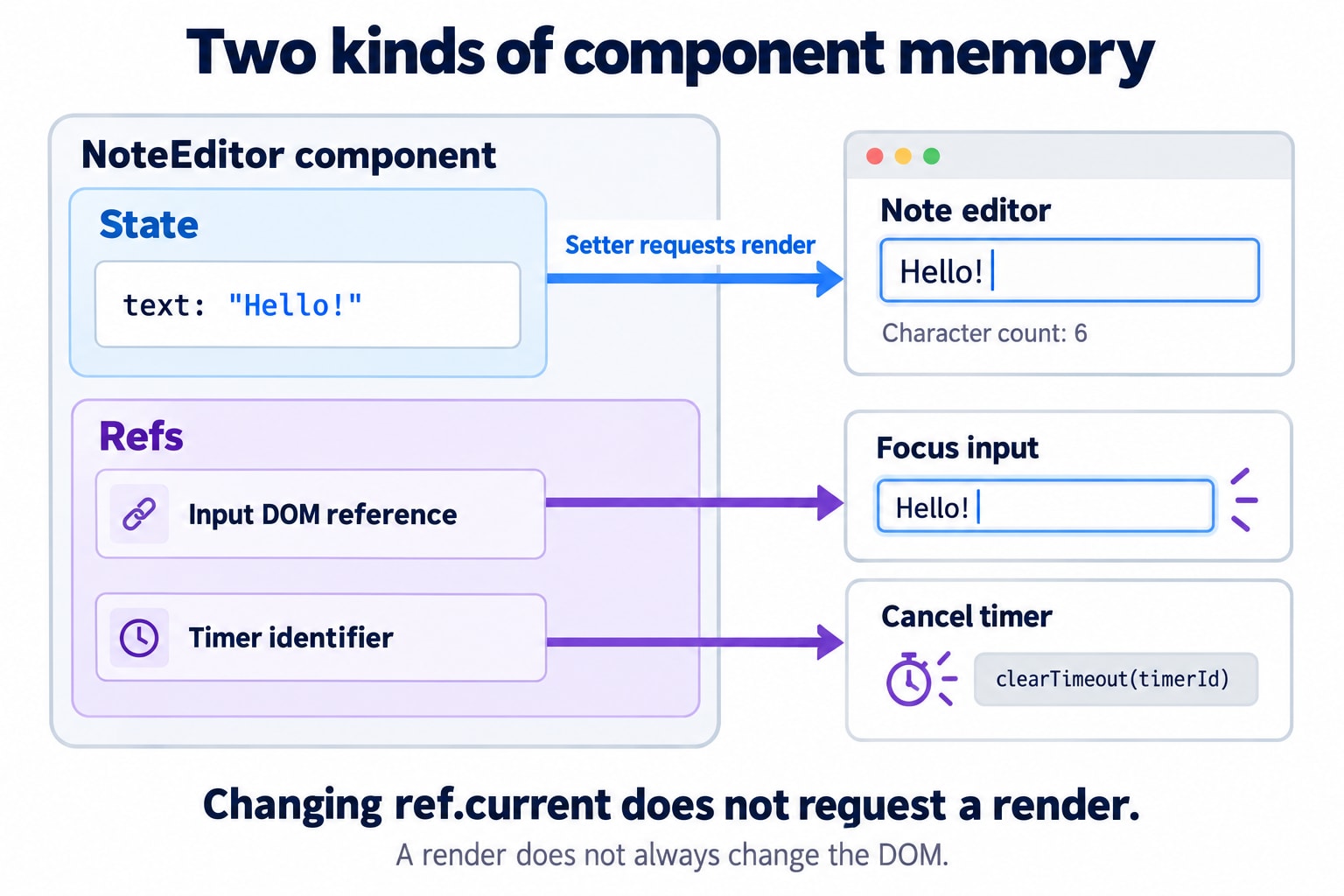
1. Two Different Kinds of Memory
A React component is a function that describes part of the interface. React calls that function again when it needs to calculate an updated UI.
Some information affects what the component displays:
const [text, setText] = useState("");The note text belongs in state because changing it should update the interface.
Other information supports operations behind the interface:
const timeoutRef = useRef(null);The timer identifier belongs in a ref because we need to retrieve it later, but changing it does not need to redraw anything.
The useful question is:
Does changing this value need to change what the user sees?
If yes, state is usually appropriate.
If the value is only needed by an event handler or Effect, a ref may be appropriate. An event handler responds to an interaction; an Effect connects the component to an external system after React commits its work.
2. What useRef Actually Returns
The syntax is:
import { useRef } from "react";

const timeoutRef = useRef(null);
Conceptually, React returns an object:
{
  current: null
}
You read or replace the stored value through .current:
timeoutRef.current = timerId;For the same mounted component instance, React returns the same ref object across re-renders. The initial value is used for initialization; subsequent renders do not reset .current.
Changing .current does not schedule a React render. It is a mutable property on a JavaScript object.
The variable name is your choice:
const inputRef = useRef(null);
const timeoutRef = useRef(null);
const lastSubmittedTextRef = useRef("");
These all use the same Hook. Their purpose comes from what you store in them.
3. Why an Ordinary Variable Is Not Enough
Suppose we store the timer identifier like this:
function NoteEditor() {
  let timerId = null;

  // ...
}
Every call to NoteEditor creates a new local timerId, initialized to null.
An event handler from one render can retain access to that render’s variable through a JavaScript closure. But a later render creates another variable and another set of handlers.
That makes an ordinary local variable unsuitable for a timer identifier that later handlers must retrieve.
Moving the variable outside the component introduces another problem:
let timerId = null;

function NoteEditor() {
  // ...
}
Now multiple editors share it. One editor could overwrite another editor’s timer identifier.
A ref gives each mounted editor its own persistent storage.
Storage | Across renders of one instance | Shared between component instances? | Requests a render when changed? |
|---|---|---|---|
Local variable | New local binding each render | No | No |
Module-level variable | Outlives individual renders | Yes, within that module instance | No |
State | Preserved while component identity remains | No | Its setter requests an update |
Ref | Preserved while component identity remains | No | No |
Refs are persistent component memory, not global storage.
4. Our First Feature: Focus the Editor
The browser already provides a method for focusing an input:
inputElement.focus();The missing piece is obtaining that actual input element.
The DOM is the browser’s representation of the page. React can place a DOM node into a ref for us:
import { useRef } from "react";

export default function FocusableEditor() {
  const inputRef = useRef(null);

  function handleFocus() {
    inputRef.current?.focus();
  }

  return (
    <section>
      <label>
        Note
        <input ref={inputRef} />
      </label>

      <button type="button"
        Focus editor
      </button>
    </section>
  );
}
This line connects the ref to the input:
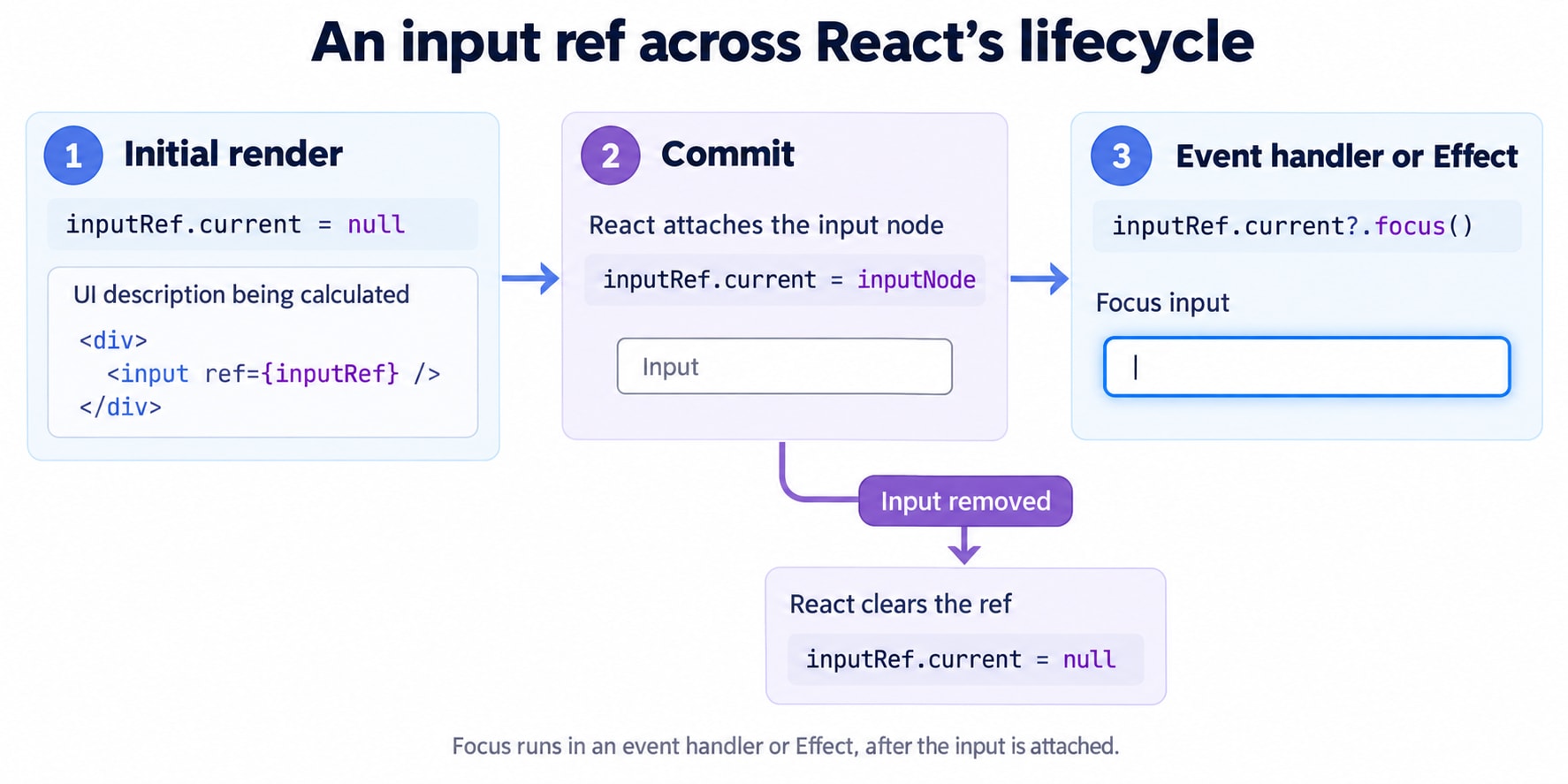
<input ref={inputRef} />React assigns the DOM node to inputRef.current during the commit process. When that node is removed, React clears the object ref back to null.
The ?. operator means “call focus() if the current value is not null or undefined.”
Notice that we pass the ref object itself:
ref={inputRef}We do not pass its initial null value:
// Incorrect for connecting this object ref:
ref={inputRef.current}
React needs the object whose .current property it will manage.
5. Why We Cannot Focus During Rendering
This is incorrect:
function NoteEditor() {
  const inputRef = useRef(null);

  // Incorrect: an external action during rendering.
  inputRef.current?.focus();

  return <input ref={inputRef} />;
}
There are two problems.
First, the input does not exist yet during the initial render.
Second, rendering should calculate the interface. It should not perform actions such as moving the user’s focus.
React separates calculating the UI from committing the result. Rendering can be repeated or abandoned, so a render attempt is not a reliable instruction to perform an external action.
Read and write refs in event handlers or Effects rather than using them during rendering. React’s ref lint rule explicitly checks for render-time access.
Focusing when the editor appears
If the intended experience is to focus this always-present input when the component mounts:
import { useEffect, useRef } from "react";

function NoteEditor() {
  const inputRef = useRef(null);

  useEffect(() => {
    inputRef.current?.focus();
  }, []);

  return (
    <label>
      Note
      <input ref={inputRef} />
    </label>
  );
}
Here, the Effect runs after the input has been committed.
The empty dependency array means there are no changing reactive dependencies for this Effect. It does not mean “exactly once forever”: remounting and development checks can run setup again.
Also, useEffect is not guaranteed to run after browser paint in every situation.
There is one practical limitation: if the input appears later through conditional rendering, an Effect with [] will not automatically rerun just because the input has appeared. Tie the focus behavior to the actual opening interaction or lifecycle.
6. Focusing an Input Is Different from Owning Its Value
Our editor also needs to display the note and its character count:
const [text, setText] = useState("");
const inputRef = useRef(null);

return (
  <>
    <input
      ref={inputRef}
      value={text} => {
        setText(event.target.value);
      }}
    />

    <p>{text.length} characters</p>
  </>
);
This input is controlled: React state supplies its value.
The ref and state have different responsibilities:
textdetermines what the input displays.inputReflets us call browser methods on that input.
To replace the text, update state:
setText("A new note");Do not bypass that ownership:
// Avoid for this controlled input.
inputRef.current.value = "A new note";
That assignment does not update text or automatically call React’s onChange handler. The character count and other state-dependent UI can disagree with the DOM, and React can restore its controlled value.
Refs are useful for browser operations such as focus, selection, scrolling, measurements, and media controls.
They do not give us permission to independently rewrite UI that React owns.
7. Our Second Feature: A Cancellable Delayed Preview
Now the user wants to schedule a preview two seconds into the future.
JavaScript gives us a timer identifier:
const timerId = setTimeout(() => {
  // Run later.
}, 2000);
We can cancel pending work using that identifier:
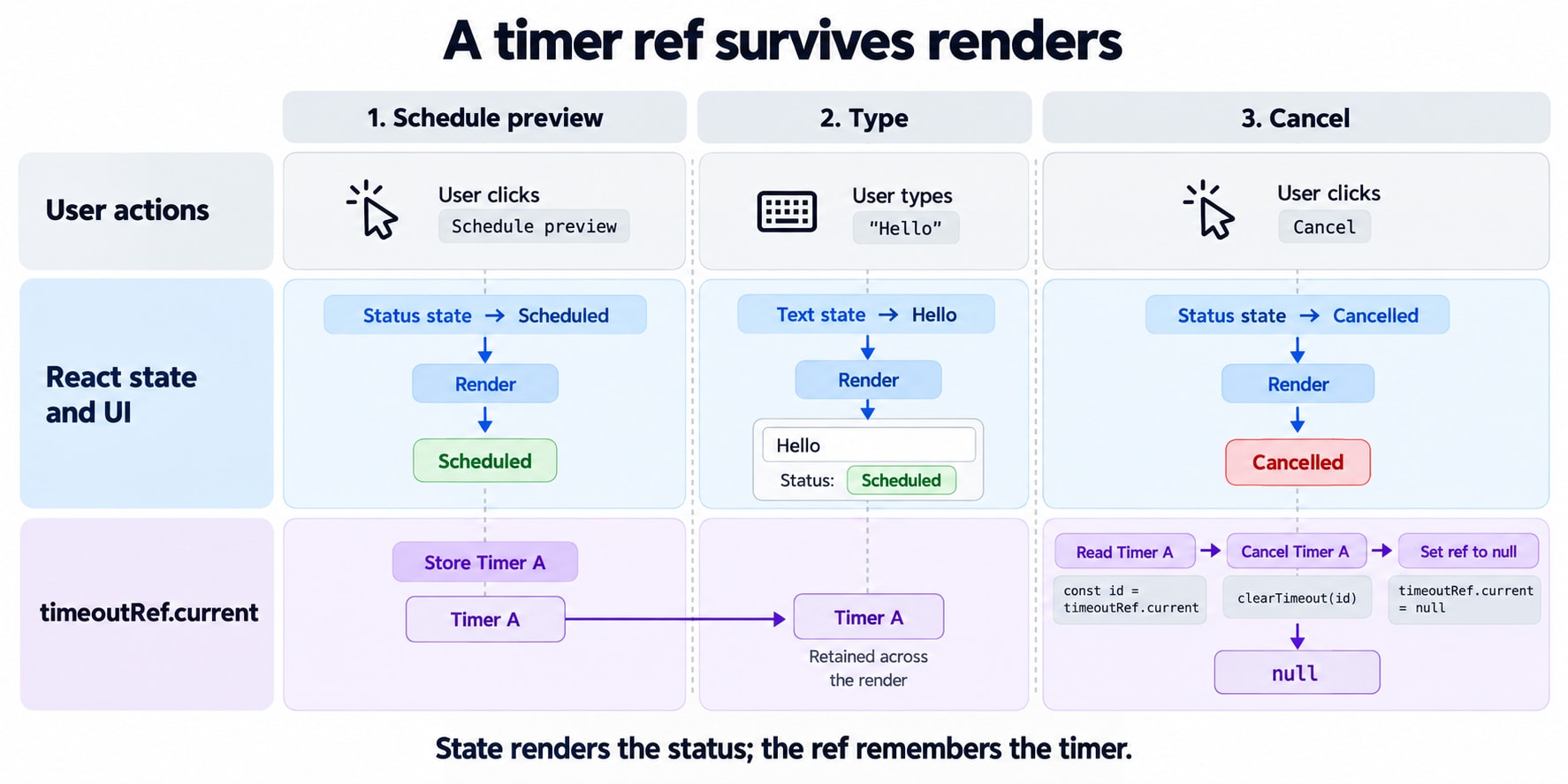
clearTimeout(timerId);The challenge is keeping the identifier available while the user continues typing and React re-renders the editor.
That is a suitable job for a ref:
const timeoutRef = useRef(null);We also need visible information:
const [status, setStatus] = useState("idle");
const [preview, setPreview] = useState(null);
Those belong in state.
The timer identifier answers “which pending task can we cancel?”
The status answers “what should we tell the user?”
Using both state and a ref is appropriate because they serve different purposes.
8. The Complete Note Editor
This example schedules a local preview, not a network save.
Its behavior is deliberate: the preview contains the text from the moment the user clicked Schedule.
import { useEffect, useRef, useState } from "react";

export default function NoteEditor() {
  const [text, setText] = useState("");
  const [preview, setPreview] = useState(null);
  const [status, setStatus] = useState("idle");

  const inputRef = useRef(null);
  const timeoutRef = useRef(null);

  useEffect(() => {
    return () => {
      if (timeoutRef.current !== null) {
        clearTimeout(timeoutRef.current);
        timeoutRef.current = null;
      }
    };
  }, []);

  function handleSchedule() {
    // Replace any existing pending preview.
    if (timeoutRef.current !== null) {
      clearTimeout(timeoutRef.current);
    }

    const scheduledText = text;

    setStatus("scheduled");

    timeoutRef.current = setTimeout(() => {
      setPreview(scheduledText);
      setStatus("ready");
      timeoutRef.current = null;
    }, 2000);
  }

  function handleCancel() {
    if (timeoutRef.current === null) {
      return;
    }

    clearTimeout(timeoutRef.current);
    timeoutRef.current = null;

    setStatus("cancelled");
  }

  return (
    <section>
      <h1>Note editor</h1>

      <label>
        Your note
        <input
          ref={inputRef}
          value={text} => {
            setText(event.target.value);
          }}
        />
      </label>

      <p>{text.length} characters</p>

      <div>
        <button
          type="button" => {
            inputRef.current?.focus();
          }}
        >
          Focus editor
        </button>

        <button type="button"
          {status === "scheduled"
            ? "Replace scheduled preview"
            : "Schedule preview"}
        </button>

        <button
          type="button"
          disabled={status !== "scheduled"}
        >
          Cancel preview
        </button>
      </div>

      <p role="status">
        {status === "idle" && "No preview scheduled."}
        {status === "scheduled" &&
          "Preview scheduled for about two seconds from now."}
        {status === "ready" && "Preview ready."}
        {status === "cancelled" && "Pending preview cancelled."}
      </p>

      {preview !== null && (
        <section>
          <h2>Last completed preview</h2>
          <p>{preview || "(Empty note)"}</p>
        </section>
      )}
    </section>
  );
}
The timer delay is approximate: a busy browser can execute the callback later.
Cancellation stops a pending callback. It does not undo a preview that has already completed.
Why typing does not lose the timer
Each keystroke updates text and requests another render.
React returns the same timeoutRef object, so the current Cancel handler can still retrieve the pending timer identifier.
Why cleanup matters
Removing the editor should cancel its pending work.
A ref does not automatically dispose of a timer just because the component that stored its identifier has gone away. The Effect’s cleanup explicitly releases that resource.
Why we still need status state
Assigning a timer identifier to .current does not update the button labels.
These state updates do:
setStatus("scheduled");
setStatus("cancelled");
The ref manages the resource. State describes the interface.
9. Why the Preview Uses the Earlier Text
Suppose the user:
Types
Hello.Clicks Schedule preview.
Changes the editor to
Hello world.Waits for the callback.
The preview shows:
HelloThat is intentional.
The event handler stores:
const scheduledText = text;The timer callback retains access to this variable through a closure—a function’s ability to remember variables from the surrounding execution.
A ref does not automatically make everything inside a callback read the latest state.
Our ref holds the timer identifier, not the note text.
Before adding a “latest value ref,” decide what the feature requires:
Preview the text at scheduling time?
Preview whatever text exists when the timer fires?
Restart the timer after every edit?
Those are different behaviors. Storage choices should follow the intended behavior.
10. Why a Ref Counter Does Not Update the Screen
Consider this deliberately incorrect display pattern:
// Avoid using a mutable ref as rendered state.
const countRef = useRef(0);

return (
  <>
    <p>{countRef.current}</p>

    <button => {
        countRef.current += 1;
      }}
    >
      Increment
    </button>
  </>
);
The assignment changes the stored number, but it does not request another render.
In simple examples, an unrelated render may make the changed number appear. That does not make this a reliable UI design: it is also reading mutable ref data during rendering.
Use state for the displayed count:
const [count, setCount] = useState(0);A suitable ref-only counter would instead be read inside an event handler:
function DebugCounter() {
  const clicksRef = useRef(0);

  function handleClick() {
    clicksRef.current += 1;
    console.log("Recorded clicks:", clicksRef.current);
  }

  return (
    <button type="button"
      Record a click
    </button>
  );
}
Here, the count is diagnostic information. It does not drive JSX.
11. The Render-Count Example to Avoid
This pattern is often used to demonstrate persistence:
const renderCount = useRef(0);

// Avoid: mutating a ref during rendering.
renderCount.current += 1;
It teaches the wrong habit.
React may call a component more than once while working toward a committed result. A render attempt is not the same as a visible update.
Mutating a persistent ref during that calculation makes the result depend on how often React attempted the work.
Moving the increment into an Effect changes what you are counting: Effect executions, including applicable development checks—not every render attempt.
For performance investigation, use React’s profiling tools rather than treating a render-time ref mutation as an authoritative count.
12. Remembering Previous Values—Precisely
Refs can remember a value for later comparison.
But “previous” needs a definition.
Does it mean:
Previous render attempt?
Previous committed value?
Previous submission?
Previous value processed by an Effect?
These are not interchangeable.
For example, this component compares a value inside an Effect:
import { useEffect, useRef } from "react";

function ChangeLogger({ value }) {
  const previousValueRef = useRef(value);

  useEffect(() => {
    const previous = previousValueRef.current;

    if (!Object.is(previous, value)) {
      console.log("Value changed:", {
        from: previous,
        to: value,
      });
    }

    previousValueRef.current = value;
  }, [value]);

  return null;
}
After initialization, the ref remembers the value processed by the preceding Effect execution.
Both reading and updating it happen inside the Effect.
This is different from returning previousValueRef.current from a custom Hook and using it to render a “previous value” label.
If history is part of the visible interface, store that history in state—for example, current and previous submissions updated together in the submit handler.
Also, assigning an object to a ref stores its reference, not a historical copy:
previousValueRef.current = someObject;If someone later mutates that same object, the ref does not preserve its old contents. A ref is not automatically a snapshot.
13. Persistence Has a Boundary
A ref survives re-renders of the same mounted component instance.
It does not survive every possible event.
Removing the editor and mounting a fresh instance creates fresh refs. Changing its identity—for example, through a different key—can also reset its component memory. React associates component state with identity in the rendered tree.
A page reload also creates a new application instance.
Use storage outside the component when information must outlive it.
For the editor:
Information | Appropriate home |
|---|---|
Current visible text | State |
Visible preview status | State |
Input DOM node | Ref |
Pending timer identifier | Ref |
Note that must survive a reload | Persistent storage, according to the application’s needs |
14. Two Subtle Ref Traps
Changing .current is not a dependency notification
This does not make React observe assignments to the ref:
useEffect(() => {
  // ...
}, [timeoutRef.current]);
Changing .current does not schedule a render, so React does not automatically get another opportunity to compare that dependency.
It also reads the mutable ref during rendering when constructing the dependency array.
If a changing value should cause reactive work, model it with state or an appropriate subscription.
useRef does not lazily call a function argument
These expressions have different implications:
useRef(createHelper());JavaScript calls createHelper() each time the component executes, even though React only uses the initial result to initialize the ref.
useRef(() => createHelper());This stores a function as .current. React does not call it as a lazy initializer.
React permits a narrow, predictable initialization pattern for ref contents, but that exception does not make render-time timers, subscriptions, or external mutations safe.
15. The Decision That Makes useRef Easier
When a value needs to survive a render, ask what it is for.
If it determines what appears on the screen, use state.
If an event handler or Effect needs to retrieve an operational value later, consider a ref.
If you need to call a browser method on an element, attach a DOM ref.
Our note editor uses all three ideas together:
State owns the note, preview, and visible status.
An input ref provides access to focus.
A timer ref lets later handlers cancel pending work.
Cleanup releases work when the editor is removed.
useRefprovides persistent, mutable storage for a component instance. Changing that storage does not request a render, so it should not be the source of truth for rendered UI.