promises in js
JavaScript Theory & Concepts
Promises in JavaScript
Understanding asynchronous operations, Promise lifecycle, chaining, error handling, and concurrent execution.
1. Why Do We Need Promises?
Imagine you are building an e-commerce application.
A customer adds shoes, pants, and a kurta to their cart. When they click Place Order, several operations need to happen:
Create the order.
Process the payment.
Show the order summary.
Update the wallet balance.
The interesting part is that these operations depend on one another.
For example, we cannot process the payment until we have successfully created the order and received its order ID.
Let's first see how we might handle this using ordinary functions.
const cart = ["shoes", "pants", "kurta"];

const orderId = createOrder(cart);

proceedToPayment(orderId);
There is a problem here.
Creating an order usually involves communicating with a server or database. It takes time. JavaScript cannot immediately provide the order ID before that operation finishes.
So how do we tell JavaScript what to do after the order has been created?
Before Promises, developers commonly used callbacks.
The callback approach
const cart = ["shoes", "pants", "kurta"];

createOrder(cart, function (orderId) {
  proceedToPayment(orderId);
});
Now, instead of expecting createOrder() to return the order ID immediately, we pass it a function.
The createOrder() function is responsible for calling that callback when the order has been created.
This works, but it introduces an important problem.
Problem 1: Inversion of Control
Look at this:
createOrder(cart, function (orderId) {
  proceedToPayment(orderId);
});
We are giving our callback function to another function and trusting that function to execute it correctly.
But what if createOrder():
Never calls the callback?
Calls it twice?
Calls it before the order is actually created?
Passes incorrect data to it?
Our code has handed control over to another function.
This is commonly called Inversion of Control.
We want a better way to handle asynchronous operations without giving another function so much control over our callback.
That is where Promises come in.
2. What Is a Promise?
Think about ordering an espresso at a busy coffee shop.
The barista does not ask you to stand beside the machine and wait until your coffee is ready.
Instead, you receive an electronic pager.
You can sit down, read a book, or do something else. When your coffee is ready, the pager notifies you.
The pager represents a Promise.
Pending: Your coffee is being prepared.
Fulfilled: Your coffee is ready.
Rejected: Something went wrong with your order.
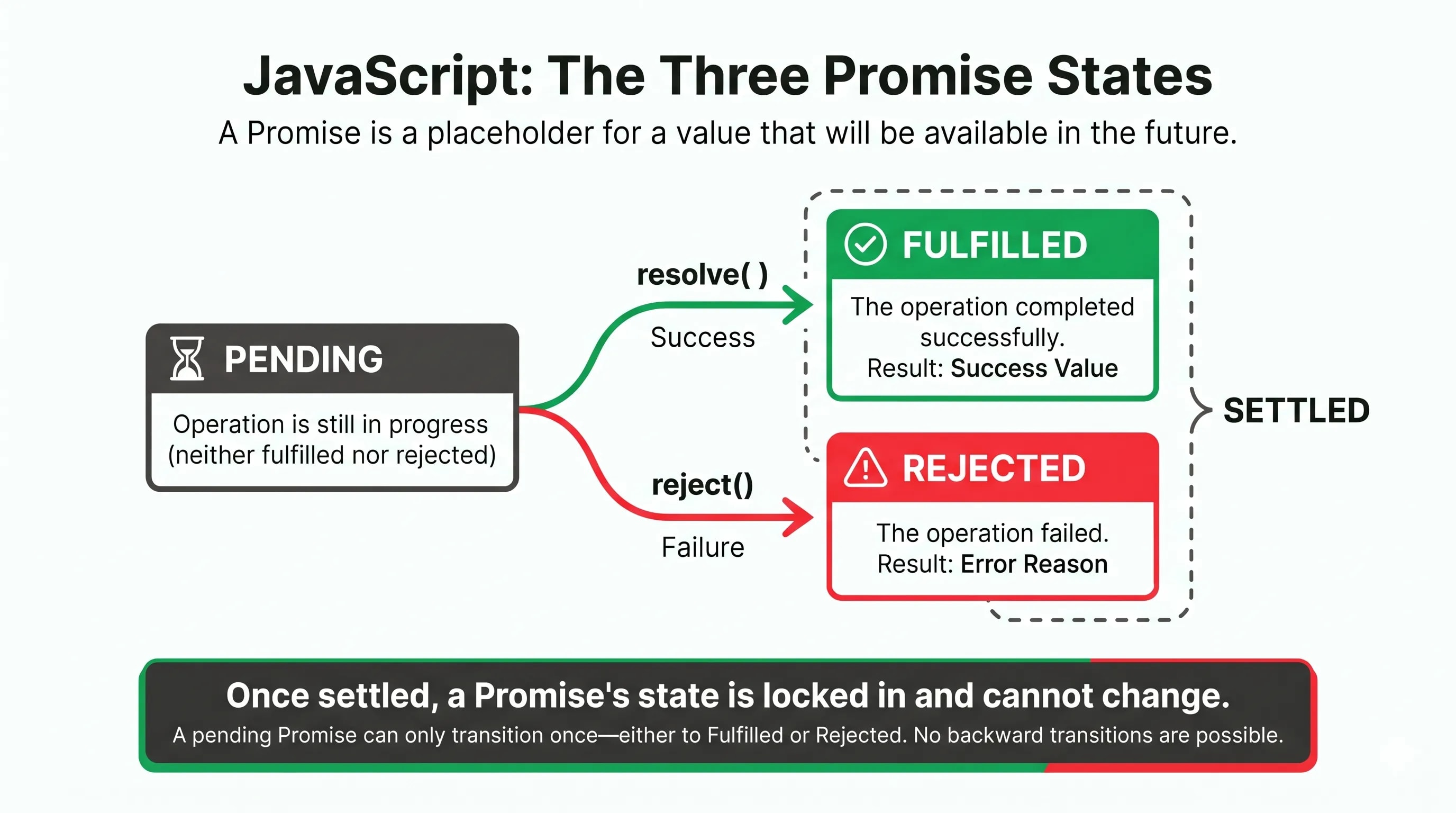
Once the Promise settles, its state cannot change again.
<text>A Promise is an object representing the eventual completion or failure of an asynchronous operation.</text>
In simpler words, a Promise is a placeholder for a value that may become available in the future.
The three states of a Promise
Every Promise has three possible states:
<box border radius="lg" padding={3} gap={3}> <box gap={1}> <row align="center" justify="between"> 1. Pending <badge color="warning">Initial state</badge> </row> The asynchronous operation has not completed yet. </box> <box align="center"> <icon name="arrow-down" color="secondary" size="lg"/> </box> <grid columns={2} gap={2}> <grid-item> <box background="rgba(22,163,74,0.08)" radius="md" padding={2} gap={1}> <badge color="success">Fulfilled</badge> Success <text size="sm" color="secondary">The operation completed successfully and produced a value.</text> </box> </grid-item> <grid-item> <box background="rgba(220,38,38,0.08)" radius="md" padding={2} gap={1}> <badge color="danger">Rejected</badge> Failure <text size="sm" color="secondary">The operation failed and produced a rejection reason.</text> </box> </grid-item> </grid> <caption>Fulfilled and rejected are both settled states. A settled Promise cannot return to pending or switch to the other settled state.</caption> </box>
Let's understand them with code:
const promise = new Promise((resolve, reject) => {
  // Asynchronous operation
});
A Promise starts in the pending state.
Later, it becomes either:
resolve("Success");or:
reject(new Error("Something went wrong"));It cannot become fulfilled and then rejected afterward.
Important distinction: A Promise's state is immutable once settled, but the object stored as its fulfillment value is not automatically immutable. If a Promise fulfills with an object, that object can still be modified.
3. How Does a Promise Solve the Callback Problem?
Let's return to our e-commerce example.
Previously, we passed a callback into createOrder().
With Promises, the function returns a Promise instead.
const cart = ["shoes", "pants", "kurta"];

const promise = createOrder(cart);

promise.then(function (orderId) {
  proceedToPayment(orderId);
});
Notice the difference.
Previously:
createOrder(cart, callback);Now:
const promise = createOrder(cart);

promise.then(callback);
We are no longer giving our callback directly to createOrder().
Instead, createOrder() returns a Promise, and we attach our callback using .then().
The Promise manages when that callback should run.
If the Promise fulfills, the fulfillment handler attached through .then() receives the fulfillment value.
If the Promise rejects, its rejection can be handled through .catch().
This gives us a standardized way to handle asynchronous results.
One important detail: A Promise does not magically make the underlying operation asynchronous. It provides a standard mechanism for representing and handling its eventual result.
4. Understanding a Real Promise Object
JavaScript already provides Promise-based APIs.
One common example is fetch().
The fetch() API is used to make HTTP requests, and it returns a Promise.
const URL = "https://jsonplaceholder.typicode.com/users/1";

const userPromise = fetch(URL);

console.log(userPromise);
The Promise is returned immediately, while the network request continues.
Depending on how quickly the operation completes, the Promise may appear as pending or settled when inspected in developer tools.
Conceptually, a Promise keeps track of:
Its current state.
Its fulfillment value, if fulfilled.
Its rejection reason, if rejected.
The reactions registered through
.then(),.catch(), and.finally().
You may see internal Promise properties in browser developer tools, but those are engine implementation details, not properties that application code should directly access.
How do we get the response?
We use .then().
const URL = "https://jsonplaceholder.typicode.com/users/1";

const userPromise = fetch(URL);

userPromise.then(function (response) {
  console.log(response);
});
The callback executes when the Promise fulfills.
However, there is something important here.
fetch() does not directly return the parsed JSON data. It fulfills with a Response object.
To extract the JSON body, we need another asynchronous operation:
fetch(URL)
  .then(function (response) {
    return response.json();
  })
  .then(function (user) {
    console.log(user);
  });
Why does response.json() need another .then()?
Because reading and parsing the response body is also asynchronous. The json() method returns another Promise.
We will understand this behavior in Promise chaining.
Important interview point: fetch() generally fulfills even when the server responds with HTTP errors such as 404 or 500. You should check response.ok if you want to treat those responses as failures.
For example:
fetch(URL)
  .then(function (response) {
    if (!response.ok) {
      throw new Error(`HTTP Error: ${response.status}`);
    }

    return response.json();
  })
  .then(function (user) {
    console.log(user);
  })
  .catch(function (error) {
    console.error(error);
  });
5. Creating Our Own Promise
So far, we have consumed a Promise returned by fetch().
But how do we create a Promise ourselves?
JavaScript provides a built-in Promise constructor.
Its syntax looks like this:
const promise = new Promise(function (resolve, reject) {
  // Perform an operation

  // Success
  resolve(value);

  // Failure
  reject(error);
});
The function passed to the Promise constructor is called the executor function.
JavaScript provides two functions to this executor:
resolve()— fulfills the Promise with a value, or adopts the state of another Promise or thenable.reject()— rejects the Promise with a reason.
Let's implement our e-commerce example.
The producer side
The function creating and returning a Promise is often called the Promise producer.
function createOrder(cart) {
  return new Promise(function (resolve, reject) {
    // Step 1: Validate the cart
    if (!cart || cart.length === 0) {
      reject(new Error("Cart is empty"));
      return;
    }

    // Step 2: Simulate order creation
    const orderId = "ORDER_101";

    // Step 3: Return the order ID
    resolve(orderId);
  });
}
Let's understand the code.
Step 1: Create a Promise
return new Promise(function (resolve, reject) {The Promise constructor creates a new Promise and immediately executes the executor function.
Step 2: Validate the cart
if (!cart || cart.length === 0) {
  reject(new Error("Cart is empty"));
  return;
}
If the cart is invalid, we reject the Promise.
Notice the return after reject().
Calling reject() settles the Promise, but it does not stop the remaining JavaScript code in the executor from running. The return prevents our example from continuing into the success logic.
Step 3: Resolve the Promise
resolve(orderId);If the cart is valid, we fulfill the Promise with the order ID.
The consumer side
The function consuming the returned Promise is often called the Promise consumer.
const cart = ["shoes", "pants", "kurta"];

const orderPromise = createOrder(cart);

orderPromise.then(function (orderId) {
  console.log("Order created:", orderId);
});
Output:
Order created: ORDER_101If the cart is empty:
const cart = [];

createOrder(cart)
  .then(function (orderId) {
    console.log("Order created:", orderId);
  })
  .catch(function (error) {
    console.error(error.message);
  });
Output:
Cart is emptyA crucial detail: The executor runs synchronously
Look at this example:
console.log("Start");

const promise = new Promise((resolve, reject) => {
  console.log("Executor runs");

  resolve("Done");
});

console.log("End");
Output:
Start
Executor runs
End
Why?
Because the Promise executor runs immediately when the Promise is created.
It does not wait for a microtask or timer.
However, the .then() handlers run asynchronously.
console.log("Start");

const promise = new Promise((resolve) => {
  console.log("Executor runs");

  resolve("Done");
});

promise.then((value) => {
  console.log(value);
});

console.log("End");
Output:
Start
Executor runs
End
Done
This difference is extremely important:
Promise executor: synchronous.
Promise reaction handlers: asynchronous, scheduled as microtasks.
6. How Promise Callbacks Are Scheduled: The Microtask Queue
Let's understand what happens when a Promise is fulfilled.
Consider:
console.log("1. Start");

const promise = new Promise((resolve) => {
  console.log("2. Executor");

  resolve("Success");
});

promise.then(() => {
  console.log("4. Promise callback");
});

console.log("3. End");
Output:
1. Start
2. Executor
3. End
4. Promise callback
But why does the Promise callback execute after "3. End" even though the Promise has already been fulfilled?
Because Promise handlers do not execute immediately.
They are scheduled as microtasks.
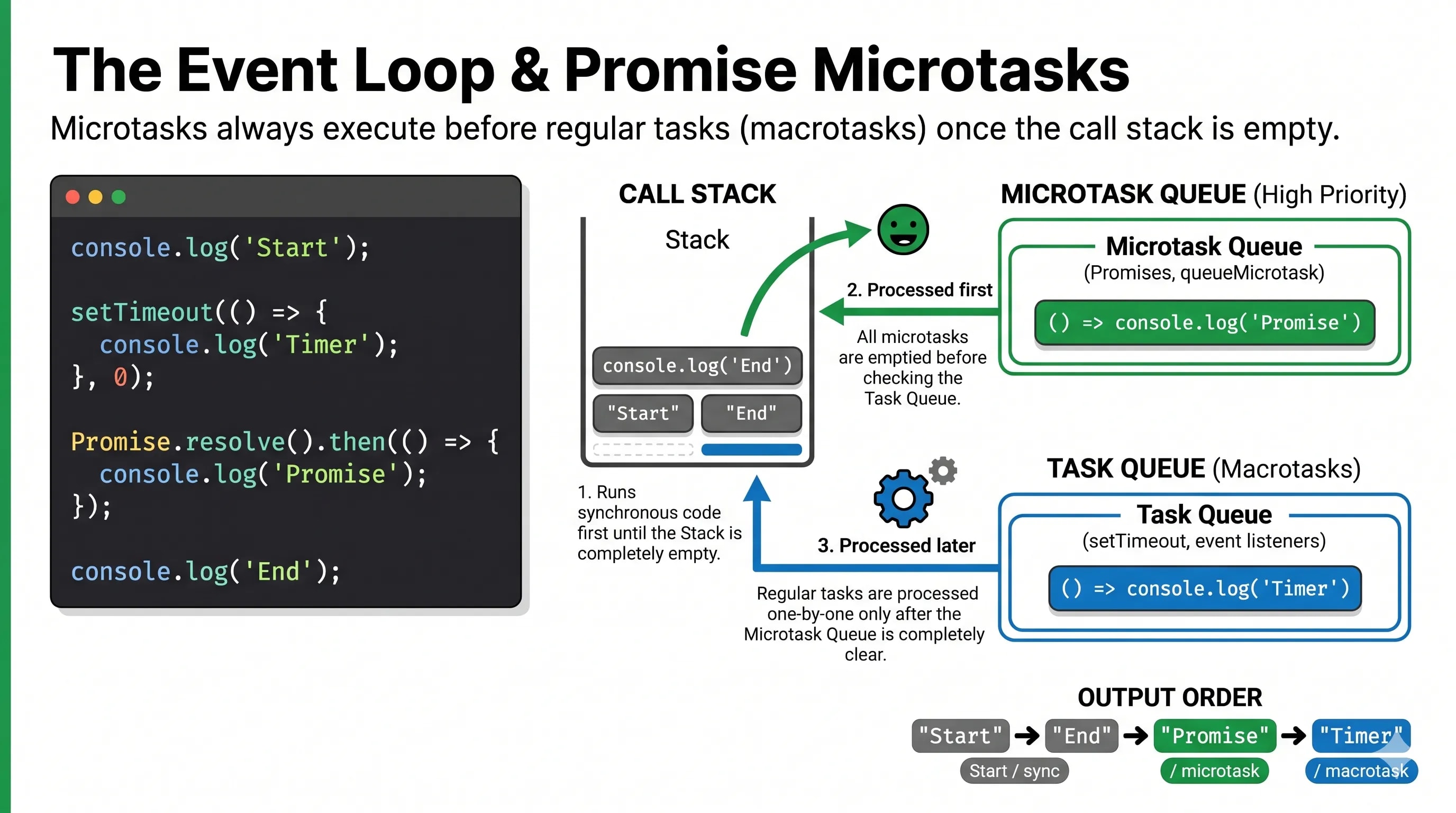
JavaScript has different queues for scheduled work
For our current discussion, understand these two categories:
Microtask queue: Promise reaction handlers,
queueMicrotask(), and other microtask jobs.Task queue: Tasks such as callbacks scheduled by
setTimeout()and many browser events.
After the current synchronous JavaScript execution finishes, the event loop processes pending microtasks before moving on to the next task.
Let's compare a Promise with setTimeout().
console.log("Start");

setTimeout(() => {
  console.log("Timer");
}, 0);

Promise.resolve().then(() => {
  console.log("Promise");
});

console.log("End");
Output:
Start
End
Promise
Timer
Why?
"Start"executes synchronously.The timer callback is scheduled as a task.
The Promise callback is scheduled as a microtask.
"End"executes synchronously.The current synchronous code finishes.
The microtask queue is processed.
The timer task executes afterward.
A zero-millisecond timer does not mean the callback executes immediately. It means the timer becomes eligible to run after its delay, subject to the event loop.
Remember: Promise callbacks are microtasks. They do not interrupt the currently running synchronous code.
7. Promise Chaining: Solving Callback Hell
We have solved one major problem: Inversion of Control.
But callbacks introduced another problem.
Consider our e-commerce workflow:
Create an order.
Process payment.
Show the order summary.
Update the wallet balance.
Each operation depends on the result of the previous operation.
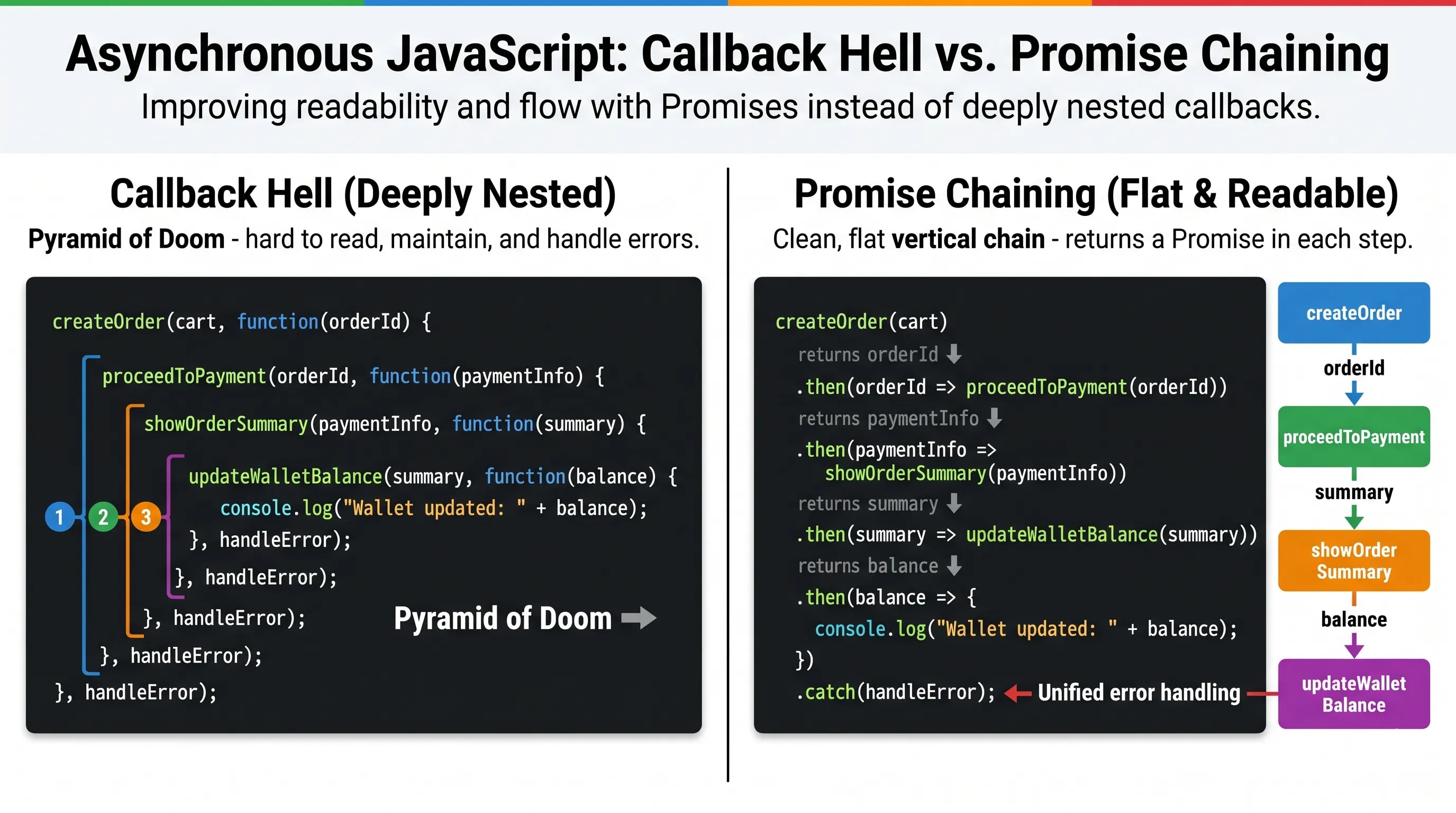
Callback hell
Using callbacks, we might write:
createOrder(cart, function (orderId) {
  proceedToPayment(orderId, function (paymentInfo) {
    showOrderSummary(paymentInfo, function (balance) {
      updateWalletBalance(balance);
    });
  });
});
As the number of dependent operations increases, our code starts moving horizontally.
This structure is commonly called Callback Hell or the Pyramid of Doom.
It becomes difficult to read, debug, and maintain.
The Promise solution: Chaining
Promises allow us to write the same workflow in a more structured way.
createOrder(cart)
  .then(function (orderId) {
    return proceedToPayment(orderId);
  })
  .then(function (paymentInfo) {
    return showOrderSummary(paymentInfo);
  })
  .then(function (balance) {
    return updateWalletBalance(balance);
  });
This is called Promise Chaining.
Each .then() receives the result returned by the previous .then() handler.
But how does that work?
Every .then() returns a new Promise
This is one of the most important things to understand about Promises.
Consider:
const promise1 = Promise.resolve("Hello");

const promise2 = promise1.then((value) => {
  return value + " Alex";
});

console.log(promise1 === promise2); // false
The original Promise remains unchanged.
The .then() method returns a brand-new Promise.
The result of the handler determines how that new Promise settles.
Let's understand the three common situations.
Case 1: Returning a normal value
Promise.resolve(10)
  .then((value) => {
    return value * 2;
  })
  .then((result) => {
    console.log(result);
  });
Output:
20The first handler returns 20. The next handler receives 20.
Case 2: Returning another Promise
Promise.resolve(10)
  .then((value) => {
    return new Promise((resolve) => {
      setTimeout(() => {
        resolve(value * 2);
      }, 1000);
    });
  })
  .then((result) => {
    console.log(result);
  });
Output after approximately one second:
20The second Promise is adopted by the Promise returned from .then().
The next handler waits until that Promise settles.
This is commonly called Promise Flattening.
Instead of receiving a nested Promise, the next handler receives its fulfilled value.
Case 3: Returning nothing
Promise.resolve(10)
  .then((value) => {
    console.log(value);
  })
  .then((result) => {
    console.log(result);
  });
Output:
10
undefined
Why?
Because the first handler does not return anything.
In JavaScript, a function without an explicit return statement returns undefined.
Therefore, the next .then() receives undefined.
The most common Promise chaining mistake
Consider:
createOrder(cart)
  .then(function (orderId) {
    proceedToPayment(orderId);
  })
  .then(function (paymentInfo) {
    showOrderSummary(paymentInfo);
  });
There is a problem here.
We forgot to return the result of proceedToPayment().
The next .then() will receive undefined, even if proceedToPayment() returns a Promise.
Correct implementation:
createOrder(cart)
  .then(function (orderId) {
    return proceedToPayment(orderId);
  })
  .then(function (paymentInfo) {
    return showOrderSummary(paymentInfo);
  })
  .then(function (balance) {
    return updateWalletBalance(balance);
  });
We can also write this more concisely using arrow functions:
createOrder(cart)
  .then(orderId => proceedToPayment(orderId))
  .then(paymentInfo => showOrderSummary(paymentInfo))
  .then(balance => updateWalletBalance(balance));
Notice that when an arrow function uses an expression body, it returns that expression automatically.
Interview rule: If you want the next .then() to receive a value or wait for another Promise, return it from the current handler.
8. Error Handling in Promises
So far, we have discussed the successful execution of asynchronous operations.
But real applications fail.
For example:
The cart may be invalid.
Payment may fail.
The server may be unavailable.
A database operation may throw an error.
Promises provide .catch() to handle rejection.
Consider:
function createOrder(cart) {
  return new Promise((resolve, reject) => {
    if (!cart || cart.length === 0) {
      reject(new Error("Cart is empty"));
      return;
    }

    resolve("ORDER_101");
  });
}
We can consume it like this:
createOrder([])
  .then((orderId) => {
    console.log("Order created:", orderId);
  })
  .catch((error) => {
    console.error("Error:", error.message);
  });
Output:
Error: Cart is emptyHow does error propagation work?
Consider this chain:
Promise.resolve("ORDER_101")
  .then((orderId) => {
    console.log("Order:", orderId);

    throw new Error("Payment failed");
  })
  .then(() => {
    console.log("This will not execute");
  })
  .catch((error) => {
    console.log("Caught:", error.message);
  });
Output:
Order: ORDER_101
Caught: Payment failed
Why did the second .then() not execute?
Because an error was thrown inside the first .then().
The Promise returned by that handler becomes rejected.
The next fulfillment handler is skipped, and the rejection travels down the chain until a rejection handler catches it.
A catch can recover from an error
An important detail: .catch() does not simply stop the chain.
If a .catch() handler returns a normal value, the Promise returned by .catch() becomes fulfilled, and the next .then() can execute.
Promise.reject(new Error("Payment failed"))
  .catch((error) => {
    console.log(error.message);

    return "Payment handled";
  })
  .then((result) => {
    console.log(result);
  });
Output:
Payment failed
Payment handled
The catch handler recovered from the failure by returning a normal value.
If the catch handler throws another error or returns a rejected Promise, the chain remains rejected.
Multiple catch blocks
We can place multiple .catch() handlers in a chain.
createOrder(cart)
  .then((orderId) => {
    return proceedToPayment(orderId);
  })
  .catch((error) => {
    console.log("Order or payment error:", error.message);

    return "Payment issue handled";
  })
  .then((result) => {
    console.log("Next step:", result);
  })
  .catch((error) => {
    console.log("Another error:", error.message);
  });
A .catch() handles rejections that reach it from earlier parts of the chain. If it recovers by returning a normal value, the following .then() can execute.
If another error occurs afterward, a later .catch() can handle it.
Remember: A .catch() only handles failures that occur before it in the Promise chain, unless a later operation also rejects and reaches it.
What about .finally()?
Promises also provide .finally().
It runs when a Promise settles, whether fulfilled or rejected.
It is commonly used for cleanup operations.
createOrder(cart)
  .then((orderId) => {
    console.log("Order created:", orderId);
  })
  .catch((error) => {
    console.error(error.message);
  })
  .finally(() => {
    console.log("Order process finished");
  });
The .finally() handler does not receive the fulfillment value or rejection reason as an argument.
It normally passes the original result or rejection through to the next part of the chain. If the finally() callback throws an error or returns a rejected Promise, however, the resulting Promise becomes rejected.
9. Common Promise Pitfalls
Pitfall 1: Forgetting to return a Promise
Incorrect:
function getUser() {
  fetch("/api/user").then((response) => {
    return response.json();
  });
}

getUser().then((user) => {
  console.log(user);
});
Why does this fail?
Because getUser() does not return the Promise from fetch().
Correct:
function getUser() {
  return fetch("/api/user")
    .then((response) => {
      if (!response.ok) {
        throw new Error("Failed to fetch user");
      }

      return response.json();
    });
}

getUser().then((user) => {
  console.log(user);
});
Now getUser() returns the Promise, so callers can attach handlers to it.
Pitfall 2: The Promise constructor antipattern
Sometimes developers wrap an API that already returns a Promise inside another Promise.
Unnecessary:
function getUser() {
  return new Promise((resolve, reject) => {
    fetch("/api/user")
      .then((response) => response.json())
      .then(resolve)
      .catch(reject);
  });
}
Why add another Promise when fetch() already returns one?
Better:
function getUser() {
  return fetch("/api/user")
    .then((response) => {
      if (!response.ok) {
        throw new Error("Failed to fetch user");
      }

      return response.json();
    });
}
The second implementation is simpler and allows errors to propagate naturally.
Pitfall 3: Thinking rejection cancels other operations
Consider:
const p1 = new Promise((resolve) => {
  setTimeout(() => resolve("P1 Success"), 3000);
});

const p2 = new Promise((resolve, reject) => {
  setTimeout(() => reject(new Error("P2 Failed")), 1000);
});

const p3 = new Promise((resolve) => {
  setTimeout(() => resolve("P3 Success"), 2000);
});

Promise.all([p1, p2, p3])
  .then(console.log)
  .catch(console.error);
Promise.all() rejects when p2 rejects.
But that does not cancel p1 or p3.
Their underlying operations continue unless you explicitly implement cancellation, for example with AbortController for supported APIs.
Important: Promise rejection is not the same as cancellation.
10. Promise APIs: Handling Multiple Promises
So far, we have mostly handled one Promise at a time.
But real applications often need to perform multiple asynchronous operations.
Imagine a dashboard that needs:
User information.
Recent orders.
Account balance.
We could call these APIs one after another, but if they are independent, that would waste time.
JavaScript provides four important Promise APIs for handling multiple Promises.
Promise.all()Promise.allSettled()Promise.race()Promise.any()
Let's understand each one.
A. Promise.all()
Promise.all() accepts an iterable of values and Promises and returns a new Promise.
It fulfills when all input values fulfill.
The results are returned as an array in the same order as the input—not the order in which the operations finish.
const p1 = new Promise((resolve) => {
  setTimeout(() => resolve("User Data"), 3000);
});

const p2 = new Promise((resolve) => {
  setTimeout(() => resolve("Order Data"), 1000);
});

const p3 = new Promise((resolve) => {
  setTimeout(() => resolve("Balance Data"), 2000);
});

Promise.all([p1, p2, p3])
  .then((results) => {
    console.log(results);
  });
Output after approximately three seconds:
[
  "User Data",
  "Order Data",
  "Balance Data"
]
Why three seconds?
Because Promise.all() waits for all three operations to fulfill.
The slowest operation takes three seconds.
Notice that although p2 finishes first, its result remains in the second position.
What happens if one Promise rejects?
const p1 = Promise.resolve("User Data");

const p2 = Promise.reject(new Error("Order API failed"));

const p3 = Promise.resolve("Balance Data");

Promise.all([p1, p2, p3])
  .then((results) => {
    console.log(results);
  })
  .catch((error) => {
    console.error(error.message);
  });
Output:
Order API failedIf any input Promise rejects, the Promise returned by Promise.all() rejects with that rejection reason.
It does not wait for the remaining operations to finish before rejecting.
However, the other operations are not automatically cancelled.
<badge color="success">Remember</badge> Promise.all() is useful when every operation must succeed before you can continue.
B. Promise.allSettled()
What if we want the results of every operation, even if some of them fail?
For example, a dashboard may need to show whatever information is available, even if one API fails.
That is where Promise.allSettled() helps.
const p1 = new Promise((resolve) => {
  setTimeout(() => resolve("User Data"), 3000);
});

const p2 = new Promise((resolve, reject) => {
  setTimeout(() => reject(new Error("Order API failed")), 1000);
});

const p3 = new Promise((resolve) => {
  setTimeout(() => resolve("Balance Data"), 2000);
});

Promise.allSettled([p1, p2, p3])
  .then((results) => {
    console.log(results);
  });
Output after approximately three seconds:
[
  {
    status: "fulfilled",
    value: "User Data"
  },
  {
    status: "rejected",
    reason: Error("Order API failed")
  },
  {
    status: "fulfilled",
    value: "Balance Data"
  }
]
Unlike Promise.all(), it waits until every input Promise settles, regardless of success or failure.
The results contain:
status: "fulfilled"with avalue.status: "rejected"with areason.
<badge color="success">Remember</badge> Promise.allSettled() is useful when you need every result, including failures.
C. Promise.race()
Imagine three delivery services are trying to deliver the same information.
You only care about whichever one finishes first.
That is the idea behind Promise.race().
It settles as soon as the first input Promise settles—whether fulfilled or rejected.
const p1 = new Promise((resolve) => {
  setTimeout(() => resolve("P1 Success"), 3000);
});

const p2 = new Promise((resolve) => {
  setTimeout(() => resolve("P2 Success"), 1000);
});

const p3 = new Promise((resolve) => {
  setTimeout(() => reject(new Error("P3 Failed")), 2000);
});

Promise.race([p1, p2, p3])
  .then((result) => console.log(result))
  .catch((error) => console.error(error.message));
Output after approximately one second:
P2 SuccessWhy?
Because p2 settles first.
But what if the fastest Promise rejects?
const p1 = new Promise((resolve) => {
  setTimeout(() => resolve("P1 Success"), 3000);
});

const p2 = new Promise((resolve, reject) => {
  setTimeout(() => reject(new Error("P2 Failed")), 1000);
});

const p3 = new Promise((resolve) => {
  setTimeout(() => resolve("P3 Success"), 2000);
});

Promise.race([p1, p2, p3])
  .then(console.log)
  .catch((error) => console.log(error.message));
Output after approximately one second:
P2 FailedThe first settled Promise wins, even when it rejects.
<badge color="success">Remember</badge> Promise.race() returns the outcome of the first Promise to settle, whether fulfilled or rejected.
D. Promise.any()
Now imagine we have three backup servers.
We don't care if one or two servers fail. We only need the first successful response.
This is where Promise.any() is useful.
It fulfills as soon as the first input Promise fulfills.
const p1 = new Promise((resolve, reject) => {
  setTimeout(() => reject(new Error("P1 Failed")), 3000);
});

const p2 = new Promise((resolve) => {
  setTimeout(() => resolve("P2 Success"), 5000);
});

const p3 = new Promise((resolve, reject) => {
  setTimeout(() => reject(new Error("P3 Failed")), 2000);
});

Promise.any([p1, p2, p3])
  .then((result) => console.log(result))
  .catch((error) => console.error(error));
Output after approximately five seconds:
P2 SuccessWhy?
p3rejects after two seconds.p1rejects after three seconds.p2fulfills after five seconds.
Promise.any() ignores the individual rejections while waiting for a successful result.
What happens if every Promise rejects?
const p1 = Promise.reject(new Error("P1 Failed"));
const p2 = Promise.reject(new Error("P2 Failed"));
const p3 = Promise.reject(new Error("P3 Failed"));

Promise.any([p1, p2, p3])
  .then(console.log)
  .catch((error) => {
    console.log(error.name);
    console.log(error.errors);
  });
Output:
AggregateError

[
  Error: P1 Failed,
  Error: P2 Failed,
  Error: P3 Failed
]
When every input Promise rejects, Promise.any() rejects with an AggregateError.
The individual rejection reasons are available through error.errors, in input order.
<badge color="success">Remember</badge> Promise.any() is useful when you only need the first successful result.
Comparing the four Promise APIs
API | When does it settle? | What happens on rejection? |
|---|---|---|
| All fulfill | Rejects as soon as an input rejects |
| All settle | Collects all results |
| First input settles | First rejection can win |
| First input fulfills | Rejects only if all inputs reject |
<box border radius="lg" padding={3} gap={2}> An easy way to remember
all→ Everyone must succeed.allSettled→ Wait for everyone, whatever happens.race→ First to finish wins.
Two additional Promise methods
JavaScript also provides two useful static methods.
Promise.resolve()
Creates a fulfilled Promise with the given value, adopting another Promise or thenable if necessary.
Promise.resolve("Hello Consistcode")
  .then((value) => {
    console.log(value);
  });
Output:
Hello ConsistcodePromise.reject()
Creates a rejected Promise with the given reason.
Promise.reject(new Error("Something went wrong"))
  .catch((error) => {
    console.log(error.message);
  });
Output:
Something went wrong11. Quick Revision: Promises Cheat Sheet
Promise fundamentals
A Promise represents the eventual result of an asynchronous operation.
It has three states:
pending,fulfilled, andrejected.A Promise can settle only once.
The Promise executor runs synchronously.
.then(),.catch(), and.finally()handlers run asynchronously as microtasks.
Promise chaining
Every
.then()returns a new Promise.Returning a normal value fulfills the next Promise with that value.
Returning another Promise makes the chain adopt its eventual outcome.
Forgetting
returnoften causes the next.then()to receiveundefined.Errors propagate down the chain until a rejection handler handles them.
A
.catch()can recover by returning a normal value.
Promise APIs
Method | Main purpose |
|---|---|
| Wait for all operations to fulfill |
| Collect every operation's result |
| Get the first settled result |
| Get the first fulfilled result |
| Create/adopt a fulfilled Promise |
| Create a rejected Promise |
What's Next?
We have now understood how Promises represent asynchronous operations, how they are created, how they are chained, and how multiple Promises can work together.
But writing long chains of .then() and .catch() can still make complex asynchronous code harder to read.
JavaScript provides another way to work with Promises that looks much closer to ordinary synchronous code.
In the next chapter, we'll explore Async/Await in JavaScript—how it works, what happens behind the scenes when JavaScript encounters await, and how to handle errors using try...catch.