How Machines Represent Meaning
“I ate an apple.”
“Apple launched a device.”
The same word, but two different meanings. You know which is which because of the surrounding words.
Now imagine searching:
"How do I centre a image?"
The top search result doesn't contain the word "centre" or "div". Instead, it reads:
"Aligning an HTML element in the middle of its parent container."
Different words. Yet you recognize immediately that this is the exact solution to your problem.
How did the Machine know that “centre an image” and “align an element in the middle” can describe the same task?
And how can an AI model distinguish “I ate an apple” from “Apple launched a device”—recognising that one refers to a fruit and the other to a company?
How can a machine that works with zeros and ones capture these relationships and tell meanings apart?
In previous chapter, we saw that text is broken down into small pieces called tokens, and each token is assigned an integer called a Token ID (for example, 42 or 10542).
"I"       ──► Token ID: 40
"love"    ──► Token ID: 1842
"coding"  ──► Token ID: 9451
Does 9451 mean "coding"? Not in any meaningful sense.
A Token ID is just an arbitrary roll number in a giant vocabulary list. Just as a student's roll number doesn't tell you their favorite hobbies, their coding skills, or who their best friends are, a Token ID contains zero meaning and shares no relationship with other numbers. In fact, Token 9451 ("coding") has no mathematical relation to Token 9452, even though their numbers sit right next to each other!
To understand language, search documents, and write answers, computers need a way to turn arbitrary tokens into numbers that carry meaning, geometry, and relationships.
That bridge is built using Vectors and Embeddings.
1. Vectors: Describing the World with Numbers
Let's start with something you can hold in your hand: fruit.
Suppose you want to describe an apple, a banana, and a pear using three simple properties, each scored on a scale from 1 to 5:
Sweetness
Size
Crunchiness
Fruit | Sweetness (1–5) | Size (1–5) | Crunchiness (1–5) |
|---|---|---|---|
Apple | 3 | 3 | 5 |
Banana | 5 | 4 | 1 |
Pear | 4 | 3 | 3 |
(Note: These scores are simplified for illustration.)
If we take the row for Apple and write it down as an ordered list of numbers, we get:
Apple → [3, 3, 5]
In computer science and mathematics, this ordered list of numbers is called a vector.
Each number in the list represents a specific property, known as a dimension. Here, our fruit description has 3 dimensions.
Order matters: The first number is always Sweetness, the second is Size, and the third is Crunchiness. If you swap the numbers to [5, 3, 3], you are no longer describing a crunchy apple; you are describing an intensely sweet, soft fruit!
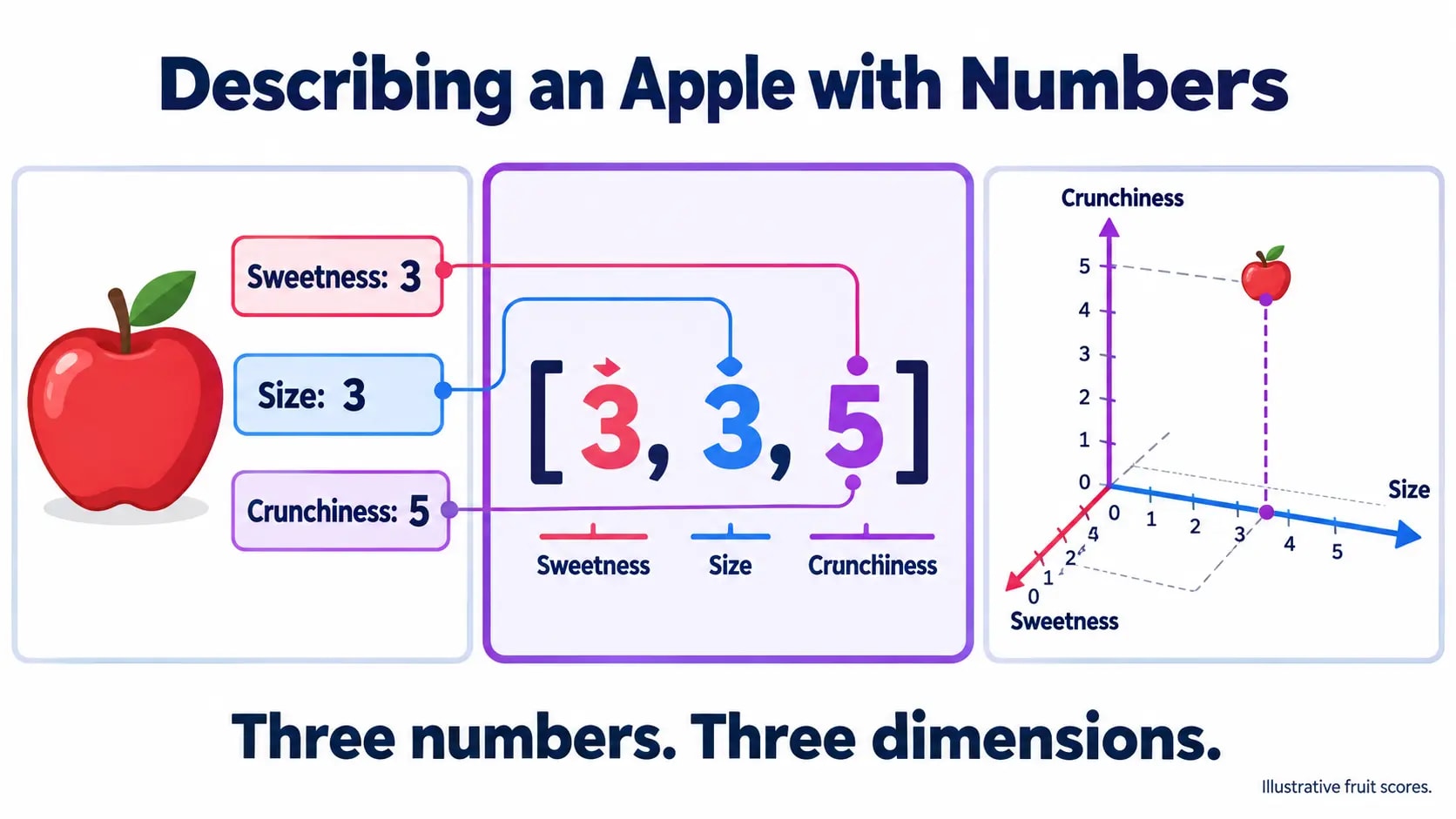
Now the computer has something it can calculate with. It can subtract vectors, find differences, or search a database for any fruit that is sweet (greater than 4) but not crunchy (less than 2).
The process of converting real-world information (words, sentences, images, audio) into numerical vectors is called vectorization.
2. Embeddings: When the Machine Learns the Numbers
Our fruit example worked easily because humans hand-picked the properties: sweetness, size, and crunchiness.
But what properties would you pick to describe words like "bank", "democracy", or "debugging"?
Human language has hundreds of thousands of words. Words act as nouns, verbs, metaphors, and slang. Writing a manual checklist of attributes for every word in the dictionary would be an impossible, never-ending task.
So instead of picking the attributes ourselves, we let an AI model learn the numbers on its own.
Definition: An embedding is a learned numerical vector that places an item into a geometric coordinate space, capturing its semantic patterns and relationships with other items.
Notice the difference in terminology:
A vector is the mathematical data structure (an array of numbers).
An embedding is what that vector represents: an item mapped into a meaningful, learned coordinate space.
3. How Embeddings Are Learned: The Company a Word Keeps
When a baby learns what a "dog" is, nobody hands them a mathematical equation. They hear parents point and say "dog", they see dogs bark in the park, and they notice dogs wagging their tails. Over time, the child's brain builds a rich mental model.
Computers don't experience the world, and they don't have eyes or ears by default. So how do they learn what words mean?
In 1957, the linguist John Rupert Firth coined a foundational principle of modern natural language processing:
"You shall know a word by the company it keeps."
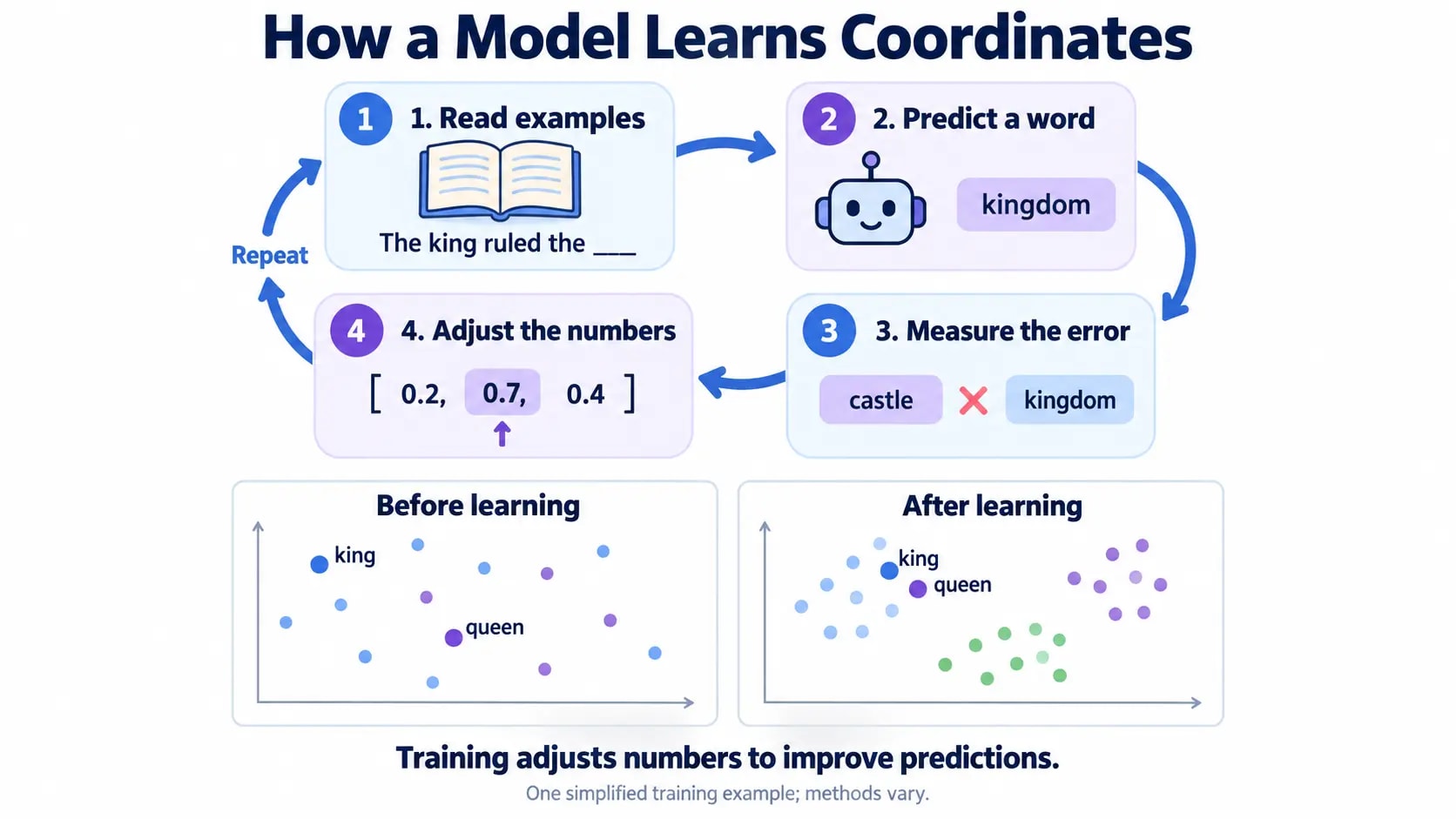
During training, an AI model reads billions of sentences from websites, books, and codebases:
"The king ruled the kingdom from the royal throne."
"The queen addressed the kingdom from the royal throne."
"The banana was sweet and yellow."
The model notices patterns:
"King" and "queen" appear in almost identical linguistic neighborhoods. Both appear near kingdom, rule, palace, crown, and reign.
"Banana" almost never appears near kingdom or crown; it appears near fruit, eat, peel, and sweet.
The system is not told what a king looks like. Instead, by adjusting the numbers to minimize prediction errors across vast amounts of text, meaningful geometric relationships emerge automatically.
[!NOTE]
Does the computer actually "understand" what a king or apple is?
No. A computer has never tasted an apple, seen a king, or felt an emotion.Think of an embedding like a location pin on Google Maps:
Google Maps doesn't know what pizza tastes like or smells like. It just knows that the pizza place and the burger joint are on the same street, while the car mechanic is miles away.The computer doesn't understand words; it only tracks which words hang out on the same street.
4. Embedding Spaces and Dimensions: Richer Representations
Imagine plotting words on a flat 2D map:
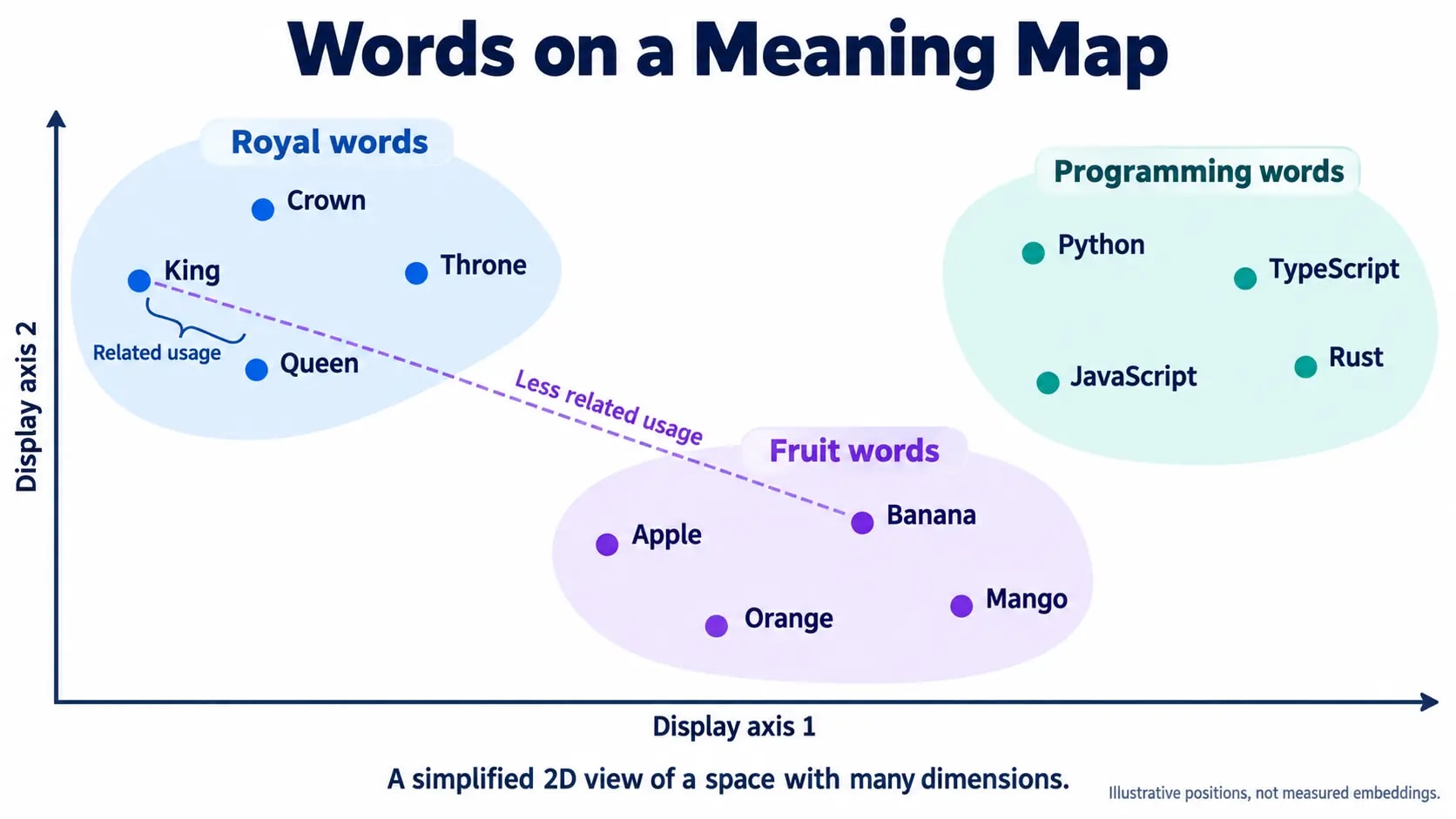
On this map:
King and Queen sit close together.
Apple and Banana sit close together.
King and Apple are far apart.
These clusters are called semantic neighborhoods.
Why Real Embeddings Have Hundreds or Thousands of Dimensions
A flat map only has 2 dimensions (X and Y). But can you describe a person using only two properties: Height and Weight?
Not very well. Two people might have the exact same height (5'10") and weight (165 lbs), but one is a junior frontend developer who loves chess, and the other is a retired chef who plays jazz trumpet!
To capture a more realistic portrait, you have to add dimensions:
Age, Spoken Languages, Years of Experience, Music Taste, Typing Speed, Location...
As you add more dimensions, your representation becomes much richer.
Real AI models use embeddings with hundreds or thousands of dimensions:
Small / Efficient Models: 384 or 768 dimensions
Large Frontier Models (OpenAI, Gemini, Claude): 1,536, 3,072, or more dimensions
Two Crucial Rules About Dimensions:
Dimensions don't have tidy human labels: In a real 1,536-dimensional embedding, dimension #412 does not cleanly mean "royalty" or "crunchiness". Concepts are distributed across many dimensions at once.
More dimensions does not mean more intelligence: A 4,096-dimension embedding takes 4x more memory, 4x more disk space, and takes significantly longer to search than a 1,024-dimension embedding. A compact model trained on clean data often outperforms a bloated model with thousands of dimensions.
[!TIP]
Try It Yourself in Real-Time: Visit Google's interactive TensorFlow Embedding Projector (projector.tensorflow.org). You can search for any word (like "computer" or "physics") and spin a 3D visualization to watch thousands of words cluster into semantic neighborhoods right in your browser!
5. Token Embeddings: From Token IDs to Starting Vectors
So far, we've been talking about embeddings as an idea. Now let's watch it happen step by step inside a real language model.
Remember from Chapter 4 that text enters the model as a sequence of Token IDs—just integers like 42, 1842, and 9451. Those numbers are meaningless on their own. So the very first thing a Transformer does is look up each ID in a giant table.
This table is called an Embedding Table (in PyTorch, it is nn.Embedding). Think of it as a massive spreadsheet: it has one row for every token in the model's vocabulary (often 32,000 to 128,000 rows), and each row contains a learned vector.
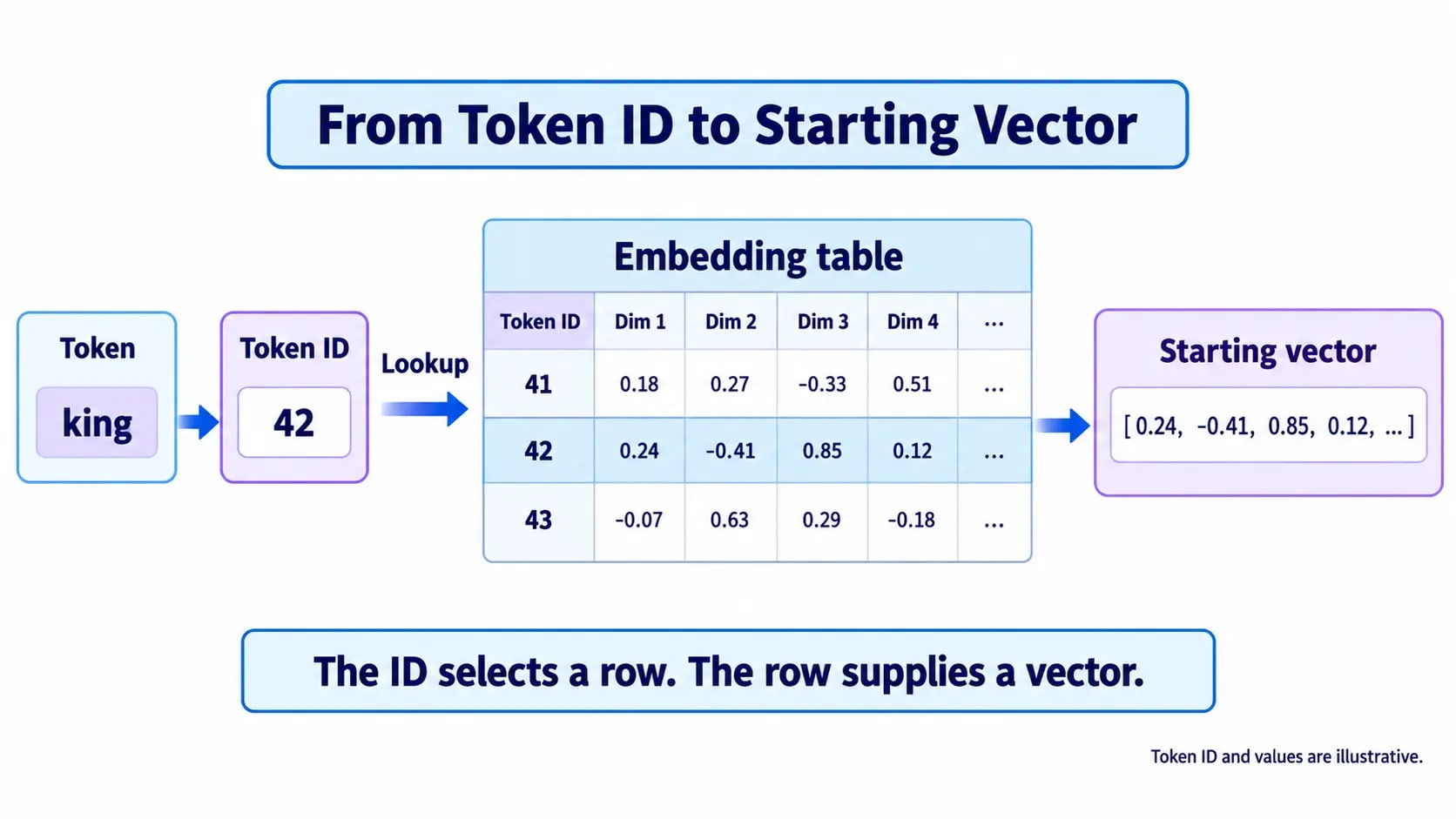
The ID acts like a key. You hand the table the number 42, and it hands back a dense numerical vector. That vector becomes the model's starting representation for the token "king."
Now, when you feed an entire sentence, every token gets its own starting vector:
Sentence: "I love coding"
Tokens:   ["I", "love", "coding"]
Vectors:  [ v("I"), v("love"), v("coding") ]
"I love coding" → [ Vector for "I", Vector for "love", Vector for "coding" ]
At this point, the model has successfully turned meaningless IDs into rich numerical coordinates. Each word now has a position in an embedding space.
But we are far from done.
If you think about it, something important is still missing. We have our list of vectors, but right now they are just sitting in a bag—like Scrabble tiles dumped on a table. The model knows what each word is, but it doesn't yet know how those words relate to each other inside this specific sentence.
Two critical problems remain unsolved. Let's tackle them one at a time.
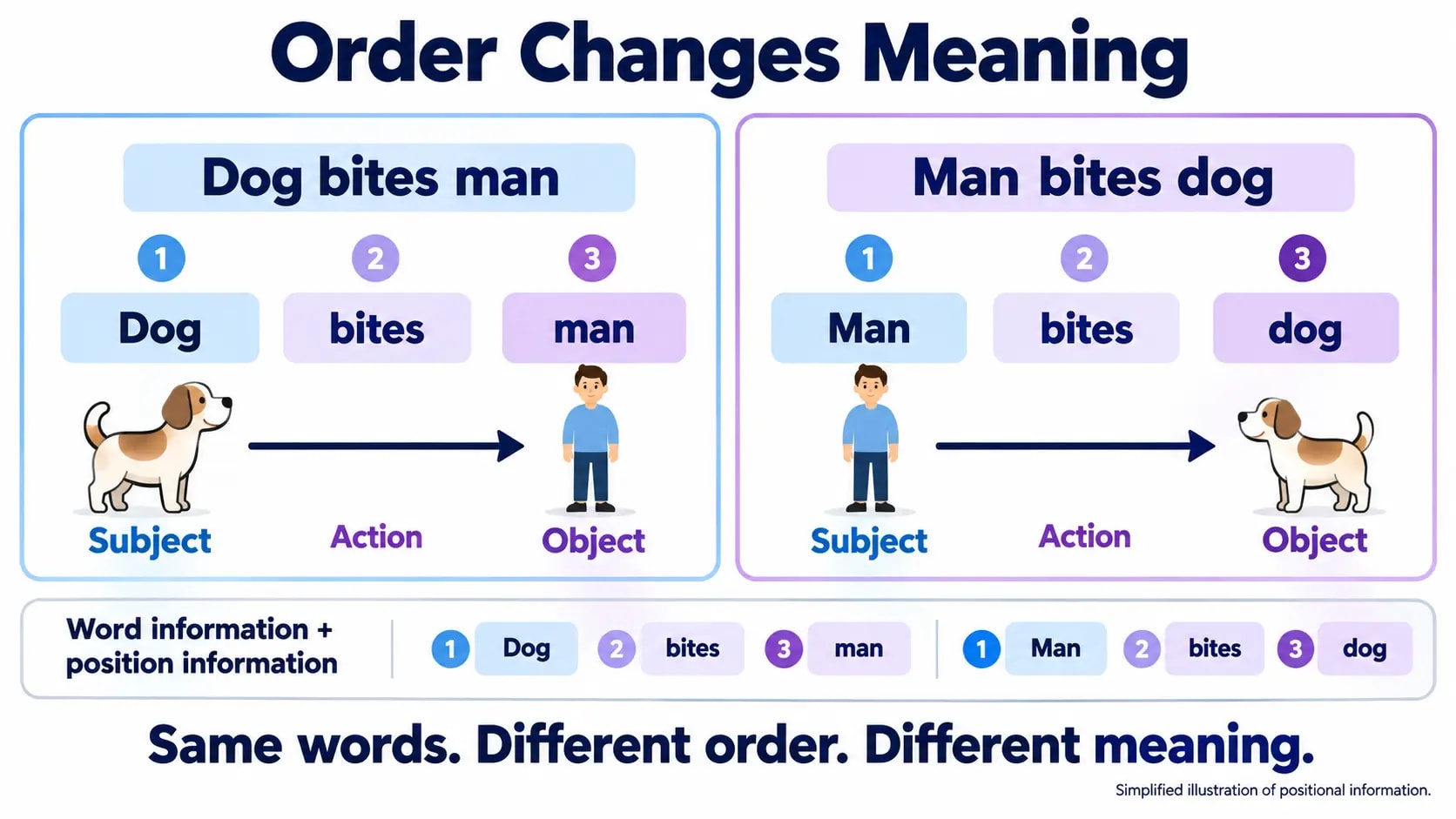
6. Problem One: Word Order Matters
The first problem is order.
Read these two headlines:
"Dog bites man." — An everyday unfortunate occurrence.
"Man bites dog." — Sensational, front-page news!
Both sentences contain the exact same three words: man, bites, dog. If we only look at the embedding vectors for each word, both sentences produce the exact same set of three vectors. To the model, they would be indistinguishable!
But clearly, the meaning is completely different. Who is biting whom depends entirely on the order of the words.
Here's why this is tricky for Transformers specifically: unlike older models (called Recurrent Neural Networks, or RNNs) that read words one at a time from left to right, Transformers process all words simultaneously in parallel. That's what makes them incredibly fast—but it also means they have no built-in sense of sequence. They see all the Scrabble tiles at once, but they don't know which tile came first.
To fix this, the model adds Positional Information to each token's vector. Think of it as stamping a position tag onto each word:
"Dog"   → Embedding + Position Tag: "I am word #1"
"bites" → Embedding + Position Tag: "I am word #2"
"man"   → Embedding + Position Tag: "I am word #3"
What goes into the model = Token Embedding (what word it is) + Positional Information (where it sits)
Different architectures use different methods for this—some add learned position vectors, others use techniques called Rotary Position Embeddings (RoPE) or ALiBi that modify the attention calculations themselves. The details vary, but the principle is the same: the model needs both identity and order.
Now the model knows which tokens are present and where they sit. The Scrabble tiles have been placed in their correct slots on the board.
But there's still a second, even trickier problem hiding in plain sight.
7. Problem Two: The Same Word Can Mean Different Things
Look at these two sentences:
"I deposited money in the bank."
"We sat along the river bank skipping stones."
Same word. Completely different meaning.
You know instantly which meaning is intended because you use the surrounding words—money, deposited vs. river, stones—as context clues. But can the model do the same?
In older NLP systems (like Word2Vec and GloVe from 2013), every word had one single fixed vector. The word "bank" was given a single set of coordinates that tried to represent financial banks, river banks, blood banks, and aircraft banking turns—all at once. This is like giving someone one single photograph to represent every mood they've ever felt. It's hopelessly blurry.
This problem—where one word carries multiple meanings—is called polysemy.
How Modern Transformers Solve This
Modern Transformers don't stop at the initial embedding lookup. After looking up the starting vectors and adding position information, the model passes the entire sequence through multiple layers. At each layer, the tokens interact with each other through a mechanism called attention.
Here's what that looks like in practice:
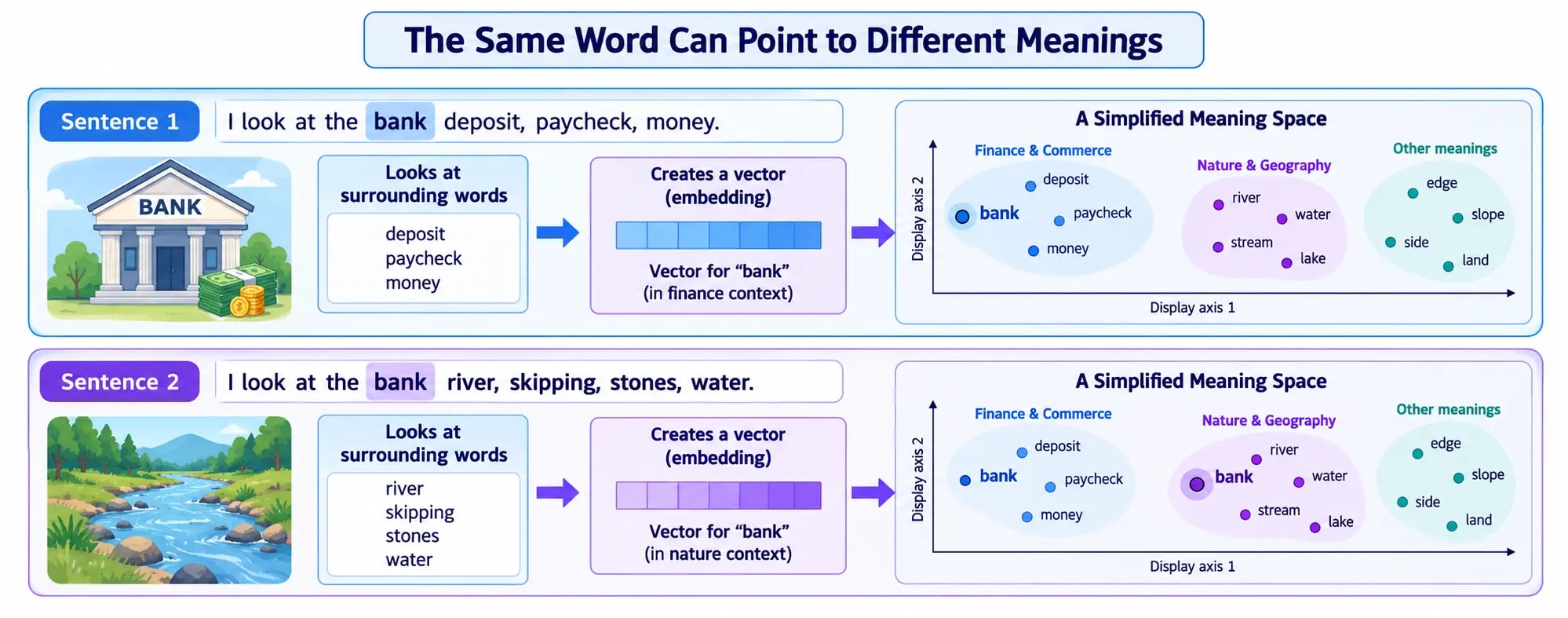
By the time the sentence has passed through all the layers, the representation of "bank" in Sentence 1 has become a completely different vector from "bank" in Sentence 2—even though they started as the exact same lookup vector.
These dynamically updated vectors are called contextual representations (or hidden states). The word is the same, but its coordinates have been reshaped by the company it keeps in that specific sentence.
This is one of the most powerful ideas in modern AI: meaning isn't fixed; it's computed from context, every single time.
8. Token Embeddings vs. Text Embeddings
Now let's zoom out from the internals of a language model and think about a different question.
When someone says "Let's generate embeddings for our documents"—what exactly do they mean? Are they talking about the internal token vectors we've been discussing, or something else entirely?
It turns out there are two very different uses of the word "embedding," and confusing them is one of the most common mistakes beginners make.
Feature | Token Embedding | Text (Sentence / Document) Embedding |
|---|---|---|
What it represents | A single token / subword | An entire sentence, paragraph, or article |
Shape | Sequence of vectors (one per token) | A single summary vector (e.g., 1,536 numbers) |
Created by | Language Model's embedding layer | Specialized embedding models (Sentence-BERT, text-embedding-3) |
Primary Use | Internal processing inside LLMs during text generation | Semantic Search, RAG retrieval, Clustering, Recommendations |
A token embedding is what we've been exploring: the starting vector for a single subword inside a language model. The model uses these internally to think and generate text.
A text embedding is something different. It takes an entire sentence or paragraph, processes all the tokens through the model, and then compresses (pools) all those token representations into a single vector that summarizes the whole passage. It's like reading an entire paragraph and then writing a one-line summary—except that summary is a list of numbers instead of words.
This distinction matters because the rest of this chapter is about what you can do with text embeddings: compare sentences, search documents, and build intelligent applications. And that starts with one fundamental question: how do you measure whether two sentences mean the same thing?
9. Semantic Similarity: Different Words, Same Intent
Let's come full circle to the search problem we opened the chapter with.
Query A: "How do I centre a image?"
Query B: "How can I align an HTML element in the middle of its parent?"
A traditional keyword search looks for exact word matches. Query A and Query B share zero overlapping words. A strict keyword engine would say: "These have nothing in common."
But an embedding model does something different:
It passes Query A through the model and gets a vector — let's call it Vector A.
It passes Query B through the model and gets Vector B.
It compares the two vectors.
Because the model was trained on thousands of web tutorials where "centering a image" and "aligning in the middle" appeared in similar contexts, both vectors end up pointing in almost the exact same direction in the embedding space.
But how does the computer actually measure how similar two directions are? That's where we need a specific mathematical tool.
10. Cosine Similarity: Measuring Directions, Not Lengths
Picture two arrows drawn from the same starting point on a piece of paper.
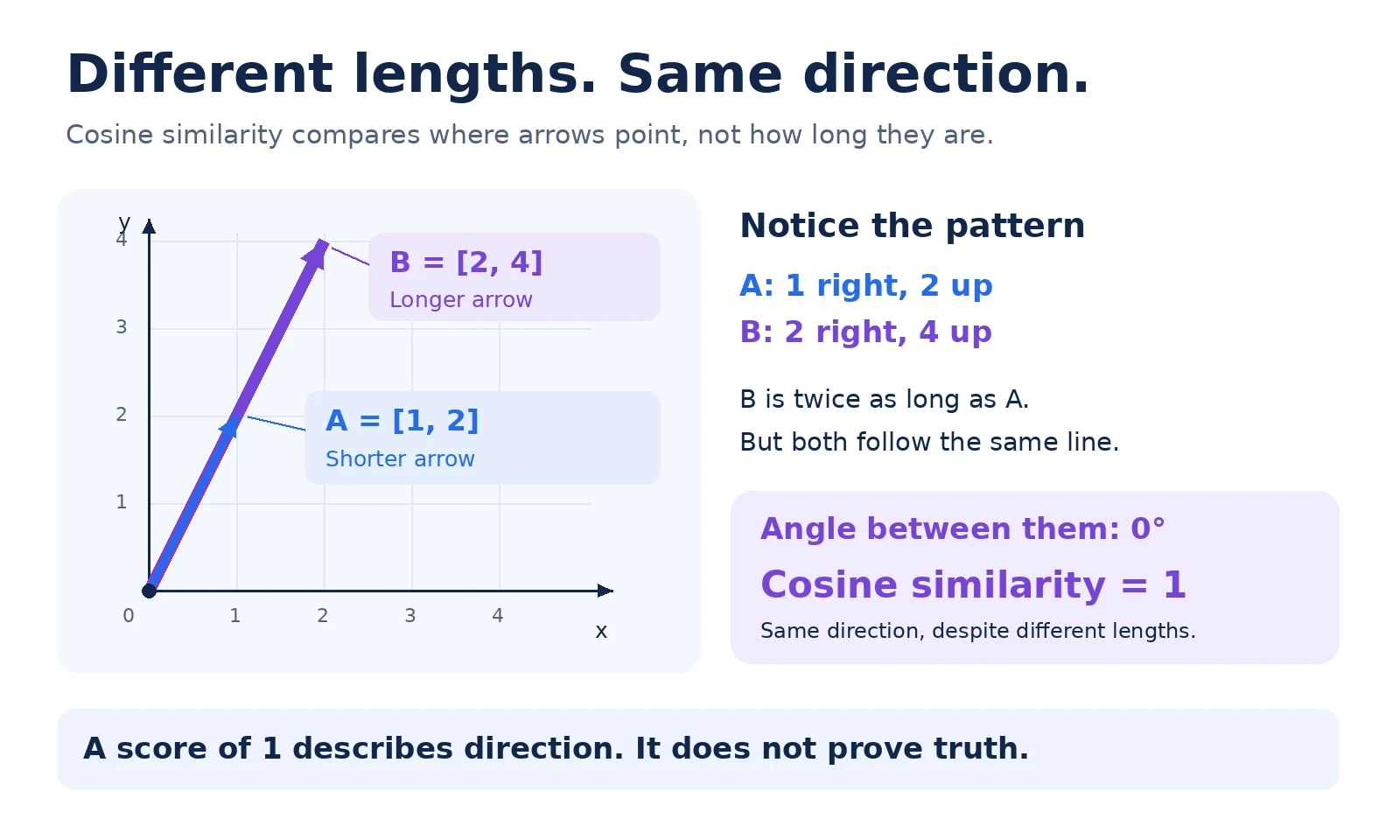
Vector B = [2, 4] is twice as long as Vector A = [1, 2]. But both arrows point in the exact same direction.
This is exactly what happens in natural language:
Short query: "Reset password."
Long query: "I forgot my account credentials and need to set a new password to regain access."
The second sentence is much longer, but both express the same intent. We need a way to compare their direction while ignoring the difference in length.
That method is called Cosine Similarity. It measures the angle between two vectors:
                    A · B
Cosine Similarity = ─────────
                    |A| × |B|
Where:
A · B is the dot product — you multiply matching elements and add them together.
|A| and |B| are the lengths (magnitudes) of vectors A and B.
What the Scores Mean
Cosine Score | Angle | What it means |
|---|---|---|
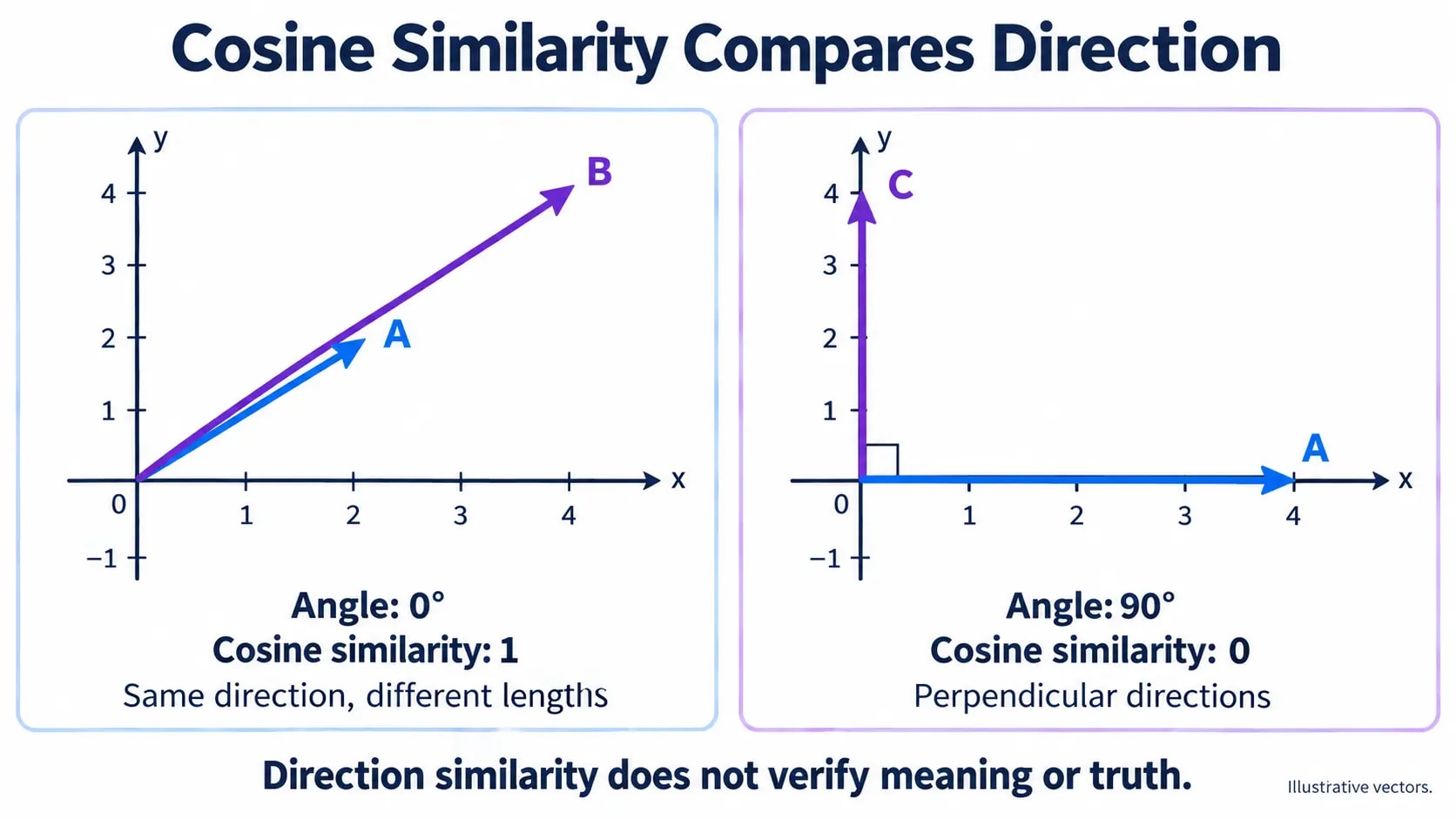
+1.0 | 0° | Exactly the same direction — very similar meaning |
0.0 | 90° | Perpendicular — completely unrelated concepts |
-1.0 | 180° | Opposite directions — rarely seen in text embeddings |
A Quick Example
Let A = [1, 2] and B = [2, 4]:
Dot product: (1 × 2) + (2 × 4) = 2 + 8 = 10
Length of A: square root of (1² + 2²) = square root of 5 ≈ 2.236
Length of B: square root of (2² + 4²) = square root of 20 ≈ 4.472
Multiply lengths: 2.236 × 4.472 = 10
Divide: 10 / 10 = 1.0 (Perfect directional match!)
Even though B was twice as long, the cosine similarity is 1.0 because they point the same way.
[!NOTE]
A Shortcut in Production: Most modern embedding APIs (like OpenAI'stext-embedding-3or Hugging Face'sall-MiniLM-L6-v2) output normalized vectors — vectors whose length is already scaled to exactly 1.0. When both vectors have length 1.0, the denominator becomes just 1, so Cosine Similarity equals the Dot Product. This makes comparisons blazing fast in production systems.
Why Cosine Similarity Does Not Understand Truth
Here is one of the most critical safety lessons in AI.
Consider these two statements:
"JavaScript is the best programming language in the world."
"JavaScript is the worst programming language in the world."
If you run these through an embedding model, their cosine similarity will typically be very high (e.g., 0.85+)!
Why? Because both sentences discuss the exact same topic: evaluating JavaScript as a programming language.
Cosine similarity measures topical closeness and semantic relatedness, not factual truth, logical agreement, or safety. Two false statements can have high similarity, and two directly conflicting arguments can sit right next to each other in vector space.
11. How Semantic Search Works in Practice
Now we have all the building blocks. Let's connect them and see how the search engine from the opening of this chapter actually works behind the scenes.
The process happens in two phases:
PHASE 1: PREPARATION (Offline, before any user searches)
Knowledge Articles ──► Split into Chunks ──► Embed Each Chunk ──► Store in Vector Database

PHASE 2: LIVE SEARCH (Online, when a user types a query)
User Types: "Forgot my password" ──► Embed Query ──► Compare Against Stored Vectors ──► Return Top Matches
Step 1: Chunking and Indexing (Offline)
You have 5,000 help desk articles.
You split large articles into smaller, readable paragraphs called chunks (typically 300 to 500 tokens each).
You pass each chunk through a text embedding model and get a vector for each one.
You save the vectors and text inside a Vector Database (such as Pinecone, Qdrant, Milvus, or pgvector).
Step 2: Querying (Real-Time)
A user searches: "I forgot my password."
Your backend sends this query through the same embedding model, producing a query vector.
The vector database runs an Approximate Nearest Neighbor (ANN) search to find the stored vectors with the highest cosine similarity to the query vector.
Within milliseconds, it retrieves the article: "Recovering access to your account."
Different words. The right help. Now you know how it works.
But wait—is embedding-based search always the right answer? Not quite. There's an important limitation we need to address.
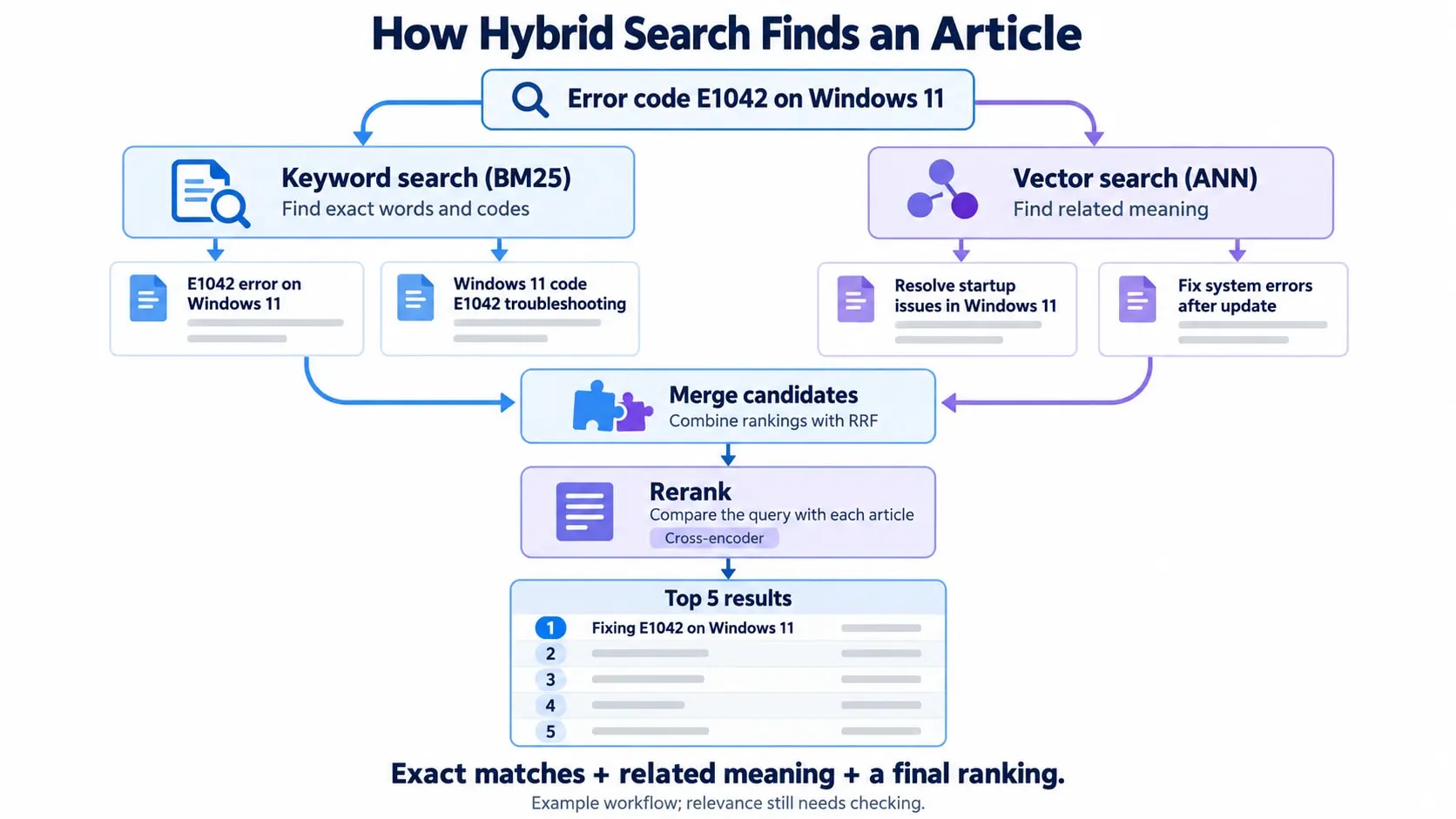
12. When Embeddings Aren't Enough: Hybrid Search
Imagine a customer searches for:
"Error code E1042 on Windows 11"
An embedding model understands the general concept—something about software errors. But it might return an article about Error E1043, which sounds similar in meaning but provides completely wrong troubleshooting steps.
For exact identifiers—error codes, product SKUs, serial numbers, phone numbers, legal clause numbers—you need exact keyword matching, not fuzzy semantic similarity.
This is why keyword search is not dead. It excels precisely where embeddings struggle: when the user needs an exact string match.
The Modern Solution: Hybrid Search + Reranking
The best production search systems combine both approaches:
User Query
   │
   ├──► 1. Keyword Search (BM25)  ──────► Top 50 results (Exact matches)
   │                                          │
   └──► 2. Semantic Vector Search ──────► Top 50 results (Intent matches)
                                              │
                                              ▼
                             Merged Candidate Pool (Reciprocal Rank Fusion)
                                              │
                                              ▼
                                   3. Cross-Encoder Reranker
                                              │
                                              ▼
                                   Final Top 5 Ranked Results
Keyword Search catches exact codes, names, and identifiers.
Vector Search catches synonyms, paraphrases, and broader intent.
A Cross-Encoder Reranker reads the query and each candidate together to produce the final, high-precision ranking.
This combination—keyword search plus vector search plus reranking—is called Hybrid Search, and it powers most serious search systems today.
13. What Else Can Embeddings Do?
Semantic search is just one application. Once you can turn any piece of text into a meaningful vector, a whole world of applications opens up.
RAG (Retrieval-Augmented Generation)
An LLM doesn't know your company's private internal documentation. In a RAG pipeline:
You search your vector database for the top 3 paragraphs matching the user's question.
You paste those paragraphs into the LLM's prompt: "Using ONLY the context below, answer the user's question..."
The LLM writes an accurate, grounded answer using your real data instead of guessing.
The embedding-based retrieval step is what connects the LLM to your specific knowledge.
Unsupervised Clustering
Imagine a customer service team receives 50,000 unstructured messages a month. Nobody has time to read and tag them all. By embedding every message and running a clustering algorithm (like K-Means or HDBSCAN), the system automatically discovers:
Cluster A: 14,000 messages about delayed deliveries
Cluster B: 8,000 messages about broken coupon codes
Cluster C: 5,000 messages about cancelling subscriptions
No human had to manually read or tag 50,000 messages. The patterns emerge from the embedding geometry alone.
Classification and Duplicate Detection
Classification: Compare an incoming ticket's embedding against known category prototypes ("Billing", "Technical Support", "Sales") and automatically route it to the right department.
Duplicate Detection: In developer forums like StackOverflow, embeddings instantly flag when a newly posted question is semantically identical to an existing answered post—even if phrased completely differently.
14. Multimodal Embeddings: Connecting Text and Images
So far, everything we've discussed has been about text. But can embeddings bridge across different types of media?
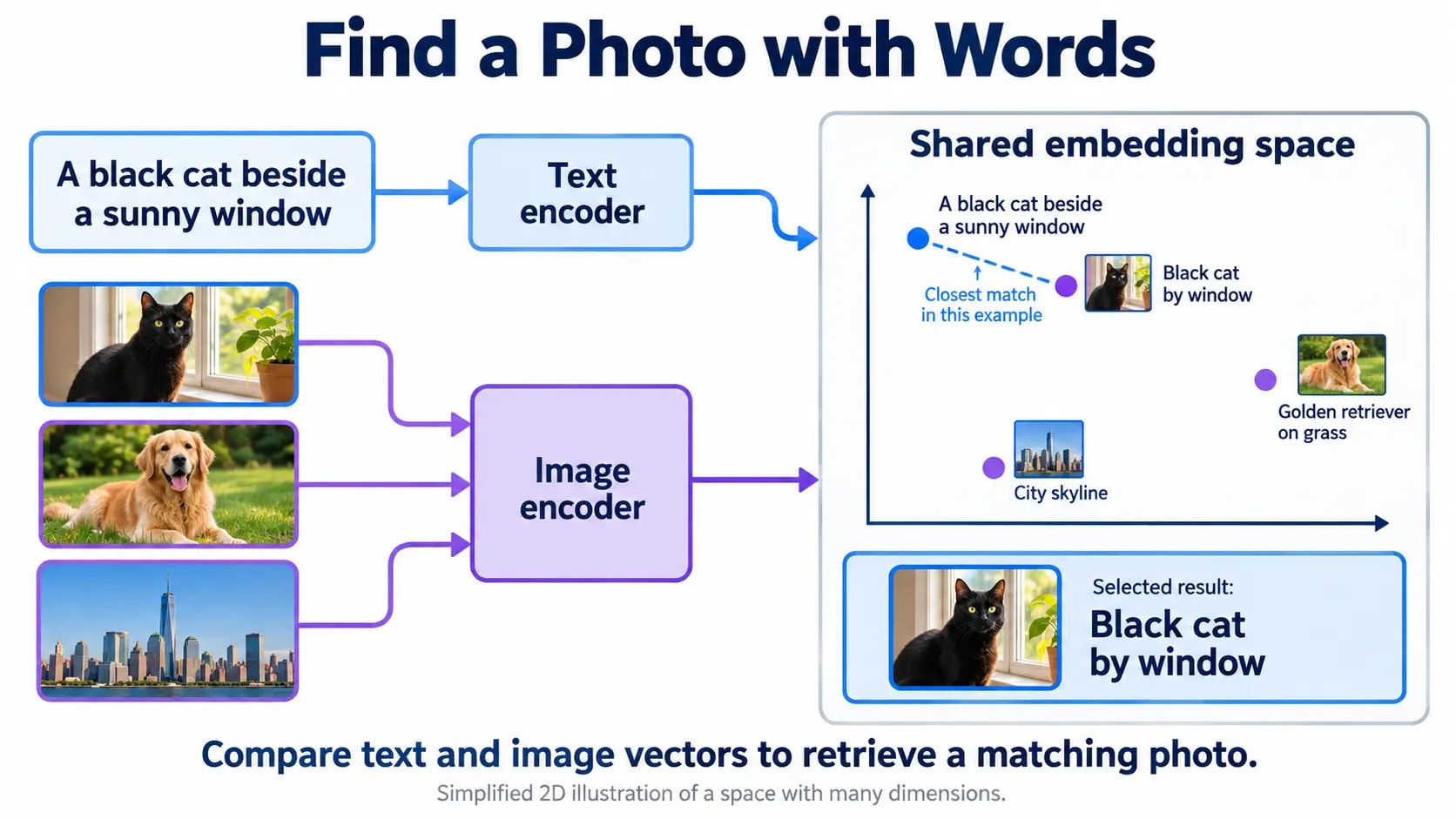
Imagine searching your phone's photo gallery by typing:
"A black cat sitting beside a sunny window."
None of your photos have text captions or tags. How can the phone possibly find the right image?
With a Multimodal Embedding Model like OpenAI's CLIP (Contrastive Language-Image Pretraining):
Text: "A black cat beside a window" ──► Text Encoder  ──► [ 0.45, -0.12,  0.88, ... ]
                                                                     ▲
                                                        High Cosine Similarity (0.91)
                                                                     ▼
Photo of Black Cat by Window         ──► Vision Encoder ──► [ 0.43, -0.10,  0.85, ... ]
CLIP has two encoders: one for text and one for images. During training, both encoders learn to map matching descriptions and photos into the same shared vector space. A photo of a black cat and the written sentence "a black cat" end up as coordinates right next to each other!
This enables text-to-image search, image-to-image similarity search, and zero-shot image classification — all without any human-written tags or captions.
15. The Human Mirror: Bias in Embeddings
Because models learn embeddings by analyzing human text from the internet, they also absorb human biases, historical stereotypes, and cultural inequities.
In famous NLP research (Bolukbasi et al., 2016), researchers discovered:
The vector math Vector("King") - Vector("Man") + Vector("Woman") famously produced Vector("Queen") — a beautiful demonstration of learned relationships.
But the same math also revealed troubling patterns: Vector("Computer Programmer") - Vector("Man") + Vector("Woman") landed closest to Vector("Homemaker"). Words like Doctor and Engineer were disproportionately aligned with male pronouns.
Numbers look clean, mathematical, and objective. But when numbers are trained on flawed human text, they mathematically encode those flaws.
When building real-world AI applications—especially in resume screening, loan approvals, or content moderation—engineers must audit their embedding models to avoid amplifying historical discrimination.
16. Engineering Checklist: Making Embeddings Work Reliably
Before deploying embeddings to production, keep these practical engineering rules in mind:
Match Query and Document Models: Never compare vectors generated by two different models (e.g., comparing an OpenAI vector with a Sentence-BERT vector). Even if both produce 1,536-dimension vectors, their coordinate spaces are completely incompatible!
Mind the Chunk Size: If you embed entire 50-page PDFs into a single vector, the vector becomes a diluted blur of everything. Split documents into coherent chunks (typically 250–500 tokens with 10–20% overlap).
Verify Normalization: Check if your model's vectors are pre-normalized to length 1.0. If so, use Dot Product instead of full Cosine Similarity to save compute.
Always Provide a Threshold Cutoff: If a user searches for gibberish like "asdfghjkl", your vector database will still return the closest 5 vectors—even if their similarity is a terrible 0.15. Set a similarity cutoff threshold so your app can truthfully answer: "No relevant results found."
Use Hybrid Search for Precision: Don't rely exclusively on embeddings if your users need to find exact error codes, model numbers, or names. Combine semantic search with keyword search.
17. Looking Ahead: From Embeddings to Attention
Let's recap the journey of this chapter.
We started with meaningless Token IDs—just arbitrary integers. Then we watched the model look up each ID in an Embedding Table to get a starting vector. We added Positional Information so the model knows the order of words. We saw how contextual representations allow the same word to take on different meanings in different sentences. And we explored how text embeddings and cosine similarity power semantic search, RAG, clustering, and multimodal applications.
The numbers give computers a way to calculate relationships between words. But they don't independently verify facts, understand sarcasm, or guarantee fairness.
One fundamental mystery still remains:
When a model reads a sentence with hundreds of words, how does it decide which words should influence each other? How does the word "bank" know to look at "river" and ignore an irrelevant word ten tokens away? How does it figure out that in "The cat sat on the mat because it was tired", the word "it" refers to the cat and not the mat?
That mechanism—the engine at the heart of modern AI—is called Self-Attention.
And that is where our next chapter begins.
Sources and Further Reading
Mikolov et al. (2013): Efficient Estimation of Word Representations in Vector Space (Word2Vec)
Vaswani et al. (2017): Attention Is All You Need (Transformer Architecture & Positional Encodings)
Reimers & Gurevych (2019): Sentence-BERT: Sentence Embeddings using Siamese BERT-Networks
Radford et al. (2021): Learning Transferable Visual Models From Natural Language Supervision (CLIP & Multimodal Embeddings)
Bolukbasi et al. (2016): Man is to Computer Programmer as Woman is to Homemaker? Debiasing Word Embeddings
Interactive Tool: Google TensorFlow Embedding Projector
Documentation: PyTorch
torch.nn.Embedding