Prompt Engineering Explained: How to Talk to AI and Get Better Answers
The Art of Talking to AI: Why the Same Model Gives Wildly Different Answers
One developer. One startup. One chatbot. And a week of small disasters that teaches us how prompting really works.
Monday: The Bot That Promised Too Much
It's your first day at a startup. You haven't even finished your coffee when your manager appears.
Manager: “We need an AI support bot. Orders, refunds, common questions. Can you build a demo before lunch?”
You've written JavaScript. You've called APIs. How hard could it be?
You send your first prompt:
Help the customer.The response appears: “Hello! How can I help you today?”
It works! Or so you think.
Ten minutes later, your manager tries it.
Manager: “Can I return my shoes?”
Bot: “Absolutely! You can return them within 30 days.”
Your manager stops smiling.
Manager: “Thirty days? Our policy is seven.”
You check the code. You never supplied the company's policy.
Lesson one: An LLM can produce a confident, believable answer even when it doesn't have the facts. It can say “I don't know,” but don't assume it always will.
So how should we give it instructions? Before writing clever prompts, we need to understand how messages are packaged.

Part 1 — Prompt Formats: How Messages Reach a Model
Episode 1: Four Ways to Deliver the Same Instruction
Imagine your manager requests the same feature through Jira, Slack, and email. The job doesn't change; its format does.
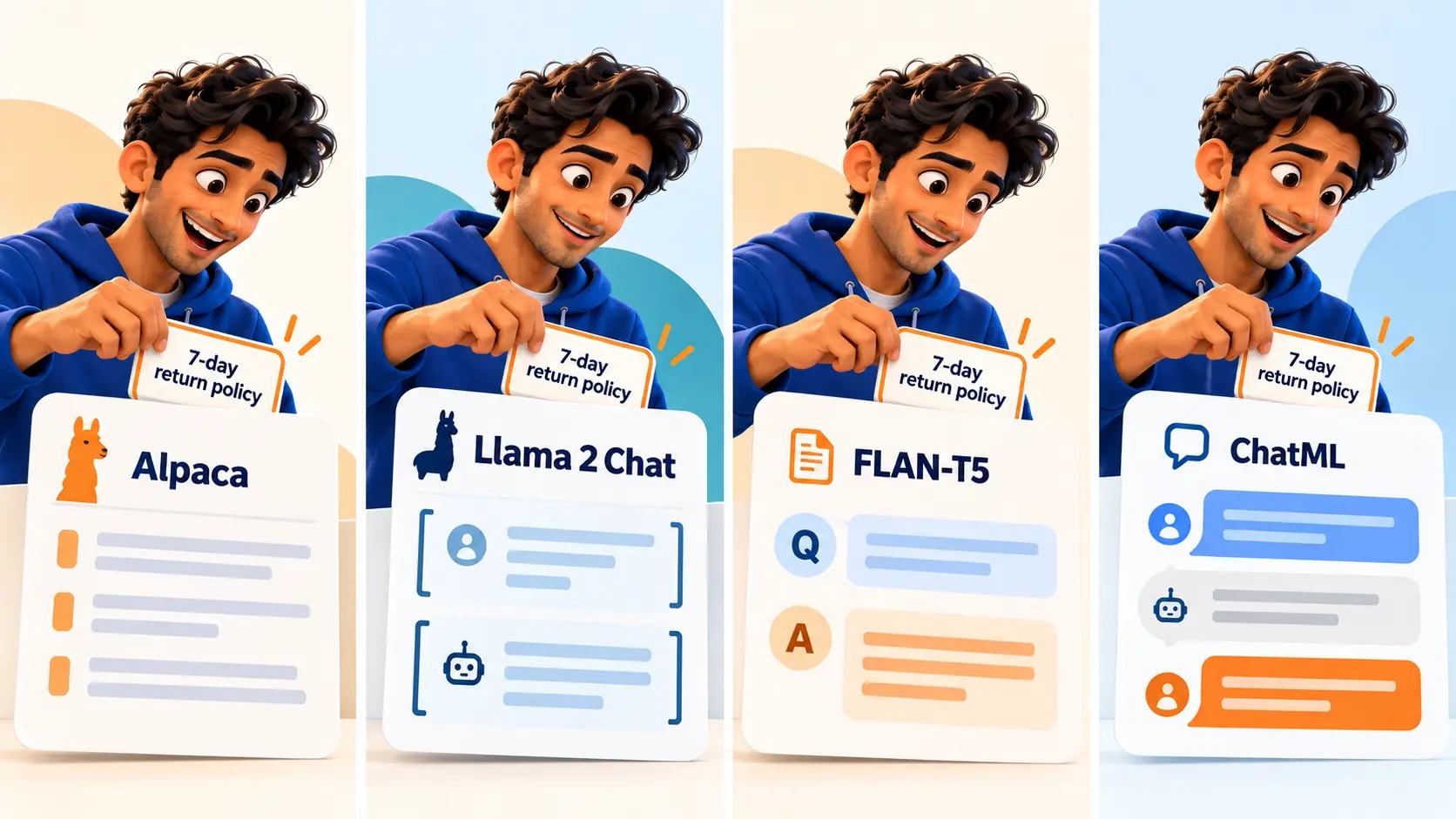
Language models can also expect different message layouts depending on how they were trained. These are called prompt formats or chat templates. They tell the model where messages or instructions begin and end.
Alpaca: The assignment sheet
### Instruction:
Answer using the return policy.

### Input:
Policy: Returns are allowed within 7 days of delivery.
Question: Can I return my shoes after 5 days?

### Response:
Yes, 5 days is within the 7-day window.
Simple: an instruction, optional input, and the response. This template became well known through Stanford's Alpaca instruction-tuning project.
Llama 2 Chat: The instruction brackets
<s>[INST]
Policy: Returns are allowed within 7 days.
Can I return my shoes after 5 days?
[/INST]
Yes, that is within the return window.</s>
[INST] and [/INST] mark an instruction. <s> and </s> mark sequence boundaries in this simplified Llama 2 Chat example. Newer Llama models may use different templates, so don't copy this blindly into every Llama model.
FLAN-T5: The plain-English quiz
Answer using the policy below.
Policy: Returns are allowed within 7 days.
Question: Can I return my shoes after 5 days?
Answer:
FLAN-T5 is an instruction-tuned encoder-decoder model. It can work with ordinary task instructions without Llama 2's [INST] brackets.
ChatML: Who said what?
Our support bot needs a conversation, not just a worksheet. A ChatML-style message sequence makes speaker boundaries explicit:
<|im_start|>system
You are a support assistant. Return policy: 7 days.
<|im_end|>
<|im_start|>user
Can I return my shoes after 5 days?
<|im_end|>
<|im_start|>assistant
That is within the stated 7-day window.
<|im_end|>
ChatML is an influential role-delimited format, not one universal template used by every model. Hosted APIs usually accept structured messages and handle the model-facing format for you.
Quick memory trick: Alpaca looks like homework, Llama 2 Chat uses instruction brackets, FLAN-T5 accepts ordinary task text, and ChatML separates speakers. Same general purpose; different packaging.
How we write this in JavaScript
Instead of manually typing special tags, we send message objects:
import OpenAI from "openai";

const client = new OpenAI(); // Uses OPENAI_API_KEY on your server

const response = await client.chat.completions.create({
  model: "gpt-4.1-mini",
  messages: [
    {
      role: "developer",
      content: "You are a support bot. Returns are allowed within 7 days. Never invent policies."
    },
    {
      role: "user",
      content: "Can I return my shoes after 5 days?"
    }
  ]
});

console.log(response.choices[0].message.content);
Roles, in plain language: developer sets application instructions, user asks a question, and assistant holds the model's replies. Some APIs also support system and tool roles. The exact set varies by API. Roles help organize instructions, but they do not replace real backend security.
Crisis one solved. Then the afternoon customer arrives.
Episode 2: The Goldfish Problem
Customer: “Can I return my jacket after five days?”
Bot: “Yes, that's within seven days.”
Customer: “What about ten days?”
Bot: “Ten days of what?”
Our chatbot has the memory of a goldfish! Well—not exactly.
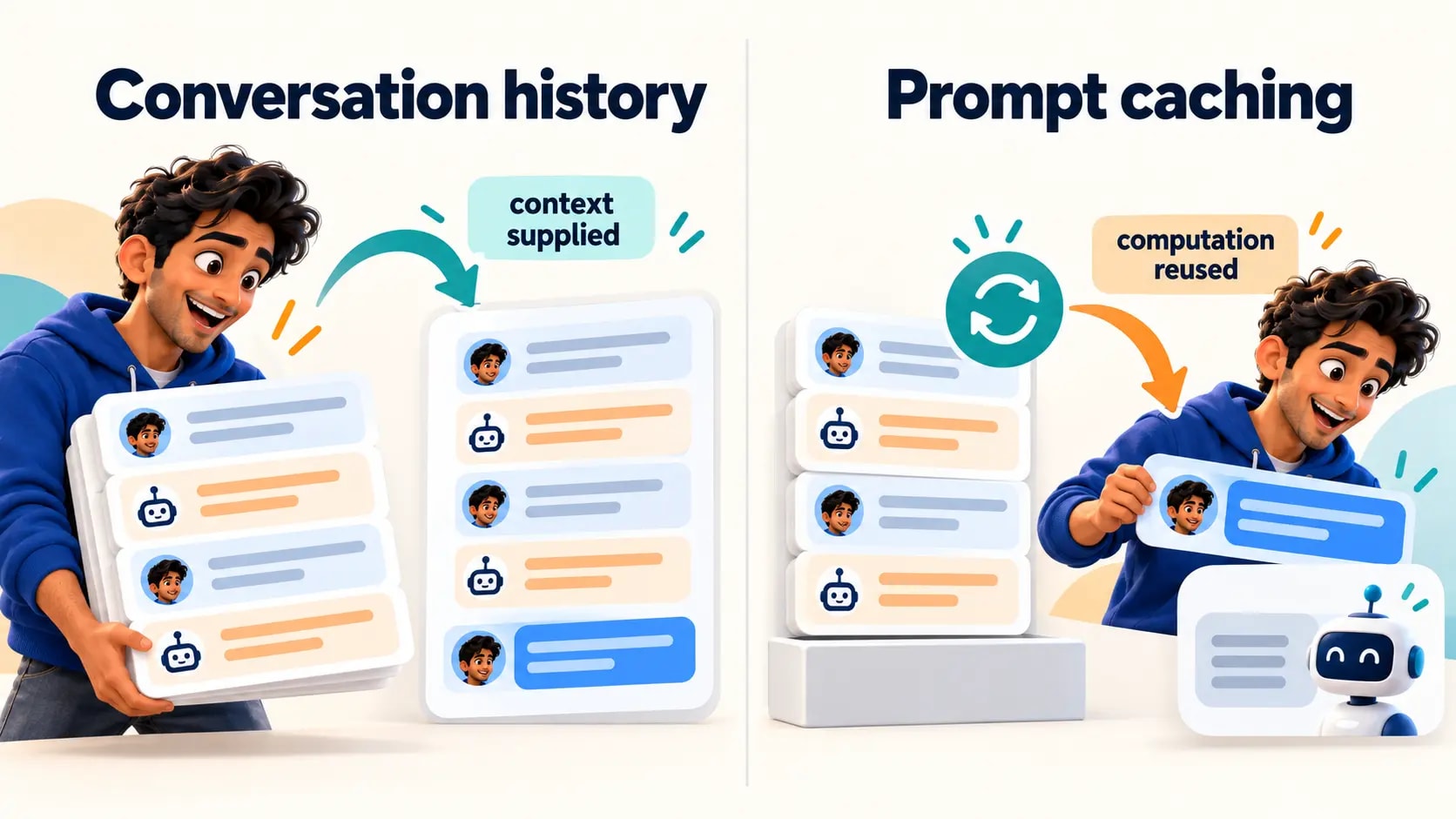
A standalone Chat Completions request doesn't automatically include previous requests. If we submit only “What about ten days?”, we've left out the conversation that gives those words meaning.
The fix is to keep earlier messages and include them in the next request:
const messages = [
  { role: "developer", content: "Return policy: 7 days." },
  { role: "user", content: "Can I return after 5 days?" },
  { role: "assistant", content: "Yes, that is within 7 days." },
  { role: "user", content: "What about 10 days?" }
];
Now the model has enough context to understand the follow-up. A real application keeps separate histories for different customers and manages how long those histories become. Some APIs also offer managed conversation state.
Wait—does sending old messages again cost money? Potentially, yes. That brings us to prompt caching.
If part of a new prompt matches a previously processed prefix, supported systems may reuse cached computation. It can reduce cost and latency for eligible requests. But repeated messages don't automatically become cached tokens; caching depends on model support, prefix matching, prompt size, and retention conditions. There is no universal “twice as fast” guarantee.
And then Tuesday begins—with 10,000 support tickets.
Part 2 — Prompting Techniques: How We Guide the Answer
Episode 3: The Ticket Avalanche
Your manager drops a spreadsheet on your desk.
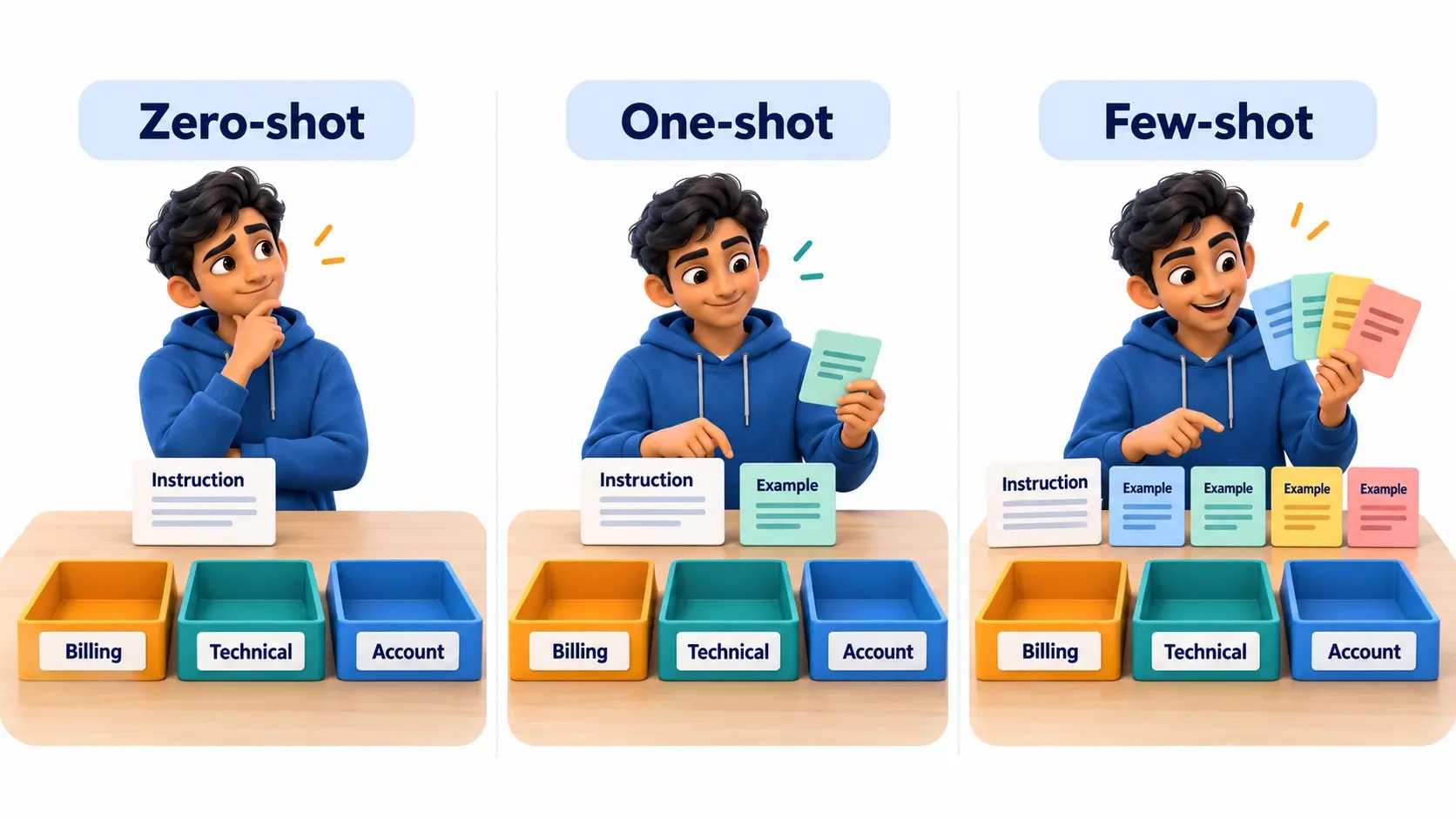
Manager: “Put every support message into one category: Billing, Technical, or Account.”
Zero-shot: Ask directly
Classify this ticket as Billing, Technical, or Account.
Ticket: “I was charged twice.”
Category:
The expected answer is Billing. No examples were provided. That's zero-shot prompting.
Then a tricky ticket arrives:
“My payment succeeded, but the app crashed before showing a receipt.”
Is that Billing or Technical? Your company has a special rule: when payment succeeded but confirmation is missing, route it to Billing.
One-shot: Show one example
Classify tickets as Billing, Technical, or Account.

Example:
“My card was charged, but the receipt never appeared.” → Billing

Now classify:
“I paid, but the app froze before confirmation.” →
One worked example demonstrates the local convention. That's one-shot prompting.
Few-shot: Show a handful of examples
Classify tickets as Billing, Technical, or Account.

“My card was charged, but the receipt never appeared.” → Billing
“The settings page keeps crashing.” → Technical
“I cannot reset my password.” → Account
“My payment was deducted twice.” → Billing

Now classify:
“The password reset link has expired.” →
Expected result: Account.
That's few-shot prompting. Examples can help teach output patterns and local conventions within the current prompt. They don't permanently update model weights.
Use zero-shot first when the task is clear; add one or a few examples when special rules need demonstration. There isn't a magic number of examples that always works best.
The classifier is doing better. But Thursday brings a refund problem.
Episode 4: The Refund That Could Bankrupt Friday
Customer: “I bought three shirts for ₹500 each. Delivery was ₹50, non-refundable. I returned one shirt. How much do I get back?”
Our rushed prototype blurts out: “₹1,550!”
That is the whole order plus delivery. The customer returned only one shirt!
Assuming the returned shirt is eligible for a full refund and there are no other deductions, the correct refund is ₹500.
Chain-of-thought: Make multi-step answers easier to check
For some problems, it helps to request visible intermediate calculations:
Three shirts cost ₹500 each.
Delivery costs ₹50 and is non-refundable.
One eligible shirt was returned, with no other deductions.

Show the short calculation and final refund amount.
A useful response would show that one returned shirt is worth ₹500, with ₹0 further deductions, giving a ₹500 refund.
This connects to chain-of-thought (CoT) prompting: using intermediate reasoning steps or worked examples for multi-step tasks. But displayed steps are not necessarily the model's actual private reasoning. Modern reasoning models can reason internally, and forcing long “think step by step” outputs is not always helpful.
What about prompts that demand START → THINK → OUTPUT in JSON? That's a custom output workflow, not guaranteed access to the model's internal thoughts. For an app, request a concise explanation and structured final data instead.
{
  "returnedItemPrice": 500,
  "deductions": 0,
  "refundAmount": 500
}
Developer rule: Let the model interpret the customer's words, but let tested backend code calculate money and enforce refund rules.
Self-consistency: What if we compare several answers?
Imagine asking for five independent candidate solutions to a difficult reasoning problem and getting 31, 31, 35, 31, 27. The most common answer is 31.
Self-consistency samples different reasoning paths and aggregates their final answers, often through majority voting. It can help on some challenging tasks, but adds cost. And five answers can agree on the same wrong result, so majority voting is not proof.
For refunds, deterministic code is much safer than voting among guesses.

Episode 5: Stop Talking Like a Victorian Lawyer
The bot's calculations are now under control. But its messages sound like this:
“Esteemed patron, pursuant to subsection 4.1, your request has been duly registered...”
Nobody talks like that in a sneaker-store support chat.
Persona prompting: Give it a communication style
You are Sam, a friendly support assistant at a sneaker store.

- Use warm, everyday language.
- Keep replies short but useful.
- Avoid legal jargon.
- Do not promise refunds before checking eligibility.
- If a fact is missing, ask instead of guessing.
Now the response might be:
“I can help with that. Can you share your order number so I can check the return options?”
That's persona-based prompting: defining a role, tone, and behavior. The model hasn't gained new knowledge or become a real support employee. It has been given a clearer style to follow.
But soon a customer asks a question that no amount of friendliness can answer by itself.
Part 3 — From Prompts to Real AI Applications
Episode 6: Where on Earth Is My Package?
Customer: “Where is order #4821?”
Our bot doesn't know. The status lives in the order database, not inside the prompt.
Contextual prompting: Supply the facts
Our backend first retrieves an order record:
{
  "orderId": 4821,
  "status": "Shipped",
  "location": "Mumbai Hub",
  "estimatedDelivery": "2026-10-17"
}
Then the model gets the data along with the question:
Use only this order information.
Order: #4821
Status: Shipped
Last recorded location: Mumbai Hub
Estimated delivery: 17 October 2026

Question: Where is my order?
Do not invent live tracking details.
Now it can say:
“Order #4821 has shipped. Its last recorded location is Mumbai Hub, and the estimated delivery date is 17 October 2026.”
That's contextual prompting: giving the model relevant information that wasn't in the customer's message. The answer is grounded in the supplied record, though the record itself must be trustworthy and up to date.
The bot can now answer using real order information instead of guessing. But your manager raises the stakes again.
Episode 7: Give the Bot Tools—Not the Company Keys
Customer: “Cancel order #4821 now.”
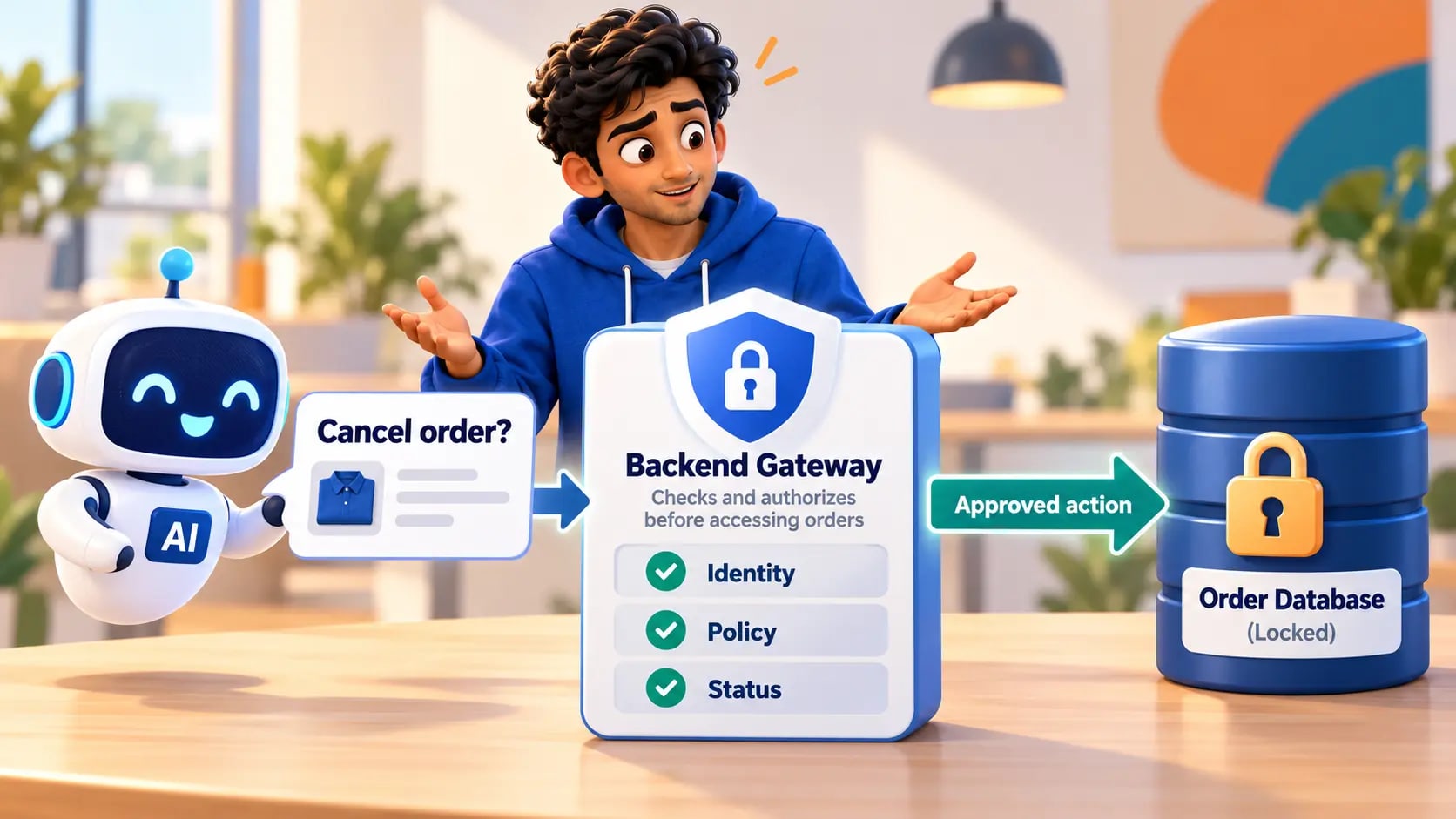
A chatbot can explain cancellation rules. But cancelling a real order requires an action in the backend.
Tool calling: From words to actions
An application might give the model access to a tool named getOrderStatus, then a controlled cancelOrder function.
Customer: “Cancel order #4821.”
Assistant requests: getOrderStatus(4821)
Backend returns: { "status": "Processing" }
Application checks ownership and cancellation rules.
If allowed, application executes: cancelOrder(4821)
Backend returns: { "success": true }
Assistant confirms the cancellation.
The model can request an action, but your server executes and authorizes it. Never let a friendly prompt substitute for authentication, permissions, or policy checks.
ReAct (Reasoning and Acting) is a related framework where a model makes decisions, uses tools, observes results, and continues. Not every tool-calling chatbot uses the original ReAct method, but the overall idea is similar.
Prompt chaining: One big job, several small jobs
A damaged-item refund might require: understand the complaint → identify missing information → retrieve the policy → prepare a response. When separate model calls pass results from one stage to another, that's prompt chaining.
Not every step needs AI. Database queries and business-rule validation should usually stay in ordinary code. Chaining can make tasks clearer, but more calls also mean more latency and cost.
Episode 8: The Friday Launch Test
It's Friday. The manager wants to launch the assistant at 2 PM.
You test three easy questions. All pass.
Manager: “So we're ready?”
Not so fast.
Try a customer who gives no order number. Someone who asks for a refund on day nine. Someone who tells the bot to ignore the company policy. What about a failed order API call?
Now we need evaluation: a repeatable set of cases that checks whether the application behaves correctly.
Test | What should happen |
|---|---|
Eligible return on day 5 | Apply the 7-day policy, subject to other conditions |
Return on day 9 | Explain that it is outside the standard window |
Missing order number | Ask for the information needed |
Unknown package location | Avoid inventing tracking details |
Unauthorized cancellation | Backend denies the action |
Payment/refund calculation | Verified by application code |
User says “ignore the rules” | Doesn't bypass protected application rules |
Self-refinement: Can a first draft improve?
We can ask a model to draft an answer, review it against a checklist, and revise it. That's self-refinement. It can improve clarity or catch some mistakes—but models can also miss their own errors. External tests and verified data still matter.
Passing a few tests doesn't make software bulletproof. Keep checking real-world failure cases as the application evolves.
Finale — What Did We Actually Learn?
On Monday, our entire AI strategy was:
Help the customer.By Friday, we've discovered why that was never enough.
We learned that prompt formats package messages, prompting techniques guide behavior, and application architecture supplies real data and controls real actions.
Your 60-Second Cheat Sheet
Category | Concept | Remember it as |
|---|---|---|
Prompt format | Alpaca | Instruction / Input / Response |
Prompt format | Llama 2 Chat |
|
Prompt format | FLAN-T5 | Plain-language task instruction |
Prompt format | ChatML | Role-delimited messages |
Prompting technique | Zero-shot | No examples |
Prompting technique | One-shot | One example |
Prompting technique | Few-shot | Multiple examples |
Prompting technique | Chain-of-thought | Intermediate reasoning approaches |
Prompting technique | Self-consistency | Compare multiple candidate solutions |
Prompting technique | Persona | Define style and role |
Prompting technique | Contextual | Supply relevant facts |
Prompting technique | Self-refinement | Review and revise a draft |
Application concept | Roles and history | Organize and preserve a conversation |
Application concept | Prompt caching | Reuse eligible matching input computation |
Application concept | Prompt chaining | Connect several model-processing steps |
Application concept | Tool calling / ReAct | Interact with external systems |
Application concept | Evaluation | Test whether the behavior is reliable |
The real lesson: Prompt engineering isn't finding magic words to trick a model into being smart. It's giving clear instructions, relevant examples, and the facts needed for a task.
And when we build actual AI applications, we go one step further: we decide what the model should do, what ordinary code should do, and how we'll check the result.
That's where writing prompts starts turning into AI engineering.
Further Reading
Stanford Alpaca: https://github.com/tatsu-lab/stanford_alpaca
Hugging Face chat templates: https://huggingface.co/docs/transformers/chat_templating
OpenAI prompt engineering: https://platform.openai.com/docs/guides/prompt-engineering
OpenAI prompt caching: https://platform.openai.com/docs/guides/prompt-caching
Chain-of-thought research: https://arxiv.org/abs/2201.11903
Self-consistency research: https://arxiv.org/abs/2203.11171
ReAct research: https://arxiv.org/abs/2210.03629