functions in javascript
Functions in JavaScript
Functions are the building blocks of JavaScript. They allow us to organize code, reuse logic, and control how different parts of an application interact.
But there is something particularly interesting about JavaScript functions.
In many programming languages, functions are primarily treated as blocks of reusable code. In JavaScript, however, functions are also values. You can assign them to variables, pass them to other functions, return them from functions, and even store them inside objects and arrays.
This simple property makes JavaScript functions incredibly powerful.
Let's understand how they work and gradually explore the concepts built on top of them.
1. Understanding Functions
Imagine you are running a restaurant.
You have different workers responsible for different tasks: one prepares food, another takes orders, and another handles payments.
Instead of explaining every instruction repeatedly, you define what each worker needs to do and simply ask them to perform their assigned task whenever required.
A JavaScript function works similarly.
You define a reusable block of code and execute it whenever you need it.
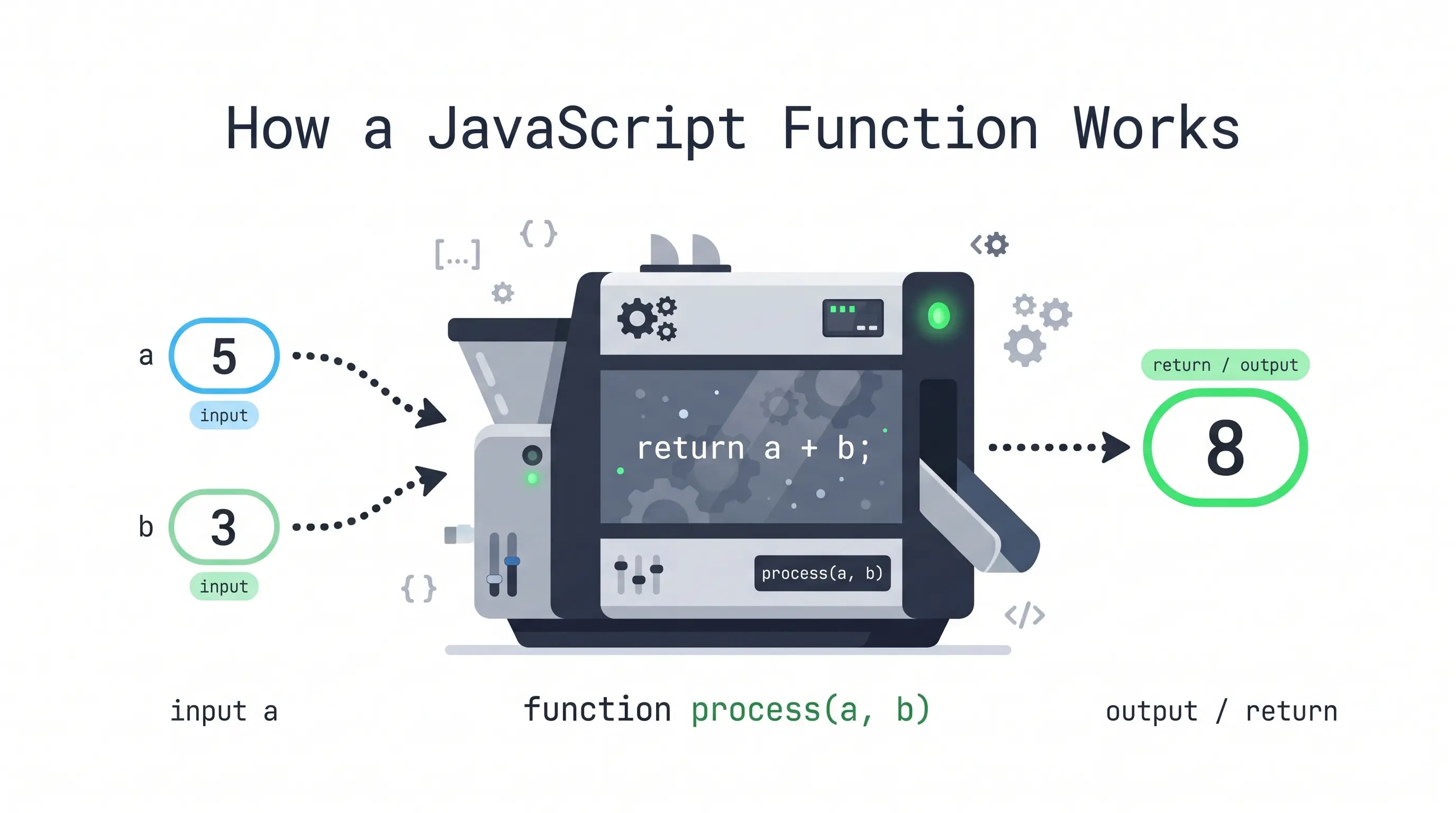
function greet() {
  console.log("Welcome to JavaScript!");
}

greet();
greet();
Output:
Welcome to JavaScript!
Welcome to JavaScript!
Here:
functionis the keyword used to declare a function.greetis the function's name.The code inside
{}is the function body.greet()executes the function.
Notice that defining a function doesn't automatically execute its body. The function runs only when it is called.
2. Different Ways to Create Functions
JavaScript provides several ways to create functions. Although they can perform similar tasks, they differ in syntax, hoisting behavior, and how they handle this.
2.1 Function Declaration (Function Statement)
A function declaration is the traditional way of defining a function.
function greet() {
  console.log("Hello JavaScript!");
}

greet();
Function declarations are fully hoisted. This means JavaScript makes the function available during the creation phase of its execution context, allowing you to call it even before its declaration appears in the code.
greet(); // Works

function greet() {
  console.log("Hello JavaScript!");
}
2.2 Function Expression
Now consider another way of creating a function.
const greet = function () {
  console.log("Hello JavaScript!");
};

greet();
Here, we create a function and assign it to a variable.
This is called a function expression.
The important difference is that a function expression produces a function value that can be assigned to a variable, passed around, or used wherever an expression is expected.
Unlike function declarations, function expressions are not independently hoisted.
greet(); // TypeError with var

var greet = function () {
  console.log("Hello!");
};
The variable exists, but its value is initially undefined. Therefore, attempting to call it as a function results in a TypeError.
With let and const, accessing the variable before initialization results in a ReferenceError because of the Temporal Dead Zone.
2.3 Anonymous Functions
An anonymous function is simply a function without an explicitly specified name.
const greet = function () {
  console.log("Hello!");
};
The function itself has no name. It is assigned to the variable greet.
Anonymous functions are useful when we need a function only for a particular operation.
setTimeout(function () {
  console.log("Hello after 2 seconds");
}, 2000);
2.4 Named Function Expression
A function expression can also have its own name.
const greet = function sayHello() {
  console.log("Hello!");
};

greet(); // Works
sayHello(); // ReferenceError
The internal name is accessible inside the function itself but not outside its function expression.
3. Function Declaration vs Function Expression
Feature | Function Declaration | Function Expression |
|---|---|---|
Syntax |
|
|
Hoisting | Fully initialized | Depends on variable declaration |
Can call before declaration | Yes | No |
Name required | Yes | No |
4. Parameters vs Arguments
Functions become much more useful when we can provide them with data.
function add(a, b) {
  return a + b;
}

add(10, 20);
Here, a and b are called parameters.
The actual values 10 and 20 passed during the function call are called arguments.
Default Parameters
function greet(name = "Guest") {
  console.log(`Hello ${name}`);
}

greet(); // Hello Guest
greet("Alice"); // Hello Alice
Default parameters are evaluated when the function is called, not when it is defined.
Rest Parameters
Sometimes we don't know how many arguments will be passed to a function.
function sum(...numbers) {
  return numbers.reduce((total, current) => {
    return total + current;
  }, 0);
}

console.log(sum(10, 20, 30, 40)); // 100
The rest parameter (...numbers) collects remaining arguments into a real JavaScript array.
The arguments Object
Before rest parameters were introduced in ES6, JavaScript developers commonly used the arguments object.
function showArguments() {
  console.log(arguments);
}

showArguments(10, 20, 30);
The arguments object is array-like, not a real array.
In modern JavaScript, prefer rest parameters when you need to collect an arbitrary number of arguments.
5. First-Class Functions (First-Class Citizens)
Now comes one of the most important concepts in JavaScript.
Until now, we have created functions and executed them. But what if we could treat a function just like any other value?
We can store a number inside a variable:
const age = 25;We can store a string:
const name = "Alice";And JavaScript also allows us to store a function:
const greet = function () {
  console.log("Hello!");
};
We can even pass that function somewhere else:
function execute(fn) {
  fn();
}

execute(greet);
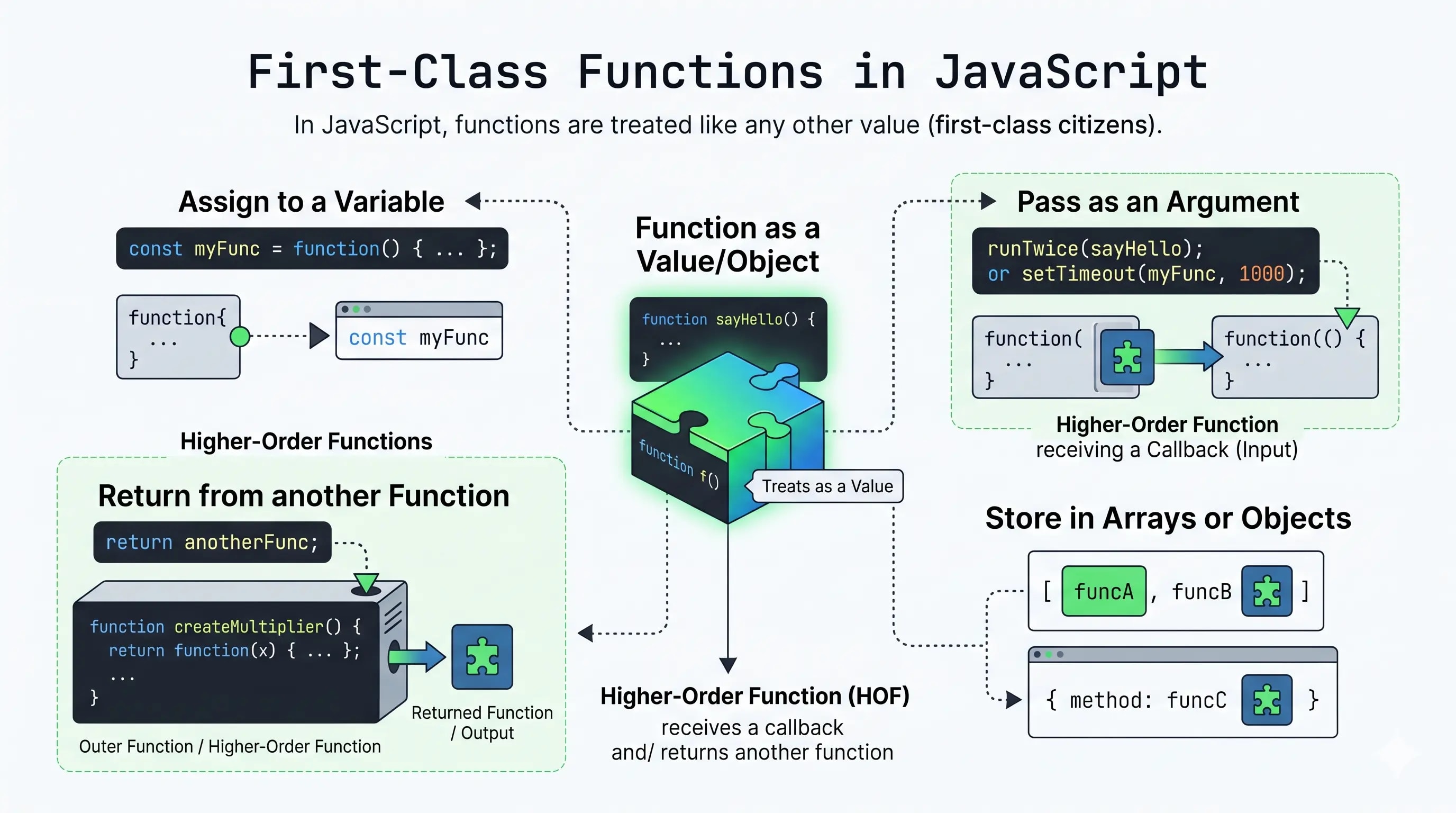
This is possible because JavaScript treats functions as first-class citizens.
A programming language supports first-class functions when functions can be treated like other values.
In JavaScript, this means functions can:
Be assigned to variables.
Be passed as arguments to other functions.
Be returned from other functions.
Be stored inside arrays and objects.
6. Higher-Order Functions (HOF)
If functions can be passed around like values, we can build functions that work with other functions.
These are called Higher-Order Functions.
A higher-order function is a function that does at least one of the following:
Accepts another function as an argument.
Returns another function as its result.
Case 1: Accepting a Function as an Argument
function greet() {
  console.log("Hello!");
}

function execute(callback) {
  callback();
}

execute(greet);
Here, execute receives another function as an argument.
Therefore, execute is a higher-order function.
Case 2: Returning a Function
function createMultiplier(factor) {
  return function (number) {
    return number * factor;
  };
}

const double = createMultiplier(2);
const triple = createMultiplier(3);

console.log(double(10)); // 20
console.log(triple(10)); // 30
Here, createMultiplier returns a new function.
We use it to create specialized functions without repeating the multiplication logic.
Real-World Examples
JavaScript's built-in array methods are excellent examples of higher-order functions.
const numbers = [1, 2, 3, 4, 5];

const doubled = numbers.map(function (number) {
  return number * 2;
});

const evenNumbers = numbers.filter(function (number) {
  return number % 2 === 0;
});
Both map() and filter() accept a function as an argument. Therefore, they are higher-order functions.
7. Callback Functions
Imagine you order food at a restaurant.
You place your order, but the food isn't ready immediately.
Instead of waiting at the counter doing nothing, you provide your contact details and ask the restaurant to notify you when the food is ready.
The restaurant continues its work and contacts you when the task is completed.
JavaScript uses a similar pattern.
A callback function is simply a function passed as an argument to another function so that it can be invoked later.
function greet(name) {
  console.log(`Hello ${name}`);
}

function processUser(callback) {
  const name = "Alice";

  callback(name);
}

processUser(greet);
Output:
Hello AliceLet's understand what happened:
We created a function named
greet.We passed
greetas an argument toprocessUser.Inside
processUser, we received it through thecallbackparameter.We invoked it using
callback(name).
Here, greet is the callback function.
Why Are Callback Functions Useful?
Consider a situation where you want to perform some operation after a certain amount of time.
console.log("Start");

setTimeout(function () {
  console.log("Task completed");
}, 2000);

console.log("End");
Output:
Start
End
Task completed
setTimeout() accepts a callback function and schedules it to execute after the specified delay.
JavaScript doesn't stop and wait for those two seconds. It continues executing the remaining code.
After the timer expires and the callback becomes eligible to run, the event loop eventually allows it to execute when the call stack is available.
Synchronous vs Asynchronous Callbacks
Not every callback is asynchronous.
Synchronous callback:
console.log("Start");

[1, 2, 3].forEach(function (number) {
  console.log(number);
});

console.log("End");
Output:
Start
1
2
3
End
The callback passed to forEach() executes synchronously.
Asynchronous callback:
console.log("Start");

setTimeout(() => {
  console.log("Timer completed");
}, 1000);

console.log("End");
Output:
Start
End
Timer completed
The callback is scheduled to execute later.
8. Callback Functions and Event Listeners
Callbacks are not limited to timers and array methods. They are also fundamental to browser interactions.
Imagine building a button that displays a message whenever a user clicks it.
const button = document.querySelector("button");

button.addEventListener("click", function () {
  console.log("Button clicked!");
});
Here, addEventListener() accepts a callback function.
But notice something interesting: we don't call the callback ourselves.
Instead, we pass the function itself.
The browser registers this function and invokes it when the specified event occurs.
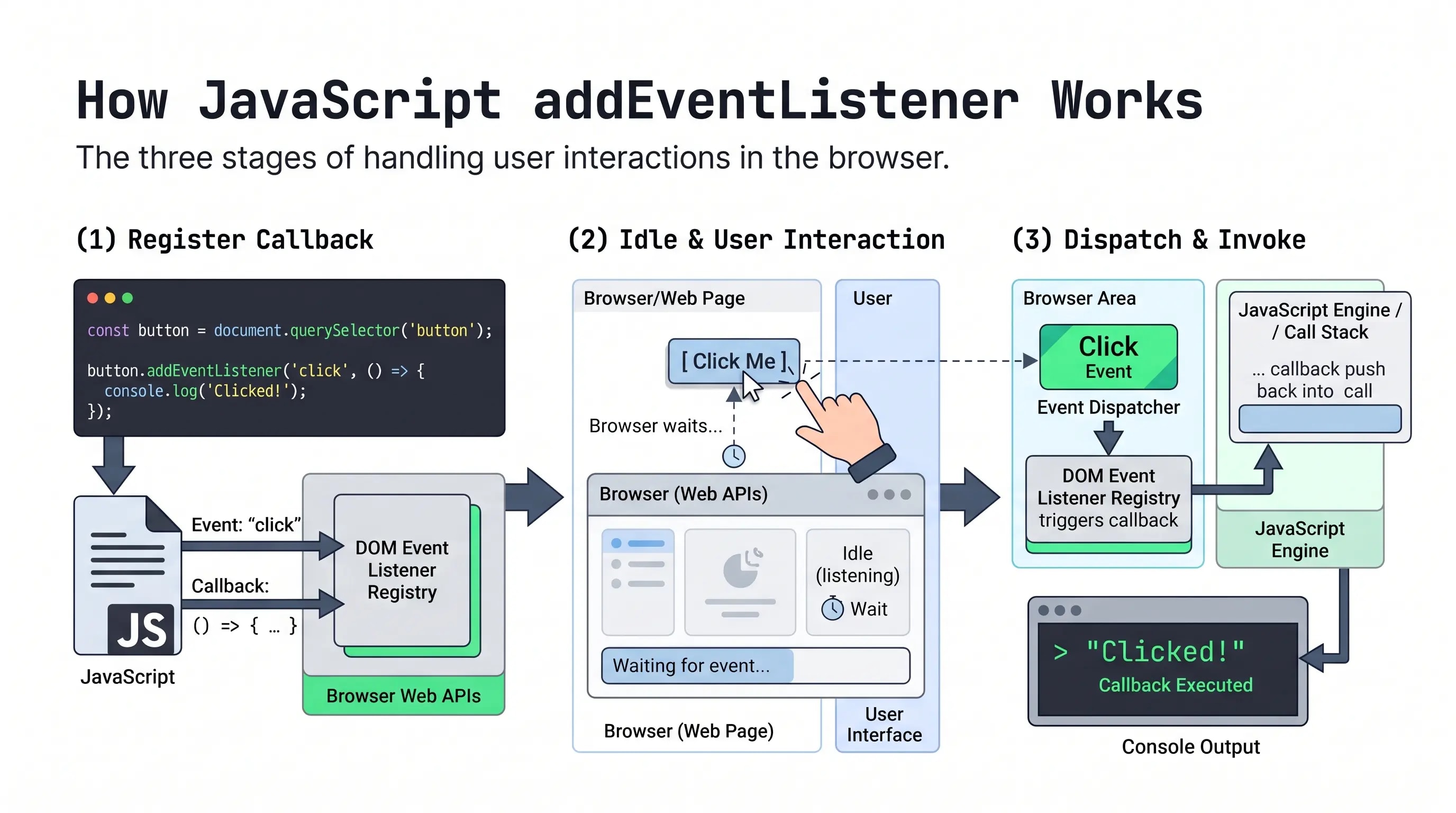
Let's understand the execution flow:
JavaScript finds the button element.
We register a click event listener.
The browser waits for the user to interact with the button.
When the click happens, the browser dispatches the event.
The registered callback is invoked.
We can also receive an event object inside the callback.
const button = document.querySelector("button");

button.addEventListener("click", function (event) {
  console.log("Button clicked!");
  console.log(event.target);
});
The event parameter contains information about the event that occurred.
For example, event.target tells us which element triggered the event.
Arrow Functions as Callbacks
We can also use arrow functions instead of traditional function expressions.
button.addEventListener("click", () => {
  console.log("Button clicked!");
});
Both approaches work.
9. Arrow Functions (ES6)
ES6 introduced arrow functions, providing a shorter syntax and an important difference in how this behaves.
Traditional function:
const add = function (a, b) {
  return a + b;
};
Arrow function:
const add = (a, b) => {
  return a + b;
};
For simple expressions, we can make it even shorter using implicit return.
const add = (a, b) => a + b;

console.log(add(10, 20)); // 30
Important Characteristics of Arrow Functions
1. Lexical this
Arrow functions do not create their own this. Instead, they inherit this from their surrounding lexical scope.
const team = {
  name: "Frontend Guild",
  members: ["Alice", "Bob"],

  printMembers() {
    this.members.forEach((member) => {
      console.log(`${member} is in ${this.name}`);
    });
  }
};

team.printMembers();
Output:
Alice is in Frontend Guild
Bob is in Frontend Guild
2. No Own arguments Object
Use rest parameters when you need to access all arguments.
3. Cannot Be Used as Constructors
Arrow functions cannot be invoked with new.
4. No Own super or new.target Bindings
They inherit these from their surrounding context where applicable.
Common Pitfall: Arrow Functions as Object Methods
const user = {
  name: "Alice",

  greet: () => {
    console.log(this.name);
  }
};

user.greet();
You might expect Alice, but that is not what happens.
Arrow functions don't have their own this. They inherit it from the surrounding lexical scope, not from the object that calls them.
Use method shorthand instead:
const user = {
  name: "Alice",

  greet() {
    console.log(this.name);
  }
};

user.greet(); // Alice
Remember: Arrow functions are not simply shorter versions of regular functions. They have different behavior, especially regarding this and constructors.
10. Quick Revision
Concept | Meaning |
|---|---|
Function Declaration | A named function declared using the |
Function Expression | A function created as an expression |
Anonymous Function | A function without an explicit name |
Named Function Expression | A function expression with its own internal name |
Parameters | Variables defined in a function's parameter list |
Arguments | Actual values passed during a function call |
First-Class Functions | Functions can be treated like other values |
Higher-Order Functions | Functions that accept or return other functions |
Callback Functions | Functions passed to another function to be invoked by it |
Arrow Functions | Functions with concise syntax and lexical |
Important Things to Remember
Function declarations are fully hoisted.
Function expressions are not independently hoisted.
Functions are first-class citizens in JavaScript.
A higher-order function accepts or returns another function.
A callback is a function passed to another function.
Callbacks can be synchronous or asynchronous.
Arrow functions inherit
thisfrom their surrounding scope.Arrow functions cannot be used as constructors.
Prefer rest parameters over
argumentswhen collecting an arbitrary number of arguments.