currying
Question 1: What is Currying?
Currying is a technique in which a function that accepts multiple arguments is transformed into a sequence of functions, each accepting one argument at a time.
Consider the following function:
function f(a) {
  return (b) => {
    return "Works";
  };
}

console.log(f(1)(2)); // Works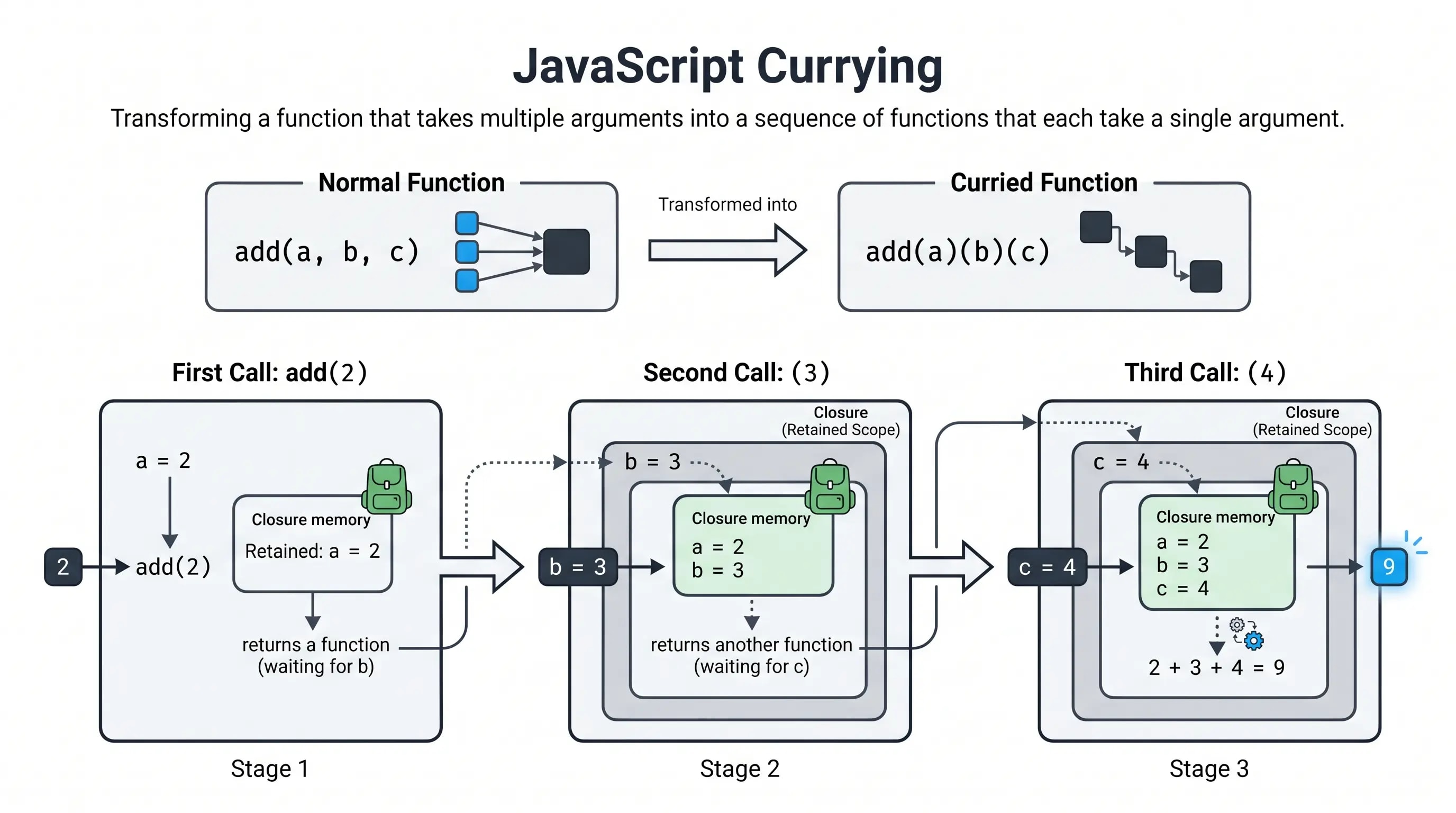
Why does f(1)(2) work?
Let's break it down:
f(1)executes and receives1as its argument.It returns another function that accepts
b.The second
(2)executes the returned function.The returned function produces
"Works".
This is an example of a curried function.
Question 2: Implement sum(2)(6)(1)
Write a function that accepts three arguments through three separate function calls.
Expected output:
sum(2)(6)(1); // 9Solution:
function sum(a) {
  return function (b) {
    return function (c) {
      return a + b + c;
    };
  };
}

console.log(sum(2)(6)(1)); // 9
We can also write this using arrow functions:
const sum = a => b => c => a + b + c;

console.log(sum(2)(6)(1)); // 9
How does it work?
The first function remembers
a.The second function remembers
aandb.The third function receives
cand calculates the final result.
Each returned function retains access to the previous arguments through closures.
Question 3: Create a Calculator Using Currying
Write a curried function that performs different mathematical operations.
Expected usage:
evaluate("sum")(4)(2);
evaluate("multiply")(4)(2);
evaluate("divide")(4)(2);
evaluate("subtract")(4)(2);
Solution:
function evaluate(operation) {
  return function (a) {
    return function (b) {
      if (operation === "sum") return a + b;

      if (operation === "multiply") return a * b;

      if (operation === "divide") return a / b;

      if (operation === "subtract") return a - b;

      return "Invalid Operation!";
    };
  };
}

console.log(evaluate("sum")(4)(2));      // 6
console.log(evaluate("multiply")(4)(2)); // 8
console.log(evaluate("divide")(4)(2));   // 2
console.log(evaluate("subtract")(4)(2)); // 2

console.log(evaluate("unknown")(4)(2));  // Invalid Operation!
Explanation:
The first call remembers the operation.
The second call remembers the first number.
The third call receives the second number and performs the selected operation.
Notice that operation, a, and b are available because of closures.
Question 4: Implement Infinite Currying
This is a slightly more interesting interview question.
Write a function that supports the following syntax:
sum(1)(2)(3)(4)(5)();Expected output:
15Unlike normal currying, we don't know how many arguments will be supplied.
We need to keep returning functions until the user explicitly tells us to stop.
Solution:
function sum(a) {
  return function (b) {
    if (b !== undefined) {
      return sum(a + b);
    }

    return a;
  };
}

console.log(sum(1)(2)(3)(4)(5)()); // 15
How does it work?
sum(1)stores1.sum(1)(2)creates another function with the accumulated value3.sum(1)(2)(3)accumulates6.This continues for every call.
When we call the final function with no argument, it returns the accumulated result.
Important: We use b !== undefined instead of if (b) because zero is a valid number and should not terminate the operation.
For example:
console.log(sum(1)(0)(2)()); // 3Question 5: Currying vs Partial Application
These two concepts are frequently confused in JavaScript interviews.
Let's understand the difference.
Currying
Currying transforms a function that accepts multiple arguments into a sequence of functions, each accepting one argument.
function multiply(a) {
  return function (b) {
    return function (c) {
      return a * b * c;
    };
  };
}

console.log(multiply(10)(3)(2)); // 60
Partial Application
Partial application means fixing some arguments of a function in advance, creating a new function that accepts the remaining arguments.
function multiply(a, b, c) {
  return a * b * c;
}

const multiplyByTen = multiply.bind(null, 10);

console.log(multiplyByTen(3, 2));  // 60
console.log(multiplyByTen(5, 4));  // 200
Here, we have fixed the first argument to 10. The remaining two arguments are supplied later.
Key Differences
Currying | Partial Application |
|---|---|
Transforms a function into nested functions | Fixes some arguments in advance |
Typically accepts one argument per function call | Can accept multiple remaining arguments |
Changes the function's calling structure | Creates a specialized function |
Example: | Example: |
Remember: Currying is about transforming function structure, while partial application is about fixing some arguments.
Question 6: Real-World Example of Currying — DOM Manipulation
Let's say you frequently need to update the text content of different HTML elements.
Normally, you might write:
function updateElementText(id, content) {
  document.querySelector(`#${id}`).textContent = content;
}

updateElementText("header", "Welcome!");
updateElementText("footer", "Thank you!");
But what if we frequently update the same element?
We can use currying.
const updateElementText = id => content => {
  document.querySelector(`#${id}`).textContent = content;
};

const updateHeaderText = updateElementText("header");

updateHeaderText("Subscribe to our newsletter!");
updateHeaderText("Welcome to JavaScript!");
How does it work?
updateElementText("header")creates a specialized function.The returned function remembers the element ID through a closure.
We can now update the header without passing its ID every time.
This is useful when we want to create reusable, specialized functions.
Question 7: Implement Your Own curry() Function
So far, we have manually converted normal functions into curried functions.
But what if we want to convert any suitable function into a curried function automatically?
Let's implement a reusable curry() utility.
Solution:
function curry(func) {
  return function curriedFunc(...args) {
    if (args.length >= func.length) {
      return func(...args);
    }

    return function (...nextArgs) {
      return curriedFunc(...args, ...nextArgs);
    };
  };
}
Let's test it.
const sum = (a, b, c) => a + b + c;

const curriedSum = curry(sum);

console.log(curriedSum(1)(2)(3)); // 6

console.log(curriedSum(1, 2)(3)); // 6

console.log(curriedSum(1)(2, 3)); // 6

console.log(curriedSum(1, 2, 3)); // 6
Understanding the Implementation
The most important part is:
func.lengthFor ordinary functions, length represents the number of parameters before the first parameter with a default value.
For example:
function add(a, b, c) {}

console.log(add.length); // 3
Now look at this condition:
if (args.length >= func.length) {
  return func(...args);
}
If we have received enough arguments, we execute the original function.
Otherwise, we return another function to collect more arguments.
return function (...nextArgs) {
  return curriedFunc(...args, ...nextArgs);
};
This returned function collects the new arguments and combines them with the previously collected arguments.
The process continues until enough arguments are available.
Note: This is a basic automatic currying implementation. It assumes a known arity and ordinary positional arguments. Functions with default parameters, rest parameters, or special this requirements need additional handling.
Quick Revision
Interview Topic | Main Concept |
|---|---|
| Nested function calls |
| Basic currying |
| Currying with operation selection |
| Infinite currying |
Currying vs Partial Application | Function transformation vs fixing arguments |
DOM Manipulation | Reusable specialized functions |
| Automatic function transformation |
Interview Takeaways
Currying transforms a multi-argument function into nested functions.
Closures allow each function to remember previously supplied arguments.
Partial application fixes some arguments to create a specialized function.
Infinite currying requires a termination condition.
Function.prototype.bind()can be used for partial application.Function.lengthhelps determine the expected number of parameters in a basic curry implementation.